

In the real world computers use electricity. Presently many countries are seeing massive increases, and failing to include this in any calculations is financial stupidity.
EG The UK will see a (edit: just announced) price increase of 46.7p 51.886p per kWh in October, or approximately 61 cents. If you use a basic calculator, like this one (scroll down to Estimate Energy Usage), you'll see that - in such a cost scenario, using the system at 100% load 24/7, the 12900k would cost over $1287/yr more to operate than an M1 Ultra.
https://www.cpubenchmark.net/compare/Ap ... 4782vs4597
Obviously you should adjust for your own expected usage. But, if you leave systems running for long periods or 24/7, you'd need to think long and hard before you go down the PC route presently, at least with processors like the 12900k, and especially if you expect to use that system for the next few years..

Please critique my dream music DAW
-

- KVRAF
- 7850 posts since 2 Sep, 2019
Running water tubes through your house or studio is unreasonable, and liquid cooling is a liability. Just getting a Mac off the shelf seems like a better idea.Pictus wrote: Tue Aug 09, 2022 11:19 am We can have a 100% silent PC if we use a custom water kit and put the kit in another room.
That's unrealistic for an x64 CPU that consumes 180W or more.
I do fanless PSUs and graphics cards. But the CPU cooler ends up making up for it one way or another. That's just physics.Pictus wrote: Tue Aug 09, 2022 11:19 am BTW, if the OP builds the PC as I suggested it will probably be quieter than your
MAC when doing heavy work, the big 420mm AIO radiator has a lot of surface to
exchange the heat, so can limit the maximum fan RPM and keep it quiet.
The PSU is also semi-passive and +- up to 410W the fan is off
https://www.tomshardware.com/reviews/co ... ply-review
But if the OP is not going to use an external GPU, can change to a fanless PSU.
The Mac Studio also has massive, slow moving fans that cover the entire area of the computer.
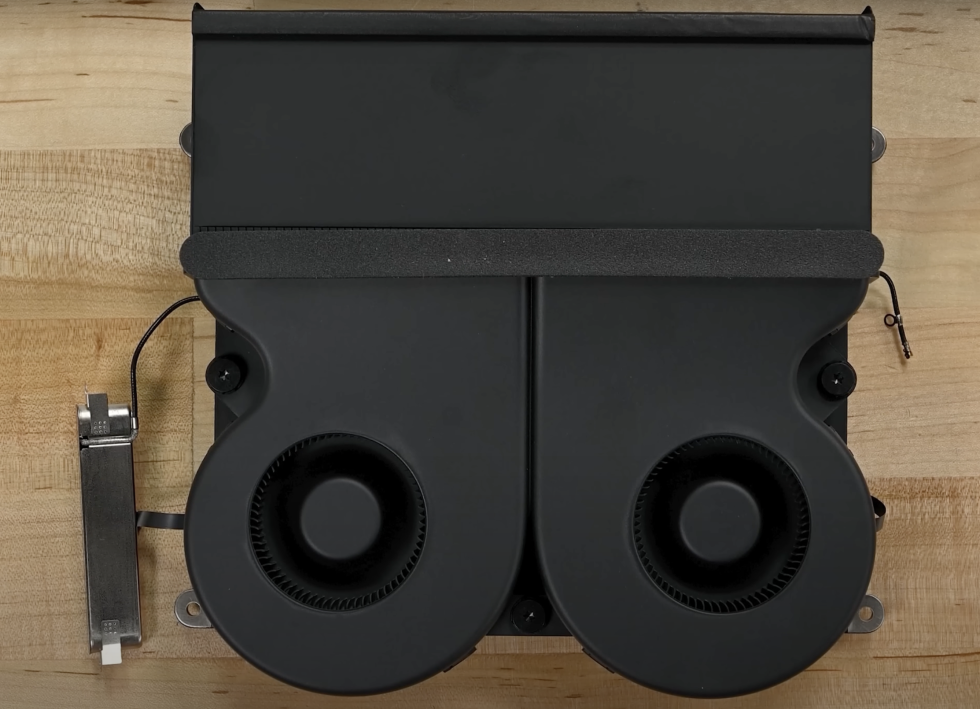
But you seem to be overlooking the massive difference in power consumption between Apple and Intel/AMD. The Apple Silicon architecture uses a fraction of the power that an x64 CPU uses, so exponentially less cooling is required at load. M1 Ultra uses 60W max compared to 180W or 250W for Intels and AMDs.
I have a Be Quiet Dark Rock on my Windows DAW with silent cooling profile set in my BIOS, and it's very quiet, up until it isn't. Inevitably, at some point Windows shits itself and sets the fan to max until I reboot, even though I'm only at 8% CPU usage.
Well, as I said, I get 16 samples of latency at 96kHz on my M1 Pro MacBook. I don't know how much lower you can get. I've never come close to that on a Windows machine.

THIS MUSIC HAS BEEN MIXED TO BE PLAYED LOUD SO TURN IT UP
-

- KVRAF
- 2382 posts since 23 Sep, 2004 from Kocmoc
"Bottom line is an M1 Mac can run more plugins than any x64 processor running Windows, with lower latency" yeah this is not true. It varies but not true as general info. OSX has always had problems running on low latency audio. Not that everyone needs 64 or 32 buffers  I'm generally at 384 or 512 here on 2013 machine.
I'm generally at 384 or 512 here on 2013 machine.Soft Knees - Live 12, Diva, Omnisphere, Slate Digital VSX, TDR, Kush Audio, U-He, PA, Valhalla, Fuse, Pulsar AUDIO, NI, OekSound etc. on Win11Pro R7950X & RME AiO Pro
https://www.youtube.com/@softknees/videos Music & Demoscene
https://www.youtube.com/@softknees/videos Music & Demoscene
-
- KVRer
- 10 posts since 20 Mar, 2022
So, one thing about integrated graphics.. the extra $50 is well worth it if you're building the new pc at a friend's and forgot to remove the gpu from your old build to transfer. It works great in a pinch and I've always looked at it as a failsafe for any potential gpu issue/special circumstance.JerGoertz wrote: Mon Aug 08, 2022 12:53 amYeah, I agree with the NVME upgrade too. I'm not sure I need a bigger power supply, since I don't plan to get a GPU at all, and just stick with the Intel i-9 on-board graphics.thmyrk wrote: Sun Aug 07, 2022 3:39 pm https://www.newegg.com/seasonic-prime-u ... 6817151200
You should look into Seasonic for power supply. They are the ones manufacturing all of Corsairs higher end PSUs. I would also consider going with a higher wattage to future proof. Not that you need a next gen gpu but the new ones coming out are slated to require ~700w alone. You could get 10 years out of a solid psu, would be a huge bummer to have to replace it as you upgrade your system. I just built a new pc for production and I went with 1200w. Overkill but my last build held out for so long that I would rather spend the money now than the ~same money twice to save $75.
Someone earlier in the thread switched your ssds out for nvme with part picker. I also think this is a necessary upgrade! Gotta have that data processing as fast as possible. At least put your OS on one. The rest of your storage could be whatever but if you decide you want faster migrating the OS is such a drag.
Aside from that, there are a few limitations in terms of what it can handle. I am on an i9 with ig and I noticed that fps/resolution takes a huge hit, which I found very distracting. More than decent gpu's are out there for fairly cheap and they will run your video out so much cleaner. I am assuming taking one less task away from your cpu when it comes to processing will help with performance as well. My i9 is great and my current build is a massive upgrade for me but it still has its ceiling depending on how greedy I get.
Anyways, just something to think about, do what you will obv

-
- KVRAF
- Topic Starter
- 4345 posts since 20 Feb, 2004
If I'm only doing music on the computer (no games or 3D rendering, etc.), would there be any point to getting a graphics card?thmyrk wrote: Sun Aug 14, 2022 2:13 pm So, one thing about integrated graphics.. the extra $50 is well worth it if you're building the new pc at a friend's and forgot to remove the gpu from your old build to transfer. It works great in a pinch and I've always looked at it as a failsafe for any potential gpu issue/special circumstance.
Aside from that, there are a few limitations in terms of what it can handle. I am on an i9 with ig and I noticed that fps/resolution takes a huge hit, which I found very distracting. More than decent gpu's are out there for fairly cheap and they will run your video out so much cleaner. I am assuming taking one less task away from your cpu when it comes to processing will help with performance as well. My i9 is great and my current build is a massive upgrade for me but it still has its ceiling depending on how greedy I get.
Anyways, just something to think about, do what you will obv
A well-behaved signature.
-
- KVRAF
- 3506 posts since 12 May, 2011
I'm going back 10 years, but it used to be that Waves plugins, at least, required more oomph than the ig provided. If you had over a certain number in your project (not necessarily the same ones) when you opened any one of them you were presented with a blank interface. I bought a cheap card and the problem disappeared.
-
- KVRist
- 171 posts since 8 Jun, 2019
If you need silence for monitoring, you might want to make sure any video card you get is fanless, or use a damped case. The AIO cooler in the original post has a pretty loud noise spec, too, and damping won't help with that since it's exposed to the outside of the case. I'd look into a damped case and a quieter tower cooler from Scythe, Noctua or the creatively-named Be Quiet brand.
https://pcpartpicker.com/list/Hfc4PX
https://pcpartpicker.com/list/Hfc4PX
-
- KVRAF
- 3506 posts since 12 May, 2011
#JerGoertz, have you pulled the trigger, yet? Just curious.
-
- KVRAF
- Topic Starter
- 4345 posts since 20 Feb, 2004
That sounds like quite the frustrating/confusing issue. I'll bear that in mind in case I see similar.Googly Smythe wrote: Thu Aug 18, 2022 12:55 pmI'm going back 10 years, but it used to be that Waves plugins, at least, required more oomph than the ig provided. If you had over a certain number in your project (not necessarily the same ones) when you opened any one of them you were presented with a blank interface. I bought a cheap card and the problem disappeared.

Not yet, I'm waiting for the i9 13900K to come out (predicted for sometime this year).Googly Smythe wrote: Thu Aug 18, 2022 12:55 pm #JerGoertz, have you pulled the trigger, yet? Just curious.
A well-behaved signature.
-

- KVRAF
- 1593 posts since 2 Oct, 2016 from Planet X-19
Doesn't bother me what people buy, but do want to state I've only ever used integrated graphics on several dedicated music computers, and never once run into any display or graphic issues using old/new daws and plugs.
Last pc was a sandybridge 2600, current machine Amd 5700g.
Last pc was a sandybridge 2600, current machine Amd 5700g.
-
- KVRist
- 171 posts since 8 Jun, 2019
I would normally just edit my post, but I saw someone thumbsed this up. Maybe check some other forums for people's experience with tower coolers on the newer i9's. I didn't realize the thing could actually hit almost double its rated TDP. A couple of the bigger Noctua ones do seem to do well in bench tests. You probably need to add the second, optional fan, too, which doubles the noise and means a good damped case is even more vital.biscuitdough wrote: Tue Aug 16, 2022 2:29 am If you need silence for monitoring, you might want to make sure any video card you get is fanless, or use a damped case. The AIO cooler in the original post has a pretty loud noise spec, too, and damping won't help with that since it's exposed to the outside of the case. I'd look into a damped case and a quieter tower cooler from Scythe, Noctua or the creatively-named Be Quiet brand.
https://pcpartpicker.com/list/Hfc4PX
-

- KVRian
- 1188 posts since 21 Aug, 2017 from Brasil
The cooler in the OP first post is noisy/inefficient, that is why I proposed a BIGbiscuitdough wrote: Fri Aug 19, 2022 12:50 am I would normally just edit my post, but I saw someone thumbsed this up. Maybe check some other forums for people's experience with tower coolers on the newer i9's. I didn't realize the thing could actually hit almost double its rated TDP. A couple of the bigger Noctua ones do seem to do well in bench tests. You probably need to add the second, optional fan, too, which doubles the noise and means a good damped case is even more vital.
420mm model as it has a lot of surface to exchange the heat, the thicker/bigger
140mm fans move more air and have more pressure than most 120mm models.
I do not know any air/AIO that is more silent/capable this.
A damped case will have poor airflow and to compensate the fans will have to
run at higher RPM and will produce more noise. The dampened case was fine
for the time when we had noisy mechanical hard drives and the CPUs/GPUs
weren't that power-hungry.
Now we need cases with better air flow, check the noise normalized results at
---
New IceGiant prototype...
Copper is more expensive, but they should have not only the plate, but the central pipe in copper.
Same for graphene coating and thicker fans like the Phanteks T30(120 x 120 x 30mm).
-
- KVRian
- 1188 posts since 21 Aug, 2017 from Brasil
Arctic Announces Service Kit For Defective Liquid Freezer 2 AIOs
https://www.tomshardware.com/news/arcti ... ezer-2-aio
https://www.tomshardware.com/news/arcti ... ezer-2-aio
-
- KVRer
- 10 posts since 20 Mar, 2022
I haven't used my new build to load a single game, but I am eternally grateful to have the dedicated gpu that I do. It doesn't take much to output to your monitor(s) but taking that task out of your cpu's hands is a must imo. I could be completely mistaken/biased - I also have 2 x 27" 4k 144hz samsung monitors - but I noticed a not insignificant increase in performance/rendering of my daw visually the second I installed my graphics card. Not to mention the hard cap for resolution that I was getting pre-mount. It's 2022, resolution is cheap. Go for the gpu. You don't need to blow half of your budget on a card you'll be using to project games but there is no reason to settle for an integrated gpu bottleneck when you're already planning on spending the $$ on a new release cpu.JerGoertz wrote: Mon Aug 15, 2022 8:52 pmIf I'm only doing music on the computer (no games or 3D rendering, etc.), would there be any point to getting a graphics card?thmyrk wrote: Sun Aug 14, 2022 2:13 pm So, one thing about integrated graphics.. the extra $50 is well worth it if you're building the new pc at a friend's and forgot to remove the gpu from your old build to transfer. It works great in a pinch and I've always looked at it as a failsafe for any potential gpu issue/special circumstance.
Aside from that, there are a few limitations in terms of what it can handle. I am on an i9 with ig and I noticed that fps/resolution takes a huge hit, which I found very distracting. More than decent gpu's are out there for fairly cheap and they will run your video out so much cleaner. I am assuming taking one less task away from your cpu when it comes to processing will help with performance as well. My i9 is great and my current build is a massive upgrade for me but it still has its ceiling depending on how greedy I get.
Anyways, just something to think about, do what you will obv
-
- KVRAF
- Topic Starter
- 4345 posts since 20 Feb, 2004
Jumping back to this a couple months later, the i13900K is released (or about to be), and I'm ready to finalize my build. Here's the list I have for everything I think I'll need to get up and running:
I only have 2 concerns:
1) UPS might be underpowered for the PSU. I think the APC BE600M1 is rated for 600W and the PSU is rated for 850W. Is this a problem? I admit that I don't know whether a PSU's rating needs to pair directly with the UPS. PC Parts Picker puts my estimated power usage at 426W, less than the UPS's rating.
2) I have 3 PCIe internal SSD drives. Will this be too many for the motherboard?
Appreciate any further input from you folks as I finalize my list!
I only have 2 concerns:
1) UPS might be underpowered for the PSU. I think the APC BE600M1 is rated for 600W and the PSU is rated for 850W. Is this a problem? I admit that I don't know whether a PSU's rating needs to pair directly with the UPS. PC Parts Picker puts my estimated power usage at 426W, less than the UPS's rating.
2) I have 3 PCIe internal SSD drives. Will this be too many for the motherboard?
Appreciate any further input from you folks as I finalize my list!
You do not have the required permissions to view the files attached to this post.
A well-behaved signature.