

Ars Technica recently published a 2022 2H system guide and the "A cost-effective workstation" really looks like a solid pocket friendly built.
Article is here: https://arstechnica.com/gadgets/2022/07 ... n-edition/
Components below:

2022 PC Build Thread
-
- KVRAF
- 1959 posts since 4 Nov, 2004 from Manchester
Yeah, the 5800X3D performed pretty much as I expected given how it's clocked at least with the DSP testing. Whilst I expected the VI testing to perform better due to the cache and with it being a more memory-heavy test, the 64/128 buffers still did decidedly better than I anticipated. It goes to show how much performance is still there to wring out and suggests theres still memory limitations bottlenecking the performance currently.
Intel's move to DDR5 was worth maybe a good 15% or so to them on the last refresh and I can see it havingthe same impact for AMD in the coming months. Add that into the standard generational step-up and I can see a pretty healthy figure on the cards for AMD with the refresh. Raptorlake feels a little rushed out to meet it, but I can see them trading blows across the range, which only goes to raise the question of what's AMD going to do about W790 now they've canned the standard TR range cause it ain't like TR-PRO is a competitively priced platform.
Apparently no 3D cache for the 7000 out the gate, rather being kept for a later refresh. Seems a bit of a missed opportunity to me if that does turn out to be true, although I guess that's already outlining what we can expect from the 7000 mk2 vs Meteor lake shoot out in 15 months time.
Intel's move to DDR5 was worth maybe a good 15% or so to them on the last refresh and I can see it havingthe same impact for AMD in the coming months. Add that into the standard generational step-up and I can see a pretty healthy figure on the cards for AMD with the refresh. Raptorlake feels a little rushed out to meet it, but I can see them trading blows across the range, which only goes to raise the question of what's AMD going to do about W790 now they've canned the standard TR range cause it ain't like TR-PRO is a competitively priced platform.
Apparently no 3D cache for the 7000 out the gate, rather being kept for a later refresh. Seems a bit of a missed opportunity to me if that does turn out to be true, although I guess that's already outlining what we can expect from the 7000 mk2 vs Meteor lake shoot out in 15 months time.
-
- KVRAF
- 4266 posts since 21 Oct, 2001 from my bolthole in the south pacific
Here's Intel's 16 P core HEDT offering.
https://overclock3d.net/news/cpu_mainbo ... 16_cores/1
https://overclock3d.net/news/cpu_mainbo ... 16_cores/1
-

- KVRAF
- 3822 posts since 20 Apr, 2005
I don't know Inta-Audio but would recommend checking out scan.co.uk. They've built my last few audio PCs and have given me great service.don1thedon wrote: Mon Jul 04, 2022 9:04 am I've also been looking at Inta-Audio for my next PC, they have some good options & I don't think the prices are too bad for a built PC. Similar to you I'm really not keen on building these days, although I've done that in the past. Hopefully the new PC sees you good for some time, let us know how it goes.
I would like to build my own, but frankly for an audio PC where I push the spec and cost a bit - I'd also rather have a professional do it and test it, and have a warranty - than do it myself.
-
- KVRAF
- 3822 posts since 20 Apr, 2005
I've had issues with a non Asus Mobo (not playing nice with UAD) before and would now always recommend a good Asus Mobo.SLiC wrote: Mon Jul 04, 2022 8:37 am General tip for people looking at comparative builds....
Motherboard is a big deal- it is the motherboard that will futureproof your PC (at least for a while) and allow you to update and expand- I would look for DDR5, PCIe5 and as many 'fast' four M.2 slots as you can get (the board I selected has 4 so I can add 2 more m.2 drives, when a 4TB becomes affordable I will get rid of my last 'spinning' drive!)
Solid State Drives and memory- look at the 'speed' not just the size!, for example WD SN850 Black NVMe Drive runs at 7000MB/S for example. Same with RAM, if you have a fast processor (want a fast system) aim for DDR5 4800-5600 of branded (Corsair, Kingston & Crucial) RAM, some RAM is also optimised for Intel.
I am not sure there is a great benefit in going over 32Gb for audio builds (there isn't for me anyway) and if you have 7000MB/S SSDs, perfectly fast enough for large samples and streaming!
Last thing- don't forget the best quality Thermal Heatsink Paste like an ARCTIC MX-4!
I think the new NVMe drives are great for the OS and where you run apps from - makes loading a bit quicker. But for audio hard drives have never really been a bottle neck for me no matter how many tracks. I guess you'd need to be streaming some very large samples for disk to ever be an issue whether HDD, SSD or NVMe. SSD and NVMe being silent as the best things about them.
RAM is also a funny one. I spec'd 32Gb in my last desktop audio PC about 5 years ago - but I'm pretty sure I never use more than half them memory when doing audio. when doing audio I'll only have my DAW and plug ins loaded. And plugs ins are much more cpu than memory intensive.
I think this desktop audio machine (32Gb, i7-7700K, had 1 x NVMe and 1 xSSD ) will easily last me another 5 years as it already covers all my needs very well. I think an entry level audio workstation would match it now at great value and be more than enough for most people.
i.e. £955 - should be more than enough for almost anyone.
https://www.scan.co.uk/3xs/configurator ... project-pc
-
- KVRAF
- 4266 posts since 21 Oct, 2001 from my bolthole in the south pacific
One issue is DAWs, plugins and OS updates refusing to work with machines that are more than a few years old. So Win11 - for no good reason - refuses to install on older hardware - they accidentally released a build which allowed this and then once it was publicised they withdrew that version from beta test. Cubase 12 is unsupported on Intel CPUs prior to a certain date and demands Win 10 which will go off MS support in 3 years IIRC - and so on.
Reaper - for example - is great for supporting older CPUs but some of your software might be a bit more "planned obselescence friendly" when it comes to CPUs that are already 5+ years old.
Reaper - for example - is great for supporting older CPUs but some of your software might be a bit more "planned obselescence friendly" when it comes to CPUs that are already 5+ years old.
-

- KVRAF
- 7414 posts since 8 Feb, 2003 from London, UK
My main use is real time streaming pretty large samples - various drum kits. Load time is a serious issue. I decided to trim out the kits I least often use (Native Instruments decided, in one of their "upgrades" to repatch them, ruining my local patches, which didn't help). That took five-plus minutes off my project load time - it's down to about three minutes now. This is off NVMe - in my previous computer, off SSD, it's over 15 minutes... The main problem, though, is RAM - 32Gb simply isn't anywhere near enough to load a couple of buffer loads of each sample of each kit. That, alone, meant I was getting underruns all the time if I triggered a "new" (swapped out) sample - even with swap on another NVMe drive. So my next machine will have 64Gb... and that, alone, means it'll be a while before I buy it. I'll get by a little longer..._leras wrote: Sat Jul 16, 2022 10:01 pm I think the new NVMe drives are great for the OS and where you run apps from - makes loading a bit quicker. But for audio hard drives have never really been a bottle neck for me no matter how many tracks. I guess you'd need to be streaming some very large samples for disk to ever be an issue whether HDD, SSD or NVMe. SSD and NVMe being silent as the best things about them.
RAM is also a funny one. I spec'd 32Gb in my last desktop audio PC about 5 years ago - but I'm pretty sure I never use more than half them memory when doing audio. when doing audio I'll only have my DAW and plug ins loaded. And plugs ins are much more cpu than memory intensive.
(I also want a pretty small case and a pretty fast CPU - the combination, with a decent fan, seems hard to achieve... There's some cases that are nearly okay but I'd have to shift stuff around for...)
-
- KVRAF
- 12106 posts since 2 Dec, 2004 from North Wales
In my experience the fast NVMe drives like the WD Black Gen 4 PCIe (5150 MB per second) are pretty much as good as RAM. My Keyscape instruments that used to take over a minute to load take a few seconds now, I can live with that.
I bought a second 2TB one from Amazon as they are half price (£180) it was this one: WD_BLACK 2TB SN770 M.2 2280 PCIe Gen4 NVMe Gaming SSD
My MB has 4 M.2 slots and my current set up is a 1TB Black as a system drive, a 1TB Blue (cheaper) for audio and a 2TB Black for loading sample based instruments I use most often (Spectrasonics, UVI, Kontakt etc). I also have a 6TB 6Gbit/s 7200RPM HHD on internal SATA of stuff I use less often. Maybe one day when the costs come down I'll get a 4TB M.2 slot drive for my last slot and just use the HHD as an external drive in a caddy for backup...
I bought a second 2TB one from Amazon as they are half price (£180) it was this one: WD_BLACK 2TB SN770 M.2 2280 PCIe Gen4 NVMe Gaming SSD
My MB has 4 M.2 slots and my current set up is a 1TB Black as a system drive, a 1TB Blue (cheaper) for audio and a 2TB Black for loading sample based instruments I use most often (Spectrasonics, UVI, Kontakt etc). I also have a 6TB 6Gbit/s 7200RPM HHD on internal SATA of stuff I use less often. Maybe one day when the costs come down I'll get a 4TB M.2 slot drive for my last slot and just use the HHD as an external drive in a caddy for backup...
X32 and 24C mixers, S88MK3, Live + PUSH 3, Osmose, RedShift 6, Pro3, S4, Tempera, Syntakt, Digitone, OP1-F, OPXY, TR-1000, Eurorack, TD27 Drums, Guitars, Basses, Amps and of course lots of pedals!
-

- KVRian
- 1188 posts since 21 Aug, 2017 from Brasil
If you want it to be more silent or live in a hot climate, I recommend to get a better cooler like Deepcool AK620nosediv3 wrote: Tue Jul 12, 2022 11:14 am Ars Technica recently published a 2022 2H system guide and the "A cost-effective workstation" really looks like a solid pocket friendly built.
Article is here: https://arstechnica.com/gadgets/2022/07 ... n-edition/
Components below:
-
- KVRAF
- 3497 posts since 30 Dec, 2014
Back in 2010, I selected and bought all the parts of my I7 920 system over a 6 month period after spending a few months doing the research vie forums a some youtube videos. Buying a quality motherboard for around £200 seemed to be the wiser choice rather than the cheaper sub £100 variants which had issues, less ports and ram slots ( and other problems that required RMA's ).
When it came to the build, I had an experienced PC building friend come down to help me build it. The HSF fan was difficult to install with it being big and heavy as well as the proximity of the screws. I had to mod the fan before I could get all my memory into all 6 slots, using an extra long cable that required some soldering. I was considering an H20 Corsair (Water Cooler) before my build which would have been easier to install, but I went with air and I liked the remote control which has become essential.
It's being going for almost 12 years without any issues, so it pays to do your research.
I actually have 20 Gigs of ram now with the fan mod.
When it came to the build, I had an experienced PC building friend come down to help me build it. The HSF fan was difficult to install with it being big and heavy as well as the proximity of the screws. I had to mod the fan before I could get all my memory into all 6 slots, using an extra long cable that required some soldering. I was considering an H20 Corsair (Water Cooler) before my build which would have been easier to install, but I went with air and I liked the remote control which has become essential.
It's being going for almost 12 years without any issues, so it pays to do your research.
I actually have 20 Gigs of ram now with the fan mod.
KVR S1-Thread | The Intrancersonic-Design Source > Program Resource | Studio One Resource | Music Gallery | 2D / 3D Sci-fi Art | GUI Projects | Animations | Photography | Film Docs | 80's Cartoons | Games | Music Hardware |
-
- KVRian
- 1188 posts since 21 Aug, 2017 from Brasil
Intel Core i5-13600K 14 Core Raptor Lake ES CPU Tested, 40% Faster Than Core i5-12600K & Beats The Ryzen 9 5950X In Cinebench
https://wccftech.com/intel-core-i5-1360 ... cinebench/
Intel Core i9-13900K Raptor Lake CPU Gaming & Synthetic Performance Benchmarks Leaked, 5% Faster Than Core i9-12900K On Average
https://wccftech.com/intel-core-i9-1390 ... arks-leak/
https://wccftech.com/intel-core-i5-1360 ... cinebench/
Intel Core i9-13900K Raptor Lake CPU Gaming & Synthetic Performance Benchmarks Leaked, 5% Faster Than Core i9-12900K On Average
https://wccftech.com/intel-core-i9-1390 ... arks-leak/
-
- KVRAF
- 4266 posts since 21 Oct, 2001 from my bolthole in the south pacific
More on the Ryzen 7000 (release Sept 15) and Intel's 13th Gen Raptor Lake chips coming later this year:
https://www.tomshardware.com/news/amd-z ... know-specs
https://www.tomshardware.com/news/amd-z ... know-specs
-
- KVRian
- 1188 posts since 21 Aug, 2017 from Brasil
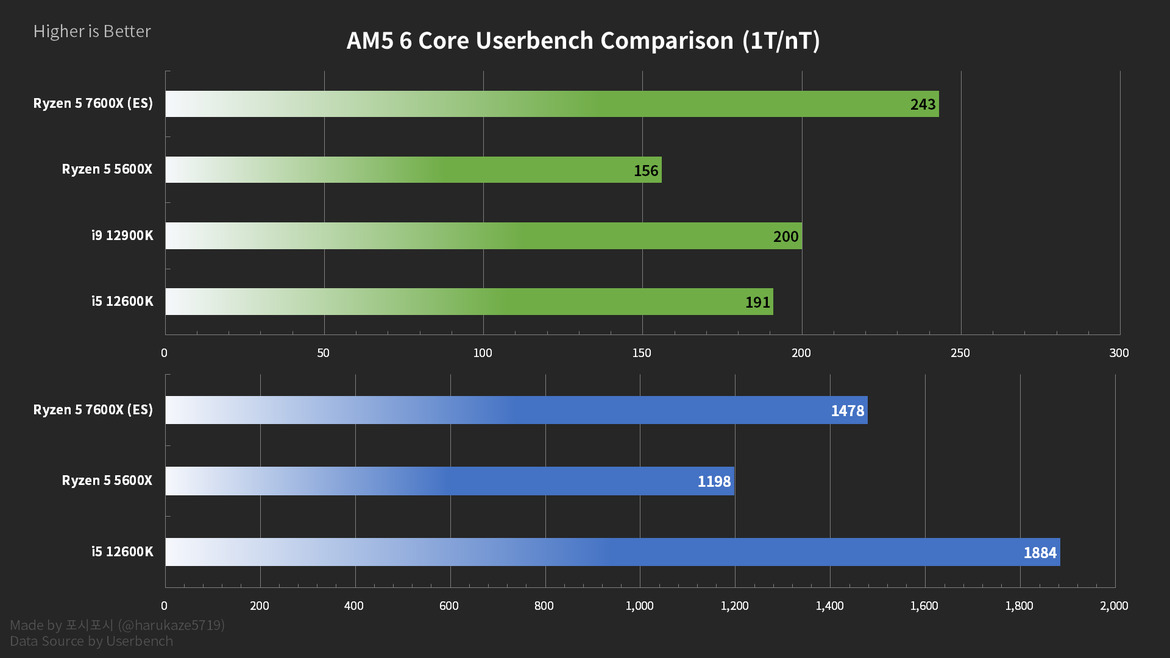
Starts at 04:27
-
- KVRAF
- 4266 posts since 21 Oct, 2001 from my bolthole in the south pacific
Ryzen 7000 series announced yesterday and available 27/9.
https://www.fudzilla.com/news/pc-hardwa ... 000-series
https://www.tomshardware.com/news/amd-l ... ryzen-7000
https://www.fudzilla.com/news/pc-hardwa ... 000-series
https://www.tomshardware.com/news/amd-l ... ryzen-7000