


RapidComposer v4 beta feedback and discussion (locked)
-
- KVRAF
- 2152 posts since 15 May, 2017
found the issue.. it paints like that when I have the setting "make window always on top" is on.. Turn that off, and it stops doing that..
-
 musicdevelopments musicdevelopments https://www.kvraudio.com/forum/memberlist.php?mode=viewprofile&u=223336
 - KVRAF
- Topic Starter
- 6010 posts since 9 Jan, 2010
You are a genius, BluGenes! 
 I am fixing this right now.
Thanks!
Attila
I am fixing this right now.Thanks!
Attila
https://www.musicdevelopments.com
Home of RapidComposer, Melodya, MIDI Mutator and Syne
Summer Sale • June 3-15 • 40% off RapidComposer, Melodya, MIDI Mutator, Syne
Home of RapidComposer, Melodya, MIDI Mutator and Syne
Summer Sale • June 3-15 • 40% off RapidComposer, Melodya, MIDI Mutator, Syne
-
- KVRAF
- 2152 posts since 15 May, 2017
yea, my wife would argue that, but, glad it's resolved.. lolmusicdevelopments wrote: Wed Oct 05, 2022 2:36 pm You are a genius, BluGenes!
Thanks!
Attila
-
musicdevelopments musicdevelopments https://www.kvraudio.com/forum/memberlist.php?mode=viewprofile&u=223336
- KVRAF
- Topic Starter
- 6010 posts since 9 Jan, 2010
The more I think about it, the setting "Make window always on top" makes no sense at all. The host provides the window so it should offer such functionality, not the plug-in, which provides only the contents but did not create the window...
I hope there is no objection if I remove this setting. The plug-in should not interfere with the host window. I think this setting was added for separate plug-in windows anyway, which was also removed recently.
I hope there is no objection if I remove this setting. The plug-in should not interfere with the host window. I think this setting was added for separate plug-in windows anyway, which was also removed recently.
https://www.musicdevelopments.com
Home of RapidComposer, Melodya, MIDI Mutator and Syne
Summer Sale • June 3-15 • 40% off RapidComposer, Melodya, MIDI Mutator, Syne
Home of RapidComposer, Melodya, MIDI Mutator and Syne
Summer Sale • June 3-15 • 40% off RapidComposer, Melodya, MIDI Mutator, Syne
-
- KVRAF
- 2152 posts since 15 May, 2017
yea, my thoughts too.. I guess that was there from an old fix/hack.. it can go..
please bump out a new beta update, and I think for the most part, just my observations, it seems very stable.
please bump out a new beta update, and I think for the most part, just my observations, it seems very stable.
-

- KVRist
- 291 posts since 10 Feb, 2018 from Cumbria, UK
Good find GeneBluGenes wrote: Wed Oct 05, 2022 12:38 pm found the issue.. it paints like that when I have the setting "make window always on top" is on.. Turn that off, and it stops doing that..

Symphony No 1 - https://youtu.be/nVVJMyjOVAY
New Album: Secret Whispers - https://open.spotify.com/album/4XtNkk6z6tngFaubnC3fME
New Single: Shiny Emeralds https://youtu.be/kaLThaPDrhg
http://www.blues-house.com/
New Album: Secret Whispers - https://open.spotify.com/album/4XtNkk6z6tngFaubnC3fME
New Single: Shiny Emeralds https://youtu.be/kaLThaPDrhg
http://www.blues-house.com/
-
musicdevelopments musicdevelopments https://www.kvraudio.com/forum/memberlist.php?mode=viewprofile&u=223336
- KVRAF
- Topic Starter
- 6010 posts since 9 Jan, 2010
RapidComposer v4.5b7 is available!
Improvements:
Improvements:
- Removed obsolete setting "Make window always on top" for plug-in windows, which fixes resizing issues (on Windows)
- Friendlier plug-in UI when the user attempts to load more than one instances
https://www.musicdevelopments.com
Home of RapidComposer, Melodya, MIDI Mutator and Syne
Summer Sale • June 3-15 • 40% off RapidComposer, Melodya, MIDI Mutator, Syne
Home of RapidComposer, Melodya, MIDI Mutator and Syne
Summer Sale • June 3-15 • 40% off RapidComposer, Melodya, MIDI Mutator, Syne
-
- KVRAF
- 2152 posts since 15 May, 2017
maybe look into this one too.. it's kind of minor, but, still kind of annoying..
If you use the idea tool, set the composition to regenerate based on rules, select your rules, etc.. If you are using universal notation, after you regenerate, it switches to note names. If you switch back and regenerate, it switches back to note names.
If you use the idea tool, set the composition to regenerate based on rules, select your rules, etc.. If you are using universal notation, after you regenerate, it switches to note names. If you switch back and regenerate, it switches back to note names.
-
- KVRAF
- 2152 posts since 15 May, 2017
is there a reason why this happens? I ask because I find it really easy to "debug" chord rules using the idea tool.. switching back to names is just very inconvenient..
-
- KVRAF
- 2152 posts since 15 May, 2017
-
musicdevelopments musicdevelopments https://www.kvraudio.com/forum/memberlist.php?mode=viewprofile&u=223336
- KVRAF
- Topic Starter
- 6010 posts since 9 Jan, 2010
This is a user choice:

In the next update the label will be "Use universal notation for chords"
Thanks,
Attila
In the next update the label will be "Use universal notation for chords"
Thanks,
Attila
BluGenes wrote: Thu Oct 06, 2022 11:23 am maybe look into this one too.. it's kind of minor, but, still kind of annoying..
If you use the idea tool, set the composition to regenerate based on rules, select your rules, etc.. If you are using universal notation, after you regenerate, it switches to note names. If you switch back and regenerate, it switches back to note names.
https://www.musicdevelopments.com
Home of RapidComposer, Melodya, MIDI Mutator and Syne
Summer Sale • June 3-15 • 40% off RapidComposer, Melodya, MIDI Mutator, Syne
Home of RapidComposer, Melodya, MIDI Mutator and Syne
Summer Sale • June 3-15 • 40% off RapidComposer, Melodya, MIDI Mutator, Syne
-
- KVRAF
- 2152 posts since 15 May, 2017
ha, something I did not know.. lol.. thanks
-
- KVRian
- 1405 posts since 11 Nov, 2013
Hi Attila
I report this some weeks ago that in studio one the window of RC can not resize. it is too small. can you increase the window size for the init in the DAW ?. in reaper i can resize but not on studio one 5. see screenshot. the window need a little larger so the resize button appear. I test 4.5 b7
I use 4k screen and hidpi mode
I report this some weeks ago that in studio one the window of RC can not resize. it is too small. can you increase the window size for the init in the DAW ?. in reaper i can resize but not on studio one 5. see screenshot. the window need a little larger so the resize button appear. I test 4.5 b7
I use 4k screen and hidpi mode
You do not have the required permissions to view the files attached to this post.
win 11 64 25H2 ryzen 8600G (6*4.3 GHZ) 48 GB Ram
-
musicdevelopments musicdevelopments https://www.kvraudio.com/forum/memberlist.php?mode=viewprofile&u=223336
- KVRAF
- Topic Starter
- 6010 posts since 9 Jan, 2010
Hi magicmusic,
You can actually make the window bigger in S1 5 but it is tricky to find the right pixel at the bottom right corner
This is not the fault of the plug-in, but the host creates a window with a very thin border, but it is resizable.
I prepared a GIF:
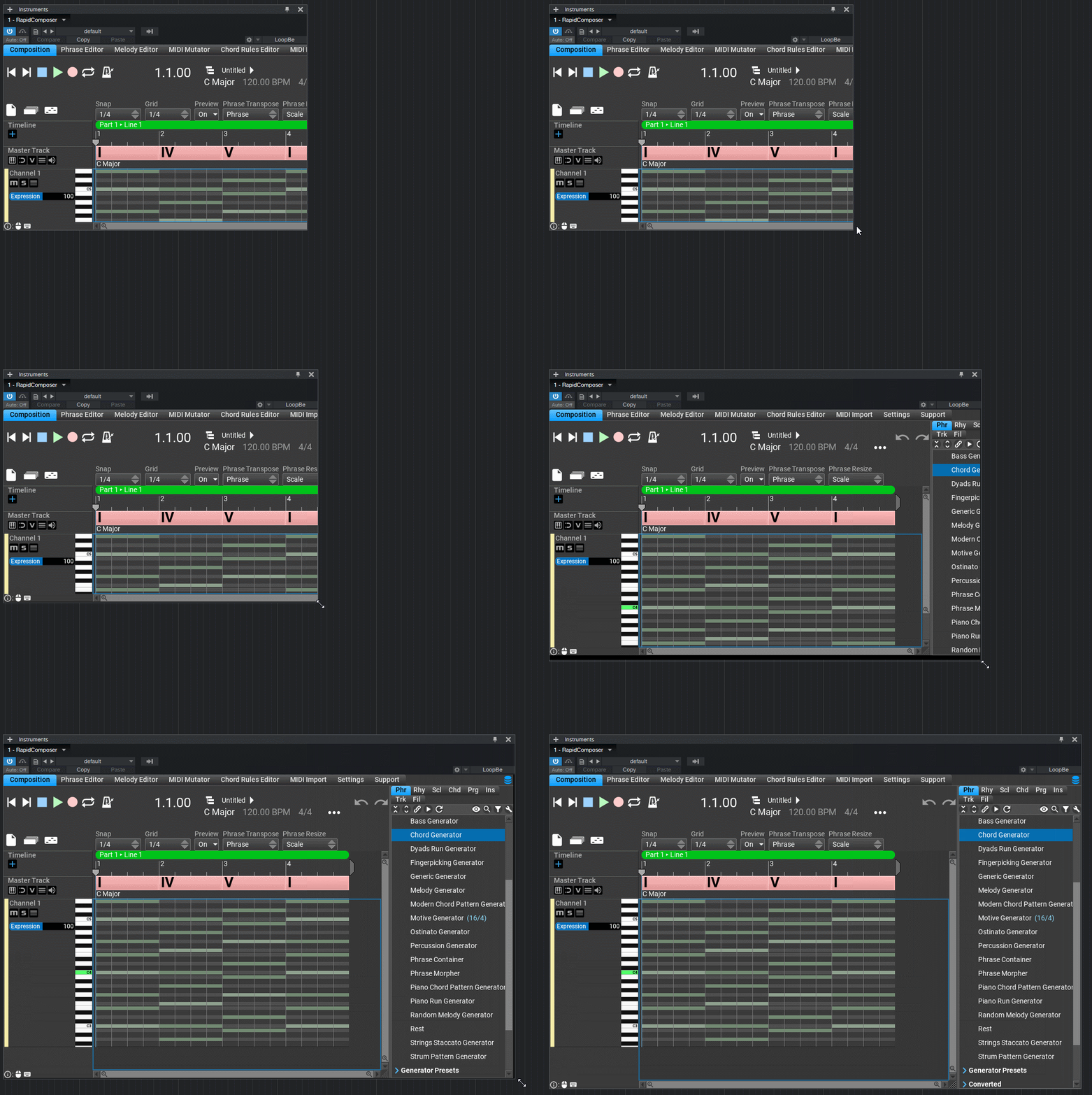
BTW I am working on MIDI CC editing for notes and phrases. You can expect the first beta in about 2 weeks.
Thanks,
Attila
You can actually make the window bigger in S1 5 but it is tricky to find the right pixel at the bottom right corner
This is not the fault of the plug-in, but the host creates a window with a very thin border, but it is resizable.
I prepared a GIF:
BTW I am working on MIDI CC editing for notes and phrases. You can expect the first beta in about 2 weeks.
Thanks,
Attila
https://www.musicdevelopments.com
Home of RapidComposer, Melodya, MIDI Mutator and Syne
Summer Sale • June 3-15 • 40% off RapidComposer, Melodya, MIDI Mutator, Syne
Home of RapidComposer, Melodya, MIDI Mutator and Syne
Summer Sale • June 3-15 • 40% off RapidComposer, Melodya, MIDI Mutator, Syne
-
musicdevelopments musicdevelopments https://www.kvraudio.com/forum/memberlist.php?mode=viewprofile&u=223336
- KVRAF
- Topic Starter
- 6010 posts since 9 Jan, 2010
RapidComposer v4.5b8 is available!
While the new MIDI CC editing is being implemented, I built the latest version for you.
Improvements:
While the new MIDI CC editing is being implemented, I built the latest version for you.
Improvements:
- Fixed note editing in transposed phrases
- It is not possible to overwrite preset phrase generators anymore
- Fixed keyboard focus selection with the Tab key
- [Plug-ins] Lots of stability fixes in the plug-in (loading/unloading/reloading, loading 2nd instance, etc)
- [Windows][Plug-ins] Fixed window when OpenGL is used (RC window was detached and opened in the background)
https://www.musicdevelopments.com
Home of RapidComposer, Melodya, MIDI Mutator and Syne
Summer Sale • June 3-15 • 40% off RapidComposer, Melodya, MIDI Mutator, Syne
Home of RapidComposer, Melodya, MIDI Mutator and Syne
Summer Sale • June 3-15 • 40% off RapidComposer, Melodya, MIDI Mutator, Syne