Xhun Audio WindChant : Procedural Wind Simulation (Ver 1.2 Released)

VST, AU, AAX, CLAP, etc. Plugin Virtual Instruments Discussion
RELATED
PRODUCTS
WindChant$40.00Buy

Post

Have problems with sleeping? Here's an audio preview of something very helpful, made of wind and leaves... :)

After having a real, direct experience (of many weeks) with it, I would recommend this 5-minutes audio demo you can listen (and play in loop) for several hours, all night long.

In order to get the most realistic and natural results, be sure NOT to listen at high volume levels (specially on headphones) : the lowest audio levels have to be barely perceivable (the final volume level depends upon your listening environment).

https://soundcloud.com/user-751205582/w ... es-edition

Just a preview of a very sui generis device : the third installment of the SnapLab Collection (coming soon).

Last edited by xhunaudio on Thu Aug 10, 2023 8:41 am, edited 4 times in total.
bruno @ Xhun Audio || www.xhun-audio.com || Twitter || Instagram
Image

Post

what type of synthesis?
Intel Core2 Quad CPU + 4 GIG RAM

Post

WindChant (the name of this synthesis device) is a procedural wind (and foliage) simulation suited for SFXs, Stage Events, Films, Videogames, etc. productions.

It is derived from a more vast particle collision physics engine I made years ago (and partially used for ResonHeart).

This simulates in real-time (without using samples) the wind + associated foliage phoenomena, all driven by a set of stochastic engines. I'll be more detailed about this further, with my usual show and tell.

This specific 5-minutes audio demo has been produced by just keeping a single note key pressed (for 5-minutes). The stochastic engines ran the full simulation entirely on their own, without any human intervention.
bruno @ Xhun Audio || www.xhun-audio.com || Twitter || Instagram
Image

Post

Another thing : with WindChant, the whole procedural audio engine can be manually controlled, or fully automated, or both.

For creating generic wind landscapes you just have to keep any MIDI key depressed : the stochastic generators will manage the whole simulation on their own (as in the audio demo above).

Or, for describing more specific wind / hurricane / breeze scenarios you can directly control the main system energy amount, the wind dispersion, the foliage phenomena, etc... in real time through MIDI CC#s.

And, there's an immersive panorama engine too.

Image

I'll publish a full parameters show and tell soon.
bruno @ Xhun Audio || www.xhun-audio.com || Twitter || Instagram
Image

Post

Parameters Show & Tell #1 :

Image

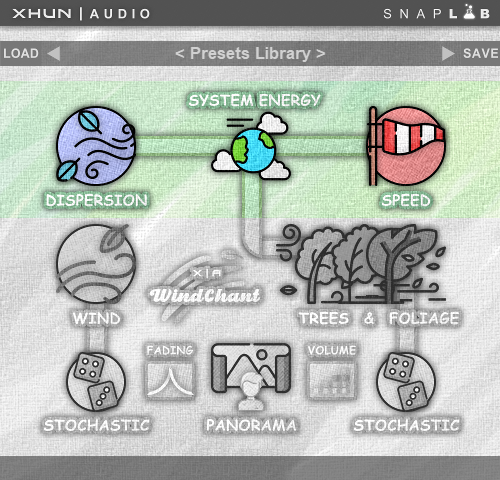
SYSTEM ENERGY [MIN...MAX] : Set the total energy amount for the fluid dynamics simulation.

DISPERSION [MIN...MAX] : Set the fluid dynamics dispersion amount.

SPEED [MIN...MAX] : Set the wind speed.
bruno @ Xhun Audio || www.xhun-audio.com || Twitter || Instagram
Image

Post

Hm... I can't see that being used in a movie it's too weird.

Maybe for a vidgame or animations.
I will take the Lord's name in vain, whenever I want. Hail Satan! And his little goblins too. :lol:

Post

It's suited for a movie too - specially if that movie is Twister...
Last edited by xhunaudio on Tue Oct 18, 2022 3:39 pm, edited 3 times in total.
bruno @ Xhun Audio || www.xhun-audio.com || Twitter || Instagram
Image

Post

Parameters Show & Tell #2 :

Image

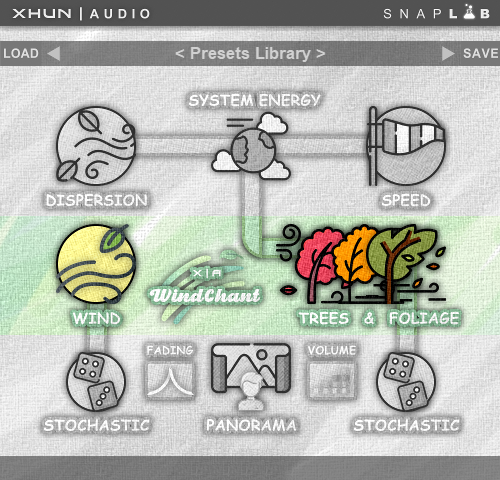
WIND [OFF...MAX] : Set the wind layer amplitude.

TREES & FOLIAGE [OFF...MAX] : Set the trees and foliage layer amplitude.
bruno @ Xhun Audio || www.xhun-audio.com || Twitter || Instagram
Image

Post

Parameters Show & Tell #3 :

Image

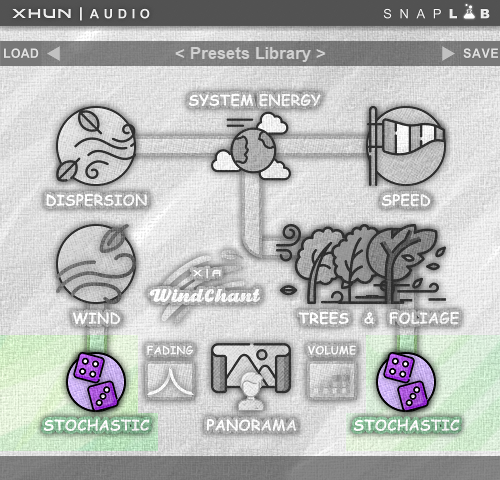
STOCHASTIC (WIND) [OFF...MAX] : Set how much the stochastic engine affects the wind dynamics.

STOCHASTIC (TREES & FOLIAGE) [OFF...MAX] : Set how much the stochastic engine affects the trees and foliage dynamics.

Note : the stochastic engines are inter-linked and they interfere each other.
bruno @ Xhun Audio || www.xhun-audio.com || Twitter || Instagram
Image

Post

- Quick note about the GUI controls -

WindChant GUI controls don't "rotate" or "move" as usually happens, nor display a specific value onscreen. They use a color-gradient / saturation change instead, as described in the example below.

Parameter "Trees & Foliage" - vertical click and drag :

Image

When a parameter is set to 0% : it has no color saturation and a high brightness.

When a parameter is set to 50% : it has a low color saturation and a low brightness.

When a parameter is set to 100% : it has a high color saturation and a high brightness.
bruno @ Xhun Audio || www.xhun-audio.com || Twitter || Instagram
Image

Post

Bruno, I want to use this. Can one dial in winds of any resonance, from very quiet eerie winds, to "alien winds" to winds passing through cavities (pipes, windows, doors, cave openings), to being out in winds of various levels of strength?
"The educated person is one who knows how to find out what he does not know" - George Simmel
"I am the way, the truth, and the life. No one comes to the Father except through Me." - Jesus Christ

Post

Hey,

exactly - the first important thing is the System Energy parameter.

This parameter defines the amount of energy involved in your simulation scenario - from a gentle summer breeze, up to a hurricane on Jupiter.

Then the Wind Dispersion and Wind Speed (the latter derived from the action of a modeled Venturi valve) are there in order to design the interaction of the wind with its so called "container" (it could be a sea shell, or a cave, etc.). All this parameters describe the wind whistle.

After that the wind enters the Trees and Foliage section / resonator.

Now, the 2 inter-acting stochastic engines (SEs) will affect both the Wind and the Trees and Foliage.

...Or, you can disable the 2 SEs and control each parameter individually, using MIDI CC#s.

...Or both ! You control the wind's general behavior (manually, using CC#s) and at the same time you let the 2 SEs to control the wind 's micro-phenomena (eg : its subtle instabilities, very important for realism).

There are also a few other parameters, including a Panorama control : set it to zero for a monophonic output / rendering (in case - for example - you need it for a subsequent studio processing) or set it to 100% in order to place yourself (the listener) into the center of the surrounding "soundscape" (I will talk about this later).
bruno @ Xhun Audio || www.xhun-audio.com || Twitter || Instagram
Image

Post

outta here
Last edited by JockMcRonan on Sun Dec 11, 2022 4:31 pm, edited 1 time in total.

Post

xhunaudio wrote: Thu Oct 20, 2022 9:27 am Hey,
...
Excellent my good sir. The hurricane on Jupiter will do!

Thank you for that explanation. Looking forward to it. 8)
"The educated person is one who knows how to find out what he does not know" - George Simmel
"I am the way, the truth, and the life. No one comes to the Father except through Me." - Jesus Christ

Post

JockMcRonan wrote: Thu Oct 20, 2022 10:38 am Takes me back to my childhood growing up on the West Coast of Scotland :) This is just nuts enough to really spark my interest, I could see a lot of potential use for an engine such as this...well done! :tu:
Ahhh, I think I know what you mean...

I saw the same windy / sea landscape, but from a fjord on the opposite side (Ireland). Unforgettable.
bruno @ Xhun Audio || www.xhun-audio.com || Twitter || Instagram
Image

Post Reply

Return to “Instruments”