

^^^
True, and a nice example- but you could also do that in VCV Rack or Reaktor Blocks etc in any DAW.
I think Bitwigs Grid GUI/UX and integration is superb and I have had fun with it, but I haven't actually built anything useful (or seen anything built by someone else that I really wanted to use).
I can't say the same for MAX stuff- the pro level MAX stuff is as good as the native devices in Bitwig, you nca build fully customised GUI pro level instruments and fx if you have the talent (or if like me you don't you can just download any of the 1000s already made from max4live.com)
If you like building your own instruments and fx at DAW level while you work on songs then Bitwig is the winner, if you want 1000s of ready-made and more advanced devices to just plug and play, Live is king!
Bitwig VS Ableton
-
- KVRAF
- 12095 posts since 2 Dec, 2004 from North Wales
X32 and 24C mixers, S88MK3, Live + PUSH 3, Osmose, RedShift 6, Pro3, S4, Tempera, Syntakt, Digitone, OP1-F, OPXY, TR-1000, Eurorack, TD27 Drums, Guitars, Basses, Amps and of course lots of pedals!
-
- KVRAF
- 9146 posts since 7 Oct, 2005
Well, to be honest, I've never hit a wall due to a lack of a modulation! My patches (if I'm in the mood to do from scratch) tend to be simple with minimum modulations. My kind of music doesn't need such complexity, so that I chose Live Standard and I don't think I'm going to upgrade to Suite. So, I don't even need M4L.
What I liked about Bitwig is the whole interface and the ease of doing experimental things. But, Live seemed always more elegant to me with its grey spacey interface. I also trust Live and Logic midi and audio processing more than another DAWs especially in Mac.
Lately, I'm taking a look at Reason (although I hate its protection). I begin to like it as well. It is a modular system if I want and the Rack of it works well in both Live and Logic, but I tend to use Logic more for 'traditional' music while Live + Reason for more experimental ones (besides the traditional ones).
What I liked about Bitwig is the whole interface and the ease of doing experimental things. But, Live seemed always more elegant to me with its grey spacey interface. I also trust Live and Logic midi and audio processing more than another DAWs especially in Mac.
Lately, I'm taking a look at Reason (although I hate its protection). I begin to like it as well. It is a modular system if I want and the Rack of it works well in both Live and Logic, but I tend to use Logic more for 'traditional' music while Live + Reason for more experimental ones (besides the traditional ones).
Using: Cubase Pro 15, Reason 13, Tascam US-4x4HR, MODX6, DM12D, LaunchKey 49, Yamaha guitar(Pacifica 612v) and bass (BB234) and some virtual instruments and synths.
-
 machinesworking machinesworking https://www.kvraudio.com/forum/memberlist.php?mode=viewprofile&u=8505
 - KVRAF
- 8027 posts since 15 Aug, 2003 from seattle
That's the least of it to me. The MPE granular synth with iPad control for instance. https://granurise.comSLiC wrote: Mon Oct 31, 2022 8:44 pm Max has many advantages in the right hands, Can't do this in Bitwig!
https://elisabethhomeland.gumroad.com/l/qymjsa
-
- KVRAF
- 12095 posts since 2 Dec, 2004 from North Wales
Yes, I have that, unbelivevable.machinesworking wrote: Mon Oct 31, 2022 9:20 pmThat's the least of it to me. The MPE granular synth with iPad control for instance. https://granurise.comSLiC wrote: Mon Oct 31, 2022 8:44 pm Max has many advantages in the right hands, Can't do this in Bitwig!
https://elisabethhomeland.gumroad.com/l/qymjsa
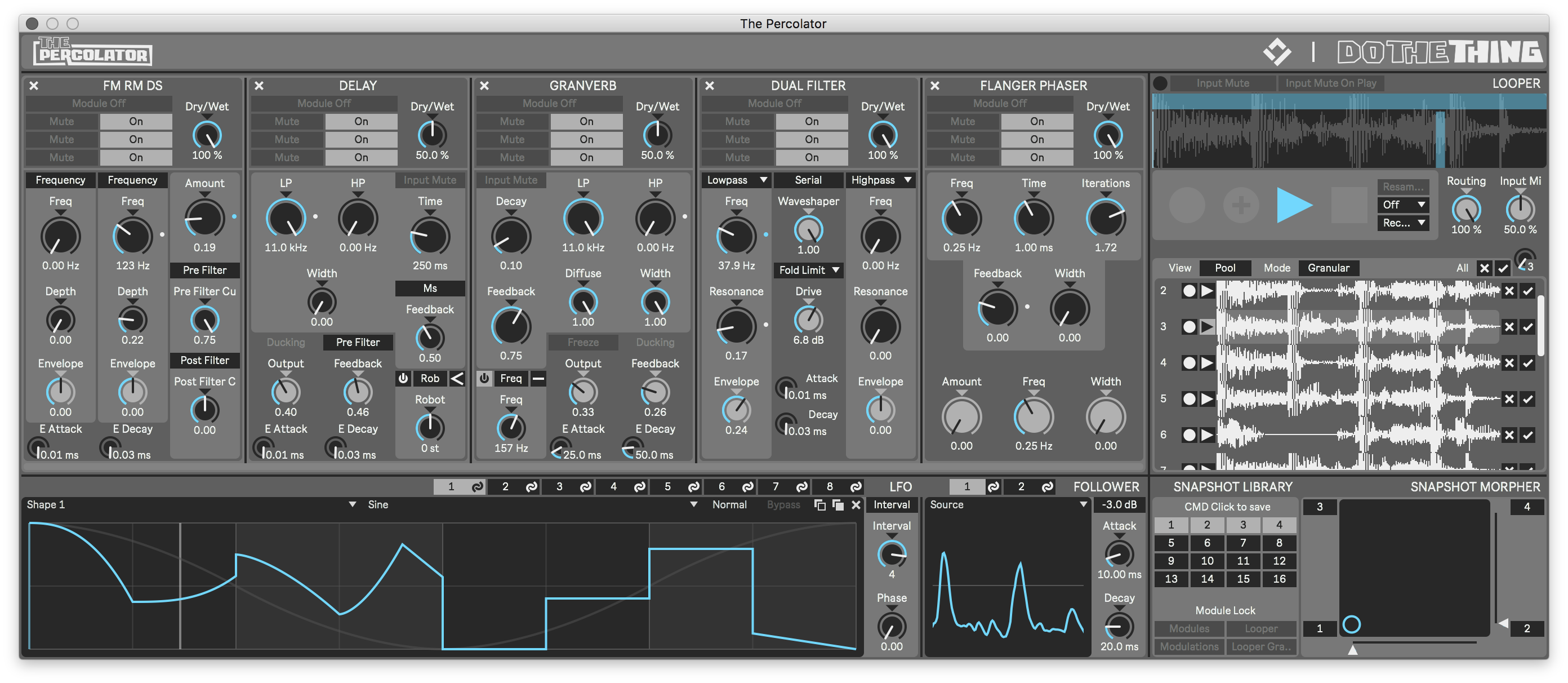
This is also frankly amazing for a MAX device
X32 and 24C mixers, S88MK3, Live + PUSH 3, Osmose, RedShift 6, Pro3, S4, Tempera, Syntakt, Digitone, OP1-F, OPXY, TR-1000, Eurorack, TD27 Drums, Guitars, Basses, Amps and of course lots of pedals!
-

- KVRAF
- 2473 posts since 25 Sep, 2014 from Specific Northwest
Re: the cursor bug in Bitwig. I could only get it to do it when the popup window was NOT focused. The cursor behaved as expected when the popup window had focus. Not really a major bug, if indeed it is one, but annoying, I guess.
Edit: if I explicitly open a popup window by clicking on the button provided, it should take focus. That's the bug in my view.
Re: Java in Bitwig. Yes, there is a very stripped down JVM hiding in there, at about 50Mb vs. the standard one which is usually 300Mb+. If it's handling the GUI, it's definitely not Swing! A rather strange choice, somewhat over-complicated when there are very performant cross-platform libraries available.
Edit: if I explicitly open a popup window by clicking on the button provided, it should take focus. That's the bug in my view.
Re: Java in Bitwig. Yes, there is a very stripped down JVM hiding in there, at about 50Mb vs. the standard one which is usually 300Mb+. If it's handling the GUI, it's definitely not Swing!
A rather strange choice, somewhat over-complicated when there are very performant cross-platform libraries available.I started on Logic 5 with a PowerBook G4 550Mhz. I now have a MacBook Air M1 and it's ~165x faster! So, why is my music not proportionally better? 
-
- KVRAF
- 9146 posts since 7 Oct, 2005
I don't know what they are using in Java, but I think the decision of using Java is might be because of the portability (Linux, Windows and Mac). Anyway, back in the days when I studied Java (2002-2005), it was running better on Windows and Linux than OSX, so I don't know if that continued the same now.
I think the only other company that uses Java to write a DAW was Arturia. What was called? Storm? Anyway, it wasn't a good DAW (buggy, buggy and buggy!) although the idea and design were fantastic (I think that was my impression at the time).
I think the only other company that uses Java to write a DAW was Arturia. What was called? Storm? Anyway, it wasn't a good DAW (buggy, buggy and buggy!) although the idea and design were fantastic (I think that was my impression at the time).
Using: Cubase Pro 15, Reason 13, Tascam US-4x4HR, MODX6, DM12D, LaunchKey 49, Yamaha guitar(Pacifica 612v) and bass (BB234) and some virtual instruments and synths.
-
machinesworking machinesworking https://www.kvraudio.com/forum/memberlist.php?mode=viewprofile&u=8505
- KVRAF
- 8027 posts since 15 Aug, 2003 from seattle
Life is filled with weird Catch 22's, Bitwig developers left Ableton around the time they incorporated Max into Live. I thought right away it was a bad idea, Cycling 74 are great at some things, not so great at others, they hated coding Pluggo, which was their Max VST/AU patch, and it was the mostly likely to crash plug in I owned at the time. I had a feeling it would take years for Max integration to be stable in Live and IMO I was right about that. Now with it stable, Max is a far more advanced environment than the Grid, but of course on a personal level I just like working in Bitwig better, I always feel like Live wants me to mouse around, it never 100% felt like a DAW with keyboard shortcuts that speed up your workflow and frankly comparatively that's true, the shortcuts are super useful, but limited. I just feel slow in Live compared, but then Max adds in this incredible wealth of add ons.SLiC wrote: Mon Oct 31, 2022 9:21 pmYes, I have that, unbelivevable.machinesworking wrote: Mon Oct 31, 2022 9:20 pmThat's the least of it to me. The MPE granular synth with iPad control for instance. https://granurise.comSLiC wrote: Mon Oct 31, 2022 8:44 pm Max has many advantages in the right hands, Can't do this in Bitwig!
https://elisabethhomeland.gumroad.com/l/qymjsa
This is also frankly amazing for a MAX device
-
- KVRAF
- 5068 posts since 27 Jul, 2004
For me it´s exactly the opposite...machinesworking wrote: Mon Oct 31, 2022 10:36 pm ... I just like working in Bitwig better, I always feel like Live wants me to mouse around, it never 100% felt like a DAW with keyboard shortcuts that speed up your workflow and frankly comparatively that's true, the shortcuts are super useful, but limited....
Because Bitwig exported so many options into the Inspector and the menu on top it feels to me 10 times more click intense than every other DAW...
If I like to work on a certain section I constantly have to mouse around and select the different parts to make them visible in the Inspector to be able to do certain things...
On top of that the distances between on what you have to click to select and the Inspector or the top menues are the biggest distances in the whole GUI...
Just a simple example: Adjusting the Volume of multiple faders together
Let´s say you want to adjust the volume from the last 3-4 tracks in your Mixer:
- in Live select the tracks grab one of the faders and move... everything very close...
- in Bitwig, select the tracks and move your mouse over the entire screen to the Inspector to grab the little text box to move them together and move it all the way back if you need to do something else on these tracks where in Live it´s the smallest distances possible...
In Bitwig you simply have to "leave" the actual workspace to go to the Inspector or the top menu too often while the workflow in Live is more logical as you edit there where you are...
If you do constructions you mostly put your tools beside you and don´t place them in a different room that every time when you need something you have to stand up, go to the other room grab one nail, go back to the workspace and hit it in... stand up again go to get the next nail and so on...
Next with shortcuts... in Live the same shortcuts work in every section of the whole programm...
In Bitwig it depends on the section which is currently selected... don´t like that!
On top of that Bitwigs shortcuts are often completely undocumentated and nobody knows what certain shortcuts actually do... it´s a bit ridiculous to write the support what a certain shortcut actually is good for...
I am a bit in the boat of EnGee:
If you cannot make use out of Bitwigs really special features there is not much left...EnGee wrote: Mon Oct 31, 2022 9:17 pm Well, to be honest, I've never hit a wall due to a lack of a modulation! My patches (if I'm in the mood to do from scratch) tend to be simple with minimum modulations. My kind of music doesn't need such complexity,...
My used Synths have themselves clever modulation options... no need for Bitwigs internals...
I am not into modular so the Grids are just waste for me... why shall I build something in semi quality while I can use everything much more streamlined and in better quality in an existing instrument or effect...
Bitwigs effects are too workintense for me to make them useful... what serves you the great system of nested effects if you are forced to use them to make them sound right while otherwise I can just load a plugin which does the same but sounds great without any additional work...
There are of course some other goodies but Live has got them too and seems to me much more elegant and streamlined while Bitwig is a mouse marathon... left right up down here there select here move to there move back select there move to there...
From a pure experimental point of view of course Bitwig wins hands down...
From a production workflow it´s honestely too far away from being one of the better ones
Bitwig stays for me a big instrument and sound design tool with a little bit of a DAW attached...
I don´t say it´s bad... but I fear it´s not made for me...
Ableton lacks some things for sure too but is as a DAW much more complete and streamlined especially after the last 2 major updates...
-

- KVRAF
- 4898 posts since 13 May, 2004
Uh, it's been a while since this topic came up. So let me clarify again:syntonica wrote: Mon Oct 31, 2022 9:53 pm Re: Java in Bitwig. Yes, there is a very stripped down JVM hiding in there, at about 50Mb vs. the standard one which is usually 300Mb+. If it's handling the GUI, it's definitely not Swing!
Bitwig uses Java as the 'glue code' between its' components and gives them access to many platform independent libraries (no there are not that many libraries in C) like internet protocols, reading/writing file formats, etc. The audio engine and drawing code of the UI is coded in C.
And BTW Java is nowadays as fast as C++ and in some aspects event faster while being much easier to debug.
-
- KVRAF
- 12095 posts since 2 Dec, 2004 from North Wales
I think the next 2 updates for Live (11.5?) and Bitwig (maybe 5?) are going to be very interesting and possibly set future direction/priorities. The first one to add simple integrated 'audio editing like midi' will be the winner for me, Reason actually does this very nicely.
X32 and 24C mixers, S88MK3, Live + PUSH 3, Osmose, RedShift 6, Pro3, S4, Tempera, Syntakt, Digitone, OP1-F, OPXY, TR-1000, Eurorack, TD27 Drums, Guitars, Basses, Amps and of course lots of pedals!
-
- KVRAF
- 5068 posts since 27 Jul, 2004
I think ARA2 support will be the next logical step after comping ... perhaps they will come even up with their house made solution...SLiC wrote: Tue Nov 01, 2022 10:47 am ...The first one to add simple integrated 'audio editing like midi' will be the winner for me, Reason actually does this very nicely.
But I think something will happen there ... at least on Abletons side...
In Bitwig I am not so sure... I guess there will be first about 20 new plugins and Grid modules before...
Last edited by Trancit on Tue Nov 01, 2022 11:33 am, edited 2 times in total.
-
- KVRAF
- 2473 posts since 25 Sep, 2014 from Specific Northwest
Thanks for the clarification. I figured they were using it for glue and not GUI or DSP. While Java can be very fast, C/C++ are very much King. And Queen.moss wrote: Tue Nov 01, 2022 10:33 amUh, it's been a while since this topic came up. So let me clarify again:syntonica wrote: Mon Oct 31, 2022 9:53 pm Re: Java in Bitwig. Yes, there is a very stripped down JVM hiding in there, at about 50Mb vs. the standard one which is usually 300Mb+. If it's handling the GUI, it's definitely not Swing!
Bitwig uses Java as the 'glue code' between its' components and gives them access to many platform independent libraries (no there are not that many libraries in C) like internet protocols, reading/writing file formats, etc. The audio engine and drawing code of the UI is coded in C.
And BTW Java is nowadays as fast as C++ and in some aspects event faster while being much easier to debug.
I got deeper into my demo last night and I truly enjoyed it once I got the persnickety GUI out of the way. (Once I figured out NOT to use the Mixer view as it only displays the clip view and not the arranger view, making it useless to me.)
Funnily enough, I installed the demo on my 11" MBA with Mojave and the cursor bug was there, regardless of whether the popup window was focused or not. This bug does not exist in this form on my new MBA M1 with Monterey. I'll need to double-check, but this looks like a macOS bug.
I started on Logic 5 with a PowerBook G4 550Mhz. I now have a MacBook Air M1 and it's ~165x faster! So, why is my music not proportionally better?
-
machinesworking machinesworking https://www.kvraudio.com/forum/memberlist.php?mode=viewprofile&u=8505
- KVRAF
- 8027 posts since 15 Aug, 2003 from seattle
You're literally complaining because there are so many shortcuts that you don't know all of them.Trancit wrote: Tue Nov 01, 2022 10:28 amFor me it´s exactly the opposite...machinesworking wrote: Mon Oct 31, 2022 10:36 pm ... I just like working in Bitwig better, I always feel like Live wants me to mouse around, it never 100% felt like a DAW with keyboard shortcuts that speed up your workflow and frankly comparatively that's true, the shortcuts are super useful, but limited....
Because Bitwig exported so many options into the Inspector and the menu on top it feels to me 10 times more click intense than every other DAW...
If I like to work on a certain section I constantly have to mouse around and select the different parts to make them visible in the Inspector to be able to do certain things...
On top of that the distances between on what you have to click to select and the Inspector or the top menues are the biggest distances in the whole GUI...
Just a simple example: Adjusting the Volume of multiple faders together
Let´s say you want to adjust the volume from the last 3-4 tracks in your Mixer:
- in Live select the tracks grab one of the faders and move... everything very close...
- in Bitwig, select the tracks and move your mouse over the entire screen to the Inspector to grab the little text box to move them together and move it all the way back if you need to do something else on these tracks where in Live it´s the smallest distances possible...
In Bitwig you simply have to "leave" the actual workspace to go to the Inspector or the top menu too often while the workflow in Live is more logical as you edit there where you are...
If you do constructions you mostly put your tools beside you and don´t place them in a different room that every time when you need something you have to stand up, go to the other room grab one nail, go back to the workspace and hit it in... stand up again go to get the next nail and so on...
Next with shortcuts... in Live the same shortcuts work in every section of the whole programm...
In Bitwig it depends on the section which is currently selected... don´t like that!
On top of that Bitwigs shortcuts are often completely undocumentated and nobody knows what certain shortcuts actually do... it´s a bit ridiculous to write the support what a certain shortcut actually is good for...
I came to Live and Bitwig from Logic and DP, I absolutely despised how little shortcuts Live has, and I still do. I still find areas of Bitwig I wish there was a shortcut for. In terms of the Inspector, I can give you that, Lives simplicity there is easier to deal with. I prefer DP's method of multiple selections though, since it includes things like drawing in track automation volume etc. From what I know neither Bitwig nor Live do that.
In general you pay a price for Lives simplicity, and to a degree Bitwigs as well.