

Does anyone use Stream Deck (with the hardware or as an app on the smartphone/tablet) or similar tools like Touch Portal, TouchOSC, Metagrid etc.?
I'm currently testing the Stream Deck iPhone app and Touch Portal and basically like the idea of controlling the DAW or other applications via shortcuts with an image on another device. Even controlling Cubase via midi works pretty well with Stream Deck. I've seen many Youtubers using it to control their recordings (scene change, start/stop etc. e.g. with OBS) and can understand how useful it is for such applications.
But: I have my keyboard commands programmed in the DAW anyway and can control the most important functions very quickly via the keyboard. So my question: is this more of a gimmick to control the DAW?
Does anyone use Stream Deck, Touch Portal, Metagrid etc. to control the DAW and can name a few points why they no longer want to do without these tools?
Control the DAW with Stream Deck, Touch Portal... nonsense?
-

- KVRAF
- 5913 posts since 17 Aug, 2004 from Berlin, Germany
 | Links
-

- KVRian
- 1113 posts since 20 Oct, 2018
I use the Streamdeck 15.
It have taken time to get it stable because i use win8 and it refuses to install the software if you don't have win10.
But there's workarounds. Does seem to complicate running it smoothly. Until now.
Nice to use the mouse with right hand and have Streamdecks buttons for left hand use.
I push one button and Cakewalk opens and simultaneously Streamdeck switches over to 15 new buttons for daw specific functions.
I've got a I button and a B button which toggles Inspector/Browser window. And a "track" button that is a little script (multi) to toggle them both at the same time and i use it when i need the track view only.
Also "D" and "shift+D" for pianoroll view.
The "multi" commands is what makes it better than the keyboard, i think. With one button you can start a chain of commands doing several things after each other.
It have taken time to get it stable because i use win8 and it refuses to install the software if you don't have win10.
But there's workarounds. Does seem to complicate running it smoothly. Until now.
Nice to use the mouse with right hand and have Streamdecks buttons for left hand use.
I push one button and Cakewalk opens and simultaneously Streamdeck switches over to 15 new buttons for daw specific functions.
I've got a I button and a B button which toggles Inspector/Browser window. And a "track" button that is a little script (multi) to toggle them both at the same time and i use it when i need the track view only.
Also "D" and "shift+D" for pianoroll view.
The "multi" commands is what makes it better than the keyboard, i think. With one button you can start a chain of commands doing several things after each other.
-
- KVRer
- 8 posts since 1 Dec, 2018
I use StreamDeck Mk2 hardware (the 15-button version) with Ableton Live and with Reason. I’ve created templates for both DAWs in the Elgato desktop app which emulate keystrokes on the computer keyboard. Works great and dead simple to set up. I use it for transport controls, metronome, change views in Live, zoom in and out in the sequencer in Reason and a bunch of other stuff. Wouldn’t be without it now. Great bit of kit.

-

- KVRAF
- 2784 posts since 18 Apr, 2001
I'm using Touch Portal with Reason, and specifically while tracking and/or arranging, I wouldn't like to be without it. Although I do know a big part of the Reason keyboard shortcuts, my Touch Portal layout has become muscle-memory by now. I want to build an even more elaborate layout-set in TP, but that muscle-memory thing is even holding me back to do it.
Here's my current layout:
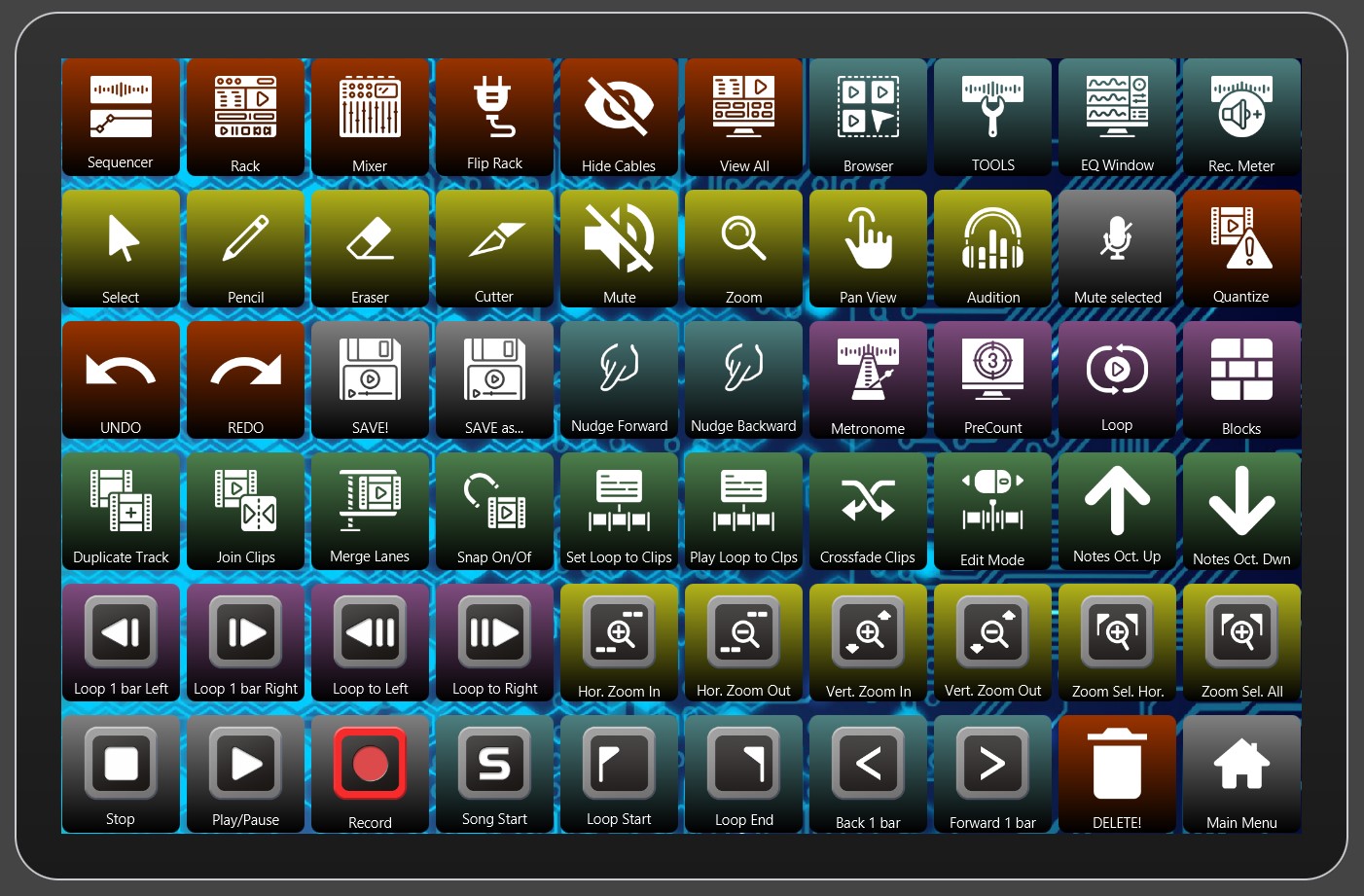
Here's my current layout:
CrimsonWarlock aka TechnoGremlin, Moved to Reason and Rack Extensions exclusively (from Reaper and VSTs) several years ago.
-
- KVRist
- 469 posts since 26 Sep, 2004 from Berlin, Germany
If you have Launchpad X, the pads can be configured to keystrokes as well on up to 8 custom pages, giving you a potential of 512 pads. If you can live without having icons and just color coding, it's a nice alternative.
-

- KVRist
- 59 posts since 6 May, 2021
I use TouchOSC for a few very basic custom functions. I have just a few large buttons for things like:
- Wait ten seconds and begin recording.
- Save take, wait ten seconds and record a new take.
- Delete take, wait ten seconds and record a new take.
- Delete all takes and stop.
- Save all takes and stop.
These let me record easily from across the room if needed and are faster and more convenient to touch rather than hunting for the keyboard shortcuts, especially while holding a guitar or sitting at the keyboard for instance.
- Wait ten seconds and begin recording.
- Save take, wait ten seconds and record a new take.
- Delete take, wait ten seconds and record a new take.
- Delete all takes and stop.
- Save all takes and stop.
These let me record easily from across the room if needed and are faster and more convenient to touch rather than hunting for the keyboard shortcuts, especially while holding a guitar or sitting at the keyboard for instance.