


Hi Attila
Can you add "Ghost Tracks"?
Would it be possible to add in a way to ghost an entire track along with its phrase/track variations?
For example make a ghost of track(1) and use the extract notes variation to extract just the bass notes from the "Ghost Track" for a bassline, then ghost track(1) again and add make monophonic(highest notes) and Simplify Phrase + Adjust note lengths to create a kinda of monophonic lead, basically creating a multitrack composition that relies on on 1 track in a non destructive way. Itd be also useful for stacking sounds\instruments and easily creating variations on the stacks etc... Would also be nice if the user were still able to add variations on individual phrases inside of a "Ghost Track", and maybe possibly make a ghost of a "Ghost Track" to add further variations
RapidComposer v4 beta feedback and discussion (locked)
-
- KVRer
- 28 posts since 15 Oct, 2017
-
 musicdevelopments musicdevelopments https://www.kvraudio.com/forum/memberlist.php?mode=viewprofile&u=223336
 - KVRAF
- Topic Starter
- 6010 posts since 9 Jan, 2010
Hi milliondabeat,
that is a very interesting and creative idea!
I'll definitely add this in a next version.
Thanks!
Attila
that is a very interesting and creative idea!
I'll definitely add this in a next version.
Thanks!
Attila
https://www.musicdevelopments.com
Home of RapidComposer, Melodya, MIDI Mutator and Syne
Summer Sale • June 3-15 • 40% off RapidComposer, Melodya, MIDI Mutator, Syne
Home of RapidComposer, Melodya, MIDI Mutator and Syne
Summer Sale • June 3-15 • 40% off RapidComposer, Melodya, MIDI Mutator, Syne
-
musicdevelopments musicdevelopments https://www.kvraudio.com/forum/memberlist.php?mode=viewprofile&u=223336
- KVRAF
- Topic Starter
- 6010 posts since 9 Jan, 2010
I tested this a lot today, but it always saved the exact number of beats that were selected. How could I reproduce this?sj1 wrote: Thu Feb 02, 2023 9:20 pm I observe that "Save composition (selection only)" is saving 1 extra bar beyond the selected timeline area. This seems to be consistent in quick testing so far.
Thanks,
Attila
https://www.musicdevelopments.com
Home of RapidComposer, Melodya, MIDI Mutator and Syne
Summer Sale • June 3-15 • 40% off RapidComposer, Melodya, MIDI Mutator, Syne
Home of RapidComposer, Melodya, MIDI Mutator and Syne
Summer Sale • June 3-15 • 40% off RapidComposer, Melodya, MIDI Mutator, Syne
-
musicdevelopments musicdevelopments https://www.kvraudio.com/forum/memberlist.php?mode=viewprofile&u=223336
- KVRAF
- Topic Starter
- 6010 posts since 9 Jan, 2010
Thanks for reporting this one! The selection worked, but the menu did not reflect the selection.
sj1 wrote: Thu Feb 02, 2023 9:29 pm I also observe that when I do a Merge to bring in one of the saved sections that any choice other than 'Add As New Track' won't take, either in the UI, or in the actual action.
https://www.musicdevelopments.com
Home of RapidComposer, Melodya, MIDI Mutator and Syne
Summer Sale • June 3-15 • 40% off RapidComposer, Melodya, MIDI Mutator, Syne
Home of RapidComposer, Melodya, MIDI Mutator and Syne
Summer Sale • June 3-15 • 40% off RapidComposer, Melodya, MIDI Mutator, Syne
-
musicdevelopments musicdevelopments https://www.kvraudio.com/forum/memberlist.php?mode=viewprofile&u=223336
- KVRAF
- Topic Starter
- 6010 posts since 9 Jan, 2010
I suspect this may happen because of a VST3 plug-in. Is that possible? I am using lots of VST3 plug-ins recently but I have not experienced this yet.
sj1 wrote: Thu Feb 02, 2023 9:32 pm Also, FWIW, I have observed that upon initial startup, RC sometimes declines to start playback when so requested. It is like it is hung, though so far it eventually does become unhung if I futz enough and wait enough. The behavior is definitely different here than that of prior versions.
Have others seen this change too?
https://www.musicdevelopments.com
Home of RapidComposer, Melodya, MIDI Mutator and Syne
Summer Sale • June 3-15 • 40% off RapidComposer, Melodya, MIDI Mutator, Syne
Home of RapidComposer, Melodya, MIDI Mutator and Syne
Summer Sale • June 3-15 • 40% off RapidComposer, Melodya, MIDI Mutator, Syne
-
musicdevelopments musicdevelopments https://www.kvraudio.com/forum/memberlist.php?mode=viewprofile&u=223336
- KVRAF
- Topic Starter
- 6010 posts since 9 Jan, 2010
Hi lulukom,
I did not forget it, I'll do my best to implement it Tuesday next week.
v4.6 is released on Monday, but this requires lots of testing so I'll upload a beta version soon after that.
Thanks,
Attila
I did not forget it, I'll do my best to implement it Tuesday next week.
v4.6 is released on Monday, but this requires lots of testing so I'll upload a beta version soon after that.
Thanks,
Attila
lulukom wrote: Thu Feb 02, 2023 7:09 pm Hi Attila.
Yes, using VST instruments in RC is a big step forward !
But I'm still really looking forward to the movement of the phrase controllers in sync with the selected quantization )) Does it make sense to expect ?
https://www.musicdevelopments.com
Home of RapidComposer, Melodya, MIDI Mutator and Syne
Summer Sale • June 3-15 • 40% off RapidComposer, Melodya, MIDI Mutator, Syne
Home of RapidComposer, Melodya, MIDI Mutator and Syne
Summer Sale • June 3-15 • 40% off RapidComposer, Melodya, MIDI Mutator, Syne
-
musicdevelopments musicdevelopments https://www.kvraudio.com/forum/memberlist.php?mode=viewprofile&u=223336
- KVRAF
- Topic Starter
- 6010 posts since 9 Jan, 2010
Well, if you scroll down to the bottom, it should be visible.
The 'plus' button is there because you wanted to have an area where you could right-click to open the "Add track..." menu and this button was a good excuse for always having a small area below the tracks.
The 'plus' button is there because you wanted to have an area where you could right-click to open the "Add track..." menu and this button was a good excuse for always having a small area below the tracks.
sj1 wrote: Fri Feb 03, 2023 12:05 pm I'm observing that when I load a composition that has enough tracks in it to go off the screen in the downward direction then the + button to add a new track is not initially visible at all.
Is it where it is for technical (e.g. OOP) reasons?
https://www.musicdevelopments.com
Home of RapidComposer, Melodya, MIDI Mutator and Syne
Summer Sale • June 3-15 • 40% off RapidComposer, Melodya, MIDI Mutator, Syne
Home of RapidComposer, Melodya, MIDI Mutator and Syne
Summer Sale • June 3-15 • 40% off RapidComposer, Melodya, MIDI Mutator, Syne
-
musicdevelopments musicdevelopments https://www.kvraudio.com/forum/memberlist.php?mode=viewprofile&u=223336
- KVRAF
- Topic Starter
- 6010 posts since 9 Jan, 2010
I fixed this. From now not just the big 'lightning' button will be displayed after any use of the IT, but the track 'light-bulb' and 'lightning' buttons are also shown.
The extra IT buttons get hidden when loading a composition, or starting a new composition.
Thanks,
Attila
The extra IT buttons get hidden when loading a composition, or starting a new composition.
Thanks,
Attila
sj1 wrote: Fri Feb 03, 2023 3:38 pm Hi.
I seem to be observing that for the IT Big Lightning to appear in the Composition pane, I need to operate the IT Big Lightning in the IT pane.
Operating one of the small lightnings in the IT pane will not lead to the Big Lightning appearing in the Composition pane.
It would be good in theory, I think, if any successful operation in the IT pane would cause the IT Big Lightning to subsequently be available in the Composition pane.
https://www.musicdevelopments.com
Home of RapidComposer, Melodya, MIDI Mutator and Syne
Summer Sale • June 3-15 • 40% off RapidComposer, Melodya, MIDI Mutator, Syne
Home of RapidComposer, Melodya, MIDI Mutator and Syne
Summer Sale • June 3-15 • 40% off RapidComposer, Melodya, MIDI Mutator, Syne
-

- KVRian
- 1177 posts since 13 Mar, 2017
Hi,musicdevelopments wrote: Sat Feb 04, 2023 3:51 pmI tested this a lot today, but it always saved the exact number of beats that were selected. How could I reproduce this?sj1 wrote: Thu Feb 02, 2023 9:20 pm I observe that "Save composition (selection only)" is saving 1 extra bar beyond the selected timeline area. This seems to be consistent in quick testing so far.
Thanks,
Attila
Here is a link to a video showing the situation.
https://www.screencast.com/t/qZ10taW8
The file used is attached below.
You do not have the required permissions to view the files attached to this post.
-
- KVRAF
- 1752 posts since 30 Nov, 2013
Thank you Attila!I did not forget it, I'll do my best to implement it Tuesday next week.
Would like a few small adjustments..
-When I call up the VST editing instrument and it's on the top, unfortunately I can't press the space bar for the playback. Maybe make an option with the inclusion of this feature? I mean playback management with the VST instrument on top of the RC ) .
- It would also be nice to be able to automatically adjust the zoom of the composition window with closing and opening the browser, i.e. I closed the browser - the composition window expanded as much as possible, I opened the browser - the composition window shrank to visible sizes.
- Apparently on Mac OS it was not possible to defeat black screens when resizing the window))
Thank you .
-
- KVRist
- 410 posts since 9 Oct, 2013 from uk
Hi Attila - a small niggle... the formatting of your posts here; is there some technical reason why your responses often appear before/above the quote you're referring to.?
I can guess for efficiency you might be using some offline editor to compose all your posts, then pasting those responses (intact with quotes) back into the forum reply box. If so, could I request a small adjustment be made, to ensure new responses display after/below the 'quote' html tags of the post being replied to.?
Reading in here, especially on a phone, gets quite clumsy (for me.!) to always have to scroll below first, take in the quote for context, then scroll back up to read/understand what it is you're answering with.!
(have to admit, I especially got a bit 'triggered' by the collective little batch of posts you just made above.!)
(Also, apologies - and please ignore if this is just me, being selfish)
I can guess for efficiency you might be using some offline editor to compose all your posts, then pasting those responses (intact with quotes) back into the forum reply box. If so, could I request a small adjustment be made, to ensure new responses display after/below the 'quote' html tags of the post being replied to.?
Reading in here, especially on a phone, gets quite clumsy (for me.!) to always have to scroll below first, take in the quote for context, then scroll back up to read/understand what it is you're answering with.!
(have to admit, I especially got a bit 'triggered' by the collective little batch of posts you just made above.!)
(Also, apologies - and please ignore if this is just me, being selfish
)System 1 - Win11; i9 13900HK miniPC; 64Gb; Iris XE graphics; Cubase 15.0.10; Studio Pro v8.0.3;UR44 i/o
System 2 - Win10; i7 4790; 16Gb; GTX750Ti; Cubase v14.0.41; WLab Pro v12.0.51; StudioOne v6.6.4
System 2 - Win10; i7 4790; 16Gb; GTX750Ti; Cubase v14.0.41; WLab Pro v12.0.51; StudioOne v6.6.4
-
- KVRist
- 410 posts since 9 Oct, 2013 from uk
And, happy to see an eye being kept on suggestions from @lovemusic15 - I'm particularly interested in the stuff about bringing 'note length' and 'spacing between notes' capabilities inside the Midi Mutator. These are really important for making good melodies.!
viewtopic.php?p=8604054#p8604054
thebutler
viewtopic.php?p=8604054#p8604054
thebutler
System 1 - Win11; i9 13900HK miniPC; 64Gb; Iris XE graphics; Cubase 15.0.10; Studio Pro v8.0.3;UR44 i/o
System 2 - Win10; i7 4790; 16Gb; GTX750Ti; Cubase v14.0.41; WLab Pro v12.0.51; StudioOne v6.6.4
System 2 - Win10; i7 4790; 16Gb; GTX750Ti; Cubase v14.0.41; WLab Pro v12.0.51; StudioOne v6.6.4
-
musicdevelopments musicdevelopments https://www.kvraudio.com/forum/memberlist.php?mode=viewprofile&u=223336
- KVRAF
- Topic Starter
- 6010 posts since 9 Jan, 2010
Hi thebutler,
Thanks,
Attila
I will pay attention to this in the future. When I reply to e-mails, the new reply goes to top with the old e-mail correspondence quoted at the bottom. I thought the same would work on the forums.thebutler wrote: Sun Feb 05, 2023 10:55 am Hi Attila - a small niggle... the formatting of your posts here; is there some technical reason why your responses often appear before/above the quote you're referring to.?
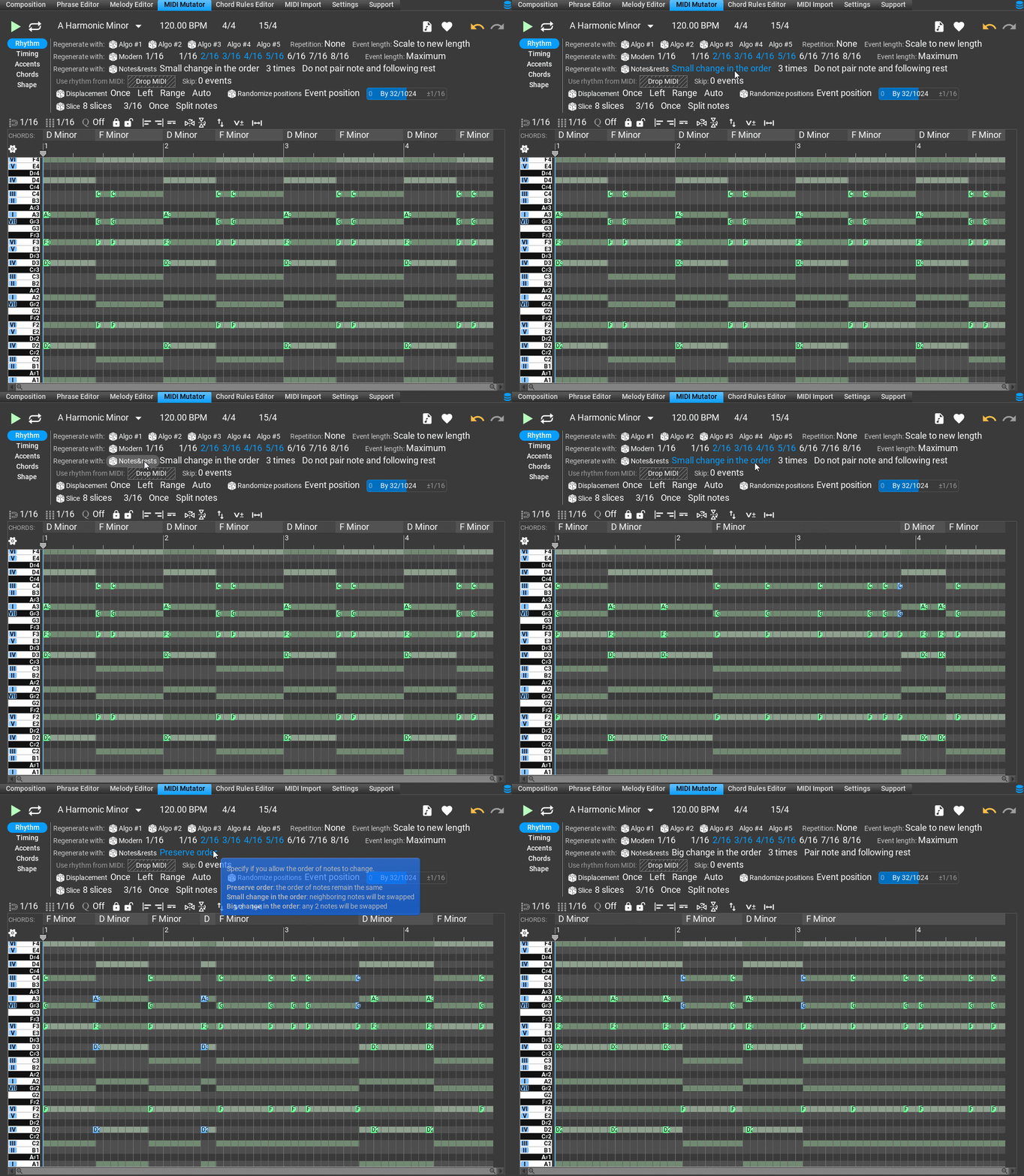
The MIDI Mutator can preserve note length and space between notes, there is a Notes&Rests tool built in, requested by lovemusic15. There are some options, e.g. you can treat notes and the following rest as a single unit, or you can treat them as separate 'note' and 'rest' units. Nothing prevents you to make new interesting rhythm patterns from an existing MIDI. I prepared a GIF:thebutler wrote: Sun Feb 05, 2023 11:17 am And, happy to see an eye being kept on suggestions from @lovemusic15 - I'm particularly interested in the stuff about bringing 'note length' and 'spacing between notes' capabilities inside the Midi Mutator. These are really important for making good melodies.!
Thanks,
Attila
https://www.musicdevelopments.com
Home of RapidComposer, Melodya, MIDI Mutator and Syne
Summer Sale • June 3-15 • 40% off RapidComposer, Melodya, MIDI Mutator, Syne
Home of RapidComposer, Melodya, MIDI Mutator and Syne
Summer Sale • June 3-15 • 40% off RapidComposer, Melodya, MIDI Mutator, Syne
-
musicdevelopments musicdevelopments https://www.kvraudio.com/forum/memberlist.php?mode=viewprofile&u=223336
- KVRAF
- Topic Starter
- 6010 posts since 9 Jan, 2010
Hi Steve,sj1 wrote: Sat Feb 04, 2023 5:23 pm Hi,
Here is a link to a video showing the situation.
https://www.screencast.com/t/qZ10taW8
The file used is attached below.
fantastic, thank you! I was able to fix this with your help.
In addition the "Merge Composition" menus are automatically set up, when merging the same track names.
Thanks,
Attila
https://www.musicdevelopments.com
Home of RapidComposer, Melodya, MIDI Mutator and Syne
Summer Sale • June 3-15 • 40% off RapidComposer, Melodya, MIDI Mutator, Syne
Home of RapidComposer, Melodya, MIDI Mutator and Syne
Summer Sale • June 3-15 • 40% off RapidComposer, Melodya, MIDI Mutator, Syne
-
- KVRian
- 1177 posts since 13 Mar, 2017
Great news about the Merge fix. Thanks!
BTW, since the MIDI Mutator is mentioned above, can you comment on whether it would ever be plausible to make MM "live" similar to the way the IT is?
IOW, you could hear what you are doing with it in context with that section of the composition all sounding while you manipulate it.
I realize, depending on the specifics, it might not be a reasonable thing to hope for.
BTW, since the MIDI Mutator is mentioned above, can you comment on whether it would ever be plausible to make MM "live" similar to the way the IT is?
IOW, you could hear what you are doing with it in context with that section of the composition all sounding while you manipulate it.
I realize, depending on the specifics, it might not be a reasonable thing to hope for.