


Hi,
I notice I'm unable to double-click zoom in on a Line, make a timeline selection (e.g. a short length of the span), then double-click zoom out and have my timeline selection remain as I set it.
IOW, timeline selection is not persisting across zoom context.
I've made a brief video to illustrate.
https://www.screencast.com/t/Sv1YPFhh
RapidComposer v4 beta feedback and discussion (locked)
-

- KVRian
- 1177 posts since 13 Mar, 2017
I also notice, searching on "z' in the keyboard shortcuts, that there does not seem to be any keyboard shortcuts for zooming.
Offhand, I would find keyboard shortcuts for these operations to be very helpful:
Zoom out full
Zoom to Timeline Selection
Zoom to Enclosing Line (around cursor position)
Zoom to Enclosing Part (around cursor position)
Zoom to Prior - (to memory of the immediately prior zoom, with repeated operation amounting to back-and-forth)
Ideally, these would all be operable while the music plays. If that is not practical to implement, there is still alot of utility even if we have to stop the music first.
Offhand, I would find keyboard shortcuts for these operations to be very helpful:
Zoom out full
Zoom to Timeline Selection
Zoom to Enclosing Line (around cursor position)
Zoom to Enclosing Part (around cursor position)
Zoom to Prior - (to memory of the immediately prior zoom, with repeated operation amounting to back-and-forth)
Ideally, these would all be operable while the music plays. If that is not practical to implement, there is still alot of utility even if we have to stop the music first.
-
- KVRAF
- 2154 posts since 15 May, 2017
-
- KVRAF
- 1752 posts since 30 Nov, 2013
Hello Attila!
How do I understand the situation when the plugin (into DAW) opens with two windows ( both do not work ) ? One plug-in window is solid white, the second one does not respond to mouse control )) Mac OS High Sierra .
How do I understand the situation when the plugin (into DAW) opens with two windows ( both do not work ) ? One plug-in window is solid white, the second one does not respond to mouse control )) Mac OS High Sierra .
You do not have the required permissions to view the files attached to this post.
-
 musicdevelopments musicdevelopments https://www.kvraudio.com/forum/memberlist.php?mode=viewprofile&u=223336
 - KVRAF
- Topic Starter
- 6012 posts since 9 Jan, 2010
Hello lulukom!
How did you open 2 windows? There is a limitation for creating a single plug-in instance. Multiple instances are not supported at the moment.
BTW I am going to post v4.7b1 with quantizing MIDI CC's. A screenshot:
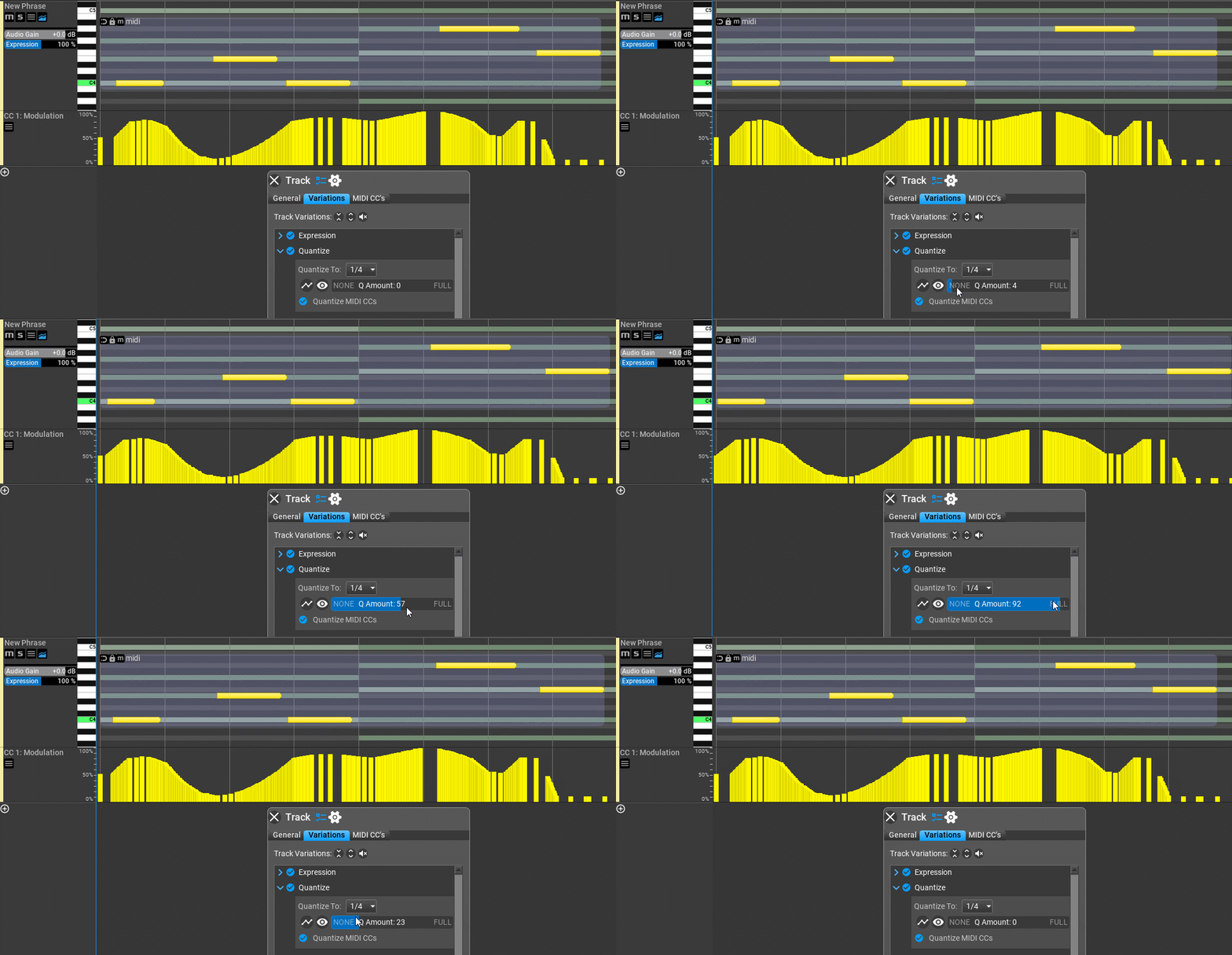
I hope this is what you were looking for.
Thanks,
Attila
How did you open 2 windows? There is a limitation for creating a single plug-in instance. Multiple instances are not supported at the moment.
BTW I am going to post v4.7b1 with quantizing MIDI CC's. A screenshot:
I hope this is what you were looking for.
Thanks,
Attila
-
musicdevelopments musicdevelopments https://www.kvraudio.com/forum/memberlist.php?mode=viewprofile&u=223336
- KVRAF
- Topic Starter
- 6012 posts since 9 Jan, 2010
RapidComposer v4.7b1 is available!
Improvements:
Improvements:
- Quantize variation offers applying the quantization to MIDI CC's
- MIDI import: imported MIDI is zoomed out when loaded
- MIDI import: MIDI CC's are displayed as events, not curves as before
- MIDI import: LSB of 14-bit controllers are not added to the imported MIDI CC's as a separate CC
-
- KVRAF
- 1752 posts since 30 Nov, 2013
Hello Attila!
I'm just inspired by your demonstration of quantize-controller synchronization. Thank you . Looks very convincing. About two plugins open at the same time.. I didn't do it intentionally, I just opened one plugin and got two windows
(I demonstrated it in the screenshot) and they did not work. This has been tested on two Macs with the same result and is still going on. Here's just the screenshot I took.
I'm just inspired by your demonstration of quantize-controller synchronization. Thank you . Looks very convincing. About two plugins open at the same time.. I didn't do it intentionally, I just opened one plugin and got two windows
(I demonstrated it in the screenshot) and they did not work. This has been tested on two Macs with the same result and is still going on. Here's just the screenshot I took.
You do not have the required permissions to view the files attached to this post.
-
- KVRAF
- 1752 posts since 30 Nov, 2013
I tried 7.1 beta. Unfortunately , the plug - ins also open in two windows and when adjusting the degree of quantization in the variations , the program freezes . (As in Mac - the colored ball spins endlessly)))(((
-
- KVRian
- 1177 posts since 13 Mar, 2017
Hi. What has to be done to see the new CC Quantize control?
For some reason, I'm not seeing it here.
For some reason, I'm not seeing it here.
You do not have the required permissions to view the files attached to this post.
-
- KVRAF
- 2154 posts since 15 May, 2017
it's a track variation..sj1 wrote: Sat Feb 11, 2023 7:44 pm Hi. What has to be done to see the new CC Quantize control?
For some reason, I'm not seeing it here.
-
- KVRAF
- 2154 posts since 15 May, 2017
-
- KVRAF
- 2154 posts since 15 May, 2017
I am guessing he didn't build this in the Windows version.. doesn't work for me.. works for you?