New! Quality of Life Update 1 (free update, v1.4)
- New effect bypass options
- MIDI learn patch switching
- Importing WAV files in the curve editors
- Entering parameters and curves via maths expressions
- And more improvements!
Altitude has been released!
The price is $99.
Visit the website: https://nakst.gitlab.io/altitude/
Download the free demo: https://nakst.itch.io/altitude/
Chat on Discord: https://discord.gg/aHnUxztsVe
Key features:
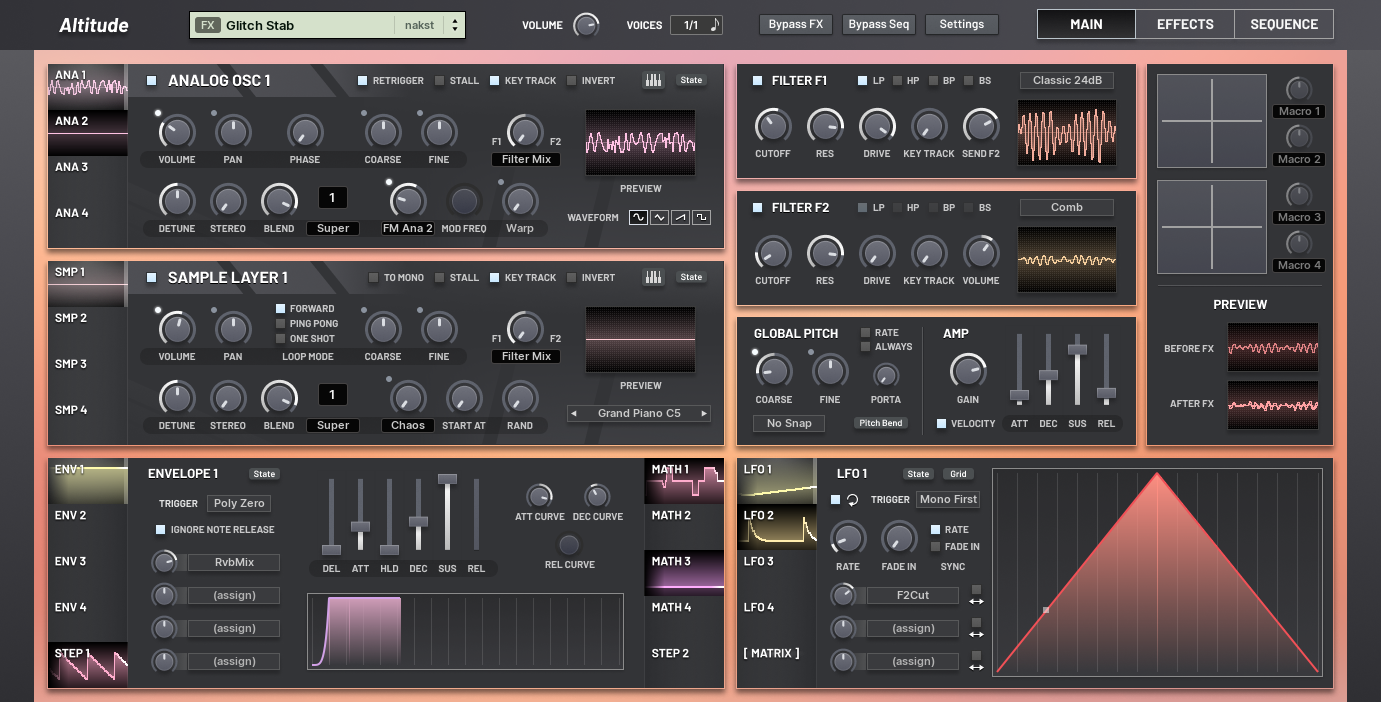
- Sound engine based upon the solid foundation of my previous instrument, Apricot, but revamped and enhanced to support the multitude of new features.
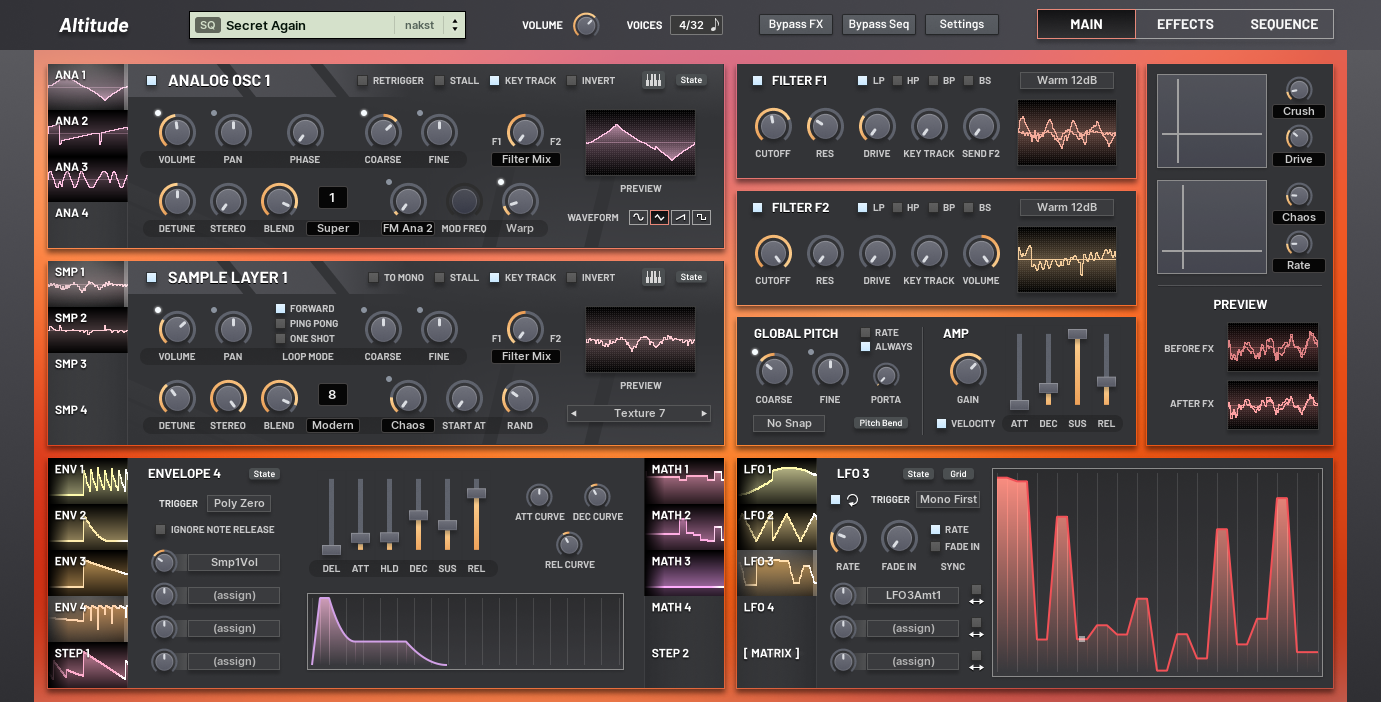
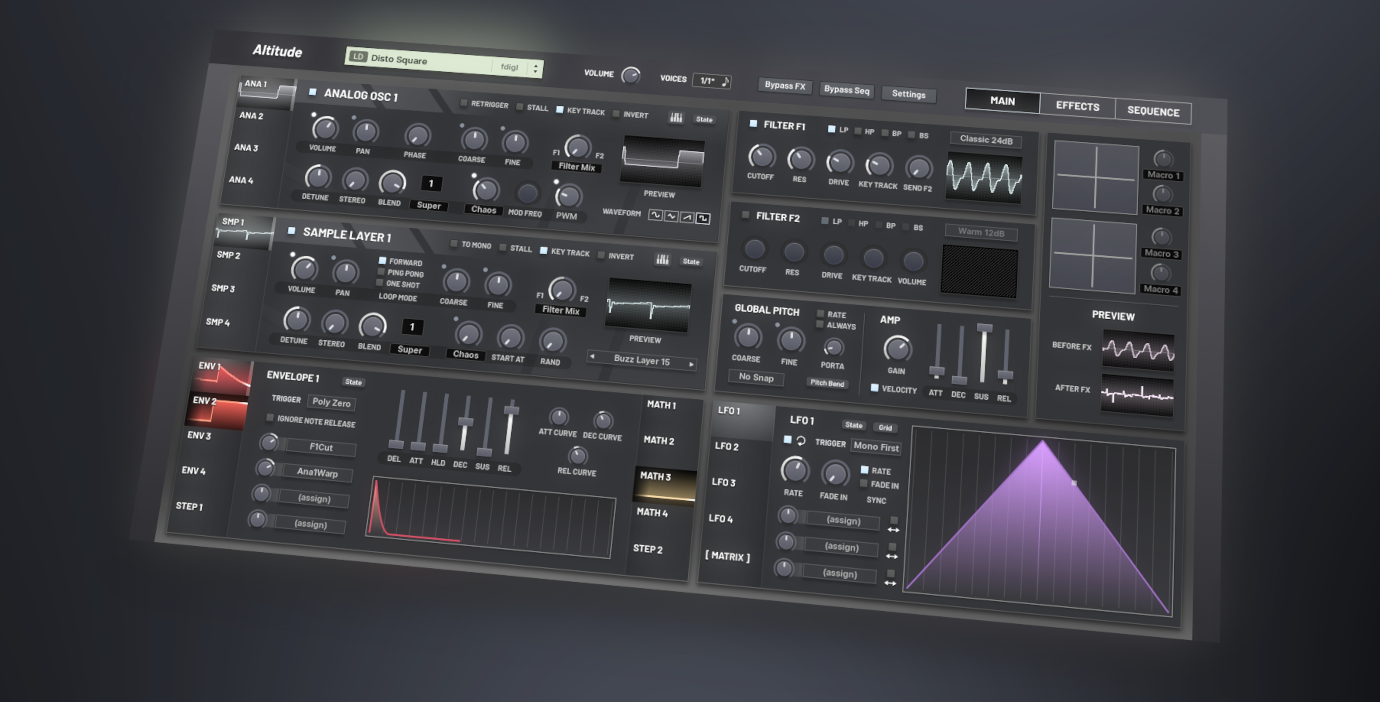
- 4 virtual analog oscillators
- All the standard parameters: pan, retrigger, key track, invert, phase, etc.
- Three unison modes: "Super" (up to 7 voices), "Hyper" (up to 9 voices) and "Modern" (up to 16 voices). Configurable detune, stereo and blend amounts.
- Sine waveform with "R-sync" control
- Triangle waveform with tightness control
- Sawtooth waveform with dual pulse width control
- Square waveform with pulse width control
- 15 modulation inputs: FM (phase modulation) from any of the 8 generators; "chaos" -- per-unison voice noise based FM that creates an incredibly powerful sound; analog-inspired wobble and drift; 4 per-unison voice LFO modes, with adjustable frequency up to 200 Hz.
- Continuous filter output selection between filter F1 and F2. Or, directly route to the amplifier, bypassing the filters.
- "Stall" parameter: stop the phase increment of the oscillator. This can be combined with phase modulation to simulate wavefolding and phase distortion synthesis.
- 4 sample layers
- All the same standard parameters features in the virtual analog oscillators
- The same unison modes available in the virtual analog oscillators
- 11 modulation inputs: FM (phase modulation) from any of the 8 generators; chaos, wobble and drift. (FM between different samples is incredibly powerful!)
- Retro-inspired sampling algorithm. Combined with the bitcrusher effect unit, you can quickly emulate classic samplers.
- Randomize the start position of the sample.
- Multiple play modes: forward, ping-pong and one-shot.
- Over 240 samples built into the factory ROM (265 MB uncompressed). They're incredibly useful for quick layering and fine tuning the timbre of a patch.
- You're able to import your own samples from the standard WAV format, which will be automatically converted into the internal format. The sample database is managed using the FNV-1a hash algorithm to ensure that patches always load the correct sample.
- Two multi-mode, multi-algorithm filters
- The output of filter F1 can be routed into filter F2 with a continuous amount parameter, allowing a smooth blend between serial and parallel routing.
- The output of filter F2 can have its polarity inverted, allowing you to simulate additional filter modes. (I recommend Dan Worrall's great YouTube video "Parallel Filters, Pro Level: Flip It And Reverse It" if you haven't heard about this technique before!)
- Light 6dB algorithm: LP/HP (one pole)
- Warm 12dB algorithm: LP/HP/BP/BS (state variable)
- Warm 24dB algorithm: LP/HP/BP/BS (state variable)
- Classic 24dB algorithm: LP/HP/BP/BS (transistor ladder)
- Sour 24dB algorithm: LP (diode ladder)
- Knife 48dB algorithm: LP/HP/BP/BS (transistor ladder)
- Phaser 12dB-36dB algorithms
- Comb filter
- Two formant filter algorithms
- Rate reducer
- 4 modulation DAHDSR envelope generators with configurable curve tensions for the attack, decay and release sections.
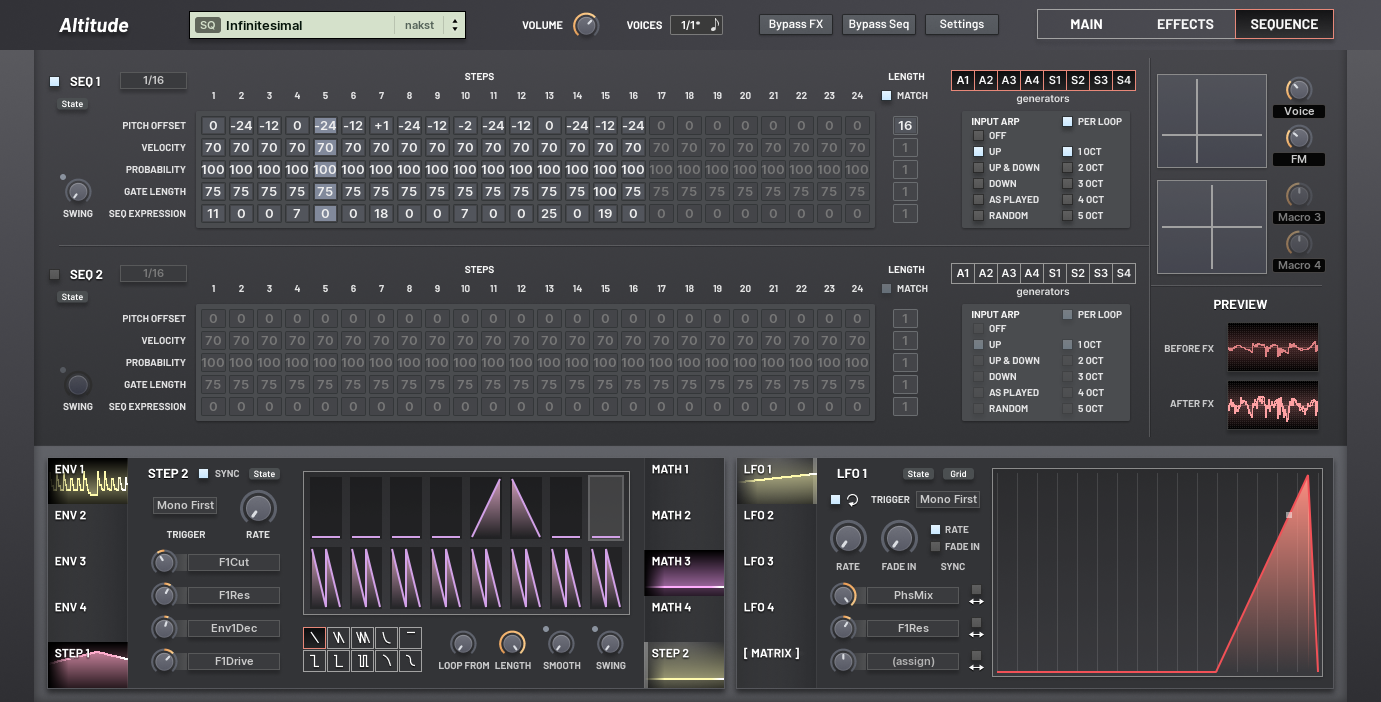
- 2 step modulation units with up to 16 steps and 10 shapes. Contour smoothing and swing.
- 4 "math" modulation units, inspired by modular hardware. Each of these units is very versatile, split up into 4 sub-units:
- Source blend: select two modulation sources as input, and blend between them
- Sample and hold: the control signal is then sent through a S&H unit, which can either run at a free rate or be synced to the host's tempo
- Smooth: the control signal is then smoothed by a given amount. You can enable "10x smooth" to get even more smoothing. Combined with the S&H sub-unit, these tools give you a way to sculpt the random/noise modulation sources into something organic.
- Remapper: a freely-modifiable curve editor with or without grid snapping lets you remap the control signal with an arbitrary function.
- 4 LFOs with built-in fade in. Looping can be disabled for one-shot effects. 6 different trigger modes. The rate and fade in times can be individually synced with the host's tempo. Each destination slot can either run in unipolar or bipolar mode. The LFO shape is taken from a curve editor.
- The curve editor lets you create an arbitrary curve. Up to 100 curve points are supported. Between each pair of points you can configure the interpolation tension. The grid can be enabled and disabled separately for the horizontal and vertical axes. Hold shift while dragging a point to snap it to the grid. You can select multiple points at the same time and drag them together, or adjust their tension together.
- 73 modulation destination slots! 52 have a fixed modulation source (they are located in each modulation unit for easy access), and 21 have a free source selection located in the mod matrix, grouped into 7x3.
- Over 500 modulation destinations and nearly 40 modulation sources.
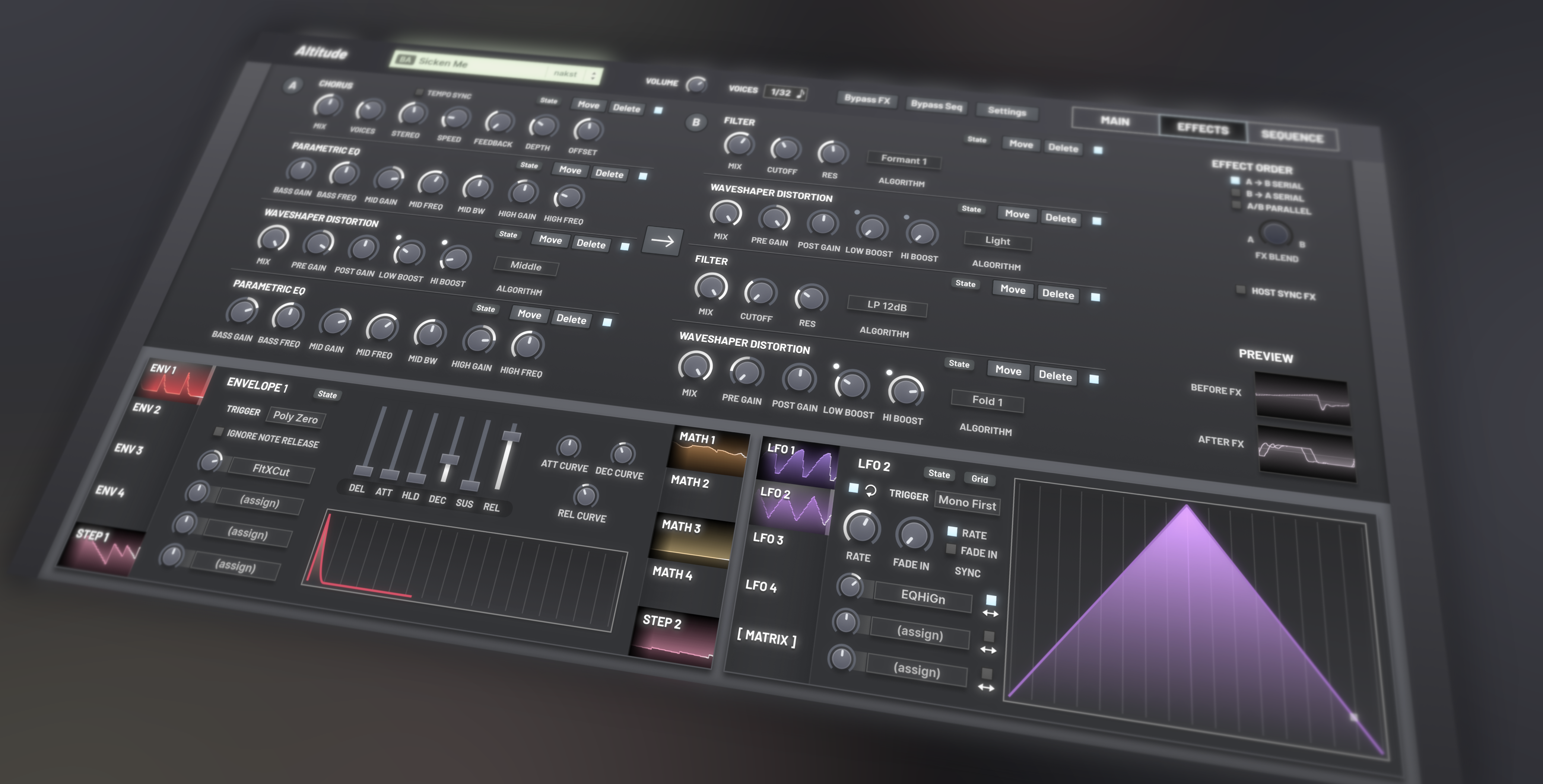
- 17 included effect units. They can be inserted in an arbitrary order into the 8 effect chain slots. Each unit type can be used up to 3 times. The effect chain is split into two parts, A and B. A and B can be routed in serial or in parallel.
- Bitcrusher: including a bit flipper and rate reducer.
- Waveshaper distortion: Light, Soft, Middle and Hard algorithms based upon a certain famous digital synthesizer. These are highly asymmetric which creates a very distinctive sound. 3 extreme wavefolding algorithms.
- Chorus, flanger and phaser. Each can be synchronized with the host's tempo. The flanger's rate can go to some extreme values for buzzing effects.
- Resonant filter with 15 algorithms
- Five-band EQ and three-band parametric EQ. Adjusting one of the parameter brings up a preview of a EQ's frequency response curve, and the preview is automatically hidden when it is no longer needed to avoid wasting precious space on the interface
- Easy to use compressor. Stereo enhancer.
- Mini-chain for simulating sidechain pumping.
- Trancegate with mono and stereo modes.
- Pattern delay with a configurable mono or stereo pattern of delay taps.
- Classic ping-pong delay.
- Two-tap delay. The time position of each taps can be freely modulated for some incredibly wild, glitchy effects.
- Reverb with four algorithms.
- Sub oscillator, which renders an additional waveform per-voice at any position in the effects chain. This is perfect for when you want only some of the effects to apply to the sub. (In fact, it's possible to create a patch entirely out of the sub oscillator effect units and not use any of the main generators!)
- Dual sequencers with attached arpeggiators. Each sequencer has up to 24 steps, split into 5 tracks, one for each property (pitch offset, velocity, probability, gate length, expression). Each track can have a different length; when the tracks loop, they will go out of sync, creating numerous variations of the original sequence. There are various random actions that can be applied to the sequences to automatically generate new step values.
- Portamento can be a fixed time or proportional to the distance of the new voice from the previous one.
- The global coarse pitch offset can be snapped after modulation to semitones or octaves. The latter is useful for creating chiptune-esque effects.
- Keyboard mapping ranges: for each generator (oscillator or sample layer), you can select which octaves they take note input from. This doesn't have to be a single interval of octaves; for example, oscillator 1 could match octaves 2, 4, 6 and 8, while oscillator 2 could match octaves 1, 3, 5, 7, 9. You can also select the algorithm to use if multiple generators match a note: layer, round-robin, or random.
- 4 rename-able macro dials, split into 2 pairs controllable with XY pads.
- Tab switchers have a preview of what all the tabs are doing. For generators, this is a waveform preview. For modulation units, this is a history graph of their output values. This means you'll never get lost in a patch again; you can immediately get an overview of a patch at a single glance.
- If you hover over a parameter that's modulated, it will highlight the tabs of all the modulation units that are affecting it. Dials show both the currently set value as well as their value after modulation is applied.
- Modulation destinations are selected by clicking on the target control. Unlike drag-and-drop based systems, you can switch pages and tabs mid-assignment, to reveal the target you want.
- Waveform previews in the GUI, with user customizable refresh rate. You can either select the oscilloscope mode or the harmonic levels.
- A selection of randomization functions
- Randomize the whole patch
- "Evolve" the patch: offset each of the parameters only slightly
- Blend with another patch
- Randomize individual units (effect chains, generators, modulation units)
- Save and load presets for individual units. Or directly copy and paste parameters between units in a patch.
- Comprehensible user manual detailing all aspects of the signal flow, every parameter, how patch and sample management work, and a section of patch ideas.
- One click bypass for effects and the sequencer, located in the top bar so it's accessible from all pages.
- Change the init patch to any of your patches.
- Streamlined three page (main, effects and sequence) user interface with scaling ranging from 100% to 300%. There are 4 skins included: citrus, graphite, midnight, pastel. You can also create your own skins are load them; a custom skin template is provided, including a text file which allows adjustment of the colors for text and preview displays.
- Completely custom C++ DSP code without the use of libraries or frameworks, for a sonic layer tightly coupled with the user interface.
- Automatic CPU feature detection for Intel/AMD processors. DSP code optimized for those specific features will then be used, to reduce overall CPU usage.
- Native Apple Silicon (M1) support.
- CLAP support with polyphonic modulation, and including many of the latest draft extensions: context menus; preset load; param indication; remote controls; preset discovery; plugin invalidation.
- MTS-ESP tuning support is available in all formats of the plugin, including standalone.
Of course, a list of features don't tell you what it's actually like to use a synth. So here's a selection of quotes from the beta testers about their experiences
 (I didn't ask them to make a statement or anything, this is just part of the feedback I've received during testing!)
- "I like this one. To be honest, ALOT."
- "Very well optimized under crazy circumstances, doesn't eat up resources at all."
- "Startup was insane fast on my 5 years old notebook."
- "without doing much this synth sounds phat and cpu light."
- "I am having a blast with this thing so far!"
- "Plugin load times are QUICK."
- "I love the versatility of this synth. It has the perfect amount of oscillators, the sample playback is perfect for those timbre tweaks you want to make, and the interface is just so well laid out. Its very easy to use, but it can really go crazy with possibilities."
- "Absolutely killer design."
- "I'm really addicted to Altitude right now"
- "the unison is making these saws sound damn nice"
- "OK, I legit love this"
- "I keep wanting to come back to this synth, it sounds reeeally good"
- "messing around with it does "feel" good, I mean it sounds reeally good too, but as an instrument I want to play it's up there with the best of them - all the right things are there and well thought out"
- "You've created an absolute monster, I keep sitting down with the intention of making XYZ type of patch and end up so far from where I intended, but in the most glorious of ways, it's so much fun "
And finally, some sound demos! I've organised these into categories; Altitude is an incredibly versatile synth so there's a lot I wanted to show.
No external samples or effects were used in these demos, except for a stock limiter on the master.
Hard dance, hardstyle, etc.
https://raw.githubusercontent.com/nakst ... oyage.opus
https://raw.githubusercontent.com/nakst ... kster.opus
https://raw.githubusercontent.com/nakst ... ation.opus
https://raw.githubusercontent.com/nakst ... essor.opus
Generative and sequences
https://raw.githubusercontent.com/nakst ... oving.opus
https://raw.githubusercontent.com/nakst ... simal.opus
https://raw.githubusercontent.com/nakst ... arkle.opus
https://raw.githubusercontent.com/nakst ... onder.opus
Epic pads
https://raw.githubusercontent.com/nakst ... Pulse.opus
https://raw.githubusercontent.com/nakst ... Pluck.opus
https://raw.githubusercontent.com/nakst ... 0Line.opus
https://raw.githubusercontent.com/nakst ... cross.opus
Effects and misc
https://raw.githubusercontent.com/nakst ... 0Sigh.opus
https://raw.githubusercontent.com/nakst ... mised.opus
https://raw.githubusercontent.com/nakst ... Organ.opus
https://raw.githubusercontent.com/nakst ... tches.opus
Let me know what you think!
 A lot of delicate work and craftsmanship has gone into this instrument, and I'm very excited to share it with you.