KORG Collection M1 Presets & AKAI VIP Problem

VST, AU, AAX, CLAP, etc. Plugin Virtual Instruments Discussion
RELATED
PRODUCTS

Post

Hi there,

Are there any happy AKAI VIP users still out there?

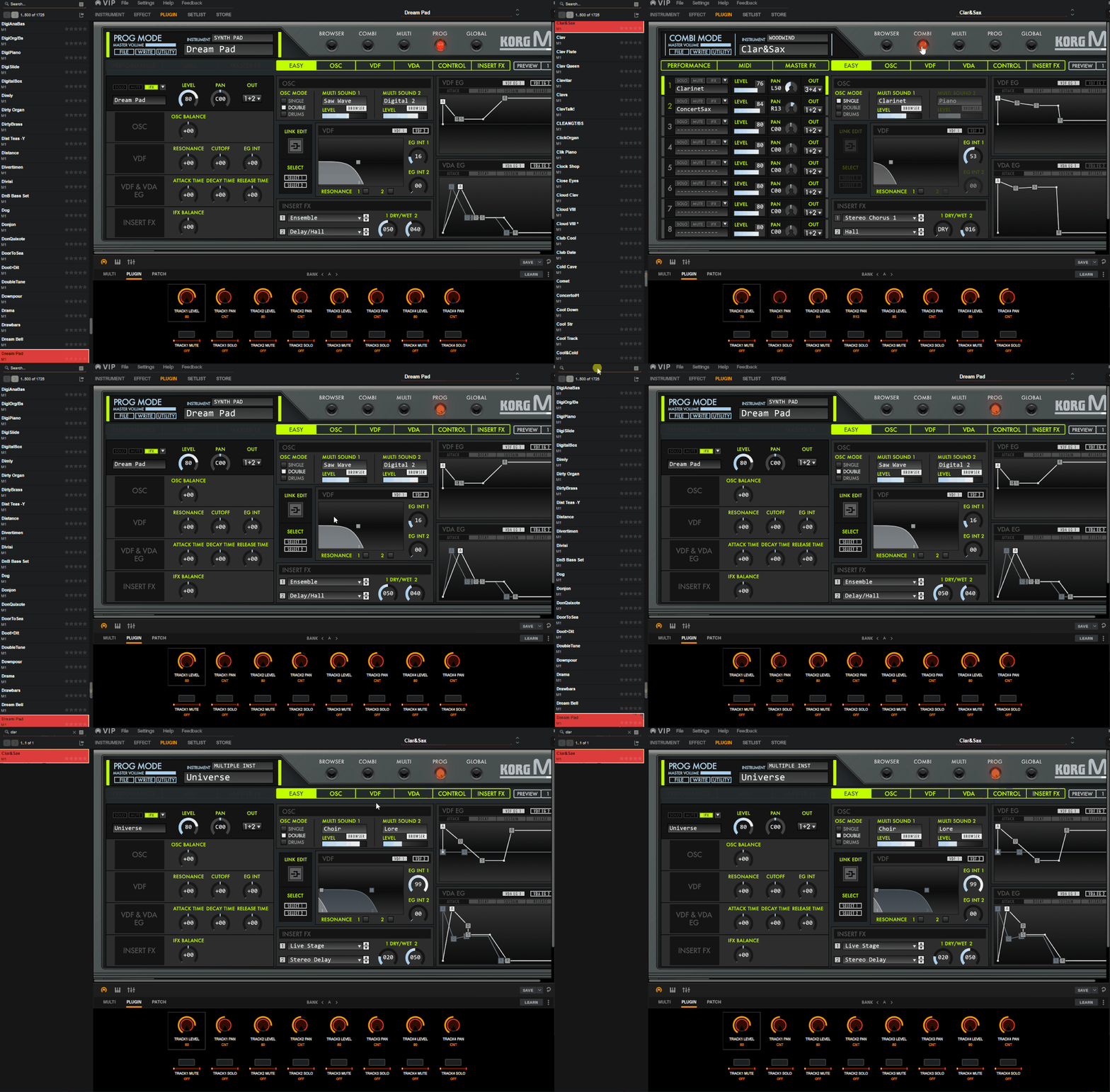
In short, when I load an AKAI VIP Korg Collection M1 preset - they all loads in PROG or COMBI mode. Somehow, AKAI VIP loads them 'random' without distinguishing between PROGs or COMBIs.

Most of the time, VIP loads preset but doesn't change the M1 MODE. So it keeps loading presets in the last/current mode of the Korg Legacy Collection M1. Which is awkward.

All other plugin presets are loading just fine.

Now, here comes the interesting part. When selecting presets directly from the KORG Legacy Collection M1 software - the VIP software is correctly following and allocating the sounds in the left tab! So, then it selects correctly between COMBI's and PROG's. Supers-strange.

I'm using the latest v2.4.0. Korg Collection M1 VST2 hosted by AKAI VIP 3.1 version.

Can someone confirm this "bug" or, even better, present a solution?

Btw, would gladly offer a $50 "bounty" fee for a friendly soul that can solve this :) (Is that really a legal thing to do!?) :dog:

Check the video here:

https://screencast-o-matic.com/watch/c0efDMVySAa
Post

Here's the animated gif.

Image

Post

I did some research.

AKAI VIP stores its presets in a .FXP format here: C:\ProgramData\VIP\presetsformat

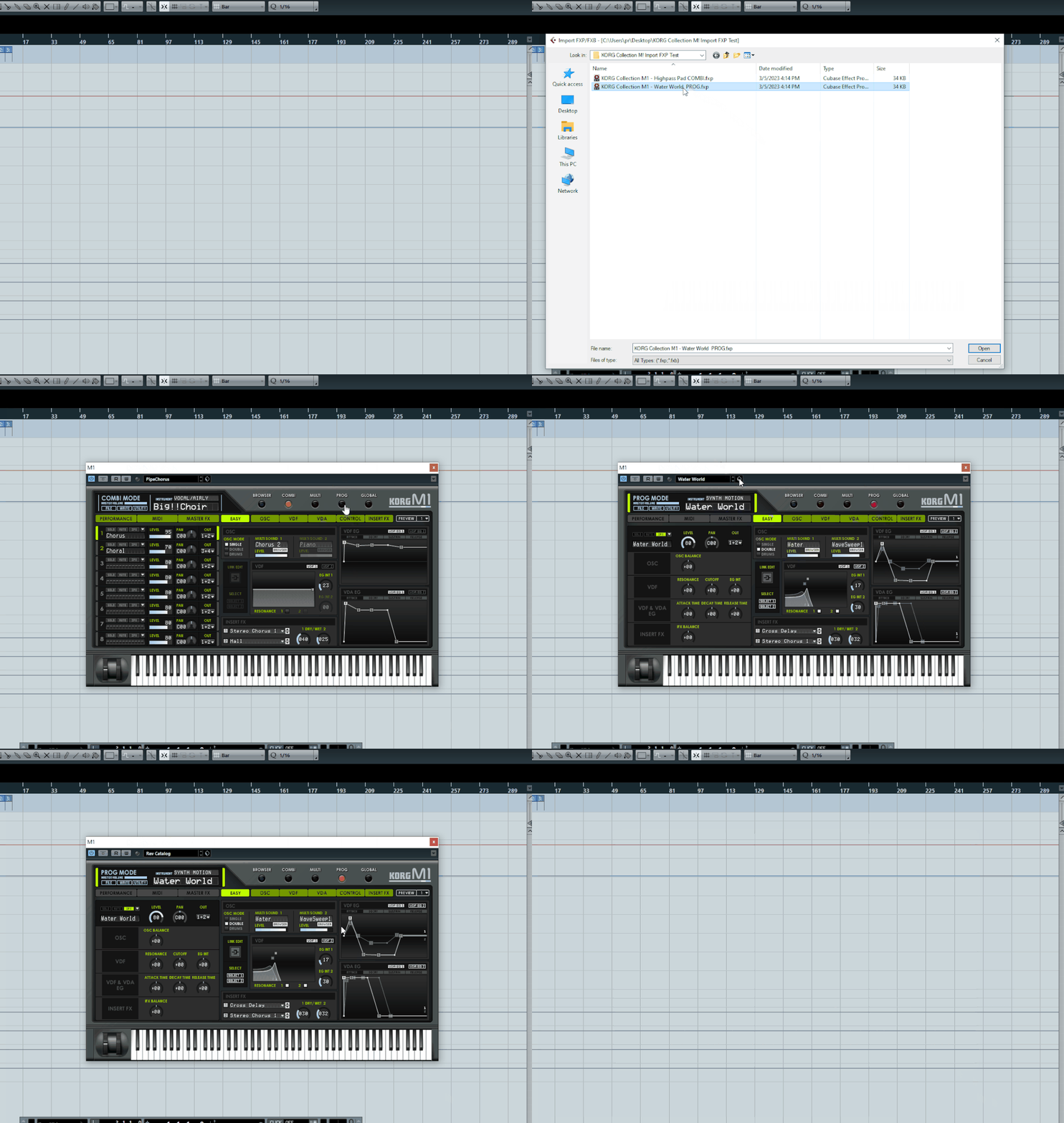
I've loaded such a file through an older version of Cubase (6) because it still has that 'Import FXP/FXB' menu in VST preset manager for KORG Legacy Collection M1.

It works BUT it still doesn't switch to the correct M1 COMBI/PROG mode when loaded.

I guess this is a dead-end unless some developer doesn't convince me of the opposite.

Post

Again, I did some research. This has nothing to do with AKAI VIP.

To be fair, I must explain that the case took a bizarre turn.

The problem lies with the KORG Collection M1 as it does not handle the .FXP imports as it should.

AKAI VIP uses the .FXP format files to save all the presets it manages. So, until Korg fixes this bug, it won't work.

Why Nektarine and Komplete Kontrol do not have this problem is just because they do NOT use the .FXP format to save presets.

Post

Afraid I don't have the Korg plugin, but all of the newest revisions of V Collection plugs have been problematic in VIP. I asked bigtick (he developed Zen, which was the base code AFAIK for VIP). He thought it might be a VST3 issue.

Post

Schmidi wrote: Sun Mar 05, 2023 6:24 pm Afraid I don't have the Korg plugin, but all of the newest revisions of V Collection plugs have been problematic in VIP. I asked bigtick (he developed Zen, which was the base code AFAIK for VIP). He thought it might be a VST3 issue.

Luckily, I didn't experience any problems with V Collection in VIP, maybe because I'm still using the V8?

AKAI VIP doesn't recognize VST3 format plugins at all, which is sad.

Nevertheless, I'm waiting on KORG to respond to my inquiry regarding the faulty .FXP files import. Thus I'm not so optimistic as that issue has been known since 2017. I've also tried older versions of KLC M1 aka KORG Legacy Collection M1, same issue there. Will update this thread with news as soon as KORG reply.

Post

Good luck to you. I like VIPs hybrid approach a lot (with an Advance kb), but I don't feel like it's good for deep, multiple page/layered plugs (Synclavier V, CMI V, etc). I'd guess the M1 and Wavestation fall into that as well.

I love to use it for 2-8x plug layering with tons of effects so I can then resample that output into MPC or Ableton.

Cheers

Post

Unify by Pluginguru has unified Korg M1 presets. That could be alternative way compared Akai VIP to use M1. I like Unify more than VIP but I hope Unify would have easier way to get presets unified.

Post

zipidowski wrote: Mon Mar 06, 2023 5:14 pm Unify by Pluginguru has unified Korg M1 presets. That could be alternative way compared Akai VIP to use M1. I like Unify more than VIP but I hope Unify would have easier way to get presets unified.
I forgot about that one. There are 1750 KORG M1 programs in that "Unified" library. :tu:
Windows 10 and too many plugins

Post

zzz00m wrote: Mon Mar 06, 2023 5:26 pm
zipidowski wrote: Mon Mar 06, 2023 5:14 pm Unify by Pluginguru has unified Korg M1 presets. That could be alternative way compared Akai VIP to use M1. I like Unify more than VIP but I hope Unify would have easier way to get presets unified.
I forgot about that one. There are 1750 KORG M1 programs in that "Unified" library. :tu:
They load in the correct M1 COMBI vs. PROG mode!?

Post

DigiPRO wrote: Mon Mar 06, 2023 8:08 pm
zzz00m wrote: Mon Mar 06, 2023 5:26 pm
zipidowski wrote: Mon Mar 06, 2023 5:14 pm Unify by Pluginguru has unified Korg M1 presets. That could be alternative way compared Akai VIP to use M1. I like Unify more than VIP but I hope Unify would have easier way to get presets unified.
I forgot about that one. There are 1750 KORG M1 programs in that "Unified" library. :tu:
They load in the correct M1 COMBI vs. PROG mode!?
The unified M1 presets that I looked at random all loaded in M1 Prog mode. Didn't run across any Combis.

That would imply that whoever saved the presets in Unify format (Unified them) evidently just selected the Prog patches. They also noted in the Unify patch info which card it came from. Which would make sense, as someone interested in adding an M1 layer to a Unify multi would likely only want to load a mono-timbral instance of an M1 program,and ignore the fact that the M1 has combis and multis. Unify makes those functions redundant, as you can build your own super multis in Unify.

So I was curious if a saved M1 Prog and M1 Combi in Unify would re-open in the correct mode. Well, based on my test with saving one of each type as a user preset in Unify, the respective M1 mode was correct upon re-loading the test patches. I toggled them A/B multiple times and they were consistently correct.
Windows 10 and too many plugins

Post

zzz00m wrote: Tue Mar 07, 2023 12:47 am
DigiPRO wrote: Mon Mar 06, 2023 8:08 pm
zzz00m wrote: Mon Mar 06, 2023 5:26 pm
zipidowski wrote: Mon Mar 06, 2023 5:14 pm Unify by Pluginguru has unified Korg M1 presets. That could be alternative way compared Akai VIP to use M1. I like Unify more than VIP but I hope Unify would have easier way to get presets unified.
I forgot about that one. There are 1750 KORG M1 programs in that "Unified" library. :tu:
They load in the correct M1 COMBI vs. PROG mode!?
The unified M1 presets that I looked at random all loaded in M1 Prog mode. Didn't run across any Combis.

That would imply that whoever saved the presets in Unify format (Unified them) evidently just selected the Prog patches. They also noted in the Unify patch info which card it came from. Which would make sense, as someone interested in adding an M1 layer to a Unify multi would likely only want to load a mono-timbral instance of an M1 program,and ignore the fact that the M1 has combis and multis. Unify makes those functions redundant, as you can build your own super multis in Unify.

So I was curious if a saved M1 Prog and M1 Combi in Unify would re-open in the correct mode. Well, based on my test with saving one of each type as a user preset in Unify, the respective M1 mode was correct upon re-loading the test patches. I toggled them A/B multiple times and they were consistently correct.
Well done, that solves the mystery. I did the same A/B test with saving and loading KCL M1 presets in VIP, but it didn't work out well.

The "problem" is that VIP uses FXP files to store the preset information

This shouldn't be a problem per se, but KORG Collection M1 actually has a problem with reading the FXP presets.

Check the recording below how it reacts when importing PROG FXP and COMBI FXP. The problem has been reported to KORG AFAIK, let us hope that they will react.

But a new problem arose, as KORG has dropped the "official" menu with the option to import .FXP/.FXB files. At least in their 64-bit version.

So, unless we are hijacking some time machine from KGB / FSB (I think I read a post claiming that they actually can go back in time, but only for 4 minutes) and go back to solve that, I wouldn't hold my breath.

Will keep you posted, I think this turns out to be interesting reading.
Last edited by DigiPRO on Tue Mar 07, 2023 8:50 am, edited 3 times in total.

Post

Here:

Image
Last edited by DigiPRO on Tue Mar 07, 2023 6:07 am, edited 1 time in total.

Post

delete duplicate

Post

DigiPRO wrote: Tue Mar 07, 2023 5:59 am
The "problem" is that VIP uses FXP files to store the preset information

This shouldn't be a problem per se, but KORG Collection M1 actually has a problem with reading the FXP presets.
That suggests the reason why Unify handles the M1 presets correctly.

Unify does not use FXP files to save presets in. It uses a proprietary (.unify) file format.

From the developer, Shane Dunne, on the Unify forum: "Each plug-in developer decides the size and format of its "state data blob". Unify just saves the blob it is given---this determines the size of the patch file---and blob sizes vary tremendously from one plug-in to another."

Just a speculation here, that maybe the former VIP developers ran into too many issues trying to wrangle VST3 plugin presets that they ended the project? It seems to me that plugin developers were forced away from FXB/FXP for the VST3 format.

https://steinbergmedia.github.io/vst3_d ... ormat.html
Windows 10 and too many plugins

Post Reply

Return to “Instruments”