
Controlling VST parameters in VST host with MIDI controller

Configure and optimize you computer for Audio.
Post Reply New Topic
RELATED
PRODUCTS

Post

I have a ROLAND A300-PRO controller and I'm trying to send MIDI CC messages to a VST loaded in minihost.
I think the setup is ok.
I assigned S2 in A-PRO Editor to CC#73 and trasmitted data to the MIDI Controller.
I did the same in the VST host, assigning CC#73 to ENV ATTACK.
MIDI ch., MIDI port... I checked everything, but it doesn't work.
I can play the synth, so the controller and the host are communicating.
I can't understand what's wrong...
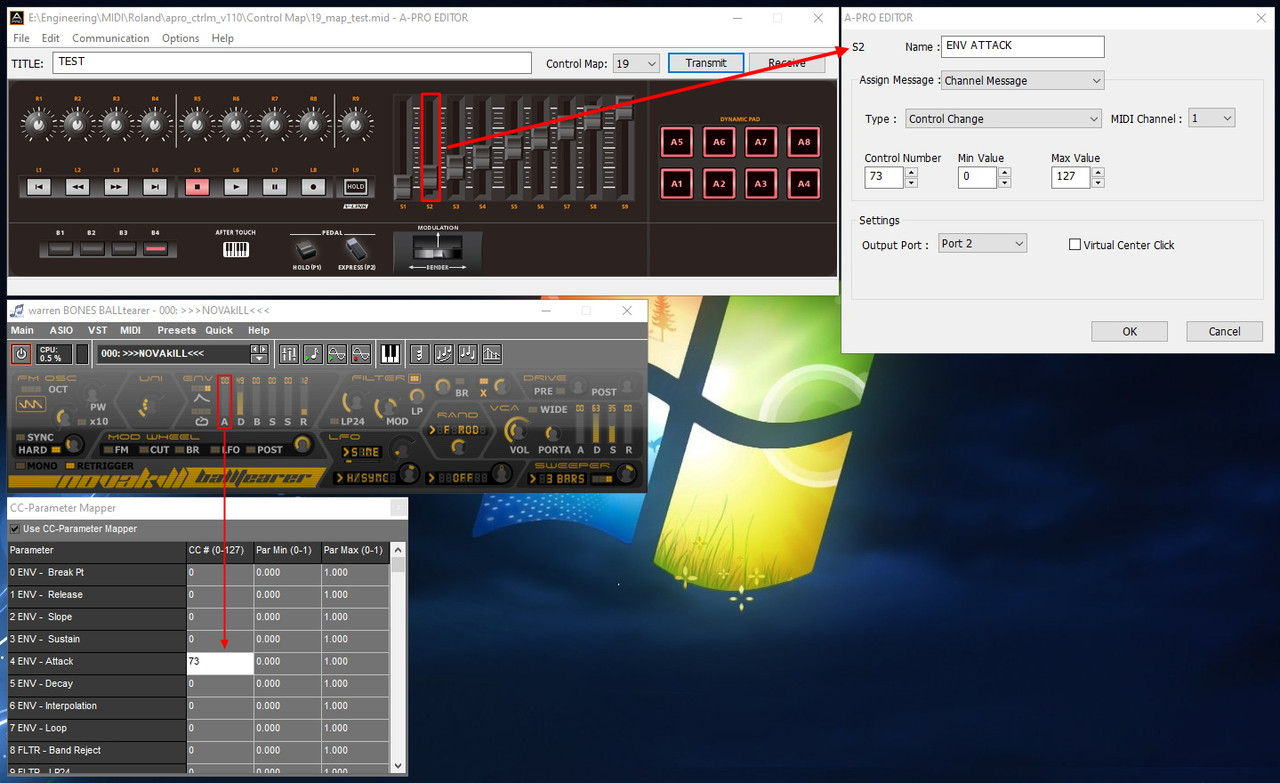
Image

Post

From what I see only VST Volume corresponds to the standard GM2 (CC#7); the rest is totally random and unfortunately does not correspond to the Parameter Mapper provided by the host (and I can't override it).
For example CC#73 does not correspond to "ENV ATTACK" but to the SWEEPER Depth parameter.
In conclusion, I need an app that analyzes the VTS and tells me which CC# the various parameters correspond to... assuming that this app exists.

Post

don't know mini host sorry, but if you right click, do you get a midi learn option?
if you do, right click the knob you want to assign, then turn the appropriate knob on the controller.


novakill, old school! 8)
:ud:

Post

Ok solved.
Learn function only works if you load a map (e.g. GM2) into A-PRO Editor.
But I'm still scratching my head trying to figure out why the manual assignment doesn't work.

Post Reply

Return to “Computer Setup and System Configuration”