

Live 11 sloooooow vst scanning
-
- KVRer
- 12 posts since 26 Mar, 2022
It's a widely used commercial development kit (framework). https://www.qt.io/
-
- KVRAF
- 5200 posts since 17 Aug, 2004
Thanks! Wasn't aware of this framework.KLANGRAUM2 wrote: Thu May 04, 2023 12:24 pm It's a widely used commercial development kit (framework). https://www.qt.io/
-
- KVRer
- 12 posts since 26 Mar, 2022
It's (Qt) the kind of software "expensive isn't always better".  Another thing seems to happen with the time duration of caching Qt runtime. When I start Live after a longer pause (computer still on) it loads slowly again. The perfect confusion.
The solution would be to keep Live running all the time. Switch off audio engine to save CPU.
I think people simply want an explanation and not the recommendation to buy a new computer. A new computer would be needed anyway to get the problem under control. At least then you would know what you're doing.
I have an i5 3,4 GHz, 500 GB SATA, 12GB RAM, Win10. I don't see the point of exchanging this computer for a new one.
Another thing seems to happen with the time duration of caching Qt runtime. When I start Live after a longer pause (computer still on) it loads slowly again. The perfect confusion. The solution would be to keep Live running all the time. Switch off audio engine to save CPU.
I think people simply want an explanation and not the recommendation to buy a new computer. A new computer would be needed anyway to get the problem under control. At least then you would know what you're doing.
I have an i5 3,4 GHz, 500 GB SATA, 12GB RAM, Win10. I don't see the point of exchanging this computer for a new one.
-
- KVRer
- 19 posts since 6 Apr, 2009
Ableton 11 is garbage and it's unusable on PC because of plugin scan changes. You guys really don't understand what's going on here and (apparently) Ableton developers have completely lost the ability to code or test this program.
THIS IS WHAT'S GOING ON PEOPLE
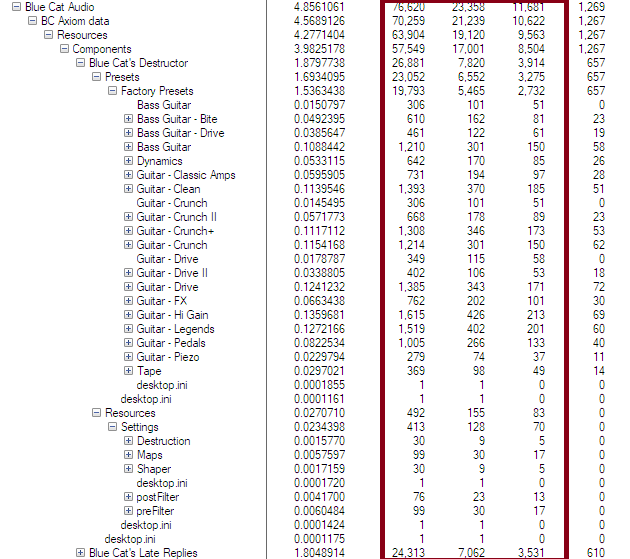
The PLUGIN SCANNER (YES THE PLUGIN SCANNER, NOT ABLETON INDEXER!) is scanning EVERY SINGLE damn FILE TYPE! in EVERY SINGLE PLUGIN DIRECTORY and following EVERY SINGLE SYMBOLIC LINK OR SHORT-CUT as show in the above graphic, HERE it has followed a shortcut that Bluecat use to re-direct the plugin to it's plugin resources.
Ableton Plugin scanner has FOLLOWED that damn short cut or symbolic link AND IS CHECKING EVERY SINGLE DAMN FILE! EVERY SINGLE FILE OF EVERY SINGLE FILE TYPE!
In the case of Bluecat Patchwork alone, THERE ARE THOUSANDS!
It should NOT BE CHECKING EVERY SINGLE FILE TYPE! IT SHOULD BE ONLY LOOKING FOR VST2 AND VST3 file types ".DLL" and ".VST3" !!!
Then the plugin scanner would work normally, PLUGINS would be scanned in mere seconds or minutes. BUT INSTEAD, IT TAKES YEARS!!!!
WHY IS IT SCANNING EVERY SINGLE DAMN FILE OF EVERY SINGLE TYPE?
BECAUSE ABLETON DEVELOPERS HAVEN'T GOT A DAMN CLUE HOW TO CODE AND DON'T TEST THIS UTTER GARBAGE IN A REAL WORLD SITUATION WITH REAL PLUGINS!
This bug has existed ALL THE WAY THROUGH VERSION 11! WHA!!!!!
HELLO? IS ANYONE THERE ABLETON? ARE YOU LISTENING? HELLO? ANYONE?
THIS IS WHAT'S GOING ON PEOPLE
The PLUGIN SCANNER (YES THE PLUGIN SCANNER, NOT ABLETON INDEXER!) is scanning EVERY SINGLE damn FILE TYPE! in EVERY SINGLE PLUGIN DIRECTORY and following EVERY SINGLE SYMBOLIC LINK OR SHORT-CUT as show in the above graphic, HERE it has followed a shortcut that Bluecat use to re-direct the plugin to it's plugin resources.
Ableton Plugin scanner has FOLLOWED that damn short cut or symbolic link AND IS CHECKING EVERY SINGLE DAMN FILE! EVERY SINGLE FILE OF EVERY SINGLE FILE TYPE!
In the case of Bluecat Patchwork alone, THERE ARE THOUSANDS!
It should NOT BE CHECKING EVERY SINGLE FILE TYPE! IT SHOULD BE ONLY LOOKING FOR VST2 AND VST3 file types ".DLL" and ".VST3" !!!
Then the plugin scanner would work normally, PLUGINS would be scanned in mere seconds or minutes. BUT INSTEAD, IT TAKES YEARS!!!!
WHY IS IT SCANNING EVERY SINGLE DAMN FILE OF EVERY SINGLE TYPE?
BECAUSE ABLETON DEVELOPERS HAVEN'T GOT A DAMN CLUE HOW TO CODE AND DON'T TEST THIS UTTER GARBAGE IN A REAL WORLD SITUATION WITH REAL PLUGINS!
This bug has existed ALL THE WAY THROUGH VERSION 11! WHA!!!!!
HELLO? IS ANYONE THERE ABLETON? ARE YOU LISTENING? HELLO? ANYONE?
-

- KVRAF
- 4062 posts since 24 Oct, 2000 from A Swede Living in Budapest
Not quite.davidhokney wrote: Sun May 07, 2023 7:33 am Ableton 11 is garbage and it's unusable on PC because of plugin scan changes.
Have you ever scanned your plugin folder with NI Maschine? That makes Ableton feel zappy&zingy.
Neon City for u-he Repro - 80s pop & Synthwave soundbank
HARDWARE SAMPLER FANATIC - Akai S1100/S950/Z8 - Casio FZ20m - Emu Emax I - Ensoniq ASR10/EPS
HARDWARE SAMPLER FANATIC - Akai S1100/S950/Z8 - Casio FZ20m - Emu Emax I - Ensoniq ASR10/EPS
-
- KVRer
- 12 posts since 26 Mar, 2022
If it scans everything, it's dumb, you are right. I didn't check the stacktrace - too much work.It should NOT BE CHECKING EVERY SINGLE FILE TYPE! IT SHOULD BE ONLY LOOKING FOR VST2 AND VST3 file types ".DLL" and ".VST3" !!!
There are obviously 2 problems here (3 with, what you found out),
1. Loading Qt dependencies, which makes the program unresponsive, most likely after a Windows restart, because after loading once, Qt is cached and start fast. They should probably monitor Qt dependencies and only build the GUI (AND start new processes) once it's fully settled in memory. But that's just my opinion. Don't know if you can overcome the Qt framework with your own genius. I've only made very simple programs with Qt4 (current version is Qt6) so far that only used Qt core, which was never a problem.
2. Scanning plugins and indexing user directories, which is being done over and over again for no reason. They don't involve the scan logs into the decision. Every process uses one CPU core with full load. For people with dual-core CPUs, this is probably a dead end. For me and most others, the main issue is, that we cannot stop the plugin scanner from the menu until the program freezes (for me 4-5 min) due to point 1. Killing the processes seemed to bring an advantage, but again under different circumstances this was not the case.
The system configurations can be complex and there are a lot of things going on parallel with this program. No wonder that stronger CPUs and SSDs have always been recommended as the only solution so far. The scanning processes could be removed anyway at start. That remains the big question.
Last edited by KLANGRAUM2 on Sun May 07, 2023 3:21 pm, edited 1 time in total.
-
- KVRist
- 363 posts since 24 Jul, 2006
It's actually worse than this.davidhokney wrote: Sun May 07, 2023 7:33 am
WHY IS IT SCANNING EVERY SINGLE DAMN FILE OF EVERY SINGLE TYPE?
It enumerates ALL files in the plugin path in an initial scan.
Then it goes back and scans each file.
The enumeration is why it seems to wait until about 10 minutes after you've opened it to start 'Scanning VSTs' per the status line.
It also doesn't seem to take into account any notion of 'I already scanned that'.
Basically, it's multiple levels of badly written, and I'm frequently astounded it's lauded as the best DAW by many.
-
- KVRer
- 12 posts since 26 Mar, 2022
Oh man, we really should build a nice stacktrace to show everything in detail.
-
- KVRian
- 798 posts since 17 Nov, 2015 from Yuma
if its scanning everything, its basically sniffing on everything.^^
[aˈtoːm] [aːl] [ˈa(ː)tonaːl] IV
https://soundcloud.com/atomaalatonal4
https://soundcloud.com/atomaalatonal4
-
- KVRer
- 12 posts since 26 Mar, 2022
You have to read a file first in order to know the file type. As such, it's not uncommon for it to read every file. However, it should not try to start a plugin test run on a txt file. Can't imagine that, but nothing is impossible. I prefer my explanation over the Plugin-Scanner-destroys-user-experience-by-itself-theory. Plugin scanning at start is dumb, no doubt. This whole thing has to do with Qt (processes) in the current version, and it's integration with Windows.if its scanning everything, its basically sniffing on everything.^^
Just leave Live running. If you can afford it, I would just put the PC into sleep mode instead of shutting it down.
People with dual-core CPU's have a problem, I guess. You need a quad-core at minimum to handle Live's start routine or it drives the PC against the wall.
SSD is a good addition since the data throughput is 5-10x of spinning HD.Live 11
Windows 10 (Build 1909 und höher), Windows 11
Intel® Core™ i5 Prozessor oder AMD Multi-Core-Prozessor
8 GB RAM
-
Galacticelastic Galacticelastic https://www.kvraudio.com/forum/memberlist.php?mode=viewprofile&u=615032
- KVRer
- 1 posts since 23 May, 2023
I'm using iMac and was sick and tired of waiting 15 minutes for plug ins to scan in Ableton 11
Mac uses AU2 and AU3 so I've turned off VST 2 and VST3 in Ableton preferences
Beachball driving me nuts.
Rebooted Mac put Ableton 11 on
Boot time 20 seconds
Beachball 10 seconds
Loading complete
What a difference in performance.
For example I loaded amplitude 5, ezdrummer 3 and ezmix in seconds and recorded.
All super quick.
To point out AUs (audio units)only work on apple and not on windows machines
Mac uses AU2 and AU3 so I've turned off VST 2 and VST3 in Ableton preferences
Beachball driving me nuts.
Rebooted Mac put Ableton 11 on
Boot time 20 seconds
Beachball 10 seconds
Loading complete
What a difference in performance.
For example I loaded amplitude 5, ezdrummer 3 and ezmix in seconds and recorded.
All super quick.
To point out AUs (audio units)only work on apple and not on windows machines
-

- KVRAF
- 2195 posts since 8 Jan, 2005
Install plugin - load Live.wasi wrote: Sun Aug 27, 2023 8:18 am This is still pretty nuts. I installed a new plugin and had to wait over twenty minutes for it to show up in Live after startup.
Instantly there.
There was not a single plugin I ever installed where such thing happened
MacMini M2 Pro …… MacOS Tahoe ……… Reason 14
-
- KVRist
- 44 posts since 13 Mar, 2022
I wait an hour for a single plugin to scan. Surprised this still isnt fixed.
Furnace, Renoise, Cubase, Reaper 