Understanding the MIDI Tic Sync in StudioOne v.6

Audio Plugin Hosts and other audio software applications discussion
Post Reply New Topic
RELATED
PRODUCTS

Post

Hey Gang, I'm an OOLD Cakewalk user that works A LOT with MIDI, so I require knowing what my clock resolution is. Meaning, it used to be 120 ticks per beat, or 480 per measure, or 30 tics every 16th note. I preferred 120. Cakewalk and many other DAWs went all the way up to 960 per meas. Now, I'm told SO6 only uses 96 tics per meas. BUMMER! :( :( This isn't NEAR the resolution I need, if I'm understanding the spec correctly. I understand they changed it so they could convert it to a much higher resolution inside the DAW so you don't hear any "Zipper" effect. Nice try. I'm making this post so if someone here understands more about music theory, and the input for composition, and how to deal with this new format? :help: :help:
i7-12650H CPU, 32Gig RAM/Win 11 Pro. PreSonus 1824C, Native Instr S88 Mk1, ATOM SQ, PreSonus Sphere, Sonar Platinum, SampleTank4, BIAB 2023.

Post

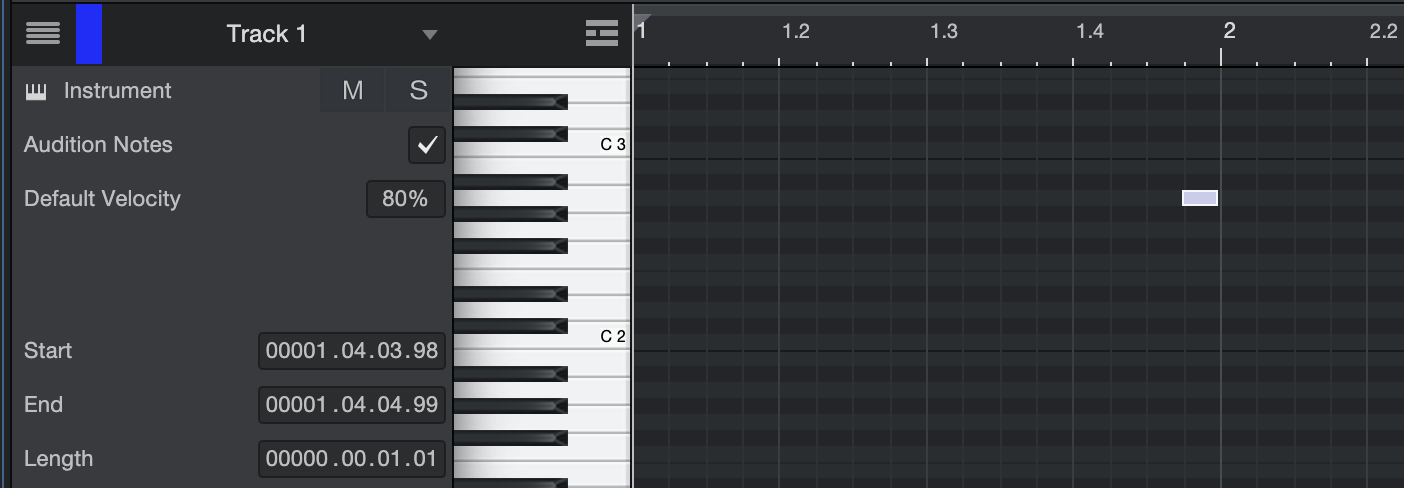
It’s 100 clock ticks per quarter beat (0 to 99). In 4/4, a measure (bar) would have 4 beats, so that’s 1600 per measure (4 x 4 x 100).

Bar = whole note // Beat = quarter note // Quarter Beat = 16th note

The position format is:
bar . beat . 16th . tick

Image


At 120bpm, that's 800 clock ticks per second, or 1 clock tick every 1.25 milliseconds, which should be enough for adequate timing resolution. :wink:

If you want a resolution of 1 clock tick per millisecond or better, you will need a bpm of 150 or greater.

Automation in Studio One is sample accurate.
THIS MUSIC HAS BEEN MIXED TO BE PLAYED LOUD SO TURN IT UP

Post Reply

Return to “Hosts & Applications (Sequencers, DAWs, Audio Editors, etc.)”