
E-mu 0404 today tells me that "You don't appear to have sufficient E-MU hardware to load ...."

Configure and optimize you computer for Audio.
Post Reply New Topic
RELATED
PRODUCTS

Post

Hi all,

I do realize that myself (and anyone else who runs the magnificent E-mu family of audio cards, be it PCI, PCI-E or PCMCIA) live on "borrowed time" with these interfaces.

Myself, i run W10x64 and in the past, i found this post that explained how to overcome the signed-driver issue of W10 (worked flawlessly until now). So yesterday when i used the card there were no issues at all. Today on the other hand, it pops up this dialogue after boot
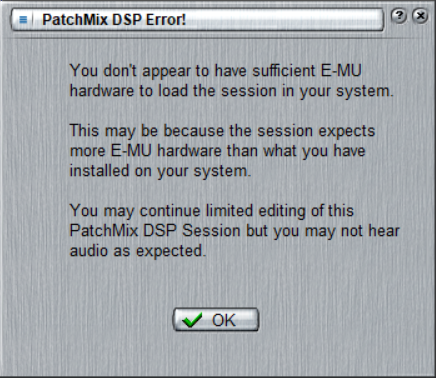
Image

Naturally, i started to search for a solution and one such solution was to fiddle with a new set of creative drivers (from the advice of clubhousekey here: viewtopic.php?t=371831&start=180). Unfortunately, that did not help either.

Any advice on how to enable everything again (if possible)?

Post

I would try to reseat(remove and place it back) the PCIe card.

Post

Pictus wrote: Thu Jul 06, 2023 8:58 pm I would try to reseat(remove and place it back) the PCIe card.
Hi pictus, i will for sure try this. On a side-note, one of my racks (Roland xv5080) refused to boot properly and i got desperate. Eventually i pulled all of the srx and sr-jv expansion card out of it and re-seated them and from that moment on, it behaved normally again. I guess one should never underestimate what years of dust/grime can cause inside an instrument or computer. :tu:

Post Reply

Return to “Computer Setup and System Configuration”