

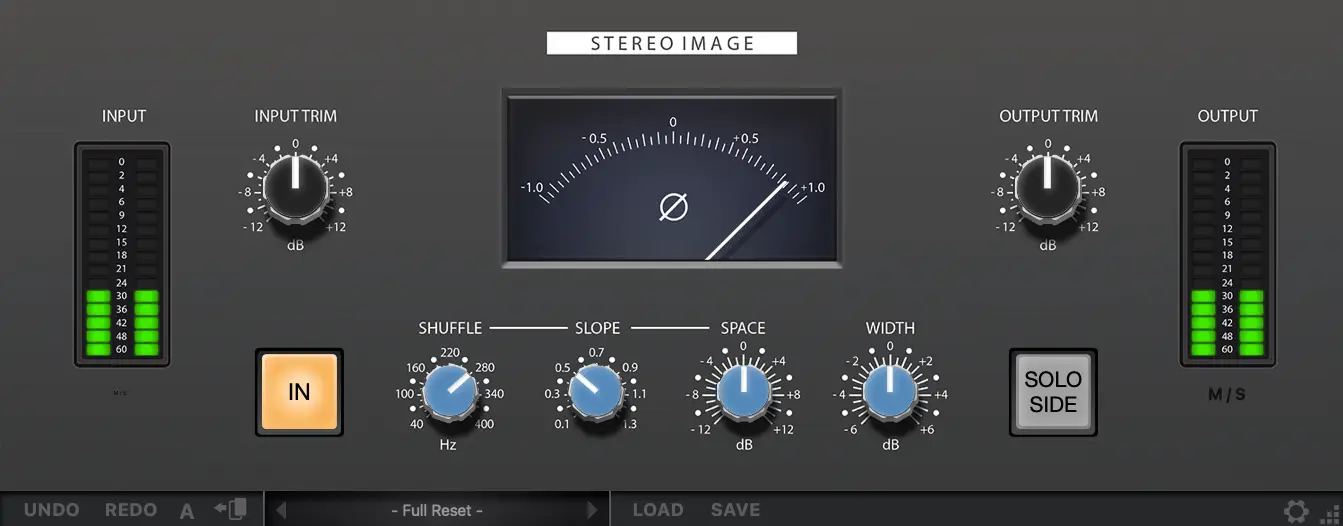
Spatial Manipulation of the Stereo Field with Red Rock Sound Fuse Stereo Image.
Learn More:
https://redrocksound.pro/en/stim-pc/

AU3 mode is enabled in Logic 10.5.1Red Rock Sound wrote: Tue Aug 01, 2023 4:33 am Please check if you have disabled AU3 mode in the plugin manager
For Red Rock Sound plugins, the AU3 mode must be disabled
Thanks, we've found a bug.TBlake wrote: Tue Aug 01, 2023 5:06 amAU3 mode is enabled in Logic 10.5.1Red Rock Sound wrote: Tue Aug 01, 2023 4:33 am Please check if you have disabled AU3 mode in the plugin manager
For Red Rock Sound plugins, the AU3 mode must be disabled
validating Audio Unit RRS Fuse Stereo Image by Red Rock Sound:
AU Validation Tool
Version: 1.6.1a1
Copyright 2003-2013, Apple Inc. All Rights Reserved.
Specify -h (-help) for command options
--------------------------------------------------
VALIDATING AUDIO UNIT: 'aufx' - 'stim' - 'RedR'
--------------------------------------------------
Manufacturer String: Red Rock Sound
AudioUnit Name: RRS Fuse Stereo Image
Component Version: 1.0.0 (0x10000)
* * PASS
--------------------------------------------------
TESTING OPEN TIMES:
COLD:
Time to open AudioUnit: 18.162 ms
WARM:
Time to open AudioUnit: 0.566 ms
This AudioUnit is a version 3 implementation.
FIRST TIME:
Time for initialization: 0.074 ms
* * PASS
--------------------------------------------------
VERIFYING DEFAULT SCOPE FORMATS:
Input Scope Bus Configuration:
Default Bus Count:1
Bus Name: Input
Default Format: AudioStreamBasicDescription: 2 ch, 44100 Hz, 'lpcm' (0x00000029) 32-bit little-endian float, deinterleaved
Output Scope Bus Configuration:
Default Bus Count:1
Bus Name: Output
Default Format: AudioStreamBasicDescription: 2 ch, 44100 Hz, 'lpcm' (0x00000029) 32-bit little-endian float, deinterleaved
* * PASS
--------------------------------------------------
VERIFYING REQUIRED PROPERTIES:
* * PASS
--------------------------------------------------
VERIFYING RECOMMENDED PROPERTIES:
VERIFYING PROPERTY: Latency
PASS
VERIFYING PROPERTY: Tail Time
PASS
VERIFYING PROPERTY: Bypass Effect
PASS
* * PASS
--------------------------------------------------
VERIFYING OPTIONAL PROPERTIES:
* * PASS
--------------------------------------------------
VERIFYING SPECIAL PROPERTIES:
VERIFYING CUSTOM UI
Cocoa Views Available: 0
WARNING: CurrentPreset property is deprectated. AU should implement PresentPreset
VERIFYING CLASS INFO
PASS
TESTING HOST CALLBACKS
PASS
* * PASS
--------------------------------------------------
PUBLISHED PARAMETER INFO:
# # # 10 Global Scope Parameters:
* * PASS
--------------------------------------------------
FORMAT TESTS:
Reported Channel Capabilities (implicit):
[-1, -1]
Input/Output Channel Handling:
1-1 1-2 1-4 1-5 1-6 1-7 1-8 2-2 2-4 2-5 2-6 2-7 2-8 4-4 4-5 5-5 6-6 7-7 8-8
X X X X X X X
ERROR: -10868 IN CALL Cannot Set Input Num Channels:4 when unit says it can
ERROR: -10868 IN CALL Cannot Set Input Num Channels:5 when unit says it can
ERROR: -10868 IN CALL Cannot Set Input Num Channels:6 when unit says it can
ERROR: -10868 IN CALL Cannot Set Input Num Channels:7 when unit says it can
ERROR: -10868 IN CALL Cannot Set Input Num Channels:8 when unit says it can
* * FAIL
--------------------------------------------------
AU VALIDATION FAILED: CORRECT THE ERRORS ABOVE.
--------------------------------------------------
validation result: failed validation
Thanks, we'll fix this.GreyLion wrote: Tue Aug 01, 2023 4:49 am The gui has Input spelled as Intput, in case you want to fix that. Good luck with this plug!

Hopefully this will get fixed before the intro price is over

 )
)
Submit: News, Plugins, Hosts & Apps | Advertise @ KVR | Developer Account | About KVR / Contact Us | Privacy Statement
© KVR Audio, Inc. 2000-2026