

Is the question…
I have been on 27” Full HD in the last 10 years.
Looking to upgrade. What’s the most wise option for the next 10 years? Should I upgrade size? Is 32” more common nowadays?
What about 4k? Is it going to give me anything? I do music only, occasionally photo editing, some hobby graphic design but not too fuzzy about videos and uber super colour, brightness etc.
I will be using it with an M2 MacbookPro. What should I watch out for in terms of refresh rate, cables etc, is HDMI2 important? I’m already having to use an adaptor for my MacBook pro cause HDMI.
Main DAW is Pro Tools.

Monitor 27” or 32”? To 4k or not to 4k?
-
- KVRian
- 998 posts since 31 Oct, 2020
-
- KVRist
- 39 posts since 28 Jul, 2023
4k would give much better pixel density at 32", even more so at 27". For photo editing it definitely makes sense.
As for refresh, 120hz and above. I'm not sure of hdmi2. Apple short changes everyone with less ports with each iteration so whatever usb-c crapshot hub or dock they sell that goes with it and its associated connections.
As for refresh, 120hz and above. I'm not sure of hdmi2. Apple short changes everyone with less ports with each iteration so whatever usb-c crapshot hub or dock they sell that goes with it and its associated connections.
-

- KVRian
- 1188 posts since 21 Aug, 2017 from Brasil
With any monitor you choose, make sure it does not use PWM for backlight dimming!
At least avoid the low frequency PWM models...
Why PWM is bad https://www.notebookcheck.net/Why-Pulse ... 240.0.html
32" + 4K + No PWM + 120Hz + IPS/VA panel with good text clarity.
The first link below is a selection of 4K monitors.
Best display review sites: (Flicker free probably means no PWM)
https://www.rtings.com/monitor/reviews/ ... tra-hd-uhd
https://www.prad.de/test-kaufberatung/t ... -monitore/
https://www.tftcentral.co.uk/reviews.htm
https://pcmonitors.info/reviews/
At least avoid the low frequency PWM models...
Why PWM is bad https://www.notebookcheck.net/Why-Pulse ... 240.0.html
32" + 4K + No PWM + 120Hz + IPS/VA panel with good text clarity.
The first link below is a selection of 4K monitors.
Best display review sites: (Flicker free probably means no PWM)
https://www.rtings.com/monitor/reviews/ ... tra-hd-uhd
https://www.prad.de/test-kaufberatung/t ... -monitore/
https://www.tftcentral.co.uk/reviews.htm
https://pcmonitors.info/reviews/
-
- KVRian
- 798 posts since 17 Nov, 2015 from Yuma
nice links pictus. exactly what i neededatm 
[aˈtoːm] [aːl] [ˈa(ː)tonaːl] IV
https://soundcloud.com/atomaalatonal4
https://soundcloud.com/atomaalatonal4
-
- KVRian
- Topic Starter
- 998 posts since 31 Oct, 2020
Yeah to be fair nice links mate. ThanksPictus wrote: Wed Aug 16, 2023 3:34 pm With any monitor you choose, make sure it does not use PWM for backlight dimming!
At least avoid the low frequency PWM models...
Why PWM is bad https://www.notebookcheck.net/Why-Pulse ... 240.0.html
32" + 4K + No PWM + 120Hz + IPS/VA panel with good text clarity.
The first link below is a selection of 4K monitors.
Best display review sites: (Flicker free probably means no PWM)
https://www.rtings.com/monitor/reviews/ ... tra-hd-uhd
https://www.prad.de/test-kaufberatung/t ... -monitore/
https://www.tftcentral.co.uk/reviews.htm
https://pcmonitors.info/reviews/
-
- KVRian
- Topic Starter
- 998 posts since 31 Oct, 2020
So PWM sounds nice on synths but doesn’t look good on a screen 

-

- KVRian
- 973 posts since 24 Oct, 2006
4k at 27" is rough as everything is so tiny. If you want 4k, go 32" all the way. I did this a few years ago and haven't been sorry about the change at all.
“Madness, as you know, is like gravity: all it takes is a little push.”
-

- KVRAF
- 6209 posts since 25 Dec, 2004
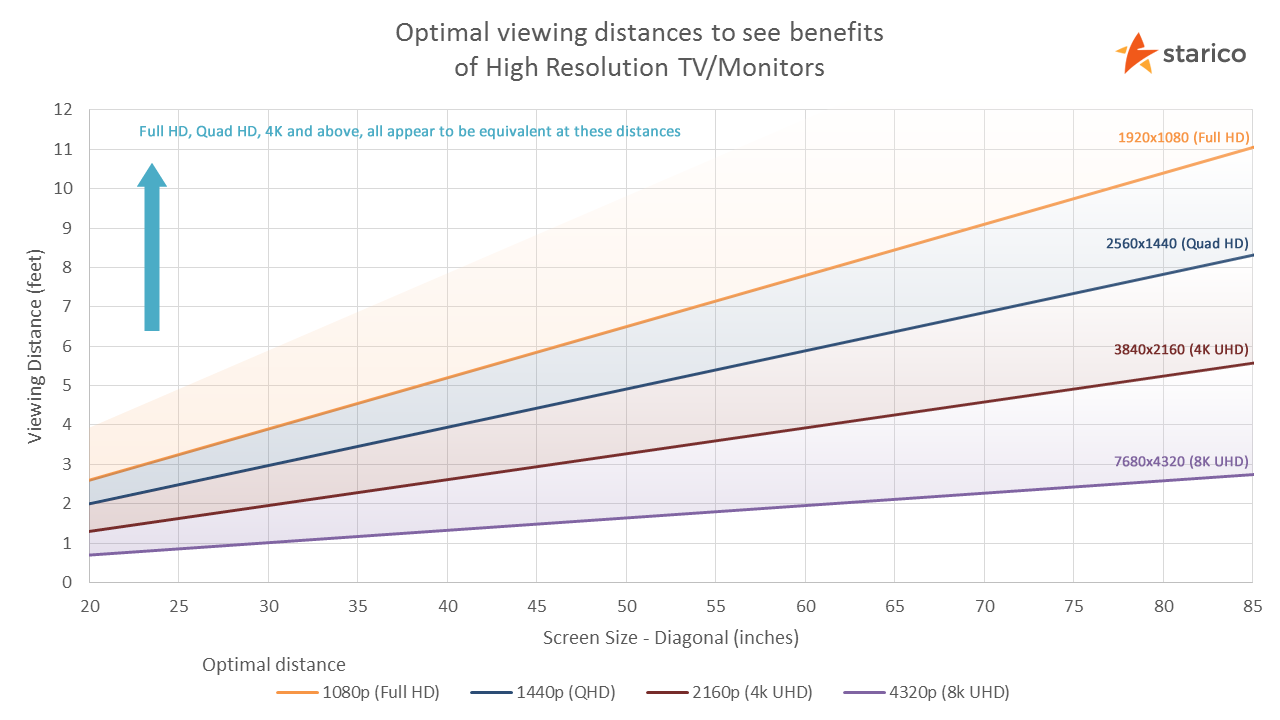
depends how far you're sitting from it.
If you're sitting 3 or 4 feet from the screen, I'd recommend a 2k 32" (QHD)
you'll only benefit from 4K if you're sitting quite close to it.
I think if i was gonna get a 4K for music it would need to be a forty something inch screen
just cos my limited option of desk and monitor placement has me positioned over 1 metre from my speakers and the screen.
i run a Macbook Pro and my 32"QHD as main monitor via HDMI, and a 27"QHD via USBC to HDMI on a sturdy arm that i can move around - it generally has my cubase mixer on it full screen. then i leave my laptop monitor for editing MIDI etc
If you're sitting 3 or 4 feet from the screen, I'd recommend a 2k 32" (QHD)
you'll only benefit from 4K if you're sitting quite close to it.
I think if i was gonna get a 4K for music it would need to be a forty something inch screen
just cos my limited option of desk and monitor placement has me positioned over 1 metre from my speakers and the screen.
i run a Macbook Pro and my 32"QHD as main monitor via HDMI, and a 27"QHD via USBC to HDMI on a sturdy arm that i can move around - it generally has my cubase mixer on it full screen. then i leave my laptop monitor for editing MIDI etc
sketches... http://soundcloud.com/onesnzeros
some artists i support... https://bandcamp.com/spectraselecta
some artists i support... https://bandcamp.com/spectraselecta
-
- KVRian
- 555 posts since 21 Nov, 2012 from Sitting in front of my PC
I'm also shopping around for a new monitor for programming.
I think monitors are like Synths. Every editorial seems to recommended a different best buy, so I can't find a definitive answer. I sit 60cm from my current 1080p monitor, nose to screen and wear high magnification glasses, 'think hubble space telescope', so maybe 4K is going to be too much. Also, I can't find a monitor with decent built in speakers.
I'm interested to read what you go for in the end.
I think monitors are like Synths. Every editorial seems to recommended a different best buy, so I can't find a definitive answer. I sit 60cm from my current 1080p monitor, nose to screen and wear high magnification glasses, 'think hubble space telescope', so maybe 4K is going to be too much. Also, I can't find a monitor with decent built in speakers.
I'm interested to read what you go for in the end.
-
- KVRAF
- 6209 posts since 25 Dec, 2004
hubble space telescope

sketches... http://soundcloud.com/onesnzeros
some artists i support... https://bandcamp.com/spectraselecta
some artists i support... https://bandcamp.com/spectraselecta
-
- Banned
- 31 posts since 22 Jun, 2023
Yes
-
- KVRAF
- 3125 posts since 6 Dec, 2002 from Ljubljana/ Slovenia
One more thing - VESA compatibility!
I'm currently using Samsung UR59C (UHD curved monitor) which is ok, kind of. Low budget thingie. The thing that bothers me the most is no VESA compatibility. It's impossible to have it where I want it with the supplied stand and it doesn't comply with VESA so I could easily mount it on some other stand.
There is an adapter but none in EU, most don't ship to EU and those that do make it expensive.
Adapter would cost me 30$, shipping not much less plus the tax...
Probably better to upgrade to some other monitor.
That thing for roughly 650€ looks great on paper (first link in pictus' post).
Eh...
Or I might try some other ways to position my monitor right.
Btw, I need to use windows scaling (120%) as right now it's too far to work at 100%. Plus it's a bit high on a shelf of my studio desk...far from ideal. It'd be killing me but I don't use my studio at all lately, kids...
I'm currently using Samsung UR59C (UHD curved monitor) which is ok, kind of. Low budget thingie. The thing that bothers me the most is no VESA compatibility. It's impossible to have it where I want it with the supplied stand and it doesn't comply with VESA so I could easily mount it on some other stand.
There is an adapter but none in EU, most don't ship to EU and those that do make it expensive.
Adapter would cost me 30$, shipping not much less plus the tax...
Probably better to upgrade to some other monitor.
That thing for roughly 650€ looks great on paper (first link in pictus' post).
Eh...
Or I might try some other ways to position my monitor right.
Btw, I need to use windows scaling (120%) as right now it's too far to work at 100%. Plus it's a bit high on a shelf of my studio desk...far from ideal. It'd be killing me but I don't use my studio at all lately, kids...
-
- KVRAF
- 3125 posts since 6 Dec, 2002 from Ljubljana/ Slovenia
I think so, too.sqigls wrote: Wed Aug 16, 2023 11:53 pm depends how far you're sitting from it.
If you're sitting 3 or 4 feet from the screen, I'd recommend a 2k 32" (QHD)
you'll only benefit from 4K if you're sitting quite close to it.
I think if i was gonna get a 4K for music it would need to be a forty something inch screen...
-
- KVRAF
- 9151 posts since 7 Oct, 2005
I have now 27" 4k monitor and I'm using mostly FHD (4k with 200%) but sometimes I use (4k with 150% = 2560 x 1440). I can't use 4k! impossible with this size! I use it both with M1 mini Mac and a Windows PC. I love it, it is a great monitor serving me very well for about 2 years. It is IPS with 60hz Dell S2721QS. The text clarity can't be better and I use it also for gaming (PS5, Xbox and Switch). In short I'm very happy with it.
I might upgrade to another monitor. The reason is I want to run it on native resolution because some synths and plugins behave odd sometimes when I'm on 200% or 150% mode. Personally I would go either for 32" with 2560 x 1440 (like this one https://www.lg.com/nz/it-monitors/lg-32gp750-b) or 34" FHD (like this one https://www.lg.com/nz/it-monitors/lg-32gp750-b). I would always choose IPS for text clarity, although some VA monitors have excellent text clarity, but I like non curved IPS monitor.
If I must go for a 4k monitor, then I would choose a 43" one (not TV). But this size is so big to fit on my desk and my eyes would travel a lot. So, choose wisely what you feel comfortable with. Of course you can do the same like I'm doing now, 27" 4k with 150% or 200%, but I have a faster response at 200% (it becomes FHD) because My mini Mac or PC would divide everything on two for the monitor so 4k / 2 but if it runs at 150% (QHD) it would upscale to 5k then divide by 2. I read that somewhere but sorry I don't remember where now!
I might upgrade to another monitor. The reason is I want to run it on native resolution because some synths and plugins behave odd sometimes when I'm on 200% or 150% mode. Personally I would go either for 32" with 2560 x 1440 (like this one https://www.lg.com/nz/it-monitors/lg-32gp750-b) or 34" FHD (like this one https://www.lg.com/nz/it-monitors/lg-32gp750-b). I would always choose IPS for text clarity, although some VA monitors have excellent text clarity, but I like non curved IPS monitor.
If I must go for a 4k monitor, then I would choose a 43" one (not TV). But this size is so big to fit on my desk and my eyes would travel a lot. So, choose wisely what you feel comfortable with. Of course you can do the same like I'm doing now, 27" 4k with 150% or 200%, but I have a faster response at 200% (it becomes FHD) because My mini Mac or PC would divide everything on two for the monitor so 4k / 2 but if it runs at 150% (QHD) it would upscale to 5k then divide by 2. I read that somewhere but sorry I don't remember where now!
Using: Cubase Pro 15, Bitwig 5, Tascam US-4x4HR, MODX6, DM12D, LaunchKey 49, Yamaha guitar(Pacifica 612v) and bass (BB234) and some virtual instruments and synths.
