


How to re-record mp3 with more bass?
-
- KVRist
- 393 posts since 16 Aug, 2004
Hey guys, one of my fav mp3's doesn't have enough bass for me and even if I turn up the bass on my hardware equipment it doesn't do it good enough, anything I might be able to do please?
-
 neverbeeninariot neverbeeninariot https://www.kvraudio.com/forum/memberlist.php?mode=viewprofile&u=350084
 - KVRian
- 1080 posts since 3 Feb, 2015 from UK
I'm guessing that you only have the mp3 and not the original source material that you could re-convert?
If the bass control on your hardware doesn't boost it enough, then there may not be enough (or any...) bass information in the track to boost. Try loading the MP3 into your DAW and put a spectrum analyser on it (Voxengo SPAN is great, and free) to see where the frequencies start dropping off.
If there is /something/ in the low end but it's just quiet, you could try boosting with a low-shelf EQ and see how far you can push it. An alternative might be a smart/auto EQ, like Sonible smartEQ, or Voxengo Teote which can rebalance mixes (but neither of which are particularly cheap if it's only going to be used once), but there's only so much they can do - it really depends on the source material.
If it works it can be exported back to MP3, but there will be another lossy format conversion taking place - something else to bear in mind - maybe export to FLAC instead (lossless conversion).
If the bass control on your hardware doesn't boost it enough, then there may not be enough (or any...) bass information in the track to boost. Try loading the MP3 into your DAW and put a spectrum analyser on it (Voxengo SPAN is great, and free) to see where the frequencies start dropping off.
If there is /something/ in the low end but it's just quiet, you could try boosting with a low-shelf EQ and see how far you can push it. An alternative might be a smart/auto EQ, like Sonible smartEQ, or Voxengo Teote which can rebalance mixes (but neither of which are particularly cheap if it's only going to be used once), but there's only so much they can do - it really depends on the source material.
If it works it can be exported back to MP3, but there will be another lossy format conversion taking place - something else to bear in mind - maybe export to FLAC instead (lossless conversion).
-
- KVRist
- Topic Starter
- 393 posts since 16 Aug, 2004
Thanks! I didn't know if it would have allowed for me to post a link to it here but here it is. I had purchased the mp3 from Amazon:
I am thinking in the video it shows the guy using a 'Cello' bass which might explain why the bass is below normal but as another Tech guy had told me he suspects it might have been an electric bass but maybe the bass is that way to 'match the tune'.
I am thinking in the video it shows the guy using a 'Cello' bass which might explain why the bass is below normal but as another Tech guy had told me he suspects it might have been an electric bass but maybe the bass is that way to 'match the tune'.
-
neverbeeninariot neverbeeninariot https://www.kvraudio.com/forum/memberlist.php?mode=viewprofile&u=350084
- KVRian
- 1080 posts since 3 Feb, 2015 from UK
That track (or at least the version you posted) does seems bass light IMO, but it kinda fits the countryesque vibe, I guess, though it's not really my genre so I can't say for sure : )
Might be worth trying to give it a low shelf boost if you want to get a bit more oomph out of it, or maybe there are other recordings/versions of the same song?
Might be worth trying to give it a low shelf boost if you want to get a bit more oomph out of it, or maybe there are other recordings/versions of the same song?
-
- KVRist
- Topic Starter
- 393 posts since 16 Aug, 2004
I have a lot of modern day Country music in my collection and this might be the only one which has that light bass so its not generally the 'norm' for Country music. It does seem to match the music I must admit but hopefully tomorrow I will be able to try some stuff in Reaper and will report back, thanks for the tips!
-
- KVRist
- Topic Starter
- 393 posts since 16 Aug, 2004
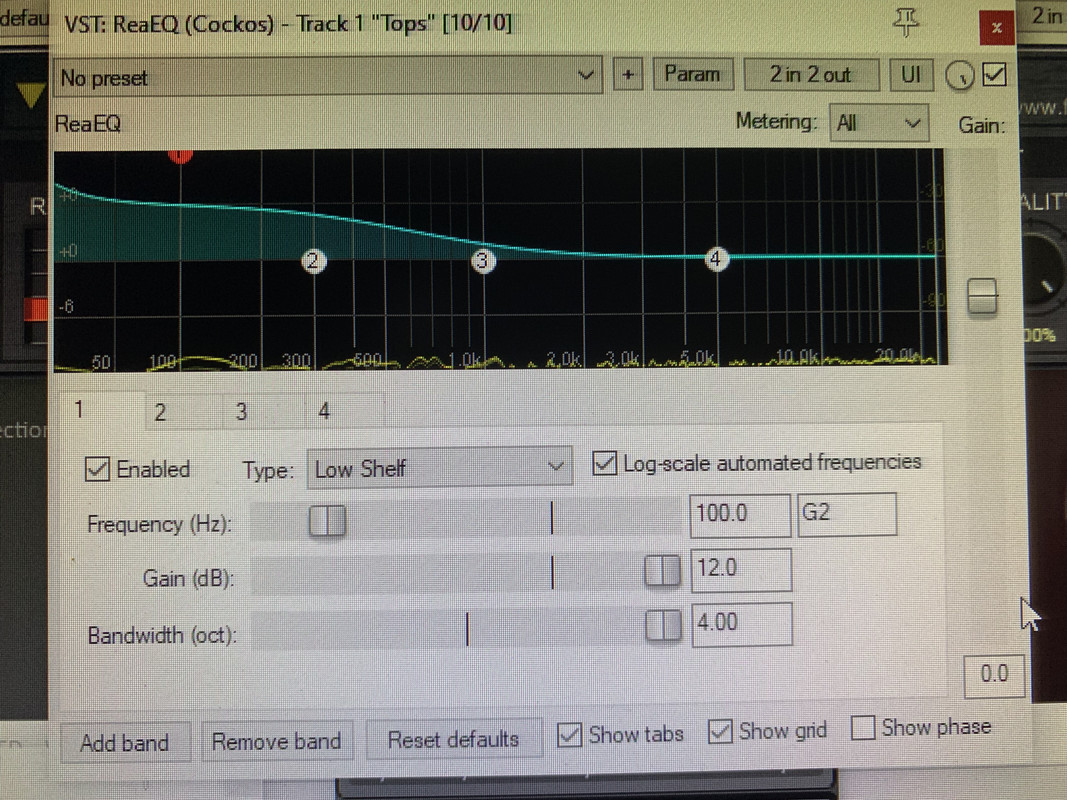
So what I have done so far is use REA EQ in Reaper to boos the bass of the track to the max it will allow. Sounds better for me, just wish I could boost it some more to match up equally with some other tracks I have in mind.
-
neverbeeninariot neverbeeninariot https://www.kvraudio.com/forum/memberlist.php?mode=viewprofile&u=350084
- KVRian
- 1080 posts since 3 Feb, 2015 from UK
You can stack EQ bands in ReaEQ - Turn Node 2 into a Low Shelf, and you can boost some more, though be wary of the sub-bass rumble getting out of control, especially if you don't have large speaker, or a sub-woofer.
You might want to add a steep-ish Low-Cut down around 30Hz to tame the rumble after all the boosting - you'll have to stack those too in ReaEQ to get steeper slopes, but it might be easier using something like Tokyo Dawn Labs Nova EQ, it's free and has dedicated Low and High pass filters.
Nova can also work as a multi-band dynamic EQ which would help keep the low end under control. https://www.tokyodawn.net/tdr-nova/
There's a good video from Dan Worrall on that page expaining how it works, if you're not sure.
You might want to add a steep-ish Low-Cut down around 30Hz to tame the rumble after all the boosting - you'll have to stack those too in ReaEQ to get steeper slopes, but it might be easier using something like Tokyo Dawn Labs Nova EQ, it's free and has dedicated Low and High pass filters.
Nova can also work as a multi-band dynamic EQ which would help keep the low end under control. https://www.tokyodawn.net/tdr-nova/
There's a good video from Dan Worrall on that page expaining how it works, if you're not sure.
-
- KVRist
- Topic Starter
- 393 posts since 16 Aug, 2004
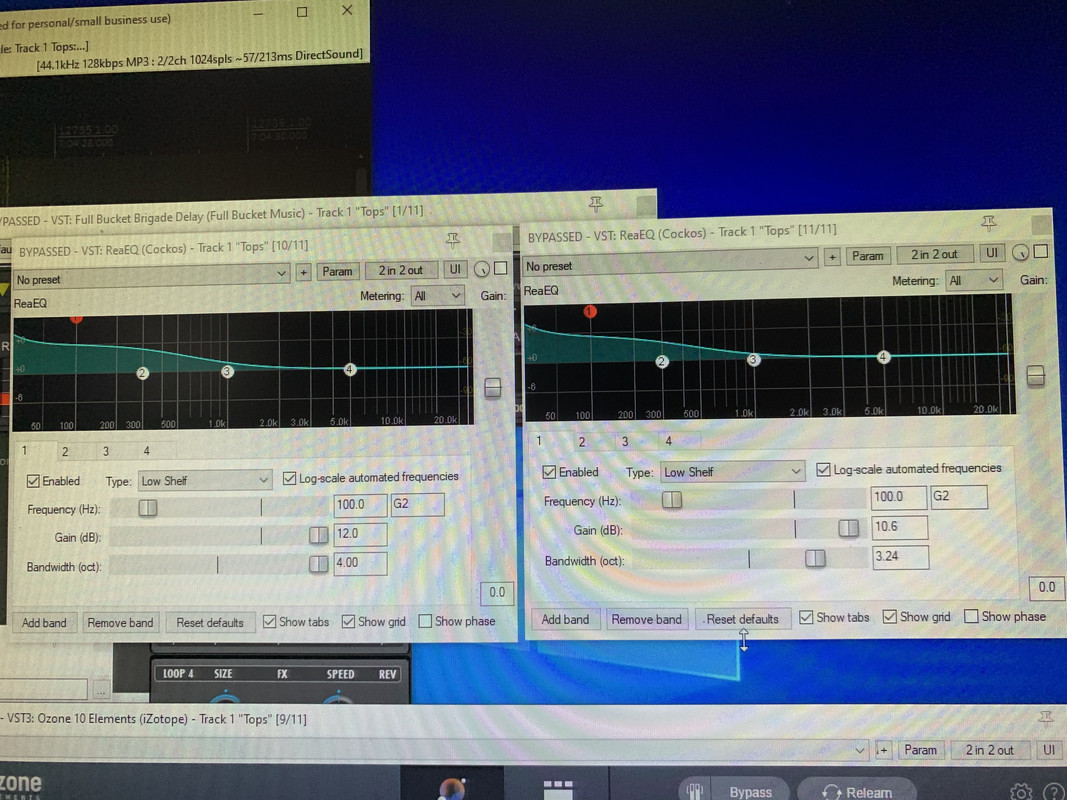
You called this correctly, thank you! I used 2 stacks of Rea EQ and that gave me more boost than needed so I had to adjust the 2nd stack to get the 'sweet spot'.
Also, at the 3' mark in that video you can hear a low end 'rumble' in the song itself so that part is very magnified on large speakers which I will need to adjust a little. Tell me this please, as first option, in Rea EQ, which of those 3 settings [Freq. Gain and Bandwidth] can I adjust to lower that rumble?
If Rea eq should not do it then I will try Nova, thanks.
Also, at the 3' mark in that video you can hear a low end 'rumble' in the song itself so that part is very magnified on large speakers which I will need to adjust a little. Tell me this please, as first option, in Rea EQ, which of those 3 settings [Freq. Gain and Bandwidth] can I adjust to lower that rumble?
If Rea eq should not do it then I will try Nova, thanks.
-
neverbeeninariot neverbeeninariot https://www.kvraudio.com/forum/memberlist.php?mode=viewprofile&u=350084
- KVRian
- 1080 posts since 3 Feb, 2015 from UK
If the rumble only happens occasionally, then a dynamic EQ or multiband compressor would be the tool to tame that.
You could do it with ReaXComp (though it's not the most intuitive of multiband compressors...), or with Nova.
You'll need to identify the frequency range where the rumble is happening, then set an EQ band (if Nova), or a ReaXComp frequency range to target it, then set the ratio and lower the threshold to taste.
Nova is a pretty cool tool, easy to use, and it's prettier than the Reaper built in stuff : )
Incidentally - in your last screenshot, you have two ReaEQs, but you could have just as easily used the 2nd band in the first EQ and changed it to a Low Shelf, the effect would be exactly the same. But whatever works for you : )
You could do it with ReaXComp (though it's not the most intuitive of multiband compressors...), or with Nova.
You'll need to identify the frequency range where the rumble is happening, then set an EQ band (if Nova), or a ReaXComp frequency range to target it, then set the ratio and lower the threshold to taste.
Nova is a pretty cool tool, easy to use, and it's prettier than the Reaper built in stuff : )
Incidentally - in your last screenshot, you have two ReaEQs, but you could have just as easily used the 2nd band in the first EQ and changed it to a Low Shelf, the effect would be exactly the same. But whatever works for you : )
-
- KVRist
- Topic Starter
- 393 posts since 16 Aug, 2004
Thanks and sorry if my description wasn't clear. the rumble at the 3' mark is only at that part of the song and only for a few seconds, seems the song was made that way, if you can play the video at the 3' you hear what I mean even on a pc speaker.
Thanks on the 2nd band, did not realize that, I can do that.
Thanks on the 2nd band, did not realize that, I can do that.
-
neverbeeninariot neverbeeninariot https://www.kvraudio.com/forum/memberlist.php?mode=viewprofile&u=350084
- KVRian
- 1080 posts since 3 Feb, 2015 from UK
No worries !
The rumble sounds like drums (a floor tom possibly) - You could still use a MB compressor or a dynamic EQ to target those lower frequencies, but also automate the Threshold or Ratio controls for just that section of the song.
I'd loop that section, then set up the dynamics until it it brings it under control. Then automate either the Threshold or Ratio. e.g. Ratio set to 1:1 (no compression) before the start of the section, rising to 3:1 during, then returning to 1:1 after it ends.
If you're not sure how to set up automation in Reaper, send me a PM and I can walk you though an example.
The rumble sounds like drums (a floor tom possibly) - You could still use a MB compressor or a dynamic EQ to target those lower frequencies, but also automate the Threshold or Ratio controls for just that section of the song.
I'd loop that section, then set up the dynamics until it it brings it under control. Then automate either the Threshold or Ratio. e.g. Ratio set to 1:1 (no compression) before the start of the section, rising to 3:1 during, then returning to 1:1 after it ends.
If you're not sure how to set up automation in Reaper, send me a PM and I can walk you though an example.