

It´s actually great that Ableton has done such a massive step in Midi useability for V12...
Perhaps this will put a bit of pressure to the Bitwigs in favour of the mentioned parts before releasing the 110th thousand device...
Live 12 or Bitwig 5.1
-
- KVRAF
- 5144 posts since 3 Oct, 2013
the EZkeys 2 editor is helped a bit. It can be synchronized with the host, has a chord track, can highlight both scales and chords(can be locked too), automatically inverts chords after inserting for smooth chord changes with minimal adjustments, can detect new chords in real-time when individual voices are moved, can handle the “SATB” voice leading, has scale snap, MIDI clip drag and drop to the host etc.
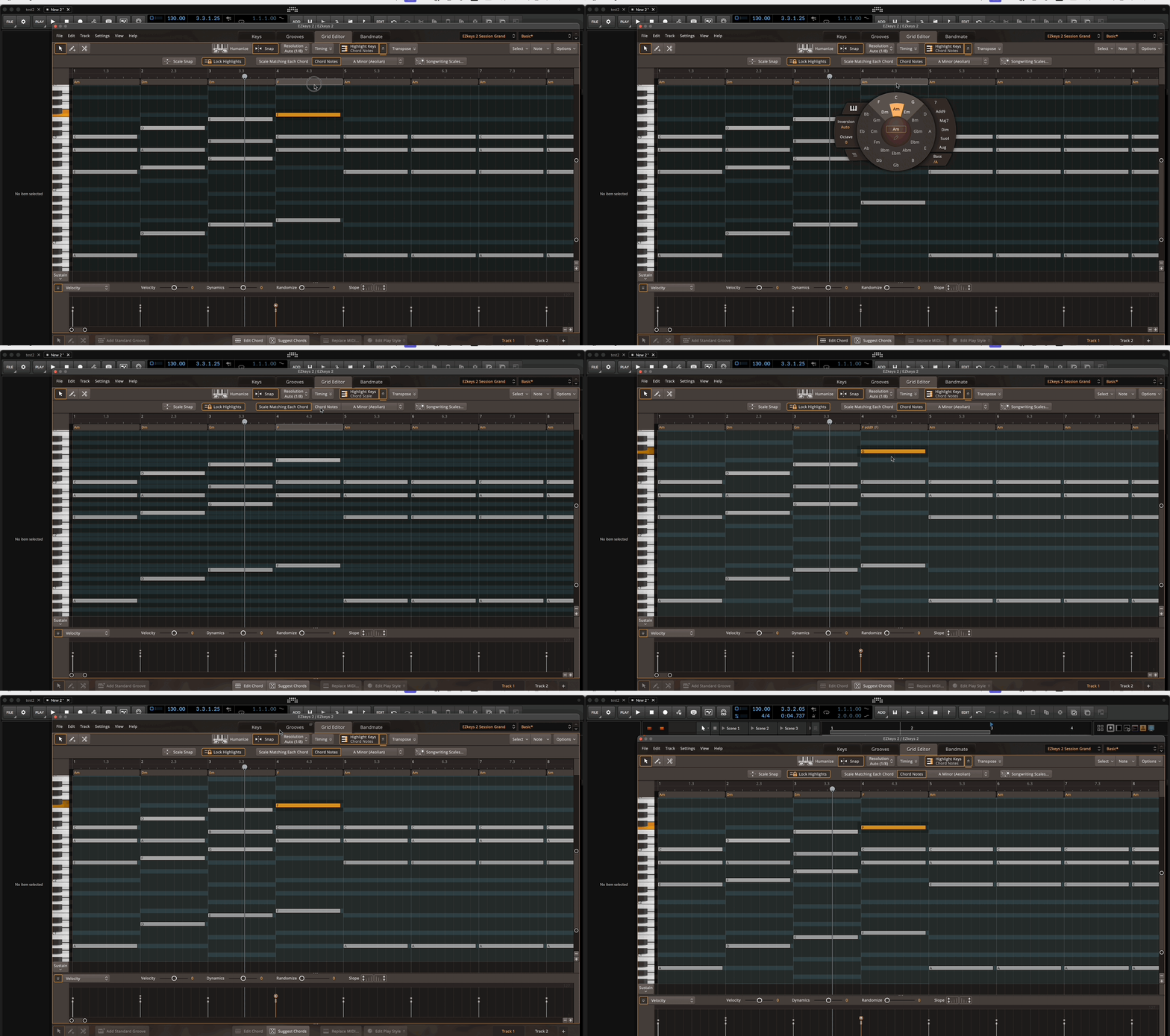
( + it has an unofficial MIDI extractor https://ezkeys.kabaragoya.com/ )
Hopefully they will have a child together someday.
( + it has an unofficial MIDI extractor https://ezkeys.kabaragoya.com/ )
Hopefully they will have a child together someday.
"Where we're workarounding, we don't NEED features." - powermat
-
- KVRAF
- 5144 posts since 3 Oct, 2013
that reminds me, Bitwig is also missing a step-recorder, which they did quite well in Live (input via MIDI keyboard and note length/positioning with cursor in the piano roll using keyboard shortcuts)
"Where we're workarounding, we don't NEED features." - powermat
-
- KVRAF
- 9145 posts since 7 Oct, 2005
It depends on how you make music. I tend to play what I want recording (Midi mostly), then if I hear mistakes in timing, I correct those notes. I like also to play the chords and practice a little before recording.
I sometimes play the kick and snare then play hihat, and sometimes enter the Notes by the pen.
I use modulations a lot either by playing controls and recording them or by drawing them.
I use the modulators in sound design and the clip launcher to organize my ideas. If I use Cubase or S1, I just lay the best idea for me and continue from there.
That's it for me. No complex editing. Just the basics, but I need the basics to be good and in Bitwig they are
Live could be my choice if it works! But it doesn't work for me.
I sometimes play the kick and snare then play hihat, and sometimes enter the Notes by the pen.
I use modulations a lot either by playing controls and recording them or by drawing them.
I use the modulators in sound design and the clip launcher to organize my ideas. If I use Cubase or S1, I just lay the best idea for me and continue from there.
That's it for me. No complex editing. Just the basics, but I need the basics to be good and in Bitwig they are

Live could be my choice if it works! But it doesn't work for me.
Using: Cubase Pro 15, Reason 13, Tascam US-4x4HR, MODX6, DM12D, LaunchKey 49, Yamaha guitar(Pacifica 612v) and bass (BB234) and some virtual instruments and synths.
-
- KVRAF
- 2296 posts since 23 May, 2012 from London
I'd like that too, will come in handy as I plan to use my modular for actual music, instead of just noodling around on it to unwind of an eveningSLiC wrote: Tue Jan 02, 2024 12:05 pm I agree with everything you said- and being able to see gridlines through clips!

Always Read the Manual!
-
- KVRAF
- 5066 posts since 27 Jul, 2004
People knowing how to play keyboard have of course more options for sure... but imagine that:EnGee wrote: Tue Jan 02, 2024 9:06 pm It depends on how you make music. I tend to play what I want recording (Midi mostly), then if I hear mistakes in timing, I correct those notes. I like also to play the chords and practice a little before recording.
...
Let´s say you have practiced and recorded everything to your liking and everything is perfect...
Now you stumbble by accident over a very nice vocal sample you cannot stand not using it in this project and it´s in the same key like your song but sadly it needs your chord progression to be shifted...
What do you do??
Practice and record everything again?? Or just going into the PR editor and shift the chords which need shifting??
Wouldn´t it be nice if they would snap to your already used scale instead of manually correcting all the notes landing off??
If your answers are "Yes"... you are actually in the same boat no matter how you first enter the notes... and you would have to agree that it´s not "good" in Bitwig as being the only more popular DAW not having this feature
-
- KVRAF
- 9145 posts since 7 Oct, 2005
In my case, if that happens and there is a killer voice singing a word or a sentence (even if someone sang it to me live and I recorded) and I need it in my music, I would shift the voice not the whole music already done!Trancit wrote: Tue Jan 02, 2024 10:54 pmPeople knowing how to play keyboard have of course more options for sure... but imagine that:EnGee wrote: Tue Jan 02, 2024 9:06 pm It depends on how you make music. I tend to play what I want recording (Midi mostly), then if I hear mistakes in timing, I correct those notes. I like also to play the chords and practice a little before recording.
...
Let´s say you have practiced and recorded everything to your liking and everything is perfect...
Now you stumbble by accident over a very nice vocal sample you cannot stand not using it in this project and it´s in the same key like your song but sadly it needs your chord progression to be shifted...
What do you do??
Practice and record everything again?? Or just going into the PR editor and shift the chords which need shifting??
Wouldn´t it be nice if they would snap to your already used scale instead of manually correcting all the notes landing off??
If your answers are "Yes"... you are actually in the same boat no matter how you first enter the notes... and you would have to agree that it´s not "good" in Bitwig as being the only more popular DAW not having this feature
Now, lets say that I do want to change the scale and chords of a song that I already done or almost done, then I see what the DAW has from tools and how to change the scale and tracks accordingly, or mostly I do it the hard way by either modify every chord and melody or just start a new song. I must say it never happened to me to change the whole scale, but of course I change chords all the times. Minor changes though, like Dmin to Dmin7 or progression, but this is part of the composing stage.
You see, I don't work like you. I work the old fashion way. My workflow doesn't require many composition tools as I like to use a pen and paper first to sketch the scale and chords fist even if I use Scaler2, I use paper and pen to outline what I think it is useful for me.
Using: Cubase Pro 15, Reason 13, Tascam US-4x4HR, MODX6, DM12D, LaunchKey 49, Yamaha guitar(Pacifica 612v) and bass (BB234) and some virtual instruments and synths.
-
- KVRAF
- 5066 posts since 27 Jul, 2004
Not possible... vocals losing all of their charm when being pitched... and now???EnGee wrote: Tue Jan 02, 2024 11:37 pm In my case, if that happens and there is a killer voice singing a word or a sentence (even if someone sang it to me live and I recorded) and I need it in my music, I would shift the voice not the whole music already done!
...
-

- KVRAF
- 26962 posts since 3 Feb, 2005 from in the wilds
I would use the vocal sample in a different song. Especially if, as you say, everything is perfect, I'm not going to change the song structure just to shoehorn something in that doesn't fit.Trancit wrote: Tue Jan 02, 2024 10:54 pm
Now you stumbble by accident over a very nice vocal sample you cannot stand not using it in this project and it´s in the same key like your song but sadly it needs your chord progression to be shifted...
What do you do??
-
- KVRAF
- 12094 posts since 2 Dec, 2004 from North Wales
Melodyne would let you repitch audio (even change chords) quite naturally, it’s unlikely any DAW will ever have this feature to the level of Melodyne (poly pitch correction). ARA helps with integration, but it’s also a VST and would be the perfect solution for this case!
X32 and 24C mixers, S88MK3, Live + PUSH 3, Osmose, RedShift 6, Pro3, S4, Tempera, Syntakt, Digitone, OP1-F, OPXY, TR-1000, Eurorack, TD27 Drums, Guitars, Basses, Amps and of course lots of pedals!
-
- KVRAF
- 5066 posts since 27 Jul, 2004
pdxindy wrote: Wed Jan 03, 2024 7:53 am I would use the vocal sample in a different song. Especially if, as you say, everything is perfect, I'm not going to change the song structure just to shoehorn something in that doesn't fit.
Now you're both pulling arguments out of thin air...SLiC wrote: Wed Jan 03, 2024 9:12 am Melodyne would let you repitch audio (even change chords) quite naturally, it’s unlikely any DAW will ever have this feature to the level of Melodyne (poly pitch correction). ARA helps with integration, but it’s also a VST and would be the perfect solution for this case!
1. No, these vocals have to be in this song... not a different one...

And you wouldn´t have to change the whole song structure... you have just layed down the chords and perhaps a few other elements...
2. Melodyne is quite good but not that good... if you have to shift a complete vocal phrase by i.e. 5 semi tones it sounds shitty and unnatural as it would sound with any other method...
If you have the choice to either destroy your vocals or to change a few midi notes would this be really something to think about??
Why can´t we just agree that Bitwig´s Midi editor could benefit from some overhaul and features which make sense to have???
-
- KVRAF
- 12094 posts since 2 Dec, 2004 from North Wales
I do agree and in fact I am currently using Live 12 beta over Bigwig for that reason, but I am still not sure I would change the entire key of my song just to drop in a sample, I don't work that way, the key isn't random, its selected for a particular feeling/scale or mode. Working with a key (and being able to easily modulate) is important to me, I have always used it in Studio One and am glad it was added to Live.Trancit wrote: Wed Jan 03, 2024 12:27 pm Why can´t we just agree that Bitwig´s Midi editor could benefit from some overhaul and features which make sense to have???
I record live vocalists and guitars etc so Melodyne is still an essential for me for pitch correction and adding harmonies. Other DAWS have implemented native mono correction (Reason, Cubase etc) but I still think mots people revert to Melodyne, its lightyears ahead of native pitch correction in my opinion and I have it set as the 'sample editor' in Live.
There is plenty of important and useful stuff missing from Bitwig, but users who like Bigwig just find work arounds or 3rd party plugs (as we all do to some extent). Piano Roll updates etc have been top of most polls by Bitwig users for as long as I can remember, but the developers seem focused on more devices/sound creation.
Last edited by SLiC on Wed Jan 03, 2024 12:57 pm, edited 1 time in total.
X32 and 24C mixers, S88MK3, Live + PUSH 3, Osmose, RedShift 6, Pro3, S4, Tempera, Syntakt, Digitone, OP1-F, OPXY, TR-1000, Eurorack, TD27 Drums, Guitars, Basses, Amps and of course lots of pedals!
-
- KVRAF
- 5066 posts since 27 Jul, 2004
Because you didn´t read carefully my initial post about this...SLiC wrote: Wed Jan 03, 2024 12:51 pm ... but I am still not sure I would change the entire key of my song just to drop in a sample, I don't work that way, the key isn't random, its selected for a particular feeling/scale or mode. Working with a key (and being able to easily modulate) is important to me, I have al3wats used it in Studio ...
The vocals are in the same key... nonetheless your chord structure isn´t matching them!
Please remember this was just a quick example out of nowhere... just to hint to a situation where editing the midi can be necessary and therefore having some helpers...even if you normally record everything.
Don´t take this special example too serious and what would be every option to avoid it...

-
- KVRAF
- 12094 posts since 2 Dec, 2004 from North Wales
It's OK- I take your point and agree about the lack of basic midi (DAW) functionality! Bitwig is fantastic for sound creation and experimentation (its the modular of DAWS!) but it wouldn't be my go-to for 'detailed' audio or midi editing, that would be Studio One for me! I still think Live + PUSH is the best for...well, live production/recording and looping! All great tools, just pick the one that works for the project!Trancit wrote: Wed Jan 03, 2024 12:56 pmBecause you didn´t read carefully my initial post about this...SLiC wrote: Wed Jan 03, 2024 12:51 pm ... but I am still not sure I would change the entire key of my song just to drop in a sample, I don't work that way, the key isn't random, its selected for a particular feeling/scale or mode. Working with a key (and being able to easily modulate) is important to me, I have al3wats used it in Studio ...
The vocals are in the same key... nonetheless your chord structure isn´t matching them!
Please remember this was just a quick example out of nowhere... just to hint to a situation where editing the midi can be necessary and therefore having some helpers...even if you normally record everything.
Don´t take this special example too serious and what would be every option to avoid it...
Personally, I dont think Live or Bitwig will ever match the more traditional DAWS at audio and midi editing, but they can and should definitely be 'better' and I think Live just did that- Over to you now Bitwig, lets see what 5.2 brings!
X32 and 24C mixers, S88MK3, Live + PUSH 3, Osmose, RedShift 6, Pro3, S4, Tempera, Syntakt, Digitone, OP1-F, OPXY, TR-1000, Eurorack, TD27 Drums, Guitars, Basses, Amps and of course lots of pedals!