

Finally installed 5.2 Producer and running into issues where inputs from keyboard, mouse and once when it shut down every controller. Audio engine locks on one project and changing to another project makes it "not available", requiring a complete reboot to get it ( and/or inputs) back.
Crashes in plugins and/or the entire DAW are happening often. I also keep turning off the notifications and they turn back on soon after nagging me to install packages I don't want. I also have a package installed and not finding anyway to uninstall it. I've written to support and not received any reply.
Going to try a reinstall of the whole thing today to see if that helps.
Any other suggestions about these issues is appreciated.
Add: certain controls in the DAW are intermittent. Sometimes the master volume will not respond but track volume will. Or vice versa. I often have to use task manager to force shut down as well. And the plug-in list is bloated beyond belief with things I never installed and won't let me uninstall them. Annoying.
And the thing is it locking onto the audio engine and not letting it to go to another project or even to another DAW after forcing a shut down without rebooting the whole computer.
Guessing I should have waited until 5.5 before upgrading...
Now it opens and locks every control and input out, still forces shut down by task manager and a second attempt at opening shows no audio or midi controller is recognized or present. Requires a complete system reboot every time. They've made a version that's completely unusable for me.
And support has still not replied.
Testing of Bitwig Studio 5.2 or .3 or .4 ...
-

- KVRian
- 1200 posts since 10 Sep, 2014
5.2.1 is out. Have you tried it?BBFG# wrote: Tue Aug 13, 2024 4:18 pm Finally installed 5.2 Producer and running into issues where inputs from keyboard, mouse and once when it shut down every controller. Audio engine locks on one project and changing to another project makes it "not available", requiring a complete reboot to get it ( and/or inputs) back.
Crashes in plugins and/or the entire DAW are happening often. I also keep turning off the notifications and they turn back on soon after nagging me to install packages I don't want. I also have a package installed and not finding anyway to uninstall it. I've written to support and not received any reply.
Going to try a reinstall of the whole thing today to see if that helps.
Any other suggestions about these issues is appreciated.
Add: certain controls in the DAW are intermittent. Sometimes the master volume will not respond but track volume will. Or vice versa. I often have to use task manager to force shut down as well. And the plug-in list is bloated beyond belief with things I never installed and won't let me uninstall them. Annoying.
And the thing is it locking onto the audio engine and not letting it to go to another project or even to another DAW after forcing a shut down without rebooting the whole computer.
Guessing I should have waited until 5.5 before upgrading...
Now it opens and locks every control and input out, still forces shut down by task manager and a second attempt at opening shows no audio or midi controller is recognized or present. Requires a complete system reboot every time. They've made a version that's completely unusable for me.
And support has still not replied.
-
- KVRAF
- 9110 posts since 28 Apr, 2013
The last three paragraphs were about 5.2.1.stamp wrote: Fri Aug 16, 2024 1:43 am5.2.1 is out. Have you tried it?BBFG# wrote: Tue Aug 13, 2024 4:18 pm Finally installed 5.2 Producer and running into issues where inputs from keyboard, mouse and once when it shut down every controller. Audio engine locks on one project and changing to another project makes it "not available", requiring a complete reboot to get it ( and/or inputs) back.
Crashes in plugins and/or the entire DAW are happening often. I also keep turning off the notifications and they turn back on soon after nagging me to install packages I don't want. I also have a package installed and not finding anyway to uninstall it. I've written to support and not received any reply.
Going to try a reinstall of the whole thing today to see if that helps.
Any other suggestions about these issues is appreciated.
Add: certain controls in the DAW are intermittent. Sometimes the master volume will not respond but track volume will. Or vice versa. I often have to use task manager to force shut down as well. And the plug-in list is bloated beyond belief with things I never installed and won't let me uninstall them. Annoying.
And the thing is it locking onto the audio engine and not letting it to go to another project or even to another DAW after forcing a shut down without rebooting the whole computer.
Guessing I should have waited until 5.5 before upgrading...
Now it opens and locks every control and input out, still forces shut down by task manager and a second attempt at opening shows no audio or midi controller is recognized or present. Requires a complete system reboot every time. They've made a version that's completely unusable for me.
And support has still not replied.
-
- KVRAF
- 9110 posts since 28 Apr, 2013
Spent some time on this today. I had a theory that maybe the last runtime environment I installed to run a demo could have something to do with my problems here. So I uninstalled it and rebooted,. Things seemed a little better, but then it locked up again while attempting an instrument layer. It let me save before it crash though. Forced "end task" shut down through Task manager and then got the same thing I get every time on reopening it. It seems this insist on updating packages (which I continually turn off) keeps popping up while doing other things and IDK, maybe it's choking the processes? It turns itself back on every time I try to add a track. And I think it's there every time it locks up. I'm sending another support ticket to Bitwig with this same info. But they haven't yet responded to the first two. So hoping someone here might have a clue.
System is Win10 Xeon 4C CPU 32GB RAM on SSD Drive.
System is Win10 Xeon 4C CPU 32GB RAM on SSD Drive.
You do not have the required permissions to view the files attached to this post.
-
- KVRAF
- Topic Starter
- 5144 posts since 3 Oct, 2013
^^^ never tried, but this is last message of the BWS discord/hack
I would say join to the server and ask it in hack topic
I would say join to the server
and ask it in hack topicYou do not have the required permissions to view the files attached to this post.
"Where we're workarounding, we don't NEED features." - powermat
-
- KVRAF
- 9110 posts since 28 Apr, 2013
So I sent this second email to them:
My reply:
ICBW here, but I think it has to do with this persistent "nag to install/update packages" that I not only don't want, but want to remove the one that is installed as well.
Anyone here have an idea of how to uninstall a package and get this notification to stay off?
Bitwig has finally responded with this short email:On Sat, 17 Aug at 1:37 AM wrote:
Package update will not stay off. Controls won't respond after a few minutes and entire DAW "locks up". Must force "end task" shut down through Task manager and then get the same thing I get every time on reopening it. It seems this insist on updating packages (which I continually turn off) keeps popping up while doing other things and IDK, maybe it's choking the processes? It turns itself back on every time I try to add a track. And I think it's there every time it locks up. I also want to uninstall the one package that is there, but can't find any way to do that. This screen shot is what I get on reopening and after canceling or retrying the request to reload the crashed project. (Either way, same result.)
Finding this annoying to the point of it being unusable.
System is Win10 Xeon 4C CPU 32GB RAM on SSD Drive.
Really?it looks like suddenly all your USB devices are gone. Are you using a hub and are they all connected to the same hub?
My reply:
Feels like they're trying to make this a hardware issue rather than fix the issue...The controllers are on a USB3 hub connected to a USB3 port. The Audio is connected directly to the computer (no hub) via USB port. But this is what happens after Bitwig Crashes and it will not allow restarting these with a complete reboot of the computer. But the initial problem is that Bitwig itself stops responding and locks even though the music controllers and audio still work. Keyboard/mouse move across screen but moving any volume slider in Bitwig doesn't. And this "nag" notification of installing/updating packages always shows as part of this lockup (even though I continually turn them off). Even after "end task" of Bitwig, trying to open any standalone or another DAW after shows the restarted Audio as "not available. This only happens in Bitwig 5 and not Cubase 13. It also did not happen in Bitwig 4.
ICBW here, but I think it has to do with this persistent "nag to install/update packages" that I not only don't want, but want to remove the one that is installed as well.
Anyone here have an idea of how to uninstall a package and get this notification to stay off?
-
- KVRAF
- 9144 posts since 7 Oct, 2005
With my PC in Windows 11 (with Tascam audio interface), Bitwig doesn't let the audio to play in the background or with other application also after quitting it! So, I need to run Reaper and quit it, so I can use the audio interface. However, Bitwig doesn't behave like that with a Steinberg and Presonus audio interfaces. It behaves normally, so it's a specific problem with Tascam driver in Windows. As it doesn't happen with Linux or Mac using the same interface. Just a thought to check with another audio interface, it might be a conflict between the driver and Bitwig.
Using: Cubase Pro 15, Reason 13, Tascam US-4x4HR, MODX6, DM12D, LaunchKey 49, Yamaha guitar(Pacifica 612v) and bass (BB234) and some virtual instruments and synths.
-
- KVRAF
- 9110 posts since 28 Apr, 2013
This is the most helpful information I've gotten on this so far. Since everything I use is class compliant, then I would garner that's where Bitwig has a possible bug. I fear their "solution" will be to buy a new interface from a list that leaves more of us behind.EnGee wrote: Wed Aug 21, 2024 7:27 am With my PC in Windows 11 (with Tascam audio interface), Bitwig doesn't let the audio to play in the background or with other application also after quitting it! So, I need to run Reaper and quit it, so I can use the audio interface. However, Bitwig doesn't behave like that with a Steinberg and Presonus audio interfaces. It behaves normally, so it's a specific problem with Tascam driver in Windows. As it doesn't happen with Linux or Mac using the same interface. Just a thought to check with another audio interface, it might be a conflict between the driver and Bitwig.
I asked them about three specific things and to so far, they don't want to even discuss two of them. And this third one doesn't bode well if they intend on eliminating hardware that makes them work.
(BTW, my interfaces are Roland and MOTU. And my controllers are Studiologic, Crumar, Arturia and Korg.)
-
- KVRAF
- 9144 posts since 7 Oct, 2005
It is strange that with the same exact PC and hardware, Bitwig is working fine in Linux! I'm using the latest Mint Cinnamon 22 using Pipewire and I don't have any problem with it (I can play YouTube videos and music while Bitwig is in the background). It is the same with Core Audio in Mac.BBFG# wrote: Wed Aug 21, 2024 5:25 pm Since everything I use is class compliant, then I would garner that's where Bitwig has a possible bug. I fear their "solution" will be to buy a new interface from a list that leaves more of us behind.
So, I think you are right. There is a bug with Bitwig in Windows with some ASIO drivers of audio interfaces. By the way, on Windows, Cubase and Studio One are working fine with all interfaces including Tascam. I can, for example, play YouTube videos while S1 is running in the background (I can't do that with Ableton Live though).
That's why I don't use Bitwig on Windows as my main DAW actually! I find it easier to use S1 or Cubase in general, especially when I need to access videos or music with another application. On Linux though, I love Bitwig, because not only it works fine, but I don't have many other choices anyway

Using: Cubase Pro 15, Reason 13, Tascam US-4x4HR, MODX6, DM12D, LaunchKey 49, Yamaha guitar(Pacifica 612v) and bass (BB234) and some virtual instruments and synths.
-
- KVRAF
- 9110 posts since 28 Apr, 2013
Bitwig:
My reply to them:
5.2.2 is out. Will be downloading and seeing how that goes today.
Did that, it nullified the one package and show them all as "please install" now. It's rather annoying that it nags everytime on start up when version 4 allowed me to turn off that particular notification completely. But it no longer pops up on adding tracks, effects or layers now. Hopefully they'll update this to work like it did before. So the major problem now is the audio engine refusing to release without a complete reboot of the system.the package message will display at every start of the app, but should not show up when adding a track to a project.
In order to give it a fresh start and delete the pack you have installed, we recommend to delete the directory C:\Users\yourusername/AppData/Local/BitwigStudio/ - it will behave like a new installation then.
Best regards,
Bitwig Technical Support Team
Bitwig GmbH
My reply to them:
They emailed me this morning.still takes control of audio engine and requires me to reboot to let it work in other applications (such as a standalone plugin or other DAW.)
5.2.2 is out. Will be downloading and seeing how that goes today.
-

- KVRAF
- 10286 posts since 17 Sep, 2004 from Austin, TX
I am at work so sorry for the terrible screenshot but do you have "exclusive mode" turned off under Windows Settings > Sound > "More sound settings" (in Windows 11) > select input and output devices > Properties > Advanced ?
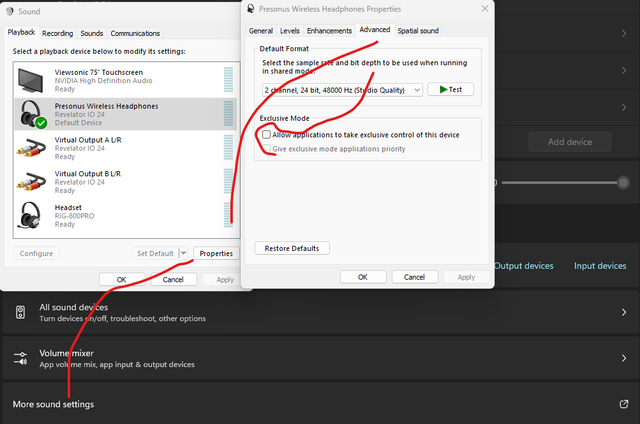
Notably, the UAC-1 I used to use did this with or without exclusive mode turned on when connected with USB 3 but not USB 2
Notably, the UAC-1 I used to use did this with or without exclusive mode turned on when connected with USB 3 but not USB 2
-
- KVRAF
- 9144 posts since 7 Oct, 2005
Thank you! This workedrunagate wrote: Mon Aug 26, 2024 5:22 pm I am at work so sorry for the terrible screenshot but do you have "exclusive mode" turned off under Windows Settings > Sound > "More sound settings" (in Windows 11) > select input and output devices > Properties > Advanced ?
Notably, the UAC-1 I used to use did this with or without exclusive mode turned on when connected with USB 3 but not USB 2

Using: Cubase Pro 15, Reason 13, Tascam US-4x4HR, MODX6, DM12D, LaunchKey 49, Yamaha guitar(Pacifica 612v) and bass (BB234) and some virtual instruments and synths.
-
- KVRAF
- 9110 posts since 28 Apr, 2013
Thanks for the suggestion. I did need to turn them off, but unfortunately it didn't fix the problem with the current version or the new pre-release version.EnGee wrote: Mon Aug 26, 2024 6:38 pmThank you! This workedrunagate wrote: Mon Aug 26, 2024 5:22 pm I am at work so sorry for the terrible screenshot but do you have "exclusive mode" turned off under Windows Settings > Sound > "More sound settings" (in Windows 11) > select input and output devices > Properties > Advanced ?
Notably, the UAC-1 I used to use did this with or without exclusive mode turned on when connected with USB 3 but not USB 2
And the nag install packages is back on every instrument/track/effect add.
It is getting me to use Cubase more.
-
- KVRian
- 1047 posts since 17 Mar, 2005 from Bay Area
Wowsers. I havent seen anything like that other than what happened when we had to temporarily use the MSIX installer (midi devices wouldnt show up). Every version before and after that has been perfect on my win10 machine. I go back and forth between cubase 13 and 5.2.1 randomly and all is well (right now).

