

Have tons of 16bit 44.1 samples recorded from VSTi output need to convert to 8bit 22.05 for a porpoise (S3M) yet everything out there applies a 'dither hiss' or 'noise shaper' that sounds terrible either way... So I am trying making fresh samples recording directly to 8bit & the only thing I have found so far as effect plug recorder that will do 8bit is SilverSpike TapeIt... Which will also dither if checked & sure enough sounds terrible but with off 8bit is kinda OK but there's still distortions around the tail (usually ALWAYS the low notes) if I carefully trim the release envelope I can usually cut it out but some sounds just cannot record clean & there's distortion that starts in the middle going on from there so has to be all deleted....
Any better way for conversion or generation?...

Possible Clean Conversion of 16 to 8 bit WAV without Dither Hiss or Optional Distortion?
-
- KVRist
- 375 posts since 17 Nov, 2022
Why don't you just use an audio tool which feature batch processing like Voxengo r8brain?
-

- KVRian
- Topic Starter
- 837 posts since 23 Feb, 2023
I've used that & many more... It makes dithering noise as well... I don't care about batch as much as clean conversion or generation... Also just tried VSThost as it records to 8bit but it's about same as TapeIt for generation of noise artifacts along with the sample... Seems like 8bit is a pain wonder how they did it in the old days... Anyways tried R8Brain, Acoustica, Goldwave, Sound Forge, Wavelab, Audacity (won't do much of anything), aWave, Wavosaur, DartXP, Sampled 2.0, NCH Audio Edit Master plus others...
-
- KVRist
- 375 posts since 17 Nov, 2022
I used plenty of such audio tools and I never encountered one which forced dithering. I think you confuse quantization noise with dithering.eLawnMust wrote: Sat Aug 17, 2024 11:09 pm I've used that & many more... It makes dithering noise as well...
There are ways to make quantization noise less audible like using a compander but I don't know if there is a tracker which has such a feature. If the playback happens with 16 bit it's possible though to combine several 8 bit samples in a way that gives the impression of a higher signal-to-noise ratio by using a high-gain release sample which is then played back at a much lower volume.
-
- KVRian
- Topic Starter
- 837 posts since 23 Feb, 2023
If there's no option to opt out of dithering then dithering takes place whether you like it or not if there's an option to use noise shaping rather than dithering or neither & nothing at all it still sounds bad... So far best option is to create from scratch a new sample library recorded at 8bit & any noise in the tail end to be cut out closely no dither or noise shape at all... It's fiddly & slow but OK... I have tried a fade out on the noise as well as noise reduction but it seems to make it WORSE!
-
- KVRAF
- 2066 posts since 11 Aug, 2012 from omfr morf form romf frmo
REAPER. By default it will not enable dithering or noise shaping. You can render media items or use the batch conversion.
But like other people said, if you've never worked with trackers back in the day, you may be confusing quantization noise as dithering. The noise floor at 8 bit is around -50db full scale with 256 total values. So you can hear it particularly on kick tails. When the sample is being pitched around it gets exacerbated, particularly on low frequency sounds like bass. That was part of the charm or desire for higher quality gear like a Gravis Ultrasound.
Noise reduction can't do anything about quantization or reduce the noise below the floor. If you want a less noisy kick squash compress it and make it end very fast so there's no tail fade.
But like other people said, if you've never worked with trackers back in the day, you may be confusing quantization noise as dithering. The noise floor at 8 bit is around -50db full scale with 256 total values. So you can hear it particularly on kick tails. When the sample is being pitched around it gets exacerbated, particularly on low frequency sounds like bass. That was part of the charm or desire for higher quality gear like a Gravis Ultrasound.
Noise reduction can't do anything about quantization or reduce the noise below the floor. If you want a less noisy kick squash compress it and make it end very fast so there's no tail fade.
-
- KVRist
- 375 posts since 17 Nov, 2022
No, that is wrong. Where did you get that from?eLawnMust wrote: Sun Aug 18, 2024 2:11 am If there's no option to opt out of dithering then dithering takes place whether you like it or not
Noise shaping applies to dithering. There is simple static dithering and there are weighted/dynamic versions which makes the dithering less audible.eLawnMust wrote: Sun Aug 18, 2024 2:11 am if there's an option to use noise shaping rather than dithering
-
- KVRian
- Topic Starter
- 837 posts since 23 Feb, 2023
I started this topic in hopes of finding a solution not starting an argument...
Here is R8Brain with no possibility to turn off dither in single nor batch-

Here is snap of help text saying it applies BOTH dither & noise shape... Every audio conversion app that has both has them separate one or the other or both I'm sure they don't know the difference...
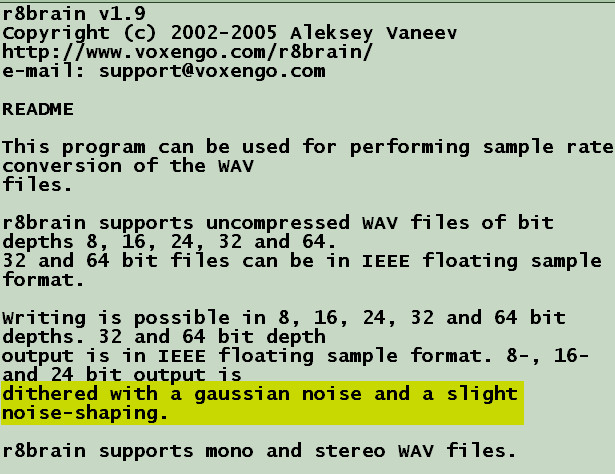
Now there are others that are the same, they dither no matter what like aWave... How do I know? I can friggin' hear it! In this past week I have become the unofficial top-shelf 'dither detective' because I have been listening to it... Dithering is a different sound to noise shaping or nothing at all...
Being there's no real solution provided here I will not return to this topic...
Here is R8Brain with no possibility to turn off dither in single nor batch-
Here is snap of help text saying it applies BOTH dither & noise shape... Every audio conversion app that has both has them separate one or the other or both I'm sure they don't know the difference...
Now there are others that are the same, they dither no matter what like aWave... How do I know? I can friggin' hear it! In this past week I have become the unofficial top-shelf 'dither detective' because I have been listening to it... Dithering is a different sound to noise shaping or nothing at all...
Being there's no real solution provided here I will not return to this topic...
-

- KVRAF
- 10128 posts since 16 Dec, 2002
Does the OP realise that downsampling introduces noise?
This was the first lesson i learned way back, thinking i could save disk space but didnt understand why my recordings sounded shit, every one is a noob at the beginning lol
This was the first lesson i learned way back, thinking i could save disk space but didnt understand why my recordings sounded shit, every one is a noob at the beginning lol
-

- KVRAF
- 16786 posts since 8 Mar, 2005 from Utrecht, Holland
R8brain dithers, because that usually is the right thing to do.
8bit 22kHz is a shitty format, no matter what. You either have truncation noise, or that masked by dithering noise. At a low bitrate. Welcome to the world of 1995.
Anyway, you can give the good 'ole
sox command line utility a try:
8bit 22kHz is a shitty format, no matter what. You either have truncation noise, or that masked by dithering noise. At a low bitrate. Welcome to the world of 1995.
Anyway, you can give the good 'ole
sox command line utility a try:
Code: Select all
sox original.wav -r 22050 -c 1 -b 8 new.wav
We are the KVR collective. Resistance is futile. You will be assimilated. 
My MusicCalc is served over https!!
My MusicCalc is served over https!!
-
- KVRist
- 375 posts since 17 Nov, 2022
My bad. Either I confused r8brain with another tool or I used a much older version than 1.9 which had optional dithering (I can remember a command line version with a dithering switch).
What about Audacity? With it you can set dithering to "None" if you want to (https://manual.audacityteam.org/man/dit ... xplanation).
What about Audacity? With it you can set dithering to "None" if you want to (https://manual.audacityteam.org/man/dit ... xplanation).
-
- KVRAF
- 2066 posts since 11 Aug, 2012 from omfr morf form romf frmo
Using Sound Forge, a new item set at 22khz 8-bit, synthesis 500 Hz to 40 Hz over 1 second, saved. Then faded out, and saved.
A new item set at 48 kHz, 32-bit float, same synthesis settings, saved. Then faded out, and saved.
Using REAPER's batch processing, converting the 48 kHz to 22kHz 8-bit using Sinc Interpolation: 768pt, no dither, no noise shaping.
The converted version and synthesized direct do not null but sound alike. This is as good as 22kHz 8-bit gets.
A new item set at 48 kHz, 32-bit float, same synthesis settings, saved. Then faded out, and saved.
Using REAPER's batch processing, converting the 48 kHz to 22kHz 8-bit using Sinc Interpolation: 768pt, no dither, no noise shaping.
The converted version and synthesized direct do not null but sound alike. This is as good as 22kHz 8-bit gets.
You do not have the required permissions to view the files attached to this post.
-
- KVRist
- 375 posts since 17 Nov, 2022
Or as bad as it can get.

-

- KVRian
- 991 posts since 24 May, 2024
I'm not a fan of dither either, but I remember doing experiments with SoundEdit 1.0 back in 1990 and you will have quantization noise in 8-bit. In all other higher bit audio, I feel that that the dither and quantization is usually invisible to our ears whether it's there or not. I quit using dither back in 2007 and nobody ever complained about it nor noticed. But I really do think you're maybe just hearing quantization noise and not dither. So you'll have to just cope with it and maybe do some manual edits if possible.
-
- KVRian
- 630 posts since 11 Nov, 2003 from Vancouver. Canada
Holy we're talking about converting samples to 8bit for S3M files in 2024. I love this.