

The Falcon 3.1 installation and database-creation are exceptionally uninformative.
I followed UVI Portal instructions, installed Falcon, Falcon Factory lib., Tag library and all the expansions. I have previously (over several years) installed my 16 UVI libraries in 2 different locations in my computer.
But when I opened the Falcon UI for the first time, got immediately a note "install the Tag library". But my UVI Portal says that it is installed!!!
No explanation of the location etc.
And no instructions where all the existing UVI libraries/soundware should locate in the computer, so that Falcon could tag them. Libraries are not visible in the Falcon browser.
The first impression is: bulls**t.
Waisted money - who wants to start the product use by reading manuals? Not me.
Not very well done, UVI.
(Win, Live 11)

UVI Falcon 3
-

- KVRist
- 186 posts since 4 Jan, 2007
Did you check the preferences in Falcon? They can be different than the preferences in UVI Portal. The TagLibrary.ufs is basically just a soundbank and should located at 1 of the two indicated locations of your USBSoundBanksHarry_HH wrote: Sun Oct 20, 2024 1:21 pm The Falcon 3.1 installation and database-creation are exceptionally uninformative.
I followed UVI Portal instructions, installed Falcon, Falcon Factory lib., Tag library and all the expansions. I have previously (over several years) installed my 16 UVI libraries in 2 different locations in my computer.
But when I opened the Falcon UI for the first time, got immediately a note "install the Tag library". But my UVI Portal says that it is installed!!!
No explanation of the location etc.
And no instructions where all the existing UVI libraries/soundware should locate in the computer, so that Falcon could tag them. Libraries are not visible in the Falcon browser.
The first impression is: bulls**t.
Waisted money - who wants to start the product use by reading manuals? Not me.
Not very well done, UVI.
(Win, Live 11)
-

- KVRAF
- 5440 posts since 4 Aug, 2006 from Helsinki
Even the very basics in the UVI’s way to share fundamental information to their paying customers is inadequate.Cepheus wrote: Sun Oct 20, 2024 2:01 pmDid you check the preferences in Falcon? They can be different than the preferences in UVI Portal. The TagLibrary.ufs is basically just a soundbank and should located at 1 of the two indicated locations of your USBSoundBanksHarry_HH wrote: Sun Oct 20, 2024 1:21 pm The Falcon 3.1 installation and database-creation are exceptionally uninformative.
I followed UVI Portal instructions, installed Falcon, Falcon Factory lib., Tag library and all the expansions. I have previously (over several years) installed my 16 UVI libraries in 2 different locations in my computer.
But when I opened the Falcon UI for the first time, got immediately a note "install the Tag library". But my UVI Portal says that it is installed!!!
No explanation of the location etc.
And no instructions where all the existing UVI libraries/soundware should locate in the computer, so that Falcon could tag them. Libraries are not visible in the Falcon browser.
The first impression is: bulls**t.
Waisted money - who wants to start the product use by reading manuals? Not me.
Not very well done, UVI.
(Win, Live 11)
Lets take for example this ”preferences”.
Self evidently in most of the cases where the user purchased the Falcon, the user already own UVI soundware (libraries) purchased earlier. And these librariez are installed over several years maybe to different locations in the DAW.
How has UVI taken account this most likely scenario?
Where UVI has instructed, if the tagged soundware should locate in one address, or if they can locate in different addresses?
UVI portal has option only to give one address for the library content in the preferences.
Why?
Most typically I adderess different content (e.g. effects and libraries and presets) to different locations.
Where in the instructions the logic between the UVI Portal and Falcon is defined.
E.g. in my BFD3 the preferences allow to define several addresses to the content,which the BFD3 collects the information.
This was just one example of the badly planned/implemented instructions.
And the paying customer suffers.
-
- KVRAF
- 2486 posts since 28 Mar, 2005
There is a bug in 3.1 where taglibrary is not checked in subfolder of indexed dir even if the recursive flag is checked in the soundbank pref panel
-
- KVRAF
- 2486 posts since 28 Mar, 2005
Portal 3 check all folder in either Falcon or UVIWorkstation to check which soundbank are installed. There is only one installation folder which should be set in Falcon and uviws but this is not enforced.
Still if you dont change any folder, it just works out of the box
Still if you dont change any folder, it just works out of the box
-
- KVRAF
- 5066 posts since 27 Jul, 2004
Cannot really agree here...Harry_HH wrote: Sun Oct 20, 2024 2:25 pmEven the very basics in the UVI’s way to share fundamental information to their paying customers is inadequate.Cepheus wrote: Sun Oct 20, 2024 2:01 pmDid you check the preferences in Falcon? They can be different than the preferences in UVI Portal. The TagLibrary.ufs is basically just a soundbank and should located at 1 of the two indicated locations of your USBSoundBanksHarry_HH wrote: Sun Oct 20, 2024 1:21 pm The Falcon 3.1 installation and database-creation are exceptionally uninformative.
I followed UVI Portal instructions, installed Falcon, Falcon Factory lib., Tag library and all the expansions. I have previously (over several years) installed my 16 UVI libraries in 2 different locations in my computer.
But when I opened the Falcon UI for the first time, got immediately a note "install the Tag library". But my UVI Portal says that it is installed!!!
No explanation of the location etc.
And no instructions where all the existing UVI libraries/soundware should locate in the computer, so that Falcon could tag them. Libraries are not visible in the Falcon browser.
The first impression is: bulls**t.
Waisted money - who wants to start the product use by reading manuals? Not me.
Not very well done, UVI.
(Win, Live 11)
Lets take for example this ”preferences”.
Self evidently in most of the cases where the user purchased the Falcon, the user already own UVI soundware (libraries) purchased earlier. And these librariez are installed over several years maybe to different locations in the DAW.
How has UVI taken account this most likely scenario?
Where UVI has instructed, if the tagged soundware should locate in one address, or if they can locate in different addresses?
UVI portal has option only to give one address for the library content in the preferences.
Why?
Most typically I adderess different content (e.g. effects and libraries and presets) to different locations.
Where in the instructions the logic between the UVI Portal and Falcon is defined.
E.g. in my BFD3 the preferences allow to define several addresses to the content,which the BFD3 collects the information.
This was just one example of the badly planned/implemented instructions.
And the paying customer suffers.
It´s hardly UVI´s fault if you are unable to keep stuff at a single location or even if you don´t to point Falcon to your multiple locations in it´s preferences...
A minimum of organization is really up to the user and not the job of any software company...
Second, even if soundbanks are spreaded over multiple locations because you didn´t care in the past... how hard can it be to move them manually to a single folder and point UVI Portal to this folder??

-
- KVRAF
- 1819 posts since 10 Jul, 2018
All of the effects are per-voice, so they be controlled by per-voice MPE parameters, right? That + extensive multisample system (with round-robins, layers, presumably decent gui editor) + harmonic and granular engines etc. are the main appeal for me.
But will the per-voice effects take up so much cpu that it's unusable?
Can't demo unless I pay $24 for the subscription, and from what I've heard so far of the presets they cover ground that's already done better (or at least in ways I prefer) by what I already have.
They advertise "improved MPE performance" in 3.1 but I haven't yet managed to find what they actually mean by that...
But will the per-voice effects take up so much cpu that it's unusable?
Can't demo unless I pay $24 for the subscription, and from what I've heard so far of the presets they cover ground that's already done better (or at least in ways I prefer) by what I already have.
They advertise "improved MPE performance" in 3.1 but I haven't yet managed to find what they actually mean by that...
-
- KVRAF
- 5440 posts since 4 Aug, 2006 from Helsinki
"It´s hardly UVI´s fault..". You didn't get the point.Trancit wrote: Sun Oct 20, 2024 3:54 pmCannot really agree here...Harry_HH wrote: Sun Oct 20, 2024 2:25 pmEven the very basics in the UVI’s way to share fundamental information to their paying customers is inadequate.Cepheus wrote: Sun Oct 20, 2024 2:01 pmDid you check the preferences in Falcon? They can be different than the preferences in UVI Portal. The TagLibrary.ufs is basically just a soundbank and should located at 1 of the two indicated locations of your USBSoundBanksHarry_HH wrote: Sun Oct 20, 2024 1:21 pm The Falcon 3.1 installation and database-creation are exceptionally uninformative.
I followed UVI Portal instructions, installed Falcon, Falcon Factory lib., Tag library and all the expansions. I have previously (over several years) installed my 16 UVI libraries in 2 different locations in my computer.
But when I opened the Falcon UI for the first time, got immediately a note "install the Tag library". But my UVI Portal says that it is installed!!!
No explanation of the location etc.
And no instructions where all the existing UVI libraries/soundware should locate in the computer, so that Falcon could tag them. Libraries are not visible in the Falcon browser.
The first impression is: bulls**t.
Waisted money - who wants to start the product use by reading manuals? Not me.
Not very well done, UVI.
(Win, Live 11)
Lets take for example this ”preferences”.
Self evidently in most of the cases where the user purchased the Falcon, the user already own UVI soundware (libraries) purchased earlier. And these librariez are installed over several years maybe to different locations in the DAW.
How has UVI taken account this most likely scenario?
Where UVI has instructed, if the tagged soundware should locate in one address, or if they can locate in different addresses?
UVI portal has option only to give one address for the library content in the preferences.
Why?
Most typically I adderess different content (e.g. effects and libraries and presets) to different locations.
Where in the instructions the logic between the UVI Portal and Falcon is defined.
E.g. in my BFD3 the preferences allow to define several addresses to the content,which the BFD3 collects the information.
This was just one example of the badly planned/implemented instructions.
And the paying customer suffers.
It´s hardly UVI´s fault if you are unable to keep stuff at a single location or even if you don´t to point Falcon to your multiple locations in it´s preferences...
A minimum of organization is really up to the user and not the job of any software company...
Second, even if soundbanks are spreaded over multiple locations because you didn´t care in the past... how hard can it be to move them manually to a single folder and point UVI Portal to this folder??
UVI's responsibility is to give clear instructions of these most major issues. And "clear" doesn't mean here hidden somewhere in the 40 pages manual.
-

- KVRAF
- 4554 posts since 12 Jan, 2019
With the size of sample libraries, it is incumbent on UVI to plan for users keeping libraries on multiple drives.Trancit wrote: Sun Oct 20, 2024 3:54 pm It´s hardly UVI´s fault if you are unable to keep stuff at a single location . . .
Doing nothing is only fun when you have something you are supposed to do.
-
- KVRAF
- 2843 posts since 24 Nov, 2023
I own Falcon 3, it's insanely powerful. It can do a ton of different things, and I don't want to seem like I am knocking itOu_Tis wrote: Sun Oct 20, 2024 4:07 pm and from what I've heard so far of the presets they cover ground that's already done better (or at least in ways I prefer) by what I already have.
Having said that IF you already have a bunch of good software Synths, than the factory presets absolutely do cover ground that's already done better elsewhere. In fact every part of Falcon and other similar software like HALion is probably done better by something else. If you like Wavetables they are in Falcon but there are better options outside of it, like granular? They are in there but there are better options outside of it. Same for FM, same for VA, etc, etc, etc.
What makes software like Falcon special is you can combine a ton of different types of synthesis, all layered up and working together to make a single patch. That capability comes with a very steep learning curve and many people find the GUI of it not very pleasant to use. (I am one of those people)
When you go outside of the factory presets and start exploring the libraries/soundwares available for it you can find some real gems. This is where the subscription starts to make sense as you get all of it. It's also where the new browser really starts to come into play
The UVI Subscription IMHO does offer a much better value than the Roland Cloud Subscription even with it costing $5 more. Even if I all use it for is presets that I sample and then load into things I find more pleasant to work with which is what I do
Last edited by IvyBirds on Sun Oct 20, 2024 5:40 pm, edited 1 time in total.
-
 Sampleconstruct Sampleconstruct https://www.kvraudio.com/forum/memberlist.php?mode=viewprofile&u=191286
 - KVRAF
- 16750 posts since 12 Oct, 2008 from Here and there
Not all FX are per voice unless you setup an FX rack or feedback machine on key-group level, but reverb/delay and some special FX will kill your CPU if used that way. All filters, dynamics and distortion modules are per voice by default though (if inserted on key group level).Ou_Tis wrote: Sun Oct 20, 2024 4:07 pm All of the effects are per-voice, so they be controlled by per-voice MPE parameters, right? That + extensive multisample system (with round-robins, layers, presumably decent gui editor) + harmonic and granular engines etc. are the main appeal for me.
But will the per-voice effects take up so much cpu that it's unusable?
Can't demo unless I pay $24 for the subscription, and from what I've heard so far of the presets they cover ground that's already done better (or at least in ways I prefer) by what I already have.
They advertise "improved MPE performance" in 3.1 but I haven't yet managed to find what they actually mean by that...

-
- KVRAF
- 16740 posts since 13 Oct, 2009
Right? I have something like 15 full minutes of experience with Falcon and I figured this out without any problem.
-
- KVRAF
- 2807 posts since 8 Sep, 2009
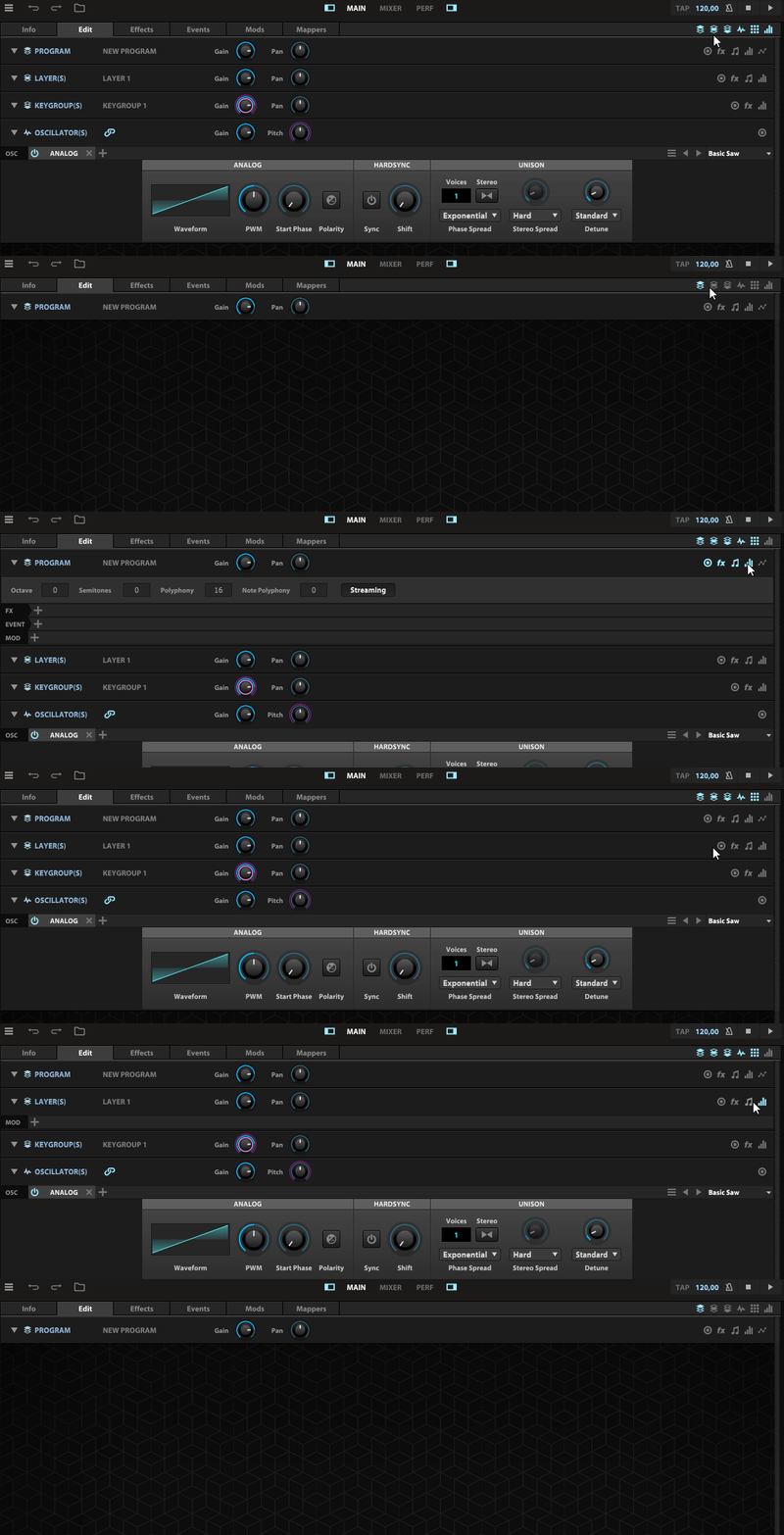
Btw, if you're new to Falcon and feel overwhelmed by the look of the edit window, try switching off individual parts first. Doing so lets you stay focused on the parts you're working on. It's a bit more clickery at the beginning but it helps to avoid getting lost in Falcon's ecosystem.
-
- KVRAF
- 5440 posts since 4 Aug, 2006 from Helsinki
elassi wrote: Sun Oct 20, 2024 5:58 pm Btw, if you're new to Falcon and feel overwhelmed by the look of the edit window, try switching off individual parts first. Doing so lets you stay focused on the parts you're working on. It's a bit more clickery at the beginning but it helps to avoid getting lost in Falcon's ecosystem.
This is not issue for me.
But you someone could as starters say,
why the Falcon gives a note "install the Tag library" although its already installed, that would the first step forward.
This note ” install the Tag library" without any instruction where this should be installed, if the location in UVI Portal is not the corret one, is typical UVI bullshit user instruction policy.