


UVI Falcon 3
-

- KVRAF
- 5440 posts since 4 Aug, 2006 from Helsinki
But my question was directed personally to everyone who installed succesfully Falcon 3.1 to Win.
-
- KVRAF
- 2807 posts since 8 Sep, 2009
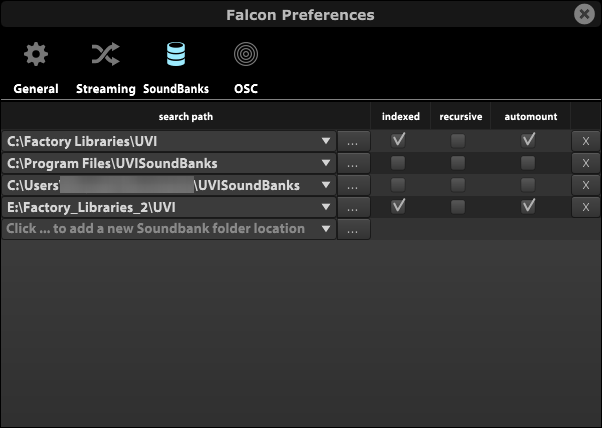
What's difficult in using the Preferences window?Dirtgrain wrote: Sun Oct 20, 2024 5:13 pm With the size of sample libraries, it is incumbent on UVI to plan for users keeping libraries on multiple drives.

-

- Banned
- 887 posts since 3 Jul, 2016
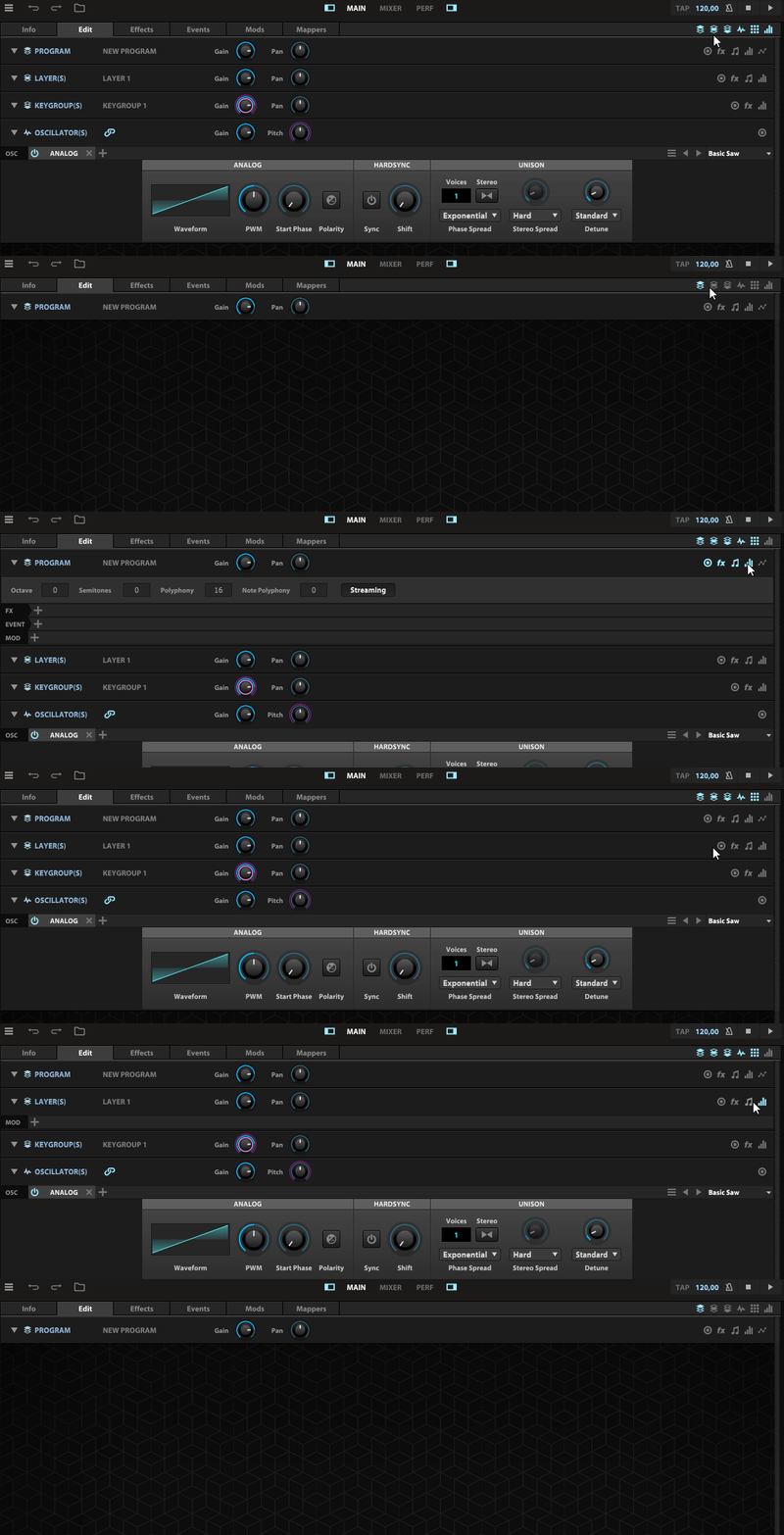
Thanks for the info - I thought I'd give it (falcon) a try ... but ' hey ' - there is no trial..Harry_HH wrote: Sun Oct 20, 2024 6:07 pmelassi wrote: Sun Oct 20, 2024 5:58 pm Btw, if you're new to Falcon and feel overwhelmed by the look of the edit window, try switching off individual parts first. Doing so lets you stay focused on the parts you're working on. It's a bit more clickery at the beginning but it helps to avoid getting lost in Falcon's ecosystem.
This is not issue for me.
But you someone could as starters say,
why the Falcon gives a note "install the Tag library" although its already installed, that would the first step forward.
This note ” install the Tag library" without any instruction where this should be installed, if the location in UVI Portal is not the corret one, is typical UVI bullshit user instruction policy.

That's another BS from UVI I guess - money grab > on the top of the uvi list !!!

MPG X670E CARBON Ryzen 9 7900, 64Gb 6K DDR5 4x2tb Nvmes
-
- KVRAF
- 5066 posts since 27 Jul, 2004
They do not... you can set multiple locations in Falcon... where is the problem??
-
- KVRAF
- 5066 posts since 27 Jul, 2004
Hmmm, most users seemed to have figured out without getting any nervous breakdown or heart attack...Harry_HH wrote: Sun Oct 20, 2024 4:35 pm "It´s hardly UVI´s fault..". You didn't get the point.
UVI's responsibility is to give clear instructions of these most major issues. And "clear" doesn't mean here hidden somewhere in the 40 pages manual.
It seems UVI has done a pretty good job...
Tbh I have never seen anybody complaining about that before... there are for sure other points which could be improved but figuring out what goes to where... come on!!
-
- KVRian
- 1408 posts since 1 Jul, 2023
Just subscribe to Sonic Pass for a month. You can trial the entire ecosystem.AcrossTheSky wrote: Sun Oct 20, 2024 9:58 pmThanks for the info - I thought I'd give it (falcon) a try ... but ' hey ' - there is no trial..Harry_HH wrote: Sun Oct 20, 2024 6:07 pmelassi wrote: Sun Oct 20, 2024 5:58 pm Btw, if you're new to Falcon and feel overwhelmed by the look of the edit window, try switching off individual parts first. Doing so lets you stay focused on the parts you're working on. It's a bit more clickery at the beginning but it helps to avoid getting lost in Falcon's ecosystem.
This is not issue for me.
But you someone could as starters say,
why the Falcon gives a note "install the Tag library" although its already installed, that would the first step forward.
This note ” install the Tag library" without any instruction where this should be installed, if the location in UVI Portal is not the corret one, is typical UVI bullshit user instruction policy.
That's another BS from UVI I guess - money grab > on the top of the uvi list !!!
-
- KVRer
- 6 posts since 8 Aug, 2014
I downloaded Tag Library in Portal, on Mac after download was finished, Portal extracted Rar file, checked file integrity and moved it to default UVI Soundbanks folder itself. I did not have to do this manually.Harry_HH wrote: Sun Oct 20, 2024 6:07 pmelassi wrote: Sun Oct 20, 2024 5:58 pm Btw, if you're new to Falcon and feel overwhelmed by the look of the edit window, try switching off individual parts first. Doing so lets you stay focused on the parts you're working on. It's a bit more clickery at the beginning but it helps to avoid getting lost in Falcon's ecosystem.
This is not issue for me.
But you someone could as starters say,
why the Falcon gives a note "install the Tag library" although its already installed, that would the first step forward.
This note ” install the Tag library" without any instruction where this should be installed, if the location in UVI Portal is not the corret one, is typical UVI bullshit user instruction policy.
What bothered me was presets still appearing in preset browser even after corresponding soundbanks were removed. I had to manually reset database by deleting FalconV2.db file which Tech Support had failed to address.
-

- KVRAF
- 4554 posts since 12 Jan, 2019
I didn't say there was a problem. I just corrected what's-his-face.
Doing nothing is only fun when you have something you are supposed to do.
-
- KVRist
- 44 posts since 17 Dec, 2013
You make it sound like 40 pages is a lot. I wish the manual was a lot bigger honestly.Harry_HH wrote: Sun Oct 20, 2024 4:35 pm ...
And "clear" doesn't mean here hidden somewhere in the 40 pages manual.
-

- KVRian
- 1074 posts since 23 Apr, 2003
I like this in principle, but the 3.1 browser still seems a bit buggy to me. When I open Falcon, I sometimes get a selection of libraries (everything starting with a P or after), or none at all. Also, in the 'old' file/library browser, now libraries show up twice - but not every single time I start Falcon. Sometimes it's just a few doubles, sometimes all, sometimes none.
Do I need to reset the db then? Or just wait until this is fixed in 3.1.1?
Do I need to reset the db then? Or just wait until this is fixed in 3.1.1?
-
- KVRAF
- 5440 posts since 4 Aug, 2006 from Helsinki
You or those given thumb-up to your comment, don’t seem to know what you are commenting.catamorphism wrote: Mon Oct 21, 2024 10:04 amYou make it sound like 40 pages is a lot. I wish the manual was a lot bigger honestly.Harry_HH wrote: Sun Oct 20, 2024 4:35 pm ...
And "clear" doesn't mean here hidden somewhere in the 40 pages manual.
After reading the Falcon manual now, in fact its 348 pages, I tend to agree that its too short.
In 348 pages UVI hasn’t been able to explain how to get the Tagging in use.
Or avoid the constant crashing in Win 10, Live 11.
As said, UVI bullsh*t instruction policy.
And their support seems to be hadles.

-

- KVRAF
- 2035 posts since 30 Mar, 2008 from MN, USA
I could not get the library to populate at all, even after installing the Tags. My library is stored under /Users/Shared/Uvi, and TagLibrary.ufs was present there.
It didn't work until I removed the soundbank location in Preference. Restarted Falcon. Added the soundbank location back and checked indexed and recursive, and then restarted Falcon again.
It didn't work until I removed the soundbank location in Preference. Restarted Falcon. Added the soundbank location back and checked indexed and recursive, and then restarted Falcon again.
CLAP Software Database: https://clapdb.tech. KVR Discussion Topic.