Is Cubase the most frustrating DAW ever created?

Audio Plugin Hosts and other audio software applications discussion
Post Reply New Topic
RELATED
PRODUCTS

Post

machinesworking wrote: Wed Oct 23, 2024 3:02 am One thing that happens though in these threads is people forget what defending a DAW should look like, i.e. the last two pages were glowing hot air. What is it that makes Cubase better to you than other DAWs? It seems like people forget that part of the whole routine? if you're defending the accusation that it's frustrating, give us more than simple praise.

For one I know that Cubase's articulation mapping is pretty straightforward, compared to Logic for instance. Mostly because DP has the same type more or less.

We know that Bitwig has plugin sandboxing and well thought out commands.

Reaper is super user definable, customizable to the nth degree.

DP is a "do everything" DAW, that does songs within songs.

Logic has amazing AI drummers, bass players, a great step sequencer etc.


All I know about Cubase's supposed superiority is it always has the latest tech, although it's not a clip luanching DAW. :shrug:
You make some valid points about the features of various DAWs, and it's important to recognise what truly sets them apart. For me, Cubase shines in a few specific areas:

MIDI Capabilities: Cubase has an incredibly powerful MIDI editing environment. The MIDI quantise, note expression, and logical editor functionalities allow for nuanced control that can be a game changer for composing intricate pieces.

Audio Engine: The audio engine in Cubase is robust, providing high-quality sound and reliable performance, which is crucial when working on large projects with multiple tracks.
Workflow Efficiency: The integration of tools like the Chord Track and Score Editor helps streamline my workflow, making it easier to compose and arrange.

Flexibility with VSTs: Cubase offers great support for VST instruments and effects, allowing for seamless integration with third-party plugins.

Project Management: The way Cubase handles project versions and backups gives me peace of mind when experimenting with different arrangements or mixes.

While I appreciate the strengths of other DAWs you mentioned, these features make Cubase my go-to choice. It’s all about finding the tool that best suits your workflow and creative process!

Post

EfreetiSultan wrote: Wed Oct 23, 2024 10:26 am Lol that's exactly what chatgpt would say :hyper:
I get why it seems that way! ChatGPT aims to provide balanced and helpful responses, so sometimes it can come across as a bit formulaic. But yoursoul add a personal touch and engaged in a more natural conversation.

Post

dlandis wrote: Tue Oct 22, 2024 9:18 pm
zerocrossing wrote: Sat Oct 05, 2024 6:11 am YES! It literally has invisible buttons that only appear if you mouse over them. I’ve been doing this since Studio Vision Pro, and I’ve yet to be as stumped by a DAW than I am while trying to learn this mess. I hope it’s worth it.
Please forgive me if your question has already been answered and I missed it, but have you checked moving the three little dots to make some of those invisible buttons appear (again, forgive me if I'm extrapolating in error; it is often difficult to envision exactly to what one is referring from an internet post.)

Here's an example: next to the Transport Bar, there are three very small dots. Clicking and dragging on them will bring into visibility in the interface several other buttons for the Transport. Is this the type of issue about which you have a question?
No, but I have no idea why I’d have to resize something to show a button that’s clearly got enough space to be shown all the time, and is shown when you mouse over it’s invisible state.
Zerocrossing Media

4th Law of Robotics: When turning evil, display a red indicator light. ~[ ●_● ]~

Post

swilow11 wrote: Sat Oct 05, 2024 10:34 am The thing is it can basically do everything including things you would never really want or need. My issue with it, and a large reason I switched to Bitwig, was persistent corrupted projects, crashes, and a tendency for things to mysteriously just ... change. I would set up the visibility options I liked for each track and they would just seem to revert. Possibly user error...nay, likely user error. But I'm not really wanting to spend lots of my very finite free time just troubleshooting annoying shit. Bitwig, being simpler in many ways, relieved most of my issues and besides some plugins like Synthmaster 3 and Decent Sampler sometimes crashing, I've had far fewer time-wasting issues (although a significant uptick for the recent versions and Bitwig support seem totally disinterested).
I did notice crashes for the first time in the last version, though I’m hopeful the recent update helps.
Zerocrossing Media

4th Law of Robotics: When turning evil, display a red indicator light. ~[ ●_● ]~

Post

rageix wrote: Sat Oct 05, 2024 6:14 pm I understand the feeling. I've learned Bitwig, Ableton, FL, Cubase, Logic, and Studio One. When I open a new DAW there is always some frustration as you learn your way around.

Cubase really isn't that different from any other DAW though and it's most similar to Logic and Studio One. It does have a lot more advanced features than something like Ableton though. You'll get it. Some things in Cubase are legit stupid though. I just recommend watching someone work in it, it makes learning it way faster.
I temporarily stopped using it, as I had deadlines that crept up that couldn’t have me futzing around with trying to figure out how to do things that should be pretty obvious.

Similarly, I rented a car last weekend. It was supposed to be a Ford Mach-E, but they were out of them and they gave us a Tesla. Smash cut to my wife and I, both tech workers with tons of experience with various interfaces, spending 10 minutes trying to figure out how to start it. We actually had to find a YouTube tutorial. The thing that killed me was that it seemed to be on when you enter the car, but it was only in accessory mode. I couldn’t figure out why I couldn’t get it in “gear.” As it turned out, I had to put the key-card on a panel that was hidden under the center console. WTF? Later I realized there was a crude animation showing this, but I blew past it looking for a “gear” button because the car seemed on, and later looking for some sort of on button. So, the car knew the key was in it, but wouldn’t turn on with that key? So stupid. Putting the “on” panel in a clear place on the main console with a graphic that suggested a key would have made this an easy and intuitive experience. I can’t believe that stupidity made it past the prototype phase.
Zerocrossing Media

4th Law of Robotics: When turning evil, display a red indicator light. ~[ ●_● ]~

Post

And why does Cubase not let go of some audio when trying to quit the program, always having to 'end task'
Beauty is only skin deep,
Ugliness, however, goes right the way through

Post

Is Cubase handling FX plugin bypass differently from other DAWs? I notice my Sonarworks SoundID plugin is always switched on when I load a project despite switching it off prior to saving.
Every day takes figuring out all over again how to f#ckin’ live.

Post

bibz1st wrote: Wed Oct 23, 2024 2:11 pm And why does Cubase not let go of some audio when trying to quit the program, always having to 'end task'
I find there is a delay (from less than 1 to up to 15 seconds) in closing large projects as Cubase clears, depending on size. But I've never had to 'end task' to get it to quit. So I'd suspect there is some issue with your installation or computer if you're waiting the seconds as I am.

Post

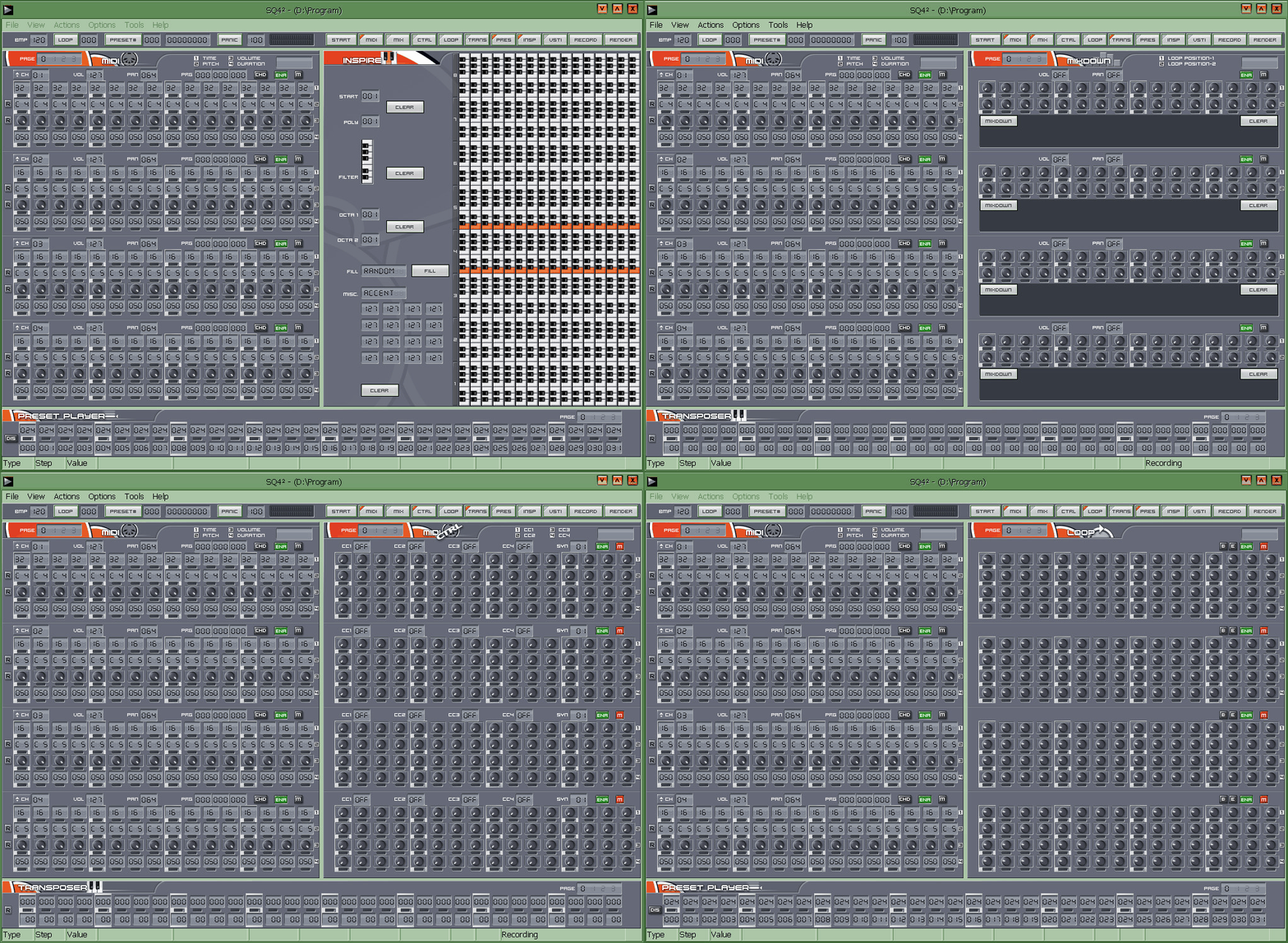
whilst being a sequencer & not a DAW the SQ4 II is far worse look at the huge array of knobs & the keyboards borrowed from the old fruity loops days real confidence building-

Image

BUTT!... there are also many way more that are better streamlined than cubase...

Post

audiouser720 wrote: Wed Oct 23, 2024 11:02 am MIDI Capabilities: Cubase has an incredibly powerful MIDI editing environment. The MIDI quantise, note expression, and logical editor functionalities allow for nuanced control that can be a game changer for composing intricate pieces.

Audio Engine: The audio engine in Cubase is robust, providing high-quality sound and reliable performance, which is crucial when working on large projects with multiple tracks.

Flexibility with VSTs: Cubase offers great support for VST instruments and effects, allowing for seamless integration with third-party plugins.
I split your list in two for a reason. The ones above could be said about DP, Studio One, Reaper, and Logic if your'e on a Mac. In terms of the "audio engine" that one is cringe, I don't think I've had issues with audio ever, I mean literally since starting on recording into a computer.
Workflow Efficiency: The integration of tools like the Chord Track and Score Editor helps streamline my workflow, making it easier to compose and arrange.

Project Management: The way Cubase handles project versions and backups gives me peace of mind when experimenting with different arrangements or mixes.
These are cool and definitely the first time I've heard someone mention this. Most DAWs can make automatic backups, but if there are other tools for making the whole process more organized that's a plus. Like I mentioned before Cubase is famous outside it's user base for getting almost every new feature first, so Atmos, ARA, articulation maps etc. all were likely first or near first on Cubase. Stability wise, it's like DP and Logic, it's had some rough patches and solid patches.

Post

zerocrossing wrote: Wed Oct 23, 2024 1:35 pm
dlandis wrote: Tue Oct 22, 2024 9:18 pm
zerocrossing wrote: Sat Oct 05, 2024 6:11 am YES! It literally has invisible buttons that only appear if you mouse over them. I’ve been doing this since Studio Vision Pro, and I’ve yet to be as stumped by a DAW than I am while trying to learn this mess. I hope it’s worth it.
Please forgive me if your question has already been answered and I missed it, but have you checked moving the three little dots to make some of those invisible buttons appear (again, forgive me if I'm extrapolating in error; it is often difficult to envision exactly to what one is referring from an internet post.)

Here's an example: next to the Transport Bar, there are three very small dots. Clicking and dragging on them will bring into visibility in the interface several other buttons for the Transport. Is this the type of issue about which you have a question?
No, but I have no idea why I’d have to resize something to show a button that’s clearly got enough space to be shown all the time, and is shown when you mouse over it’s invisible state.
From what you're saying I agree with you that we're probably not looking at the same issue: it's not really a "resize" I'm talking about, but just an addition of previously unseen buttons. But what I'm not getting is your reference to "invisible" buttons that show up when one mouses over them. Can you give an example of where/when you see this? Just what do the buttons do that are invisible? Would you call them "core functions" or something a bit more extraneous?
“Madness, as you know, is like gravity: all it takes is a little push.”

Post

mataya wrote: Wed Oct 23, 2024 9:04 am I work in Cubase for over 20 years and instead of listing what's good or bad about it...the fact that I made a lot of work in it professionally and was rarely "frustrated" by it, say's a lot.
It has what I need for my job...if it doesn't, I use something else.
Yup, this is how I feel, except I've definitely had my share of frustrations over the years haha

But I recently upgraded from an ANCIENT version of Cubase, and after seeing all the stuff Ableton Live had to offer, was feeling pretty sure I'd make the switch. I demoed it and put in a lot of time, but I just found it frustrating as hell. Apart from the regular growing pains, I'd run into what I considered very simple workflow issues (and sometimes bugs) that people had been bringing up on their forums for years. Eventually, I saw a great deal on a Cubase upgrade and decided it would be better to just work with what gets me results. But I'm still going to keep an eye on Ableton...

Post

VitaminD wrote: Wed Oct 23, 2024 3:55 pm
bibz1st wrote: Wed Oct 23, 2024 2:11 pm And why does Cubase not let go of some audio when trying to quit the program, always having to 'end task'
I find there is a delay (from less than 1 to up to 15 seconds) in closing large projects as Cubase clears, depending on size. But I've never had to 'end task' to get it to quit. So I'd suspect there is some issue with your installation or computer if you're waiting the seconds as I am.
Left it for 2 minutes last night and still had to 'end task' it. Dont know what to look for to get it working properly so any suggestions ?
Beauty is only skin deep,
Ugliness, however, goes right the way through

Post

dlandis wrote: Wed Oct 23, 2024 9:24 pm From what you're saying I agree with you that we're probably not looking at the same issue: it's not really a "resize" I'm talking about, but just an addition of previously unseen buttons. But what I'm not getting is your reference to "invisible" buttons that show up when one mouses over them. Can you give an example of where/when you see this? Just what do the buttons do that are invisible? Would you call them "core functions" or something a bit more extraneous?
There is only one invisible button I can think of and it would be the track show/hide automation button. It's in the bottom left most part of the tack header.

Post

bibz1st wrote: Thu Oct 24, 2024 8:23 pm Left it for 2 minutes last night and still had to 'end task' it. Dont know what to look for to get it working properly so any suggestions ?
This has been an issue with Cubase forever, but I haven't ran into in V13, so I thought they finally fixed this. But basically the issue is one of your plugins in your project is misbehaving and keeping Cubase from closing, at least that is the explanation that Steinberg gives us. To figure out the plugin you would have to go though your project and probably try disabling various plugins. It's likely a 3rd party plugin. I don't know why they don't just kill every plugin on exit like every other DAW but that's just another Cubase quirk.

Post Reply

Return to “Hosts & Applications (Sequencers, DAWs, Audio Editors, etc.)”