

This was actually a nice idea, thank you! We'll test it further in the following weeks.


Looks great! Thank youaudiothing wrote: Wed Sep 18, 2024 8:45 am
This was actually a nice idea, thank you! We'll test it further in the following weeks.

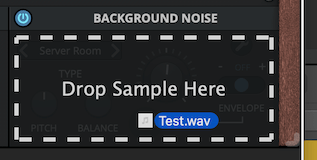
I need to think about the best way to implement this. Currently, any file you drop gets copied into a "user" folder and loaded, but there's no option to delete a sample from within the plugin, so you'd have to do that manually. This is the simplest and quickest solution for now. Saving a sample into a preset might be a bit confusing.enCiphered wrote: Wed Sep 18, 2024 8:57 am Edit: I was just thinking, it would make more sense if Speakers saved the samples only temporarily, unless I create a preset. In that case, the sample would be 'baked' into the preset, just to avoid cluttering the hard drive, or maybe there is a better solution for it. I usually drag and drop a lot of different samples in similar tools until I'm satisfied with the sound.
Maybe you can do it like many software samplers and let Speakers remember the location of the noise file (anywhere on the user's drives, not necessarily the current Speakers user folder).audiothing wrote: Thu Sep 19, 2024 10:14 amI need to think about the best way to implement this. Currently, any file you drop gets copied into a "user" folder and loaded, but there's no option to delete a sample from within the plugin, so you'd have to do that manually. This is the simplest and quickest solution for now. Saving a sample into a preset might be a bit confusing.enCiphered wrote: Wed Sep 18, 2024 8:57 am Edit: I was just thinking, it would make more sense if Speakers saved the samples only temporarily, unless I create a preset. In that case, the sample would be 'baked' into the preset, just to avoid cluttering the hard drive, or maybe there is a better solution for it. I usually drag and drop a lot of different samples in similar tools until I'm satisfied with the sound.
Unfortunately, the way it works now, it's not like a standard "rompler". The samples found in the folder populate the parameter Noise Type, and that's it. We don't store the sample path, just the reference to the sample used as a parameter value.Lotuz2019 wrote: Thu Sep 19, 2024 11:59 amMaybe you can do it like many software samplers and let Speakers remember the location of the noise file (anywhere on the user's drives, not necessarily the current Speakers user folder).
At the moment is there a "missing noise file dialogue" in case the noise file that was used in a project can't be found by Speakers in the user folder?
Oh very nice, I have been waiting for this! Thank you so much for the updateaudiothing wrote: Thu Nov 14, 2024 10:54 pm Update v1.3
You can download the update from your user area.
Speakers now features a Snapshot System, letting you save settings in available slots, with each plugin instance having its own snapshots stored in the DAW session. You can automate snapshot changes via the Snapshot parameter in your DAW for smooth transitions.
Changelog:
- Added: Snapshot System
- Added: Noise Drag and Drop
- Added: 1 speaker model (Synthi)
- Added: Graphics Controls (Brightness and Contrast)
- Added: macOS 15 Sequoia support
- Improved: Frequency response of some models
- Fixed: Pro Tools session and automations recall in certain situations

Could you do a video on this demonstrating this feature?audiothing wrote: Thu Nov 14, 2024 10:54 pm Update v1.3
Speakers now features a Snapshot System, letting you save settings in available slots, with each plugin instance having its own snapshots stored in the DAW session. You can automate snapshot changes via the Snapshot parameter in your DAW for smooth transitions.
Sure, there you go:
This feature will be extremely useful in Fog Convolver, especially since it's currently not possible to change IRs with automation. It’s still in the early stages and has room for further improvement.Lotuz2019 wrote: Fri Nov 15, 2024 3:46 pm Interesting feature. This could be nice for other plugins as well. Maybe even allow you to transition from one snapshot to another gradually rather than instantaneously. A different way of doing automation. Instead of automating multiple parameters at the same time the user could just change from one snapshot to another and let the plugin do the automation. Just brainstorming...
Yes probably that's a good idea.Funkybot's Evil Twin wrote: Fri Nov 15, 2024 7:53 pm For Fog Convolver might it make sense to have a spillover option so users have the choice as to whether they want to cut off the tails or not?
Submit: News, Plugins, Hosts & Apps | Advertise @ KVR | Developer Account | About KVR / Contact Us | Privacy Statement
© KVR Audio, Inc. 2000-2026