

Yes, most DAWs have multiple midi tracks view. However, shared/ghost/cloned clips has its use that when you want to edit all of them, you edit just one because they are ghost (linked) copies to each other which can be very handy if you want your repetitive part to be edited:
Which DAW would you recommend coming from FL Studio? Bitwig, Ableton, Cubase etc.
-
- KVRAF
- 9144 posts since 7 Oct, 2005
Using: Cubase Pro 15, Reason 13, Tascam US-4x4HR, MODX6, DM12D, LaunchKey 49, Yamaha guitar(Pacifica 612v) and bass (BB234) and some virtual instruments and synths.
-

- KVRist
- 387 posts since 4 Apr, 2021
Oh, I understand nowBONES wrote: Sat Nov 16, 2024 12:10 pm Studio One will display MIDI data from multiple tracks, depending on which clips you have selected. It's not strictly ghost notes, because you can edit notes from any or all of them.

And to achieve the same in Fl Sgudio you need to make “unique”. Both ways have cons and pros maybe.
-

- GRRRRRRR!
- 17749 posts since 14 Jun, 2001 from Somewhere you're not!
That's not my understanding of what ghost notes are. I thought they were notes from other parts that display in your PR window while you are working on another part. What you described is the "pattern" workflow in Studio One.EnGee wrote: Sat Nov 16, 2024 4:34 pm Yes, most DAWs have multiple midi tracks view. However, shared/ghost/cloned clips has its use that when you want to edit all of them, you edit just one because they are ghost (linked) copies to each other which can be very handy if you want your repetitive part to be edited:
NOVAkILL : Legion GO, AMD Z1x, 16GB RAM, Win11 | Audient EVO 8 | Lumi Keys | Studio Pro 8
Korg Odyssey, bx-oberhausen, Proxima, PolyMax, GR8, JP6K, Union, Atomika,
Invader 2, Flow Motion, Olga, TRK 01, Thorn, Spire, VG Iron
Korg Odyssey, bx-oberhausen, Proxima, PolyMax, GR8, JP6K, Union, Atomika,
Invader 2, Flow Motion, Olga, TRK 01, Thorn, Spire, VG Iron
-
- KVRAF
- 9144 posts since 7 Oct, 2005
You are correct about the ghost notes, but what we were talking about was the ghost clips or cloned clips (midi or audio). The ghost/cloned clips are any clips (midi or audio) that you can copy and paste. They are linked to one clip and when you change any midi or audio data inside that clips, it reflects on all other cloned clips.BONES wrote: Sun Nov 17, 2024 8:46 amThat's not my understanding of what ghost notes are. I thought they were notes from other parts that display in your PR window while you are working on another part. What you described is the "pattern" workflow in Studio One.EnGee wrote: Sat Nov 16, 2024 4:34 pm Yes, most DAWs have multiple midi tracks view. However, shared/ghost/cloned clips has its use that when you want to edit all of them, you edit just one because they are ghost (linked) copies to each other which can be very handy if you want your repetitive part to be edited:
Yes, patterns are the same but more organized midi clips. So, in FL Studio you can of course repeat the patterns but you can 'disconnect' the repetitions from the original so when you edit one of them, it doesn't reflect on the other (the same in S1).
In Ableton Live there is no cloned clips, so when you copy and paste the same clip, all are not connected to each other. Personally, I like them like this so I can edit what I want without reflecting the changes in other clips. I don't remember if Cubase has it or not because I really don't use this feature.
Ghost notes is another feature but completely different usage. It means notes of multiple midi tracks in the same piano roll. Ableton Live has that and I think now all of the DAWs I know of as well. I use this feature from time to time especially when I want to match or inspect the relation between the chords and melody. Also, important for me to lay the bass notes so it doesn't clash a lot with the kick drum for example. Although, ideally, I should depend on my ears, but my ears are not enough to judge! I don't have a good musical ears!
Using: Cubase Pro 15, Reason 13, Tascam US-4x4HR, MODX6, DM12D, LaunchKey 49, Yamaha guitar(Pacifica 612v) and bass (BB234) and some virtual instruments and synths.
-
- KVRAF
- 9144 posts since 7 Oct, 2005
Oh? Nice! I don't have 14 yet, I'm still on 13. I will upgrade when there is a discount as there are many good features in v14.xbitz wrote: Sun Nov 17, 2024 9:23 am ^^^ Cubase 14 has just implemented/introduced the pattern based workflow
very similiar as the S1 one
Anyway, shared/cloned clips are also exist in Cubase:
Using: Cubase Pro 15, Reason 13, Tascam US-4x4HR, MODX6, DM12D, LaunchKey 49, Yamaha guitar(Pacifica 612v) and bass (BB234) and some virtual instruments and synths.
-

- KVRAF
- 2784 posts since 18 Apr, 2001
Totally agree. I moved from Orion to Reaper because I wanted more options and functionality, but eventually, I was more programming and tweaking Reaper (into a usable workflow) than making music. Now, I would say that Reason (which I now use exclusively) is the closest thing to the directness and balance of features that Orion had. Of course, Reason also does a lot more than Orion did, but overall, it has that same feel.BONES wrote: Fri Nov 15, 2024 1:29 pm I have no idea what that might be these days but something like Synapse's Orion was the prefect thing for getting stuff done with the fewest distractions.
CrimsonWarlock aka TechnoGremlin, Moved to Reason and Rack Extensions exclusively (from Reaper and VSTs) several years ago.
-
- KVRAF
- 5144 posts since 3 Oct, 2013
By the way, S1 can also do what Reaper and Reason(with SSL mixer) can—its native plugins are interactive and come with visual feedback in the mixer view as well. You don’t need to switch between tracks or open and close plugins; I can only praise it

I think S1's only drawback now is that if you don’t want to draw those automation curves manually, it still needs some kind of third-party modulation processor, like the mp3244. But otherwise, it’s pretty solid

I think S1's only drawback now is that if you don’t want to draw those automation curves manually, it still needs some kind of third-party modulation processor, like the mp3244. But otherwise, it’s pretty solid
"Where we're workarounding, we don't NEED features." - powermat
-
- KVRAF
- 2784 posts since 18 Apr, 2001
I never used S1, but was a Reaper user for over a decade (still have it installed as well), and showing FX graphics in the mixer is no substitute for having the actual EQ and compressor controls on the mixer channels the way that Reason does. So far, I think only LUNA and Harrison MixBus have a similar setup, and those two are (still) a fa cry from an actual DAW.xbitz wrote: Sun Nov 17, 2024 1:56 pm By the way, S1 can also do what Reaper and Reason(with SSL mixer) can—its native plugins are interactive and come with visual feedback in the mixer view as well. You don’t need to switch between tracks or open and close plugins
I tried to get to something like the Reason SSL console in Reaper, and it gets a big mess really fast.
When you can mix on a virtual (but full) SSL-console, though...

CrimsonWarlock aka TechnoGremlin, Moved to Reason and Rack Extensions exclusively (from Reaper and VSTs) several years ago.
-
- KVRAF
- 5144 posts since 3 Oct, 2013
^^^ What you see in the mixer is the simplified representation of the S1 Fat Channel. You can pick the actual one from all kinds of (vintage) compressors and EQs

so

--
but the closest to Reason, where the creative part happens in the rack and the mixing in the mixer, is the AL-Bitwig/SSL360 combo.

The concept of Studio One (S1) is actually very similar to Ableton Live (AL)/Bitwig, even the macros are there. The only difference is that individual devices are not located horizontally in the device bar at the bottom, but rather in the track inspector or the mixer.

in Studio One (S1), the creative processes happen within the devices themselves rather than in the DAW as a whole, but fundamentally, they are very similar, finished, too much coffee sry
so
--
but the closest to Reason, where the creative part happens in the rack and the mixing in the mixer, is the AL-Bitwig/SSL360 combo.
The concept of Studio One (S1) is actually very similar to Ableton Live (AL)/Bitwig, even the macros are there. The only difference is that individual devices are not located horizontally in the device bar at the bottom, but rather in the track inspector or the mixer.
in Studio One (S1), the creative processes happen within the devices themselves rather than in the DAW as a whole, but fundamentally, they are very similar, finished, too much coffee sry
"Where we're workarounding, we don't NEED features." - powermat
-
- KVRAF
- 2784 posts since 18 Apr, 2001
But the fat-channel controls are not all in the mixer channel. You still need to open a window to get to them. Even the Pro-channel in Cakewalk, which is a lot more functional than what you can do inside the Reaper mixer (and same for S1 from what I can see), is not constantly visible in the mixer and needs to be opened for each mixer channel individually.xbitz wrote: Sun Nov 17, 2024 3:49 pm ^^^ What you see in the mixer is the simplified representation of the S1 Fat Channel. You can pick the actual one from all kinds of (vintage) compressors and EQs
That mixer looks nice, but is it a native part of Bitwig? If so, it is indeed close, but I never seen it mentioned as a native feature.xbitz wrote: Sun Nov 17, 2024 3:49 pm but the closest to Reason, where the creative part happens in the rack and the mixing in the mixer, is the AL-Bitwig/SSL360 combo.
However, I stand by my opinion that both the mixers from S1 and Reaper are nowhere near the functionality of a fully emulated SSL-console. If any of these DAWs had full SSL (or other console) mixer strips, why is everyone who uses those DAWs loading up console-channel VST plugins on all their mixer channels

CrimsonWarlock aka TechnoGremlin, Moved to Reason and Rack Extensions exclusively (from Reaper and VSTs) several years ago.
-
- KVRAF
- 5144 posts since 3 Oct, 2013
^^^ I don't know which one is the best to use, but in Cubase 14, you can now modulate everything, like the built-in channel strip controls. It's become pretty fun
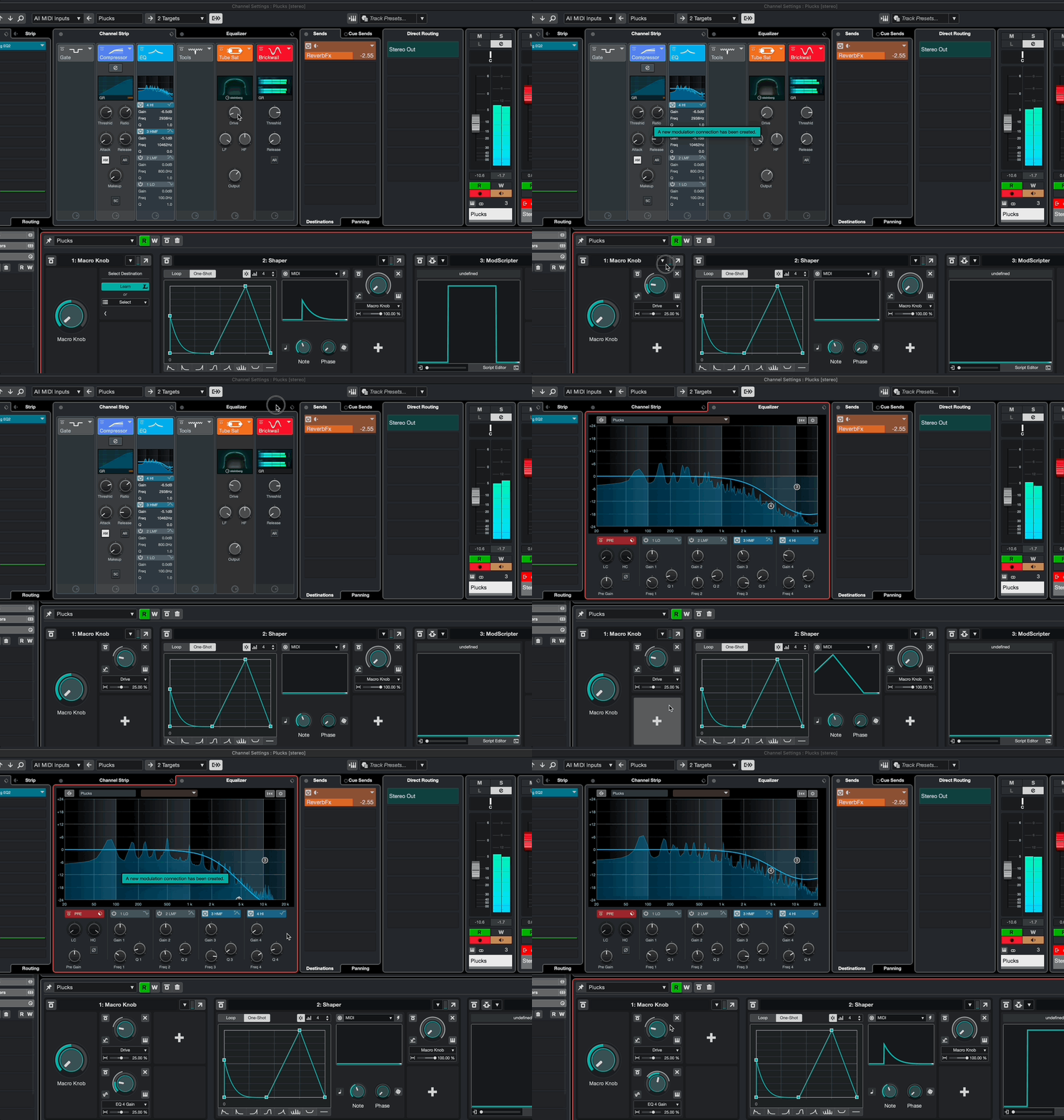
At least it keeps me hooked for now, though I’m generally a Cubase fan anyway. This was exactly what I felt was missing from it until now, obviously, it’s clear that this is their first attempt at it, but since you can create scripted modulators—for example, setting modulation to every 4th incoming MIDI note, modulation above a pitch-velocity level or just on ginven notes with given MIDI channel etc. —it’s already good for a lot of creative things
At least it keeps me hooked for now, though I’m generally a Cubase fan anyway. This was exactly what I felt was missing from it until now, obviously, it’s clear that this is their first attempt at it, but since you can create scripted modulators—for example, setting modulation to every 4th incoming MIDI note, modulation above a pitch-velocity level or just on ginven notes with given MIDI channel etc. —it’s already good for a lot of creative things
"Where we're workarounding, we don't NEED features." - powermat
-
- GRRRRRRR!
- 17749 posts since 14 Jun, 2001 from Somewhere you're not!
Yeah, I always thought the pattern workflow would be really useful but I have literally never bothered with it. I prefer to be able to go in and change individual patterns and if I do want to change every copy, it is very little effort to delete all but one, change it and then press D a few times to repopulate the track. In fact, most of the time I end up gluing all the patterns together once I am settled on a basic arrangement. It makes the arrangement window a lot neater. After that, all the editing can be done in the PR.EnGee wrote: Sun Nov 17, 2024 9:18 amIn Ableton Live there is no cloned clips, so when you copy and paste the same clip, all are not connected to each other. Personally, I like them like this so I can edit what I want without reflecting the changes in other clips.
I find I am extremely comfortable in Studio One. It's very much like Cubase, without the 30+ years of kludges and bolt-on workarounds you have to deal with in Cubase. I initially bought Pro but switched to Artist a couple of years ago. IN that two years I have never once wanted a feature that was in Pro but not in Artist. If the free version supported VSTs, I reckon it would have everything I need. Now that they have ditched Artist, I probably won't upgrade for a long, long time. I managed to keep using Orion for 5 or 6 years after development ended. I still have it installed and it still works perfectly well so I see no reason why Studio One v6.6 won't also still work when I am well into my 70s. (It's quite the thought that I will almost certainly still be making music when I am 70+ years old.)crimsonwarlock wrote: Sun Nov 17, 2024 12:00 pmTotally agree. I moved from Orion to Reaper because I wanted more options and functionality, but eventually, I was more programming and tweaking Reaper (into a usable workflow) than making music. Now, I would say that Reason (which I now use exclusively) is the closest thing to the directness and balance of features that Orion had. Of course, Reason also does a lot more than Orion did, but overall, it has that same feel.
NOVAkILL : Legion GO, AMD Z1x, 16GB RAM, Win11 | Audient EVO 8 | Lumi Keys | Studio Pro 8
Korg Odyssey, bx-oberhausen, Proxima, PolyMax, GR8, JP6K, Union, Atomika,
Invader 2, Flow Motion, Olga, TRK 01, Thorn, Spire, VG Iron
Korg Odyssey, bx-oberhausen, Proxima, PolyMax, GR8, JP6K, Union, Atomika,
Invader 2, Flow Motion, Olga, TRK 01, Thorn, Spire, VG Iron
-
- KVRian
- 1413 posts since 7 Oct, 2023 from Tokyo
I like Bitwig a lot so far but am relatively new to it, coming from Reaper and Logic.
For a general purpose/recording DAW I would recommend Reaper over Logic if you have sophisticated routing needs, otherwise it's a tie. I'm definitely more comfortable in Reaper but Logic comes with a reasonable amount of stuff for the money. Reaper is less buggy/more stable than Logic in my experience. Logic is a nicer mac app. Reaper is a bigger bargain over time.
AL and Bitwig come with a lot more than Logic - it's not even a fair comparison really. However, the DAW workflow tends to be more integral with them than Logic or Reaper, in that in AL and Bitwig (and especially Bitwig), the DAW becomes almost an instrument itself (or literally one, with The Grid). Especially in terms of modulation.
I'm still getting used to some things in Bitwig (the scrolling and zoom behavior of the Arranger timeline is... different).
For a general purpose/recording DAW I would recommend Reaper over Logic if you have sophisticated routing needs, otherwise it's a tie. I'm definitely more comfortable in Reaper but Logic comes with a reasonable amount of stuff for the money. Reaper is less buggy/more stable than Logic in my experience. Logic is a nicer mac app. Reaper is a bigger bargain over time.
AL and Bitwig come with a lot more than Logic - it's not even a fair comparison really. However, the DAW workflow tends to be more integral with them than Logic or Reaper, in that in AL and Bitwig (and especially Bitwig), the DAW becomes almost an instrument itself (or literally one, with The Grid). Especially in terms of modulation.
I'm still getting used to some things in Bitwig (the scrolling and zoom behavior of the Arranger timeline is... different).