

Use one of the 4 LFOs on the mod page.Touch The Universe wrote: Tue Dec 03, 2024 4:21 pm One more things, are there any truly monophonic LFO's that never trigger back, even at the start of the bar? If not, I'll like to make an official feature request on github. This goes for LFO's or envelopes or anything I can use for this purpose.

reFX NEXUS5 is out now!
-

- KVRian
- 1287 posts since 3 May, 2005 from Victoria, BC
-
- KVRian
- 906 posts since 25 Jan, 2014
I just had a quick look and to me that doesn't sound like a bug but rather that the "retro gui" cutoff is a "master cutoff control" for all 1 and 2 filters for all the layers you could have ...so it wouldn't make sense that it would follow each other as you said.Touch The Universe wrote: Tue Dec 03, 2024 3:46 pm I recreated a previous bug I found earlier too, where the retro gui settings don't match the editor. Retro gui cutoff could be at zero but the editor could be at 100.
You can even turn it off in the retro gui and you will still be able to use the filter in the new gui...

There is the same kind of control in Sylenth1

-
 Touch The Universe Touch The Universe https://www.kvraudio.com/forum/memberlist.php?mode=viewprofile&u=190615
 - KVRAF
- 5808 posts since 2 Oct, 2008
I think you are rightJolaff wrote: Tue Dec 03, 2024 4:59 pmI just had a quick look and to me that doesn't sound like a bug but rather that the "retro gui" cutoff is a "master cutoff control" for all 1 and 2 filters for all the layers you could have ...so it wouldn't make sense that it would follow each other as you said.Touch The Universe wrote: Tue Dec 03, 2024 3:46 pm I recreated a previous bug I found earlier too, where the retro gui settings don't match the editor. Retro gui cutoff could be at zero but the editor could be at 100.
You can even turn it off in the retro gui and you will still be able to use the filter in the new gui...
There is the same kind of control in Sylenth1

It's a bit confusing though, would be nice to see the master cutoff in the editor as well but as long as I keep that in mind it shouldn't be an issue anymore. Good catch.
At this point I'm wondering if other "bugs" I mentioned aren't just user error as well, but the manual can't seem to help shed light on the issue. Will wait and see.
100 High Quality Soundsets: Omnisphere 2, Dune 3, Tone 2 Synths, Pigments, Uhe Synths, Halion, Spire, and others.
TTU Youtube
TTU Youtube
-
Touch The Universe Touch The Universe https://www.kvraudio.com/forum/memberlist.php?mode=viewprofile&u=190615
- KVRAF
- 5808 posts since 2 Oct, 2008
PerfectFigBug wrote: Tue Dec 03, 2024 4:55 pmUse one of the 4 LFOs on the mod page.Touch The Universe wrote: Tue Dec 03, 2024 4:21 pm One more things, are there any truly monophonic LFO's that never trigger back, even at the start of the bar? If not, I'll like to make an official feature request on github. This goes for LFO's or envelopes or anything I can use for this purpose.

100 High Quality Soundsets: Omnisphere 2, Dune 3, Tone 2 Synths, Pigments, Uhe Synths, Halion, Spire, and others.
TTU Youtube
TTU Youtube
-
Touch The Universe Touch The Universe https://www.kvraudio.com/forum/memberlist.php?mode=viewprofile&u=190615
- KVRAF
- 5808 posts since 2 Oct, 2008
Someone commented on this video that the solution to this issue is not to delete the samples from the sample editor. Can someone confirm this is the way Nexus just handle things? That any sample you import will always show up for some reason in the sample editor window, even if it's hundreds or what not, whether they are used in a patch or not?Touch The Universe wrote: Sun Dec 01, 2024 4:34 pm Alright I made a quick video on what I think is going it. It might be a result of me not reading the manual for the correct way to be loading presets and making patches. I load samples, then save the patch, then I delete the samples from the sample editor and load new samples and save a new patch. What I show what is happening is in the process of deleting the presets in the sample editor to load new samples for a new patch, it seems the samples I delete from the sample editor also remove the samples from the user sample folder in a way I can't recall the patch, even though it seems common sense since I already saved the patch it won't undo a critical operation from a previous patch in the creation of a new one.
I also address the issue of samples hanging on from previous patch creation. I'm also not sure if it was designed to be that way but if so, it's crazy since if I want a bank with a couple hundred patches, I don't want them all showing up in the sample editor window all the time. It would get too busy to the extreme.
The manual does not specify this. If this is the way it should work, then I can get back to designing presets.
100 High Quality Soundsets: Omnisphere 2, Dune 3, Tone 2 Synths, Pigments, Uhe Synths, Halion, Spire, and others.
TTU Youtube
TTU Youtube
-
- KVRian
- 1287 posts since 3 May, 2005 from Victoria, BC
Yes. Samples and presets are separate / independent things. They live in "User Samples" and "User Presets" respectively. Many presets can use the same sample, that's how much of the factory content is designed. If you delete that one sample, then any other presets that use it will break.Touch The Universe wrote: Tue Dec 03, 2024 8:06 pm The manual does not specify this. If this is the way it should work, then I can get back to designing presets.
-
- KVRian
- 906 posts since 25 Jan, 2014
See the "Audio files" section as a browser to access your Nexus User Samples ...not the contain of the actual presets... if you delete something there ...you delete it from your user sample folder...


-
Touch The Universe Touch The Universe https://www.kvraudio.com/forum/memberlist.php?mode=viewprofile&u=190615
- KVRAF
- 5808 posts since 2 Oct, 2008
Alright, sounds good. Off to work. Thanks guys 
P.s. any chance of getting a search for missing samples option?
P.s. any chance of getting a search for missing samples option?
100 High Quality Soundsets: Omnisphere 2, Dune 3, Tone 2 Synths, Pigments, Uhe Synths, Halion, Spire, and others.
TTU Youtube
TTU Youtube
-
qtheerearranger qtheerearranger https://www.kvraudio.com/forum/memberlist.php?mode=viewprofile&u=325452
- KVRian
- 920 posts since 26 Mar, 2014 from Denver, Co
Just updated to the latest update and the reverbs and delays are doing nothing? The other effects work for me but when I put a reverb or delay on something there is zero effect. No I don’t have things bypassed
Bitwig 6 • Diva, Dune, Serum, and UVI Falcon are my Daily Drivers • Drum Machines • Harrison 32c + DSM 3 + American Class A Enjoyer • Apple M4 Max • Apollo User • DJ • Dance Music is life
-
Touch The Universe Touch The Universe https://www.kvraudio.com/forum/memberlist.php?mode=viewprofile&u=190615
- KVRAF
- 5808 posts since 2 Oct, 2008
I'm finding it hard to get loop points to sound decent on some samples, especially shorter ones for bass. I added them manually and they should sound perfect in a seperate program I made but Nexus just isn't reading the points that are already embedded in the sample. Will this ever get addressed?
100 High Quality Soundsets: Omnisphere 2, Dune 3, Tone 2 Synths, Pigments, Uhe Synths, Halion, Spire, and others.
TTU Youtube
TTU Youtube
-
- KVRian
- 1287 posts since 3 May, 2005 from Victoria, BC
Can you share the samples with me that aren't looping correctly, I'll look into it.Touch The Universe wrote: Wed Dec 04, 2024 12:05 am I'm finding it hard to get loop points to sound decent on some samples, especially shorter ones for bass. I added them manually and they should sound perfect in a seperate program I made but Nexus just isn't reading the points that are already embedded in the sample. Will this ever get addressed?
-
Touch The Universe Touch The Universe https://www.kvraudio.com/forum/memberlist.php?mode=viewprofile&u=190615
- KVRAF
- 5808 posts since 2 Oct, 2008
Let me clarify, Nexus is reading none of my loop points from any sample. On pads I can use nexus autoloop feature and that sounds decent enough most times, but on short basses or leads you really need to dial in close and deep to select zero points to make them loop flawlessly. I've done this already with thousands of samples so I'd just like Nexus to read the loop points already embeded in the samples. I'm happy to send you some samples though.FigBug wrote: Wed Dec 04, 2024 12:18 amCan you share the samples with me that aren't looping correctly, I'll look into it.Touch The Universe wrote: Wed Dec 04, 2024 12:05 am I'm finding it hard to get loop points to sound decent on some samples, especially shorter ones for bass. I added them manually and they should sound perfect in a seperate program I made but Nexus just isn't reading the points that are already embedded in the sample. Will this ever get addressed?
Is anyone else getting Nexus to read loop points already embedded in the samples?
100 High Quality Soundsets: Omnisphere 2, Dune 3, Tone 2 Synths, Pigments, Uhe Synths, Halion, Spire, and others.
TTU Youtube
TTU Youtube
-
- KVRian
- 1287 posts since 3 May, 2005 from Victoria, BC
Yeah, send me a few at roland.rabien@refx.com and I'll see what's up. They probably aren't being read right now, but it's not hard to add.Touch The Universe wrote: Wed Dec 04, 2024 12:34 am Let me clarify, Nexus is reading none of my loop points from any sample. On pads I can use nexus autoloop feature and that sounds decent enough most times, but on short basses or leads you really need to dial in close and deep to select zero points to make them loop flawlessly. I've done this already with thousands of samples so I'd just like Nexus to read the loop points already embeded in the samples. I'm happy to send you some samples though.
-
ViRiX Dreamcore ViRiX Dreamcore https://www.kvraudio.com/forum/memberlist.php?mode=viewprofile&u=726416
- KVRer
- 11 posts since 29 Nov, 2024
Thanks!maestrooooooo wrote: Tue Dec 03, 2024 9:27 am Hello, ViRiX Dreamcore! This is a super video! Thank you for the work you have done!
Perhaps you can help me? How can I assign a button of my midi commander (e.g. CC86) to switch a certain preset in the Nexus 5? I have eight buttons in midi commander, and I want to assign each of them its own preset to quickly switch them between each other.
Hm, what DAW are you in? Depending on which one it is, you can use things within the DAW. Like in Ableton, you can use the Combinator.
In Cubase, there are some systems you can set up something in the MIDI logical editor.
I'll do some experimenting a bit.
-
- KVRer
- 4 posts since 2 Dec, 2024
AUTO-ADMIN: Non-MP3, WAV, OGG, SoundCloud, YouTube, Vimeo, Twitter and Facebook links in this post have been protected automatically. Once the member reaches 5 posts the links will function as normal.
Thanks for the answer! I am not using a DAW in this experiment. I open the VST Nexus 5 in the Jam origin - Midi bass 2 program, which I use at concerts to switch different VSTS. For example, Omnisphere has a built-in LIVE mode that allows you to learn\assign any preset for midi messages in my midi commander. In the Nexus 5, I didn't find any options on how to do this. Is there perhaps some way to get under the hood of the Nexus 5 and assign certain presets to the appropriate midi commands (e.g. CC86, CC90)?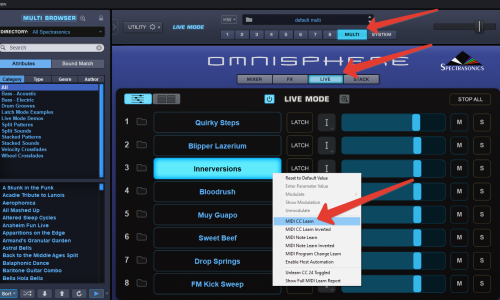 (https://radikalfoto.host/i/0uF21)