Plogue OPS7 (bit-accurate DX7 emulation!)

VST, AU, AAX, CLAP, etc. Plugin Virtual Instruments Discussion
Post Reply New Topic
RELATED
PRODUCTS
chipsynth OPS7

Post

enCiphered wrote: Fri Sep 27, 2024 9:56 pm I would kindly request an optimization for the randomizer. Without the option to exclude or lock parameters, it becomes difficult to use effectively and is hardly usable. Thank you.
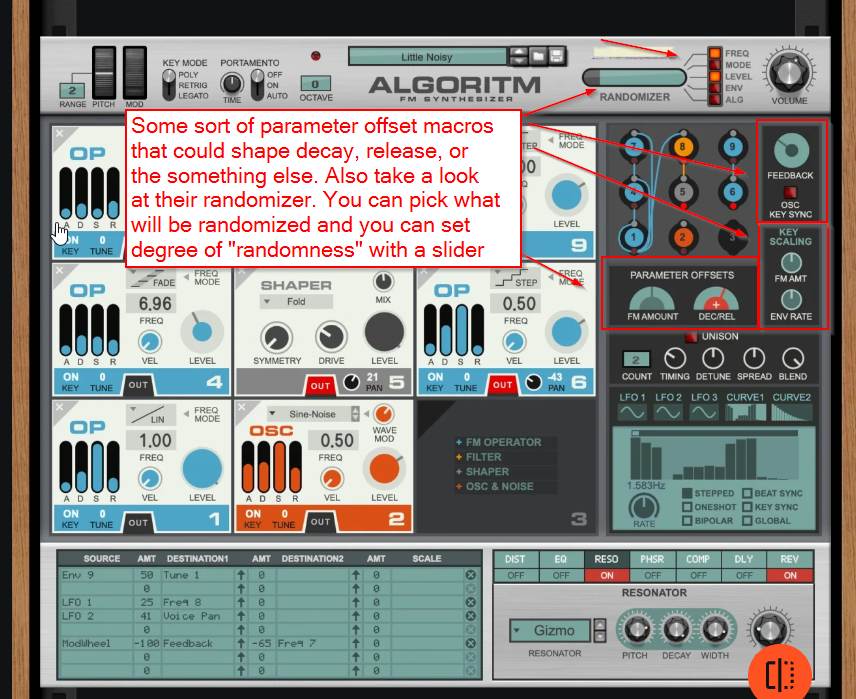
Yeah. I just pictured it. Reason Studios Algoritm did it nicely. While I am not that eager to see clever randomization I am more inclined to see a top bar with various macros.

See here:

Image

With a few controls, one can drastically impact decay, or release of a complete patch.

Though some sort of "patch morphing" or "patch genetics" ala Synapse Dune would be more than welcome in a synth like OPS7 that is not as intuitive as other subtractive synths.

Now before some of you geeks jump on the legs "ooo it's more intuitive than XY", sure for some of you it is but that is a minority. Every two weeks, we see a question on envelopes, which generally tells me that some macros would be cool to work with. I mean macros that use standardized labels such as Decay and Release that everyone knows about.

Post

There is one thing that PLogue should not do , is dumbing down things .
The macro's for adsr are right there in front of you , I've showcased this numerous times .
r1=attack
r3=decay
l3=sustain
r4=release
Leave all other controls at their default position ( everything at max value , except l4 should be at 0)
If people can't even memorise simple stuff like that ...
Eyeball exchanging
Soul calibrating ..frequencies

Post

gentleclockdivider wrote: Mon Dec 23, 2024 12:55 pm There is one thing that PLogue should not do , is dumbing down things .
The macro's for adsr are right there in front of you , I've showcased this numerous times .
r1=attack
r3=decay
l3=sustain
r4=release
Leave all other controls at their default position ( everything at max value , except l4 should be at 0)
If people can't even memorise simple stuff like that ...
:lol: :D

Here is a biscuit for you, you Superman genius

:hyper:

Post

dx7-envelope (1).png
kmonkey wrote: Mon Dec 23, 2024 7:05 am
Now before some of you geeks jump on the legs "ooo it's more intuitive than XY", sure for some of you it is but that is a minority. Every two weeks, we see a question on envelopes, which generally tells me that some macros would be cool to work with. I mean macros that use standardized labels such as Decay and Release that everyone knows about.
If you understand how a ADSR works you already understand how the envelopes in the DX7 work. It's really that simple

For example the A in ADSR stands for attack. On your typical synth attack will always start at 0% and then end at 100%. Back in the days when everything was voltage controlled that meant you started at zero volts and worked your way up to whatever the maximum voltage was and all you were doing was adjusting how fast that transition took

The L controls are just 4 points on a graph that stands for level. They can be 0% or 100% or anywhere in between

The R levels stand for "rate" and control the rate of speed that the envelope will travel from point to point

L4 is the level you set for when a key is not pressed. This is usually set at zero but doesn't have to be.

So when a key is not pressed the level is controlled by level 4 or "L Four". That is the level that key release will travel to. In typical use this would be 0. So if you don't have any key pressed the envelopes will be at 0

Now press a key and the envelope will travel from point 1 to point 2. Point two can be any level your want. So now you have to decide how fast you want it to travel there. That is the R1 control. So if you have level four (or the no key pressed down level) set at 0 the envelope will start there. And if you have L2 set at maximum all you have is rate controlled by R1 which is the time of travel just like on a ADSR control

Once it gets to R1 it will begin traveling to the second point on the graph. That value is set by L2 how fast it gets there is controlled by R2 or rate two. Once it gets there it will then travel to the next point. The value of point 3 is set by L3 or level three, the time it takes to get there is set by rate there or R3

It will stay at at point until you release the key at which time it will travel to the final point or L4 which is set by Level 4 and again the time it takes to get there is set by rate 4 or R4. It will remain there in that state until you press another key at which point it will travel to L1 again at whatever rate R1 is set to

These are are controlled by the macros already on the DX7 and OPS7 with the R and L controls

Anyone with a basic grasp of ADSR should be able to use them with minimal effort
You do not have the required permissions to view the files attached to this post.

Post

gentleclockdivider wrote: Mon Dec 23, 2024 12:55 pm There is one thing that PLogue should not do , is dumbing down things .
The macro's for adsr are right there in front of you , I've showcased this numerous times .
r1=attack
r3=decay
l3=sustain
r4=release
Leave all other controls at their default position ( everything at max value , except l4 should be at 0)
If people can't even memorise simple stuff like that ...
This is indeed a useful approach to grok'ing the DX7 envelopes as if they were ADSR -- it's helpful to simply add the reminder that the R1, 3 and 4 knobs are at their *fastest* (shortest) when at FULL, and slowest (longest) when at their minimum position -- which is exactly the opposite of how the ADR knobs on any other synth behave, thus why it's such a useful reminder for newcomers :P

Post

I hate all ADSRs because they are not like the DX envelopes. For me its extremely important to have all levels and rates to control. ADSRs are a limitation of analog circuits that are not interesting at all and first of all not necessary in the digital domain.
I really don‘t get why almost all developers torture us with this stupid limitation…

Rant over…!!!

Post

Tj Shredder wrote: Thu Dec 26, 2024 9:30 pm I hate all ADSRs because they are not like the DX envelopes. For me its extremely important to have all levels and rates to control. ADSRs are a limitation of analog circuits that are not interesting at all and first of all not necessary in the digital domain.
I really don‘t get why almost all developers torture us with this stupid limitation…

Rant over…!!!
Could not agree more

Post

Second that !
Eyeball exchanging
Soul calibrating ..frequencies

Post

Tj Shredder wrote: Thu Dec 26, 2024 9:30 pm I hate all ADSRs because they are not like the DX envelopes. For me its extremely important to have all levels and rates to control. ADSRs are a limitation of analog circuits that are not interesting at all and first of all not necessary in the digital domain.
I really don‘t get why almost all developers torture us with this stupid limitation…

Rant over…!!!
Opposite take: I usually prefer AD or AR envelopes with adjustable curvature, like West Coast function generators. I rarely care about sustain level.

Ironically, where I think ADSR works well is when using an LPG (with real or fake vactrol response) instead of a VCA. Give it a snappy attack and decay and a low sustain level, so there's a very nice pluck but you can kind of control what feels like release time just by holding the note. I haven't used that technique in quite a while though.

I love FM but I sincerely hate DX7 style envelopes :hihi:

Post

Hey everyone I've heard the OPS7 works with TX81Z waveforms but when I try to load a TX81Z sysex file, it aska "From other YM synth?"
Someone else maybe asked the same question but I couldnt find the answer even from the user guide. If anyone knows please let me know, thanks.
This is Samuel S. I make music for fun even if it isn't music.

Post

Samuel_S wrote: Sat Apr 05, 2025 5:25 pm Hey everyone I've heard the OPS7 works with TX81Z waveforms but when I try to load a TX81Z sysex file, it aska "From other YM synth?"
Someone else maybe asked the same question but I couldnt find the answer even from the user guide. If anyone knows please let me know, thanks.
It is not a TX81Z emulation, so no. It will not work with its patches. You can only turn on the waveforms using Extra mode (which also gives feedback and noise per operator).

Post

foosnark wrote: Sat Dec 28, 2024 1:44 pm
Tj Shredder wrote: Thu Dec 26, 2024 9:30 pm I hate all ADSRs because they are not like the DX envelopes. For me its extremely important to have all levels and rates to control. ADSRs are a limitation of analog circuits that are not interesting at all and first of all not necessary in the digital domain.
I really don‘t get why almost all developers torture us with this stupid limitation…

Rant over…!!!
Opposite take: I usually prefer AD or AR envelopes with adjustable curvature, like West Coast function generators. I rarely care about sustain level.

Ironically, where I think ADSR works well is when using an LPG (with real or fake vactrol response) instead of a VCA. Give it a snappy attack and decay and a low sustain level, so there's a very nice pluck but you can kind of control what feels like release time just by holding the note. I haven't used that technique in quite a while though.

I love FM but I sincerely hate DX7 style envelopes :hihi:
Your opinion is perfectly fine. What's nice about a 5-stage envelope is that you can do a brief decay pluck before a rising pad within the same voice! I don't mind AR envelopes for percussive sounds, basses, and leads, but for evolving pads, some decay is nice.

Post

One ergonomic hindrance for me: the currently selected preset is not marked in the preset browser.
I don't mind a simple folder-based preset browser; only wish all developers marked the path to current with a standard beautiful check icon :)
Weapons of choice (subject to change):
Godin Redline, Kuassa, Fuse Audio, Audiority, Roland A-500pro, Dune, Dagger, TAL, Reaper for Rock & Synthwave pleasures; Viper and FL Studio for guilty EDM pleasures

Post

OPS7 possible bug:

Hopefully David will see this.
OPS7 v1.12
Fermata Engine v2.123(macOS Silicon)
Fermata Standalone v2.123

I’m running OPS7 standalone and as a plugin for Reaper 7.46
Apple M4 Pro (48 Gb RAM)
Sequoia 15.6.1

David,
Please see my two attached OPS7 .fermatax files to use in this test.

1. Please use headphones to emphasize this issue.
2. Load E.PIANO 1 STEREO BEST and without changing any controls, check “Pan” in the “Patch” area for both A and B. Notice I have them respectively hard panned left for A and hard panned right for B. Also notice without changing it, it shows “0” for “A/B Detune”.
3. Go ahead and play a chord and listen for spacial left right information. Remember this.
4. Without playing anything on the keyboard, move “A/B Detune” up from zero up a couple than down back to zero.
5. Now play that same chord. I now hear a much wider spacial image even though the A/B Detune is still zero.

Thoughts:
It appears that the A/B Detune control visual display if on zero is not saving correctly when you save the . .fermatax files. I’m not sure what it’s defaulting to when saved, but the sound field collapses after reloading the saved sound file. At first I was thinking PAN control, but after experimentation, I think the PAN controls are working.

I was wondering why my saved files sounded different after reloading.

Of course, you need a file that use both A and B. The attached files I’ve included use dual sounds A and B hard panned and were saved with the A/B Detune set to “0”.
You do not have the required permissions to view the files attached to this post.

Post

S Thomas wrote: Mon Sep 22, 2025 11:04 pm ...
I think you'll have much better luck posting this on the Plogue bug report forums than posting it here and hoping.

Post Reply

Return to “Instruments”