Introducing ARIA Studio: Personalized Audio Mixing Based on Your Hearing Profile

VST, AU, AAX, CLAP, etc. Plugin Virtual Effects Discussion
RELATED
PRODUCTS
ARIA Studio

Post

Elevate mixing and listening with ARIA Studio by Altitude Audio—the plugin designed to tailor your mix to your unique hearing profile.

ARIAStudioX3.png

How It Works:
  • Take the FullScale Hearing Test: Use the mobile app on iOS or Android to map your full-spectrum hearing profile from 125Hz to 20kHz.
  • Load Your Hearing Profile into ARIA Studio: Import your hearing profile into the plugin or standalone app to make precise, personalized mixing decisions based on your auditory perception.
  • Mix with Confidence: Create mixes that resonate with all listeners by actually hearing all sonic content, loading client profiles to hear what they hear, or experimenting with variations tailored to different hearing preferences.
Join the ARIA Studio Beta Program:
Help shape the future of ARIA Studio by joining our free beta program. Complete the form at https://altitude.audio/beta to get started. Participants who provide feedback will receive a thank-you license for ARIA Studio at launch.


Key Features:
Learn about ARIA’s main features on our product page https://www.kvraudio.com/product/aria-s ... tude-audio. Highlights include:
  • 3 Operating Modes: Optimize for speakers and headphones.
  • In-Depth, Multi-band Profile Editors: Customize how your hearing profile is applied to create precise hearing correction filters using intuitive multi-band editors.
  • High-Resolution Correction Filters: Customizable, FIR filters at 4K, 8K and 16K with minimum-phase variants.
  • PRO-Level Dynamics Processing: Advanced tools for professional-grade peak and loudness control. Control character, transients, channel link, and, optionally, automate the envelope.
  • 4X Post DSP Convolution Engines: Load WAV impulse responses for room correction, headphone correction, or creative effects with inversion and phase controls.
aria-studio-img-5.png

Get Started:
  • FullScale Hearing Test:
Promo:
[media][/media]
You do not have the required permissions to view the files attached to this post.

Post

AltitudeAudio wrote: Wed Feb 05, 2025 8:45 am Elevate mixing and listening with ARIA Studio by Altitude Audio—the plugin designed to tailor your mix to your unique hearing profile.


ARIAStudioX3.png


How It Works:
  • Take the FullScale Hearing Test: Use the mobile app on iOS or Android to map your full-spectrum hearing profile from 125Hz to 20kHz.
  • Load Your Hearing Profile into ARIA Studio: Import your hearing profile into the plugin or standalone app to make precise, personalized mixing decisions based on your auditory perception.
  • Mix with Confidence: Create mixes that resonate with all listeners by actually hearing all sonic content, loading client profiles to hear what they hear, or experimenting with variations tailored to different hearing preferences.
Join the ARIA Studio Beta Program:
Help shape the future of ARIA Studio by joining our free beta program. Complete the form at https://altitude.audio/beta to get started. Participants who provide feedback will receive a thank-you license for ARIA Studio at launch.


Key Features:
Learn about ARIA’s main features on our product page https://www.kvraudio.com/product/aria-s ... tude-audio. Highlights include:
  • 3 Operating Modes: Optimize for speakers and headphones.
  • In-Depth, Multi-band Profile Editors: Customize how your hearing profile is applied to create precise hearing correction filters using intuitive multi-band editors.
  • High-Resolution Correction Filters: Customizable, FIR filters at 4K, 8K and 16K with minimum-phase variants.
  • PRO-Level Dynamics Processing: Advanced tools for professional-grade peak and loudness control. Control character, transients, channel link, and, optionally, automate the envelope.
  • 4X Post DSP Convolution Engines: Load WAV impulse responses for room correction, headphone correction, or creative effects with inversion and phase controls.
aria-studio-img-5.png

Get Started:
  • FullScale Hearing Test:
Promo:
[media][/media]
It sounds interesting... I think I'm gonna try :-)

Post

I have to check your personalized presets !

Post

Coralie L wrote: Wed Feb 05, 2025 9:49 am
AltitudeAudio wrote: Wed Feb 05, 2025 8:45 am
It sounds interesting... I think I'm gonna try :-)
It was really important that you quote that whole post in its entirety right beneath itself.

Had you posted your reply without any quote at all, nobody would have the faintest idea what your post might possibly refer to, right? :razz: :lol:

Welcome to KVR - to both of you - by the way. :-)

Post

Will the results not be inaccurate due to differences in phone audio vs pc audio? (DACs etc.). Or is that whole DAC thing just a marketing scam?
What lies behind us and what lies before us are small matters compared to what lies within us. - Emerson

Post

This looks interesting, but the current list of earphones compatible with the hearing test do not include any typical studio use headphones. For example the Audio Technica ATH-M50x would be my guess for a good one to include.

Also, I agree that for studio users it would be preferrable to be able to do the test on the daw computer rather than an iphone or android.

Post

Cuauhtli wrote: Thu Feb 06, 2025 10:16 pm Will the results not be inaccurate due to differences in phone audio vs pc audio? (DACs etc.). Or is that whole DAC thing just a marketing scam?
Neither - nor.

ARIA Studio seeks to compensate for the flaws of one certain part of the whole listening-chain. Other parts of the chain are neither affected (directly) by it nor relevant to it. With or without it they might (or might not) be an issue you should deal with/be concearned about. I.e.: if for instance you listen to your mixes on 5$ headphones, you'll have a problem that ARIA will neither fix nor affect.

Post

I am more than happy to get Audio Technica ATH-M50x measured.

Does anyone have a recommendation for a handful of interfaces/dacs to select for use in the calibration? We have to buy them and start measuring in our lab.

It is not about the quality of the dac/amp per se, but about knowing the output voltage exactly--down to 3 decimals in mVrms.

I actually pulled out 3 hardwired headphones I had calibrated, as they were calibrated with the assumption you are using one specific portable amp/dac combo that did not take off. But we can do the exact same thing with any amp/interface + headphone combo.

Try thinking of the FullScale Hearing Test as separate from ARIA Studio, in that the device used to complete the test has no bearing on what output devices you use with ARIA Studio.

We want to input calibrated hearing test data in db units so they can be normalized against the target curve, also in db. Once done, ARIA Studio's output device does not effect it, with some obvious caveats for things like crosstalk.


There is a lot more to be said around this topic though if you want me to really dive in.

Post

Just done the hearing test on android, click to get the result and.......nothing, screen just stayed grey. Even when restarting the app it was the same grey screen.
Beauty is only skin deep,
Ugliness, however, goes right the way through

Post

Let me investigate. I'll push an update as quickly as possible and ping you with it. Your results should persist to be picked up in the update. Thanks for letting us know.

Post

Ok thank you
Beauty is only skin deep,
Ugliness, however, goes right the way through

Post

I believe this was on the server side and have fixed it. So no app update is needed.

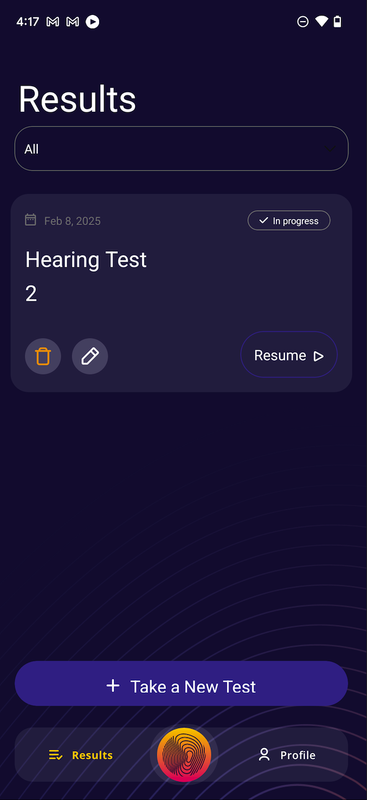
Please uninstall and reinstall the app to force a new authentication when you sign in. We are hoping you see this view, showing an in-progress test. You may need to refresh the RESULTS view once, but not more.

Image

If present you can resume it and then conclude it.

If you do not get the view above, you will need to retest. Before actually completing it, please complete these steps.

1. Launch a new test and press start
2. Exit the test in top left corner
3. Press yes to save the test
4. Refresh RESULTS tab view

You should now see a test in-progress, confirming data/test persistence. You may then launch a new test and take it.

I apologize ahead of time if this is the case.

Post

I got that screen but when I resumed it seemed to go back to near the beginning of the test, I have deleted that one and will take the test again some time today (Sunday) and let you know what happens
Beauty is only skin deep,
Ugliness, however, goes right the way through

Post

Well I have just gone right through both tests, got the same grey screen as before. Pressed back button on phone and got the screen as you posted but still cannot see any results. If I do as you said and resume, then start, exit, confirm exit, I dont get the option of saving it and it goes back to 'start a new test' so its a no go at the moment.
Beauty is only skin deep,
Ugliness, however, goes right the way through

Post

Let me try triggering the report generation for you. I'll shoot you a message to confirm email address. And get some device info from you. Unfortunately my crashalatics are not in yet. What is occurring is the data fetch is hitting a server error and the results are fully populated with this.

Sorry for this. I just pushed the prod auth scheme and will need to push a new hearing test app I suspect. Give me the afternoon.

Post Reply

Return to “Effects”