

To all readers.
Please hold on trying the hearing test until I can push a new build tomorrow, February 10, 2025.
Sorry for the delay.
Updates will follow when I push the update.

Introducing ARIA Studio: Personalized Audio Mixing Based on Your Hearing Profile
-
- KVRist
- Topic Starter
- 30 posts since 27 Nov, 2024
-
- KVRist
- Topic Starter
- 30 posts since 27 Nov, 2024
The FullScale Hearing Test is ready once again for use. Thanks for your patience.
Beta Build #2.1 is live on Google Play and TestFlight.
NOTES:
- Resolved authentication issue causing gray crash screen when accessing results.
- Add crashalytics, pending user approval of their use in app
- Audio framework improvements for playback
Beta Build #2.1 is live on Google Play and TestFlight.
NOTES:
- Resolved authentication issue causing gray crash screen when accessing results.
- Add crashalytics, pending user approval of their use in app
- Audio framework improvements for playback
-
- KVRist
- Topic Starter
- 30 posts since 27 Nov, 2024
ARIA STUDIO BETA UPDATE v0.9.3 - Major UI Overhaul & New Features
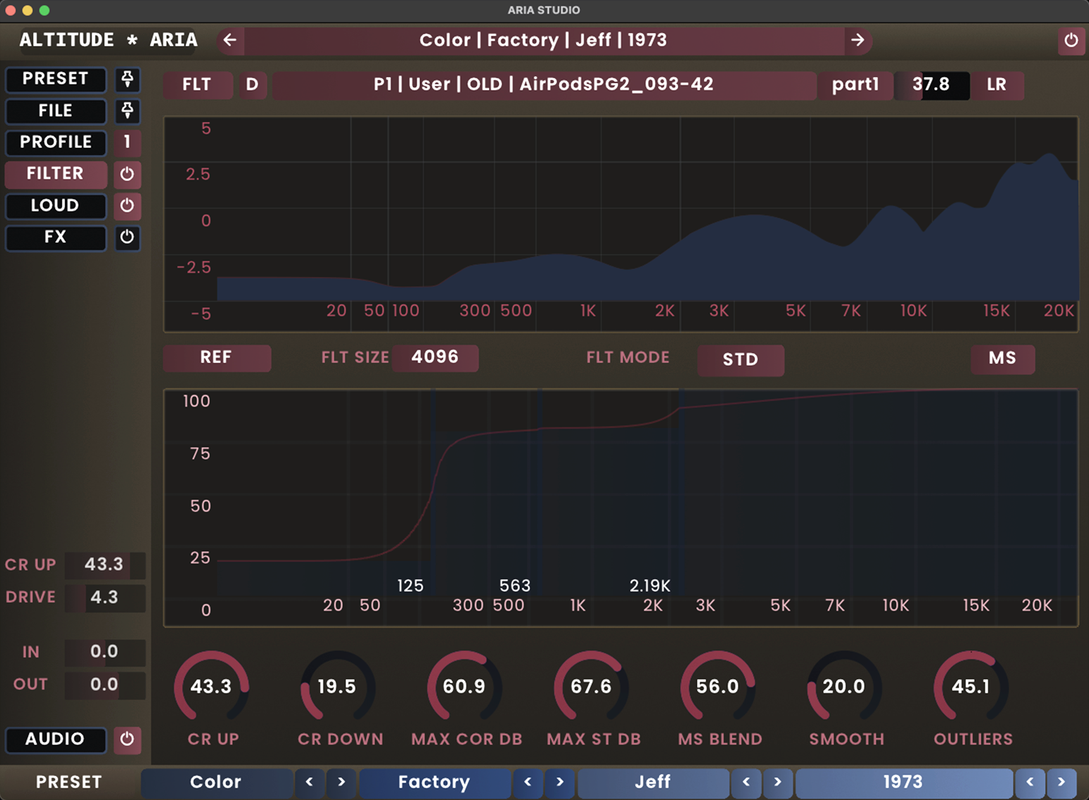
We're excited to announce a significant update to the ARIA Studio Beta! Version 0.9.3 introduces a complete UI redesign, workflow improvements, and powerful new features that enhance your sound personalization experience.
How to Get It
Download the latest build by registering for the beta at https://altitude.audio/beta (or simply log in if you're already a beta tester).
 Important Installation Note
Due to extensive configuration changes in this version, you must completely uninstall any previous version before upgrading to v0.9.3.
Backup your hearing test results and custom presets before uninstalling
What's New
This update focuses on customization, workflow efficiency, and expanded sound-shaping capabilities:
 Redesigned Interface & Customization
Complete UI Overhaul: Fresh layout with improved workflow and visual clarity
Theme Customization: Fully adjustable color schemes with HSL controls
Theme Presets: Including the new retro theme shown below, plus many more to match your style
Large Hearing Profile Graph: Detailed visualization of your personalized hearing data
 Workflow Enhancements
New Bottom Bar Navigation: Quick access to essential tools and browsers
Side Panel: Direct access to core controls including CR UP & DRIVE
Tooltips: Contextual help throughout the interface
Streamlined Parameters: Focused control set for more intuitive operation
 Parameter Lock - New Call-Out Feature
Selective Preset Loading: Lock specific parameter subsets while loading presets that would otherwise conflict
Workflow Example: Hold your limiter settings steady while changing only the filter characteristics
Simple Activation: Alt+Click any parameter to lock/unlock it
Visual Indicators: Locked parameters are clearly marked for easy identification
Modular Approach: Create hybrid presets by combining the best elements from different settings
 Sound Shaping Improvements
MS Blend Width Control: Adjust stereo image width with precision
Focus Adjustment: Target specific frequency ranges for enhanced clarity with a 5th band
Preset & File Browsers: Quickly find and load your favorite settings
 Plus numerous bug fixes and performance improvements
We're actively incorporating user feedback, so please continue sharing your thoughts and experiences as you explore this major update.
The Altitude Audio Team
We're excited to announce a significant update to the ARIA Studio Beta! Version 0.9.3 introduces a complete UI redesign, workflow improvements, and powerful new features that enhance your sound personalization experience.
How to Get It
Download the latest build by registering for the beta at https://altitude.audio/beta (or simply log in if you're already a beta tester).
 Important Installation Note
Due to extensive configuration changes in this version, you must completely uninstall any previous version before upgrading to v0.9.3.
Backup your hearing test results and custom presets before uninstalling
What's New
This update focuses on customization, workflow efficiency, and expanded sound-shaping capabilities:
 Redesigned Interface & Customization
Complete UI Overhaul: Fresh layout with improved workflow and visual clarity
Theme Customization: Fully adjustable color schemes with HSL controls
Theme Presets: Including the new retro theme shown below, plus many more to match your style
Large Hearing Profile Graph: Detailed visualization of your personalized hearing data
 Workflow Enhancements
New Bottom Bar Navigation: Quick access to essential tools and browsers
Side Panel: Direct access to core controls including CR UP & DRIVE
Tooltips: Contextual help throughout the interface
Streamlined Parameters: Focused control set for more intuitive operation
 Parameter Lock - New Call-Out Feature
Selective Preset Loading: Lock specific parameter subsets while loading presets that would otherwise conflict
Workflow Example: Hold your limiter settings steady while changing only the filter characteristics
Simple Activation: Alt+Click any parameter to lock/unlock it
Visual Indicators: Locked parameters are clearly marked for easy identification
Modular Approach: Create hybrid presets by combining the best elements from different settings
 Sound Shaping Improvements
MS Blend Width Control: Adjust stereo image width with precision
Focus Adjustment: Target specific frequency ranges for enhanced clarity with a 5th band
Preset & File Browsers: Quickly find and load your favorite settings
 Plus numerous bug fixes and performance improvements
We're actively incorporating user feedback, so please continue sharing your thoughts and experiences as you explore this major update.
The Altitude Audio Team
-
- KVRist
- 74 posts since 3 May, 2023
Can you also make hearing tests possible to capture inside Aria Studio please??? Or port mobile app to PC please!
Our studio headphones are not powered enough on mobile phone. Who is mixing with aripods? Makes no sense to me...
Our studio headphones are not powered enough on mobile phone. Who is mixing with aripods? Makes no sense to me...
-
- KVRist
- Topic Starter
- 30 posts since 27 Nov, 2024
Yes we can. In retrospect, we wish we had pursued this approach first. We'll be using it moving forward for development, as it is faster and easier on desktop.
The BT devices for testing became advantageous in calibration simply because dac + amp + transducer are all contained. We had, still have, a few wired devices calibrated through a mobile dac+amp dongle. The process for desktop use in ARIA is the same.
The BT devices for testing became advantageous in calibration simply because dac + amp + transducer are all contained. We had, still have, a few wired devices calibrated through a mobile dac+amp dongle. The process for desktop use in ARIA is the same.

-
- KVRian
- 871 posts since 20 Jun, 2010
Hi, does that mean the hearing test can already be done on desktop with the current version or will it come later in an update?AltitudeAudio wrote: Sun Apr 06, 2025 4:21 am Yes we can. In retrospect, we wish we had pursued this approach first. We'll be using it moving forward for development, as it is faster and easier on desktop.
The BT devices for testing became advantageous in calibration simply because dac + amp + transducer are all contained. We had, still have, a few wired devices calibrated through a mobile dac+amp dongle. The process for desktop use in ARIA is the same.
-
- KVRist
- Topic Starter
- 30 posts since 27 Nov, 2024
It will come in a future update.
If you happen to be on mac, it's currently possible to use TestFlight on your mac to take the iOS test. I don't have an immediate workaround for Android though.
I should clarify that the earbud or headphone used in the hear test need not be the same as that used when mixing or listening.
If you happen to be on mac, it's currently possible to use TestFlight on your mac to take the iOS test. I don't have an immediate workaround for Android though.
I should clarify that the earbud or headphone used in the hear test need not be the same as that used when mixing or listening.
-
- KVRist
- Topic Starter
- 30 posts since 27 Nov, 2024
Yes, this is the next headphone up. I've planned for the Platinum Edition.
Do you mind sharing what interface you use. We'll need to buy one of these as well, or make some estimations from technical documentation. It is the interface + headphone combo that ultimately gets calibrated in our process.
Do you mind sharing what interface you use. We'll need to buy one of these as well, or make some estimations from technical documentation. It is the interface + headphone combo that ultimately gets calibrated in our process.
-
- KVRian
- 871 posts since 20 Jun, 2010
In my case it's an RME multiface II. I'm not sure if they are still available. But honestly buying and measuring every possible headphone/interface combination sounds like an impossible task anyway.
Did the interface make such a big difference in your tests? I've always thought modern interfaces are as clean as possible.
Did the interface make such a big difference in your tests? I've always thought modern interfaces are as clean as possible.
-
Andreya_Autumn Andreya_Autumn https://www.kvraudio.com/forum/memberlist.php?mode=viewprofile&u=553235
- KVRian
- 510 posts since 21 Feb, 2022
AltitudeAudio wrote: Wed Feb 05, 2025 8:45 am
- Take the FullScale Hearing Test: Use the mobile app on iOS or Android to map your full-spectrum hearing profile from 125Hz to 20kHz.
Are you really saying your test bottoms out at 125 Hz or is that typo or something? Omitting the low bass from this kind of test seems very strange.
-
- KVRist
- Topic Starter
- 30 posts since 27 Nov, 2024
Good news. RME has several interfaces calibrated by GRAS/AP and really good tech docs. We can expect to forecast the output fairly accurately.Dr.Gunjah wrote: Tue Apr 08, 2025 8:01 am In my case it's an RME multiface II. I'm not sure if they are still available. But honestly buying and measuring every possible headphone/interface combination sounds like an impossible task anyway.
Did the interface make such a big difference in your tests? I've always thought modern interfaces are as clean as possible.
What matters is trying to determine an exact output voltage. Basically what volume setting should be used.
To get VSX in quickly I'm going to use the Roon OPRA https://github.com/opra-project/OPRA library of headphone measurements. It's purpose was more for headphone eq, but its a good open source of raw measurements.
-
- KVRist
- Topic Starter
- 30 posts since 27 Nov, 2024
If they are wanted, we'd gladly add them.Andreya_Autumn wrote: Wed Apr 09, 2025 9:57 amAltitudeAudio wrote: Wed Feb 05, 2025 8:45 am
- Take the FullScale Hearing Test: Use the mobile app on iOS or Android to map your full-spectrum hearing profile from 125Hz to 20kHz.
Are you really saying your test bottoms out at 125 Hz or is that typo or something? Omitting the low bass from this kind of test seems very strange.
The challenge with low frequencies is variance in device-fit causes disproportionate changes in output. Compared to mid and high frequencies that is. Another words, they are harder to calibrate accurately
