

I tried to install vst3shell 1.3.1 on a windows 7 ultimate 64bit in order to use it with sonar 64bit when I started the DAW it began to scan for the plugins and arrived at the vst3shell.x64.dll I had 2 errors
see the attachments as I tried to click ok to move on (I actually had to give like 60 ok or something) the error dialogs came back. At the end the DAW started but my the vst3 where not available and when I tried to close the project and the DAW it crashed.
So I have to say that vst3shell does not work on sonar. If you have some tip or know about updates, let me know. Thanks

VST3 to VST2 adaptor update to v1.4
-
- KVRer
- 7 posts since 11 Aug, 2010 from Italy
You do not have the required permissions to view the files attached to this post.
Ciao belli!
-
- KVRer
- 6 posts since 22 Sep, 2025
Hello everyone. I just registered because I want to say this...whyterabbyt wrote: Thu Jul 18, 2024 12:21 pm
Nope, that's shell2vst.
Ive already explained this a bit at viewtopic.php?p=8627637#p8627637
A shell plugin looks like a single plugin, but actually contains multiple different plugins. To use, you insert the shell, then set it to be the plugin you want to use.
shell2vst is a pair (32-bit and 64-bit) of executables that converts a VST2 'shell' plugin that you drop onto them into a folder full of individual VST2 plugins.
EdwinJacobs was asking for vst3shell.exe, but there's no such thing. The vst3shell.dll family are a set of four VST2 shell plugins (effect and instrument, in 32-bit and 64-bit) each of which allows you to access all your VST3 plugins of that type.
Link for vst3shell plugins, is in the first post of this thread.
whyterabbyt....I don't know if you're still around since this is an old thread, but I just want to say you are an INVALUABLE ASSET and an absolute TREASURE to this thread!!! Thank you very much for taking the time to explain how to get this plugin adapter to work, brother.
I was racking my brain trying to figure out why dragging and dropping my vst3shell.x64.dll onto the shell2vst64.exe kept giving me a slew of errors in the command prompt window, namely "failed to create dll" or something to that effect.
Then I tried something different...instead of conducting the conversion within my Program files\Steinberg\VSTplugins\ folder, I moved the entire operation over the root of my C drive, re-ran the conversion and VOILA!!! It worked!!!
So...for anyone out there trying to use the wrapper adapter and are running into errors when dragging and dropping your vst3shell.x64.dll(or whatever shell.dll your trying to convert), MAKE SURE you create a new folder on your C drive and do it in there. Windows is VERY stubborn when it comes to having new files written and created in the Program files folder, so keep that in mind.
Anyway thanks again for your very informative posts in this thread whyterabbyt. It's extremely appreciated my friend!


-

- Beware the Quoth
- 35529 posts since 4 Sep, 2001 from R'lyeh Oceanic Amusement Park and Funfair
No problem, glad i could help...isamu99 wrote: Mon Sep 22, 2025 3:43 pm Anyway thanks again for your very informative posts in this thread whyterabbyt. It's extremely appreciated my friend!
An idiot on Set Theory:
"In some cases there is an object called red that contains everything that is red. In much the same way a pot is a plate."
"In some cases there is an object called red that contains everything that is red. In much the same way a pot is a plate."
-

- KVRist
- Topic Starter
- 167 posts since 8 Mar, 2003 from Cologne
Hi,
had some time to fix some serious issues, there were some gamebreaker bugs. Also the vst3shells don't scan per default for new vst3's, you have to hold the CTRL-key when the host is in scanning mode. This way there should be much faster host loading times. I suppose Waveshell might be the culprit here, I heard from people that had to wait >10 minutes for finishing the scanning process. Song loading should be also improved now.
had some time to fix some serious issues, there were some gamebreaker bugs. Also the vst3shells don't scan per default for new vst3's, you have to hold the CTRL-key when the host is in scanning mode. This way there should be much faster host loading times. I suppose Waveshell might be the culprit here, I heard from people that had to wait >10 minutes for finishing the scanning process. Song loading should be also improved now.
-
- KVRist
- 59 posts since 22 May, 2020 from Croatia
Hi,
I´m trying to figure out this.
If i throw a vst3shell.64.dll onto a shell2vst64.exe, i get this:
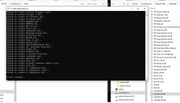
Is this possible, i know i can get this to work with the waves-waveshell which gives me bunch of 5kb dll files, but i wonder what would be the problem here in my case. I´ve applied permissions and sharing for both folders btw
Edit: Solved 3 minutes later, shell2vst64.exe RUN AS ADMIN!
Thx
I´m trying to figure out this.
If i throw a vst3shell.64.dll onto a shell2vst64.exe, i get this:
Is this possible, i know i can get this to work with the waves-waveshell which gives me bunch of 5kb dll files, but i wonder what would be the problem here in my case. I´ve applied permissions and sharing for both folders btw
Edit: Solved 3 minutes later, shell2vst64.exe RUN AS ADMIN!
Thx
!
-
- KVRist
- Topic Starter
- 167 posts since 8 Mar, 2003 from Cologne
Most likely shell2vst couldn't create the shell stub dlls in a folder that required admin rights. Thanks for pointing out.Reticular wrote: Sun Mar 01, 2026 4:18 pm Hi,
I´m trying to figure out this.
If i throw a vst3shell.64.dll onto a shell2vst64.exe, i get this:
Is this possible, i know i can get this to work with the waves-waveshell which gives me bunch of 5kb dll files, but i wonder what would be the problem here in my case. I´ve applied permissions and sharing for both folders btw
Edit: Solved 3 minutes later, shell2vst64.exe RUN AS ADMIN!
Thx
-
- KVRer
- 1 posts since 17 Jun, 2014
Hi. Thanks for amazing plugin. This wrapper helps me long time since I stopped upgrading daw.
On windows 11 and ableton live 9.7.7, v1.4 does not working.
It loaded as bare "vst3shell", and when I loading vsti3shell, ableton crashes.
Pressing ctrl or alt (force-re-scan on ableton live 9) while scaning doesn't make change.
v1.3.1 is fine.(well actually it was, it just takes so long to do initial scan again)
v1.4 works fine on Reaper. Load time is also faster(not sure daw thing or not).

On windows 11 and ableton live 9.7.7, v1.4 does not working.
It loaded as bare "vst3shell", and when I loading vsti3shell, ableton crashes.
Pressing ctrl or alt (force-re-scan on ableton live 9) while scaning doesn't make change.
v1.3.1 is fine.(well actually it was, it just takes so long to do initial scan again)
v1.4 works fine on Reaper. Load time is also faster(not sure daw thing or not).
-
- KVRer
- 1 posts since 2 Apr, 2026
vst3shell v1.4 fails to scan plugins in Cakewalk Sonar 8.5.3
Hi Polac:
I've found a regression in vst3shell v1.4 when using Cakewalk Sonar 8.5.3. The new version is unable to scan/detect VST3 plugins, even when holding the CTRL key (left, right, or both) during the host's scanning process. The plugins remain invisible.
However, v1.3.1 works perfectly for scanning. My current workaround is:
1. Scan all VST3 plugins using vst3shell v1.3.1.
2. Once scanned, replace the v1.3.1 DLLs with the new v1.4 files.
3. The plugins then work optimally in Sonar 8.5.3.
It seems the new scanning logic in v1.4 is not compatible with how Sonar 8.5.3 handles the shell. Is there a way to force the old scanning behavior in v1.4 (perhaps via a .ini file or a parameter like "alwaysscan") to avoid this issue?
Thank you for your help!
PS: Message generated with the assistance of Google's AI translation from Spanish
Hi Polac:
I've found a regression in vst3shell v1.4 when using Cakewalk Sonar 8.5.3. The new version is unable to scan/detect VST3 plugins, even when holding the CTRL key (left, right, or both) during the host's scanning process. The plugins remain invisible.
However, v1.3.1 works perfectly for scanning. My current workaround is:
1. Scan all VST3 plugins using vst3shell v1.3.1.
2. Once scanned, replace the v1.3.1 DLLs with the new v1.4 files.
3. The plugins then work optimally in Sonar 8.5.3.
It seems the new scanning logic in v1.4 is not compatible with how Sonar 8.5.3 handles the shell. Is there a way to force the old scanning behavior in v1.4 (perhaps via a .ini file or a parameter like "alwaysscan") to avoid this issue?
Thank you for your help!
PS: Message generated with the assistance of Google's AI translation from Spanish
-
- KVRist
- 59 posts since 5 Mar, 2007
Hi polac,
It looks like vst3shell 1.4 also no longer works at all in OpenMPT, even if I hold Ctrl while adding it to OpenMPT's plugin manager: Shell plugins that OpenMPT already knows about are no longer found, and if I scan vst3shell for the first time, the list of shell plugins is empty (yes, with Ctrl pressed), i.e. effShellGetNextPlugin never returns a non-zero value. Let me know if you need any more information about how OpenMPT loads VST plugins.
It looks like vst3shell 1.4 also no longer works at all in OpenMPT, even if I hold Ctrl while adding it to OpenMPT's plugin manager: Shell plugins that OpenMPT already knows about are no longer found, and if I scan vst3shell for the first time, the list of shell plugins is empty (yes, with Ctrl pressed), i.e. effShellGetNextPlugin never returns a non-zero value. Let me know if you need any more information about how OpenMPT loads VST plugins.