

Hi! Is there any way to print the list of plugins to a text or PDF file? With the manufacturer's information, etc. Or to save the list somehow? I think it would be useful, if not, to format the computer and reinstall it.
Regards!

Print the list of plugins
-

- Banned
- 197 posts since 22 Aug, 2023
are you on windows , osx or linux ? vst ; vst3 ?
**dark music for dark lovers**
-

- KVRian
- 852 posts since 23 Feb, 2023
I have a shell extension (no longer available) that has a 'Print Folder Listing' but as alternate I can save to text file... I have used it like you have said except it ain't gonna save manufacturer BS but since it's a text file you could add that in yourself...
I'm sure there's probably a shell extension that would work like that for you but I would be looking in that direction...
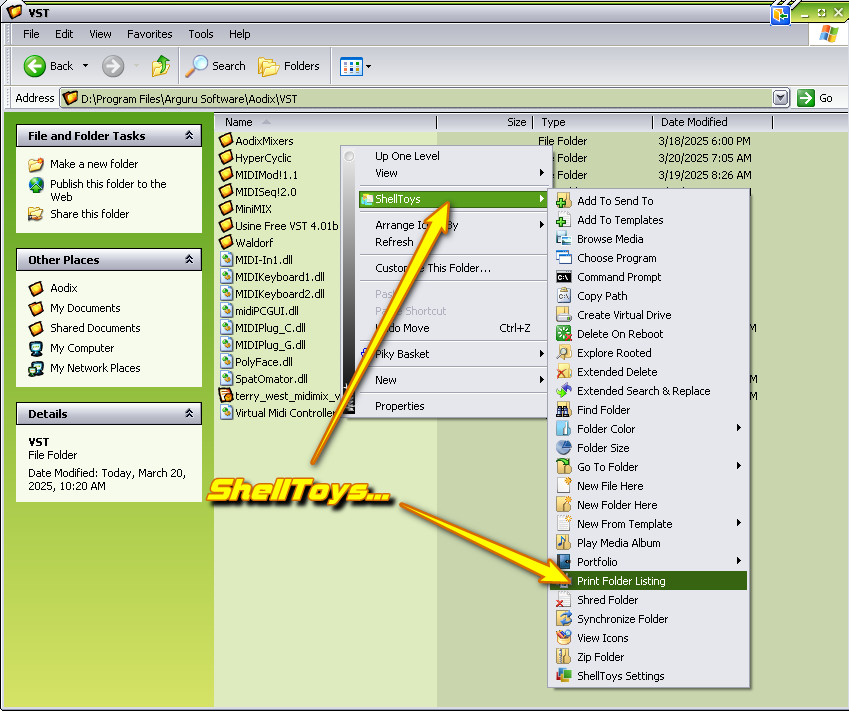
I'm sure there's probably a shell extension that would work like that for you but I would be looking in that direction...
-

- Beware the Quoth
- 35449 posts since 4 Sep, 2001 from R'lyeh Oceanic Amusement Park and Funfair
This is the 'KVR Studio Manager' forum, so try considering that he's asking about how to do this for the plugins listed by KVR Studio Manager.eLawnMust wrote: Thu Mar 20, 2025 4:09 pm I'm sure there's probably a shell extension that would work like that for you but I would be looking in that direction...[/img]
An idiot on Set Theory:
"In some cases there is an object called red that contains everything that is red. In much the same way a pot is a plate."
"In some cases there is an object called red that contains everything that is red. In much the same way a pot is a plate."
-

- KVRian
- 1278 posts since 10 Oct, 2002 from Barcelona
Dir C:/..../folder /a /s /b > list.txteLawnMust wrote: Thu Mar 20, 2025 4:09 pm I have a shell extension (no longer available) that has a 'Print Folder Listing' but as alternate I can save to text file... I have used it like you have said except it ain't gonna save manufacturer BS but since it's a text file you could add that in yourself...
I'm sure there's probably a shell extension that would work like that for you but I would be looking in that direction...
-
- KVRer
- 2 posts since 2 Apr, 2023
i also think "printing a list" should be "a main core feature". not syncing to "kvr".
cmd with admin rights:
dir "C:\Program Files\Common Files\VST3" /a /s /b > list.txt
explorer .
the list is in the folder, where cmd starts.... e.g. system32...
power shell with admin rights:
Get-ChildItem "C:\Program Files\Common Files\VST3" -Recurse -Name > "$env:USERPROFILE\Desktop\vst3_list.txt"
have fun. thanx to the post above and ki.
cmd with admin rights:
dir "C:\Program Files\Common Files\VST3" /a /s /b > list.txt
explorer .
the list is in the folder, where cmd starts.... e.g. system32...
power shell with admin rights:
Get-ChildItem "C:\Program Files\Common Files\VST3" -Recurse -Name > "$env:USERPROFILE\Desktop\vst3_list.txt"
have fun. thanx to the post above and ki.
-
- KVRian
- 1278 posts since 10 Oct, 2002 from Barcelona
Yep, i'm not good explaining the context.User201 wrote: Thu Jun 05, 2025 9:08 am i also think "printing a list" should be "a main core feature". not syncing to "kvr".
cmd with admin rights:
dir "C:\Program Files\Common Files\VST3" /a /s /b > list.txt
explorer .
the list is in the folder, where cmd starts.... e.g. system32...
power shell with admin rights:
Get-ChildItem "C:\Program Files\Common Files\VST3" -Recurse -Name > "$env:USERPROFILE\Desktop\vst3_list.txt"
have fun. thanx to the post above and ki.
/A all files
/S search recursive folders
/B simple list format, without info about size, date...
There's a full explanation of options by typing "dir /?"