

Version 7.2.1 Released (June 24, 2025)
Link to Studio One 7.2.1 Online Discussion:
https://studiooneforum.com/.../studio-one-7-2-1.../
The following issues have been fixed:
● [Fader Flip] Disabled fader caps not visible in small narrow Console view mode
● [Import Song Data] Arranger Track colors not imported
● [Import Song Data] Song ignores tempo change after
● [macOS] UI glitch when scrolling in Arrangement with Folder Tracks at certain zoom levels
● [macOS] Play Cursor redraw issue when main window is moved between displays
● [Note Editor] Out-of-scale notes shift to wrong octave when Scale option is enabled
● [Score Editor] Misaligned chords from Chord Track
● [Score Editor] Roman Numerals: Improved display of minor chords
● [Tuner] Added “Guitar Celtic” preset
● [Tuner] Typo in "Baritone" preset
● [Show Page] Certain tracks won't play if precount engaged
● [Show Page] Triggering sections via remote causes unwanted repetition in certain cases
● Crossfade editing moves fades instead of resizing
● Hanging notes when using QWERTY keyboard in background
● Improved Chinese translation
● Potential crashes or freezes during tempo detection
● Potential crash when performing “Transform to bus”
● Ripple Edit doesn't work inside Editor
● Shift-click doesn’t allow multi-selection of Automation Points
● “Takes to Layers” shifts in time when comping (also when re-selecting same layer repeatedly)
● Track selection with Shift+arrow keys is inconsistent
● Transformed track removes sends after undo
Studio One 7.2
-
- KVRAF
- 3496 posts since 30 Dec, 2014
KVR S1-Thread | The Intrancersonic-Design Source > Program Resource | Studio One Resource | Music Gallery | 2D / 3D Sci-fi Art | GUI Projects | Animations | Photography | Film Docs | 80's Cartoons | Games | Music Hardware |
-
- KVRist
- 94 posts since 15 Nov, 2005 from Hamburg, Germany
According to the release notes, this is still not fixed in 7.2.1Resonant- Serpent wrote: Sat Jun 14, 2025 9:08 am Hardware synth inputs routed to Aux tracks (as recommended in their tutorials) is still broken. No plugin delay compensation, so every render is off by however high your buffer is.
 And in fact, not only the rendered audio is delayed. This also affects realtime playback of recorded MIDI events. External synths are not usable this way in Studio One.
-

- KVRAF
- 7664 posts since 2 Sep, 2019
With the exception of the Console Shaper which comes with Studio One, Mix FX are add-ons that you have to install. You may or may not have to purchase them separately, depending on which version and license type you have.Hanz Meyzer wrote: Tue Jun 24, 2025 7:13 pm I've seen those mix fx inserts in older versions of Studio One, I think. But it seems to be removed now, is there mix fx per track? I only see it on the master, and then there is just one choice "Console Shaper".
The two Mix FX packages are CTC-1 and Retro Mix Legends.
CTC-1 is a single plugin with 3 models: Classic, Tube, and Custom (hence "CTC").
Classic is modeled on Neve summing.
Tube is based on EMI REDD summing.
Custom is PreSonus' own model.
Retro Mix Legends includes 3 separate plugins: Alpine Desk, Brit Console, and Porta Cassette.
Alpine Desk is based on API summing.
Brit Console is SSL summing, with 4000 E (Vintage), 9000 J "Superanalogue" (Super), and VHD+ (Modern) models. (The 2nd / 3rd Harmonics section only works with Modern.)
Porta Cassette is modeled on TASCAM Portastudio summing.
The "Tape Multi Track" Mix FX is a 3rd party plugin from Softube.
The one drawback to Mix FX is they do not currently support multichannel surround sound.
THIS MUSIC HAS BEEN MIXED TO BE PLAYED LOUD SO TURN IT UP
-
- KVRAF
- 7664 posts since 2 Sep, 2019
This time my Customization user preset was retained after updating!

THIS MUSIC HAS BEEN MIXED TO BE PLAYED LOUD SO TURN IT UP
-
- KVRAF
- 2623 posts since 20 Oct, 2014
Ah ok! Strangely when I find these bundles on the Presnous webpage, it tells me always "sold out". Also those pages do not seem to work properly.jamcat wrote: Tue Jun 24, 2025 10:08 pm The two Mix FX packages are CTC-1 and Retro Mix Legends.
CTC-1 is a single plugin with 3 models: Classic, Tube, and Custom (hence "CTC").
Classic is modeled on Neve summing.
Tube is based on EMI REDD summing.
Custom is PreSonus' own model.
Where did you find this changelog? I search quite a bit, but didn't find this info on the presonus webpage...THE INTRANCER wrote: Tue Jun 24, 2025 9:08 pm Version 7.2.1 Released (June 24, 2025)
Link to Studio One 7.2.1 Online Discussion:
https://studiooneforum.com/.../studio-one-7-2-1.../
-
- KVRAF
- 7664 posts since 2 Sep, 2019
In Studio One, click the "Shop" tab in the Browse sidebar, then open PreSonus Shop > Plug-insHanz Meyzer wrote: Tue Jun 24, 2025 11:49 pm Ah ok! Strangely when I find these bundles on the Presnous webpage, it tells me always "sold out". Also those pages do not seem to work properly.
You can find the Release notes in Studio One under Help > View Release NotesHanz Meyzer wrote: Tue Jun 24, 2025 11:49 pm Where did you find this changelog? I search quite a bit, but didn't find this info on the presonus webpage...
THIS MUSIC HAS BEEN MIXED TO BE PLAYED LOUD SO TURN IT UP
-
- KVRAF
- 3496 posts since 30 Dec, 2014
Hanz Meyzer wrote: Tue Jun 24, 2025 11:49 pm Where did you find this changelog? I search quite a bit, but didn't find this info on the presonus webpage...

KVR S1-Thread | The Intrancersonic-Design Source > Program Resource | Studio One Resource | Music Gallery | 2D / 3D Sci-fi Art | GUI Projects | Animations | Photography | Film Docs | 80's Cartoons | Games | Music Hardware |
-
- KVRer
- 26 posts since 20 Apr, 2025
Yes that’s a pity!dastewart wrote: Tue Jun 03, 2025 5:18 pm Also, are they purposely trolling Windows users by adding multi-core support for Apple but not for Windows? Not 100% sure of my facts here but I seem to recall that Studio One only uses one core in Windows .... which is a bit of a shame
-
- KVRAF
- 7664 posts since 2 Sep, 2019
that is not correct.dastewart wrote: Tue Jun 03, 2025 5:18 pm Also, are they purposely trolling Windows users by adding multi-core support for Apple but not for Windows? Not 100% sure of my facts here but I seem to recall that Studio One only uses one core in Windows .... which is a bit of a shame
Studio One has been multicore since the beginning with version 1.0. I never would have used it on Windows if it wasn't.
What PreSonus did in 7.2 was add efficiency core support for Apple Silicon. Apple Silicon efficiency cores had been purposefully bypassed in Studio One, just as they are in Logic Audio. This is because efficiency cores are meant to run light background tasks so your performance cores can run foreground processor heavy tasks (like audio processing) uninterrupted. But most other DAWs use all of the cores, and saw better performance (higher plugin counts) than Studio One because of it. A viral video exposed this a few months back, and users (including me) complained about it, and PreSonus responded fairly quickly with full efficiency core support in the very next update.
THIS MUSIC HAS BEEN MIXED TO BE PLAYED LOUD SO TURN IT UP
-

- KVRian
- 522 posts since 25 Dec, 2002
Definitely one of my pet peeves about S1 that bugs me every time I need to preview a sample and have to press play to start it. Why not just start playing automatically when the sample is selected like every other major DAW does? At the very least give the user an option to set it on or off.Vortifex wrote: Sat Jun 28, 2025 11:35 am Can you set it to preview samples with a single click by default yet?
Edit: Nope
Mac Studio M1 Max 10-core CPU, 32-core GPU, 64GB RAM, 4TB SSD | Logic Pro 10.7.5 | Cubase Pro 12 | Nuendo 12 | Studio One 6 | Seagate 8TB external HDD | Focusrite Scarlett 18i8 2nd Gen | Akai MPK261 | Akai MPC X
-

- KVRAF
- 37397 posts since 14 Sep, 2002 from In teh net
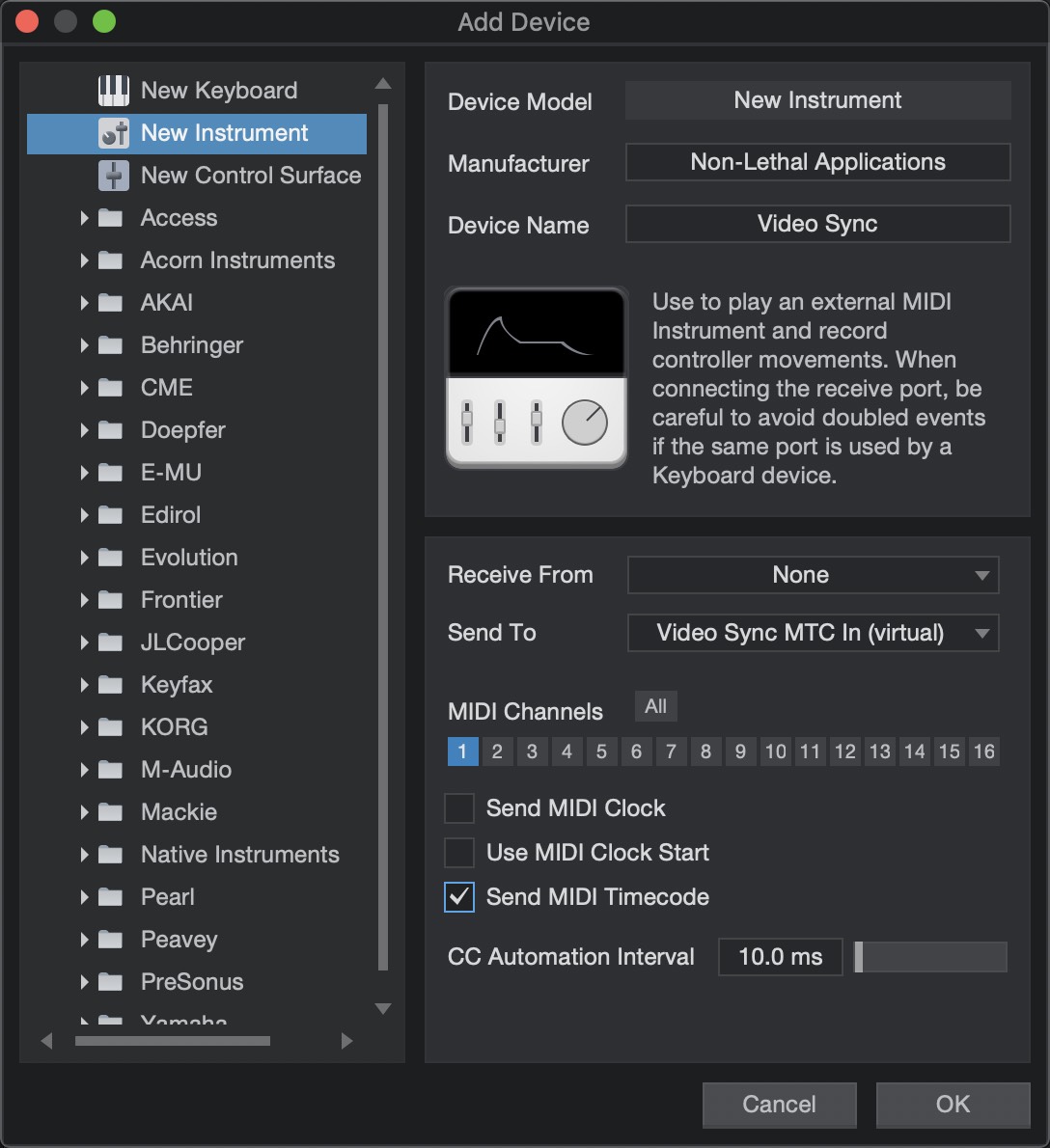
How can you set the MIDI input for an instrument track to a specific MIDI channel? I can see a channel selector but it only selects the instrument, I don't see channel numbers
-
- KVRian
- 843 posts since 1 Aug, 2016
Yeah that's kind of annoyingsummer2000 wrote: Sun Jun 29, 2025 11:14 amDefinitely one of my pet peeves about S1 that bugs me every time I need to preview a sample and have to press play to start it. Why not just start playing automatically when the sample is selected like every other major DAW does? At the very least give the user an option to set it on or off.Vortifex wrote: Sat Jun 28, 2025 11:35 am Can you set it to preview samples with a single click by default yet?
Edit: Nope
My hobbyist music!
https://on.soundcloud.com/xKcyMkP2jDDyw4tuXj
https://on.soundcloud.com/xKcyMkP2jDDyw4tuXj
-
Resonant- Serpent Resonant- Serpent https://www.kvraudio.com/forum/memberlist.php?mode=viewprofile&u=189941
- KVRist
- 433 posts since 23 Sep, 2008
If I remember correctly, you have to change it in the profile you created for the input instrument.aMUSEd wrote: Sun Jun 29, 2025 11:29 am How can you set the MIDI input for an instrument track to a specific MIDI channel? I can see a channel selector but it only selects the instrument, I don't see channel numbers
What sound do dreams make when they die?
-
- KVRAF
- 7664 posts since 2 Sep, 2019
Resonant- Serpent wrote: Sun Jun 29, 2025 2:37 pmIf I remember correctly, you have to change it in the profile you created for the input instrument.aMUSEd wrote: Sun Jun 29, 2025 11:29 am How can you set the MIDI input for an instrument track to a specific MIDI channel? I can see a channel selector but it only selects the instrument, I don't see channel numbers
THIS MUSIC HAS BEEN MIXED TO BE PLAYED LOUD SO TURN IT UP