Nixie tube emulation for frequency counter?

VST, AU, AAX, CLAP, etc. Plugin Virtual Effects Discussion
Post Reply New Topic
RELATED
PRODUCTS

Post

Silly idea really but I've always liked the look of the nixie tube frequency display on the EMS Synthi 100.

Doesn't seem to be anything like that in plugin format?

Even an old style LED dispaly like the one of the MXR Pitch Transposer would be nice (see below for style not actual readout which should be in Hz).
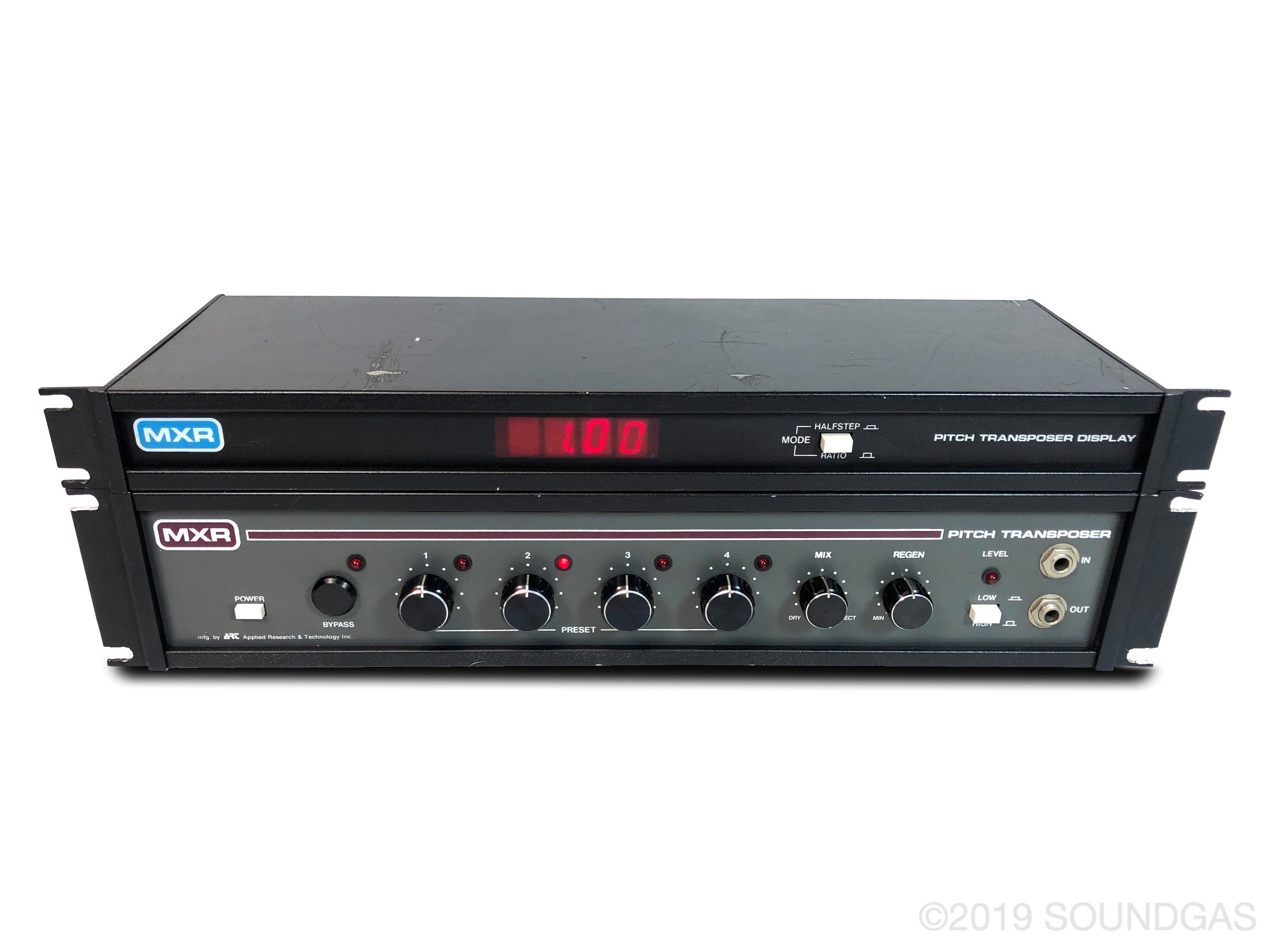

Image
Last edited by ChamomileShark on Sun Jul 06, 2025 4:44 pm, edited 2 times in total.
Pastoral, Kosmiche, Ambient Music https://markgriffiths.bandcamp.com/
Experimental Music https://markdaltongriffiths.bandcamp.com/

Post

oops double post
Pastoral, Kosmiche, Ambient Music https://markgriffiths.bandcamp.com/
Experimental Music https://markdaltongriffiths.bandcamp.com/

Post

You want a frequency counter with that display? Or anything that has that kind of display?
What lies behind us and what lies before us are small matters compared to what lies within us. - Emerson

Post

Frequency counter.

I use a modular for analogue linear FM. So I need to get precise readouts of frequency to hit the required ratios. I can do it with other tuners but I thought a nixie tube emulation would be fun. I'm sort of surprised that no one has done it, I assume it's just a skinning thing.
Pastoral, Kosmiche, Ambient Music https://markgriffiths.bandcamp.com/
Experimental Music https://markdaltongriffiths.bandcamp.com/

Post

You might have to build your own. There's a guy who's done a lot of stuff with plugdata. I can't recall his name (Eian Bristow?) his plugins are usually labelled EB-something-or-other. His stuff is available for free and I've seen him livestream a couple of times recently on youtube. Maybe drop him a line and see if he'll knock one out for you.
What lies behind us and what lies before us are small matters compared to what lies within us. - Emerson

Post

ChamomileShark wrote: Thu Jul 10, 2025 8:44 am Frequency counter.

I use a modular for analogue linear FM. So I need to get precise readouts of frequency to hit the required ratios. I can do it with other tuners but I thought a nixie tube emulation would be fun. I'm sort of surprised that no one has done it, I assume it's just a skinning thing.
Should be pretty straightforward to build in Reaktor if you have that?

Post

nixie-clock.jpg
You do not have the required permissions to view the files attached to this post.

Post

thanks for the suggestions, I'm not interested in building my own, I don't have the skills. Just wondered if it still existed.
Pastoral, Kosmiche, Ambient Music https://markgriffiths.bandcamp.com/
Experimental Music https://markdaltongriffiths.bandcamp.com/

Post

A cheap hardware version may be your best option.

I have reaktor but have yet to try it out.
What lies behind us and what lies before us are small matters compared to what lies within us. - Emerson

Post

Been mucking about with Reaktor as I recently acquired it. I managed to figure out how to get a numeric display of the frequency. Unfortunately, it works based on midi note pitch so not very useful since you can look that info up or print out a chart if you want.

I did a search and found a tutorial on adsrsounds.com and they have an ensemble one can download. It is also based on midi pitch to frequency, however I was able to get it to work as an effect so it works with audio signals. The issues now are one: the accuracy is not perfect but it will get you fairly close, and two: there doesn't seem to be a way to modify the basic numeric display module as far as size/color goes and the display is pretty small. Supposedly the multi display module can be used but I've no idea how to use that thing as of yet but I think that is skinnable. Guess I'm going to have to read the manuals.
What lies behind us and what lies before us are small matters compared to what lies within us. - Emerson

Post

Well, if you're still interested and not opposed to Reaktor player (or have Reaktor), I managed to get one working with audio and figured out how to make a large digital display.
What lies behind us and what lies before us are small matters compared to what lies within us. - Emerson

Post

hi, yes, that would be great, I have Reaktor.
Pastoral, Kosmiche, Ambient Music https://markgriffiths.bandcamp.com/
Experimental Music https://markdaltongriffiths.bandcamp.com/

Post

Okay, I've uploaded it to the reaktor user library. Title: 'Simple Frequency Counter', it's 3.9 MB and the upload date is July 21, 2025. Let me know here if it works or you have any issues with it or want to change the size/color of it.

Edit: well. I've tested it with various synths as test signals and it works with some better than others. Vital makes it go nuts for some reason and with some the readout fluctuates all over the place even when there's no sound. Hopefully it works for you.
What lies behind us and what lies before us are small matters compared to what lies within us. - Emerson

Post

hi, really thanks for doing this.

I tried it with live audio, ie routing a hardware synth into it. It takes a little while to settle down but it's working great in Bitwig. I can read the display even with my poor eyesight from where I would be fiddling with the modular hardware. Maybe a little bigger would be nice but as I say I can read it ok as it is.

It didn't work in Cubase, no idea why. It showed audio going in but the display didn't shift from 0 and no audio was passed out, ie it muted the track.

Once again, thank you for doing this.
Pastoral, Kosmiche, Ambient Music https://markgriffiths.bandcamp.com/
Experimental Music https://markdaltongriffiths.bandcamp.com/

Post

You're welcome. I didn't connect the inputs to the outputs! That's probably why Cubase is muted. Might not fix the issue with it not reading the signal but should unmute the track hopefully.

Just click edit on reaktor and click on the 'instrument' tab in the edit area. You can then drag wires from the input to the outputs (leave the others connected) and that should give you audio out (or audio through, or whatever).

To change the display size:
from the 'instruments' view: you should see two boxes labelled 'knob'.
right click on them (one at a time) and select 'structure'.
you should see a little box labelled 'R frequency' or 'L Frequency'.
right click on it and select 'properties'.
on the left pane where is says: function, info, view, connect, select the 'view' tab.
where is says 'Size', that's where you can resize the display box.
where it says 'Style' is where you can alter the backround of the display box (none, light, or dark) and the fonts and size of the numbers.
What lies behind us and what lies before us are small matters compared to what lies within us. - Emerson

Post Reply

Return to “Effects”