
Drumlabooh free drum machine: ideas and suggestions needed

VST, AU, AAX, CLAP, etc. Plugin Virtual Instruments Discussion
RELATED
PRODUCTS
Drumlabooh

Post

Image

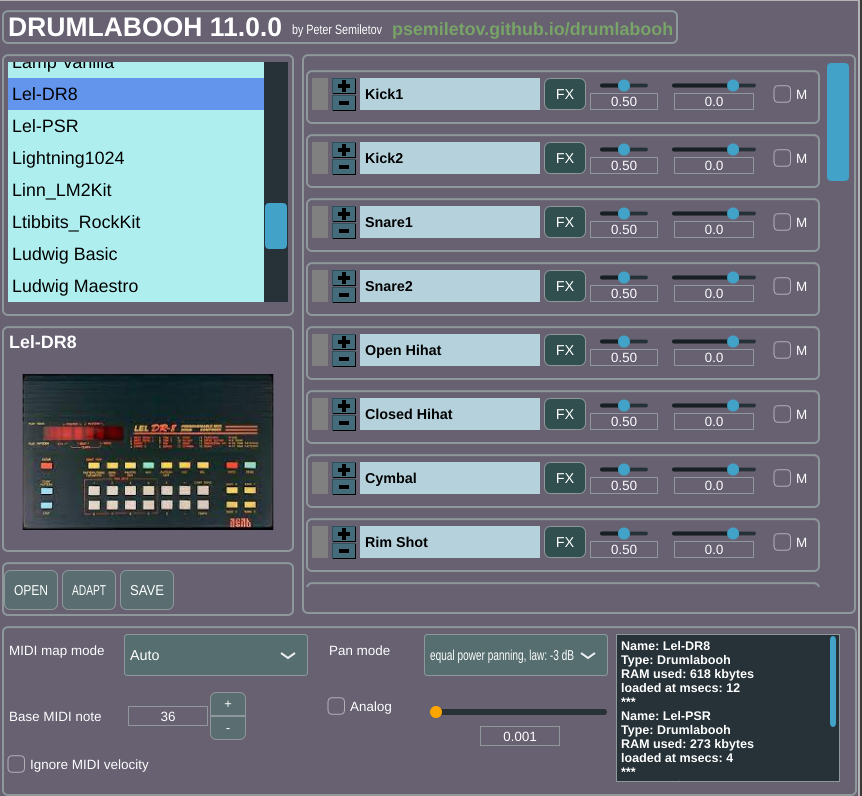
Hello! After releasing the 11-th version of Drumlabooh (https://psemiletov.github.io/drumlabooh/) I think I've implemented almost all thing that I need in the drum machine plugin:
* Linux LV2/VST3i, Windows VST3i plugin format
* Supported sample drumkit formats: Drumlabooh, Hydrogen, SFZ, plain directory!
* Bundled with high quality drumkits designed after legendary acoustic drums and drum machines
* Built-in kit editor/creator (just add your samples!)
* Stereo (with built-in mixer) or multi (36 channels) output
* Built-in mixer with Pan, Volume, mute controls and Pan mode option
* FX for each instrument slot: LP, HP resonance filters and Analog knob to make the sound warmer (per-instrument or/and for the whole mix)
* Up to 36 instrument slots with layers (max 127 layers)
* Layer change by MIDI velocity, Round Robin or Random order
* Automatic open hihat mute on hihat close
* Manual mute groups
* Drumkit image (if provided) at plugin window
* Flexible MIDI mapping modes

What else do you need at the drum machine plugin? Share your thoughts.

Post

I would find it useful to have configurable controls for humanization (to make timing less robotic) and overcoming the machine-gun effect (for patches that don't have round robin)--through editable, and random, tiny changes in timing, velocity, pitch, etc. Essentially things that assist with making the drums sound slightly less perfect -- like they are played by a real drummer. :)

This is a fantastic drum program!! :)
Vendor‑Dependent Copy Protection: Customers lose. Pirates win.:mad:
(Also: I'm Accused of lying about Linux—it boots, runs my pro audio workflow, stays stable, updates--though yearly dismissed as “niche”. Yet I'm the deluded one.)
:roll:

Post

audiojunkie wrote: Thu Oct 16, 2025 4:53 pm Essentially things that assist with making the drums sound slightly less perfect -- like they are played by a real drummer. :)
Maybe a "Number of Drinks" knob?! :hihi:

Post

audiojunkie wrote: Thu Oct 16, 2025 4:53 pm I would find it useful to have configurable controls for humanization (to make timing less robotic) and overcoming the machine-gun effect (for patches that don't have round robin)--through editable, and random, tiny changes in timing, velocity, pitch, etc. Essentially things that assist with making the drums sound slightly less perfect -- like they are played by a real drummer. :)
This is a fantastic drum program!! :)
Thank you!
I’ve thought about humanization, and it’s a complex topic.
As far as I can understand, humanization makes each playing/rendering unique, resulting in a slightly different mix each time. For live performances, this is acceptable, but for the mixdown, it might be less desirable. Perhaps it would be more controllable to create manual humanization using DAW automation. This way, we can automate MIDI events and Drumlabooh's mixer strips/FX parameters, adjusting them to achieve a more live sound.

Post

roxton wrote: Fri Oct 17, 2025 12:41 pm
audiojunkie wrote: Thu Oct 16, 2025 4:53 pm I would find it useful to have configurable controls for humanization (to make timing less robotic) and overcoming the machine-gun effect (for patches that don't have round robin)--through editable, and random, tiny changes in timing, velocity, pitch, etc. Essentially things that assist with making the drums sound slightly less perfect -- like they are played by a real drummer. :)
This is a fantastic drum program!! :)
Thank you!
I’ve thought about humanization, and it’s a complex topic.
As far as I can understand, humanization makes each playing/rendering unique, resulting in a slightly different mix each time. For live performances, this is acceptable, but for the mixdown, it might be less desirable. Perhaps it would be more controllable to create manual humanization using DAW automation. This way, we can automate MIDI events and Drumlabooh's mixer strips/FX parameters, adjusting them to achieve a more live sound.
That is a possibility as well. :) What MIDI controls are automatable from the DAW?
Last edited by audiojunkie on Fri Oct 17, 2025 4:04 pm, edited 1 time in total.
Vendor‑Dependent Copy Protection: Customers lose. Pirates win.:mad:
(Also: I'm Accused of lying about Linux—it boots, runs my pro audio workflow, stays stable, updates--though yearly dismissed as “niche”. Yet I'm the deluded one.)
:roll:

Post

How does your midi mapping work? Is it easy to create a new map? Is there a default GM mapping? These are some other questions I'd be interested in knowing more about. I can't really think of anything else. It's a really solid project! :)
Vendor‑Dependent Copy Protection: Customers lose. Pirates win.:mad:
(Also: I'm Accused of lying about Linux—it boots, runs my pro audio workflow, stays stable, updates--though yearly dismissed as “niche”. Yet I'm the deluded one.)
:roll:

Post

Oh! I just thought of another really important thing. Does the app scale up for HiDPI/high-resolution monitors?
Vendor‑Dependent Copy Protection: Customers lose. Pirates win.:mad:
(Also: I'm Accused of lying about Linux—it boots, runs my pro audio workflow, stays stable, updates--though yearly dismissed as “niche”. Yet I'm the deluded one.)
:roll:

Post

audiojunkie wrote: Fri Oct 17, 2025 4:02 pm How does your midi mapping work? Is it easy to create a new map? Is there a default GM mapping? These are some other questions I'd be interested in knowing more about. I can't really think of anything else. It's a really solid project! :)
Currently Drumlabooh supports MIDI mapping for SFZ and native Drumlabooh kits. If MIDI notes are assigned to samples at the drum kit file, Drumlabooh loads such MIDI mapping, and to use it you need to set (at Drumlabooh UI) "MIDI map mode" option to "Kit". If there is "Auto"value, Drumlabooh map samples starting from the "Base MIDI note" value (36 by default).
For example, all AVL SFZ drumkits have GM MIDI mapping. All Drumlabooh kits also has GM-compatible mapping.
To make a custom MIDI mapping, just edit SFZ or Drumlabooh kit file with any text editor. Here is an example of Drumlabooh's Cheetah SpecDrum Standard kit, the file drumkit.txt:

Code: Select all

[36]KICK=kick.wav
[38]SNARE=snare.wav
[47]MID TOM=tom_mid.wav
[45]LOW TOM=tom_low.wav
[56]COWBELL=cowbell.wav
[42]HIHAT C=hihat_c.wav
[46]HIHAT O=hihat_o.wav
[39]CLAPS=clap.wav
Here, the numbers are MIDI note numbers. You can edit them to fit MIDI e-drums or pads.
Drumlabooh has also a more powerful, XML-based kit format, where you can also assign the MIDI note number to the sample:

Code: Select all

<sample name="Kick" note="36">
kick01.wav,kick02.wav,kick03.wav
</sample>

Post

audiojunkie wrote: Fri Oct 17, 2025 4:07 pm Oh! I just thought of another really important thing. Does the app scale up for HiDPI/high-resolution monitors?
Actually I don't know :(

Post

roxton wrote: Fri Oct 17, 2025 4:59 pm
audiojunkie wrote: Fri Oct 17, 2025 4:07 pm Oh! I just thought of another really important thing. Does the app scale up for HiDPI/high-resolution monitors?
Actually I don't know :(
What libraries/frameworks are you using? I will look them up and see if they support it.
Vendor‑Dependent Copy Protection: Customers lose. Pirates win.:mad:
(Also: I'm Accused of lying about Linux—it boots, runs my pro audio workflow, stays stable, updates--though yearly dismissed as “niche”. Yet I'm the deluded one.)
:roll:

Post

audiojunkie wrote: Fri Oct 17, 2025 4:07 pm What libraries/frameworks are you using? I will look them up and see if they support it.
JUCE of course.

Post

roxton wrote: Fri Oct 17, 2025 6:26 pm
audiojunkie wrote: Fri Oct 17, 2025 4:07 pm What libraries/frameworks are you using? I will look them up and see if they support it.
JUCE of course.
It looks like HiDPI is supported! :)
Vendor‑Dependent Copy Protection: Customers lose. Pirates win.:mad:
(Also: I'm Accused of lying about Linux—it boots, runs my pro audio workflow, stays stable, updates--though yearly dismissed as “niche”. Yet I'm the deluded one.)
:roll:

Post

audiojunkie wrote: Fri Oct 17, 2025 3:59 pm What MIDI controls are automatable from the DAW?
To be more precise, I mean MIDI events such as velocity. If we try to handle the hardware's pitch or modulator wheel, we cannot determine to which sample it must be applied - for the kick or the snare or whatever.

Post

roxton wrote: Sat Oct 18, 2025 6:51 am
audiojunkie wrote: Fri Oct 17, 2025 3:59 pm What MIDI controls are automatable from the DAW?
To be more precise, I mean MIDI events such as velocity. If we try to handle the hardware's pitch or modulator wheel, we cannot determine to which sample it must be applied - for the kick or the snare or whatever.
Ok, so aside from which note number, note on, note off, and velocity, what else is controllable from MIDI?
Vendor‑Dependent Copy Protection: Customers lose. Pirates win.:mad:
(Also: I'm Accused of lying about Linux—it boots, runs my pro audio workflow, stays stable, updates--though yearly dismissed as “niche”. Yet I'm the deluded one.)
:roll:

Post

audiojunkie wrote: Sat Oct 18, 2025 3:30 pm Ok, so aside from which note number, note on, note off, and velocity, what else is controllable from MIDI?
States of wheels (pitch, modulation) and pedals (sustain, etc). But it make sense with a single instrument, not with a drum machine.

Post Reply

Return to “Instruments”