

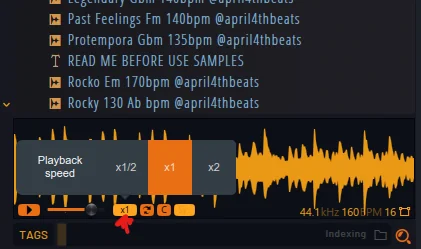
How do I enable the Playback speed function in browser in FL Studio?
-
- KVRer
- 13 posts since 5 Oct, 2016
Could you tell me how to enable features like Playback speed and similar functions in the browser, as shown in the image? Or are they only available when working with FL Cloud?
-
- KVRAF
- 5060 posts since 27 Jul, 2004
That´s an FL Cloud exclusive feature ...at least until now...
Maybe they will bring it to the normal browser too but will probably take long time until this might appear (or never...who knows)
Before they would need first to integrate automatic tempo detection into the normal browser as 99% of available samples do not have the tempo information baked into the file like FLS until now requires.
Maybe they will bring it to the normal browser too but will probably take long time until this might appear (or never...who knows)
Before they would need first to integrate automatic tempo detection into the normal browser as 99% of available samples do not have the tempo information baked into the file like FLS until now requires.
-
- KVRAF
- 5060 posts since 27 Jul, 2004
I am sorry: I told you nonsense...
What I forgot: you need to hover with your mouse over the preview window after having selected the sample! .
BUT: it just works with files having tempo information stored in the file header! This is with nearly no existing sample the case so you have to save the tempo information into the file manually with i.e. Edison!
You do not have the required permissions to view the files attached to this post.