FFAB 'FFmpeg Audio Batch' – free GUI for FFmpeg audio

Audio Plugin Hosts and other audio software applications discussion
RELATED
PRODUCTS

Post

Hi everyone –– I've finally got around to releasing a PUBLIC BETA for my latest app project:

FFAB
aka 'FFmpeg Audio Batch'

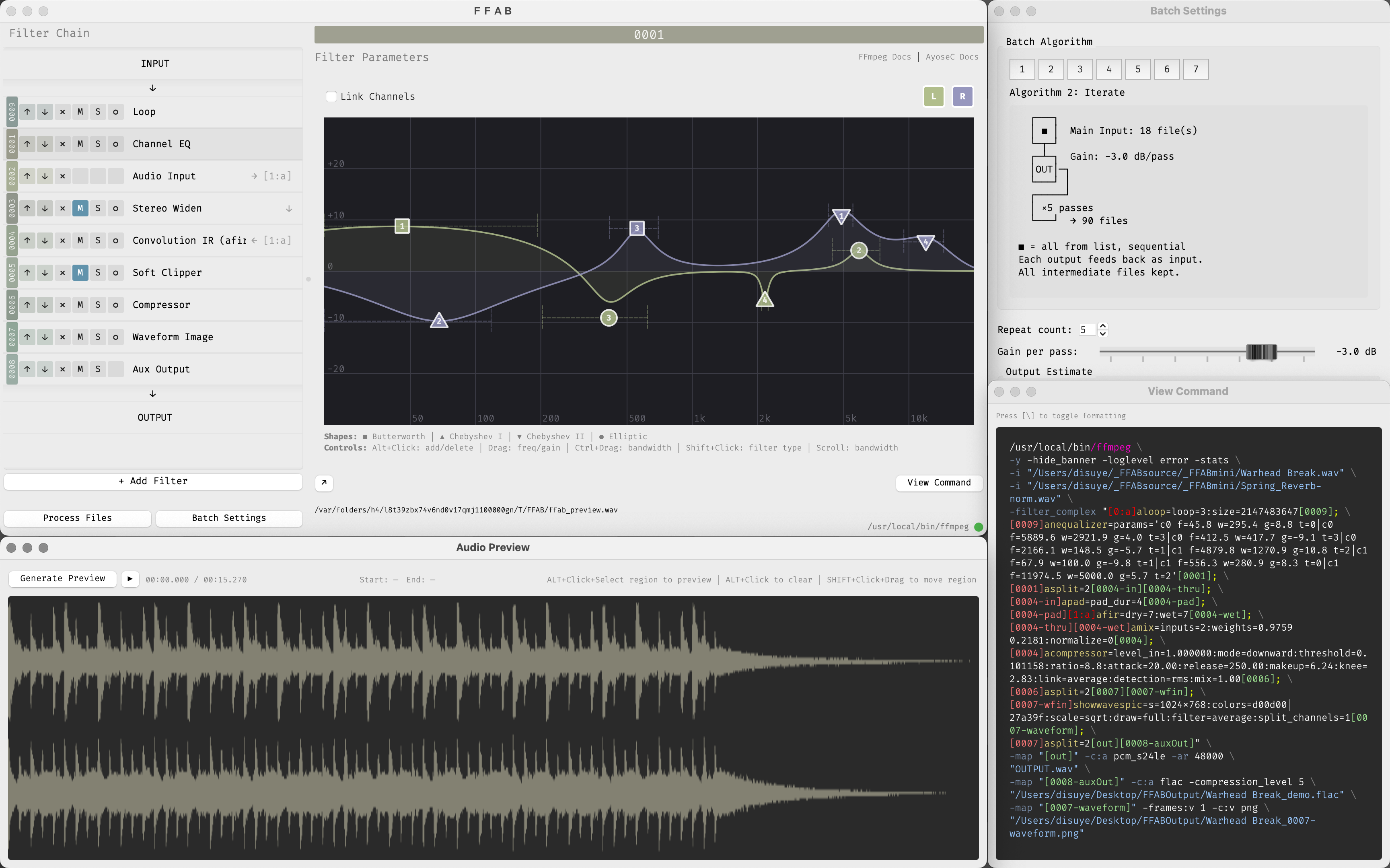
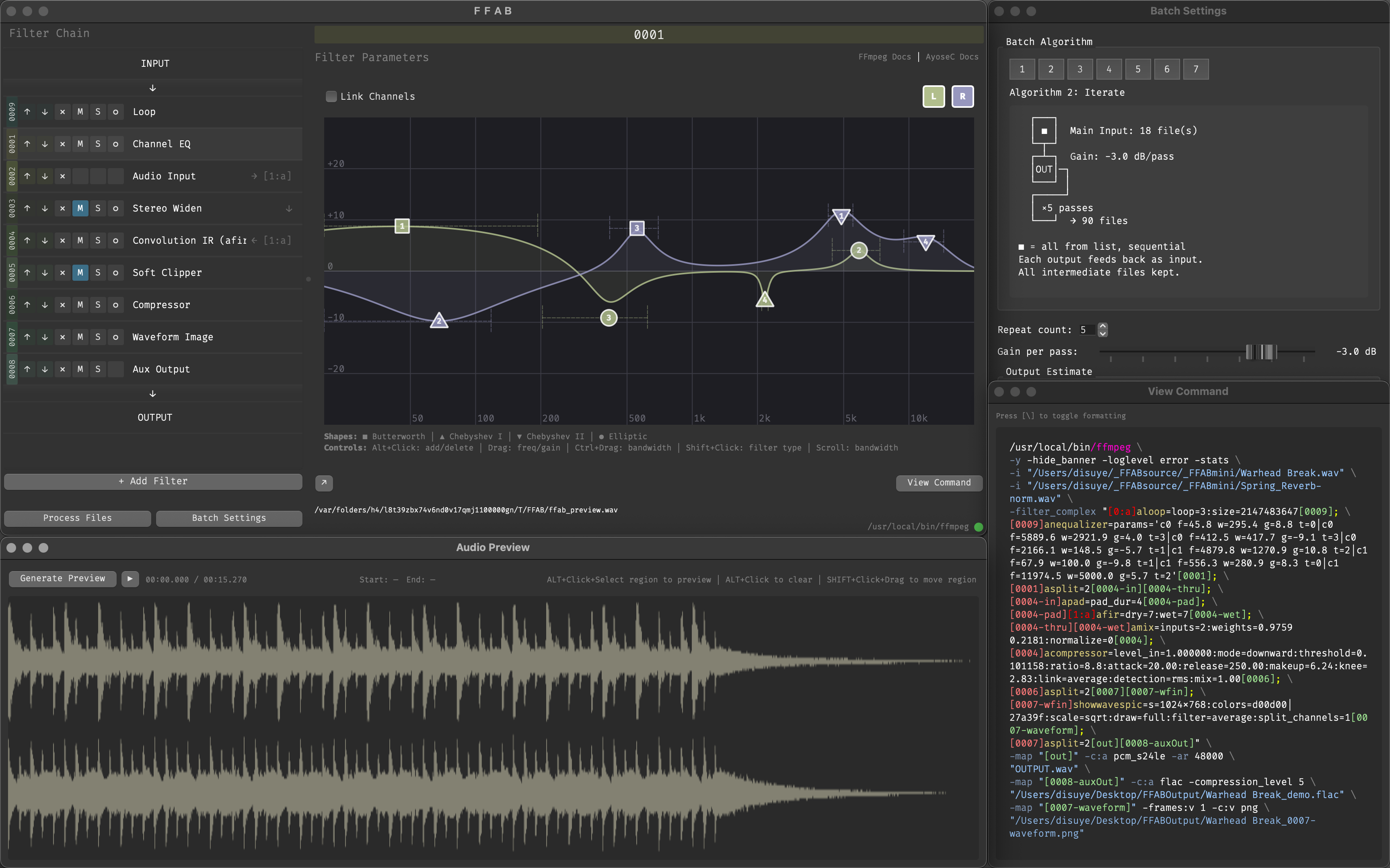
A batch processing GUI for FFmpeg but *only* the audio related stuff. Generate audio previews, drag & drop filter effect chains (with mute & solo), parallel processing (asplit), sidechain and multiples file inputs, parallel file outputs, copy & paste commands from FFAB direct to FFmpeg command line. FFmpeg is installed separately and FFAB simply calls it (but FFAB also has a built-in FFmpeg installer routine so if you've struggled with it in the past, FFAB hopefully makes it easy).

https://www.disuye.com/ffab
Image

Image

Free / donationware / will eventually be open source (but not for another 6 months or so).

Built using C++/Qt6.7.3 so runs on macOS (Monterey+, Universal) and I've also tested on Linux VMs (Ubuntu 24, ARM64 & x86_64). I don't have motivation for Windows but theoretically it can be built if someone wants to take up the task.

Would love to get some feedback or feature requests. There are no huge bugs on my limited test rig, and for this public beta version 0.1.5 is in a 'finished enough' state. But if it flat-out fails to install on your machine, please let me know :)

FFAB is equal parts mundane batch processing utility ("convert all these into those") and an unhinged experimental sample based inspiration generator ("destroy my entire sample library"). Oh, and it also has video passthrough, so you can fix audio issues in 100x MOV files without transcoding or touching pixels.

Cheers all, Dan

p.s: By donationware I mean consider buying some of my music, no obligation, but that's the simplest way to support this project:

https://dan-f.bandcamp.com
https://smplr.bandcamp.com
https://dyscopian.bandcamp.com

Post

Kinda surprised at the complete lack of feedback on KVR, but hey ho! Not doing this for props :)

Writing back in here to say that the *complete* source code for FFAB is now up on my Github:

https://www.github.com/disuye/ffab

Plus I finally got my Apple Dev account so the macOS version is now notarized (no more gatekeeper / first run issues). Linux versions run great, and still looking for a Windows maintainer.

Cheers,

Dan
Last edited by disuye on Wed Mar 11, 2026 10:08 am, edited 1 time in total.

Post

Thanks for creating this. I need time to see what I can do with it…

Post

Thanks – I've got FFAB working perfectly for my own personal use – but I'd love for the community to give me more jobs to work on: Features, workflows, additional filters pulled from FFmpeg video that are useful to the audio people, and of course bugs?

I have intentions to make a node graph UI for FFAB (the code is already running under the hood, audio streams are handled via DAG/ Directed Acyclic Graph) but without community motivation & feedback for a node UI, I personally don't have a use for it.

Cheers, Dan

Post

Incidentally – apart from humdrum audio batch proessing jobs – a chunk of FFAB test code runs this entire generative 24/7 livestream of experimental ambient / glitch / art music...

SMPLR "The Infinite Album"
https://theinfinitealbum.com/

Judge SMPLR based on what it's doing, not if you like the music or not – I only like most of it :)

FFmpeg does all song generation at 24bit/48kHz, does the mastering pipeline, does stream assembly, does spectral visual creation... then a secondary FFmpeg pipeline handles GPU encoding and 3-way RTMP / RTMPS simulcasting to YouTube, Twitch and Kick... All of this is handled by FFmpeg filter chains created in FFAB (the RTMP streaming filters are not in the public version, but they can be).

So FFAB / FFmpeg is literally limited by the imagination. AMA!

https://theinfinitealbum.com/

Post

disuye wrote: Tue Mar 10, 2026 7:41 pm Kinda surprised at the complete lack of feedback
It must be said that there is a serious lack of explanation for laypersons :help:
What exactly is FFmpeg? I know it has some connection to video processing, but nothing more…

Post

I do a lot of batch processing and conversion, and generally use fr:eac. I applaud you from working on this tool and like the concept, especially the ability to configure filters. But this needs a lot of workflow improvements. Some suggestions:
  • Presets for the entire processing chain. There is too much to setup for every batch. Preset should output format, destination directory (which should also be relative to input), etc.
  • Enable drag-and-drop of folders and files into the batch window.
  • An output preset system. Should be able to configure any output format supported by ffmpeg, and save it to appear in the drop-down list.
  • Support multiple output formats. Should be able to output multiple versions of each file in the batch. For example, output both a FLAC and an AAC.
  • Add preferences. At minimum the user should be able to choose an ffmpeg binary, default output directory, etc.

Post

teilo wrote: Wed Mar 11, 2026 2:48 pm I do a lot of batch processing and conversion, and generally use fr:eac. I applaud you from working on this tool and like the concept, especially the ability to configure filters. But this needs a lot of workflow improvements. Some suggestions:
  • Presets for the entire processing chain. There is too much to setup for every batch. Preset should output format, destination directory (which should also be relative to input), etc.
  • Enable drag-and-drop of folders and files into the batch window.
  • An output preset system. Should be able to configure any output format supported by ffmpeg, and save it to appear in the drop-down list.
  • Support multiple output formats. Should be able to output multiple versions of each file in the batch. For example, output both a FLAC and an AAC.
  • Add preferences. At minimum the user should be able to choose an ffmpeg binary, default output directory, etc.
Great input, and thanks for taking the time.

[*] Presets for the entire processing chain.

FFAB already has 'project' presets, which saves/loads the entire filter chain, all filter params, including "Aux Output" filter(s)* codec settings, and the contents of both Main and "Sidechain / Audio Input" File Lists.

The only thing FFAB does not save is the output folders, my reasoning being that FFAB's FFmpeg command is hardcoded to overwrite destination files (makes running trials much faster), so the user has to manually confirm where files will write each time. But noted, I can make this an option.

[*] Enable drag-and-drop of folders and files into the batch window.

Will do! I've been messing around with this recently. Next release.

[*] An output preset system. Should be able to configure any output format supported by ffmpeg, and save it to appear in the drop-down list.

I'll go one step further to say that FFAB could have preset save/load function for *every* filter in the chain. The backend for this already partially exists with 'project' presets. Needs extending. Also, each filter preset drop-down list could be populated based on the contents of each filter's preset folder.

[*] Support multiple output formats. Should be able to output multiple versions of each file in the batch. For example, output both a FLAC and an AAC.

This already exists in FFAB: The processing chain has one Main Output, but the user can insert as many 'Aux Output' filters as they wish, choosing any codec they need, at any point in the processing chain. So you can output WAV files before &/or after a group of filters to A-B the results, or save one input to several simultaneous outputs: WAV -> AIFF, FLAC, MP3 low, MP3 high, and OGG ... with one button click. But if I've misunderstood your requirement, please just tell me.

[*] Add preferences. At minimum the user should be able to choose an ffmpeg binary, default output directory, etc.

Output dir, I can add, as discussed above re: auto file overwrite. But right now the user *can* specify path to whatever FFmpeg binary they want. I included an installation wizard for the Tessus FFmpeg because that build includes the largest number of audio related features (and FFAB is an audio focused app)... but if you prefer the HomeBrew, or Martin Riedl's, or some other custom FFmpeg build, path/to/ffmpeg can be declared right now in FFAB > Menu > Settings.

I'm also looking into making my own audio-oriented FFmpeg build based on a mixture of Tessus and Martin Reidl's and some other features I'd like to see included ... but not for a couple more months, too much on my plate.

I think this reply covers your points, and thanks again for the feedback, genuinely all appreciated!

Dan
Last edited by disuye on Wed Mar 11, 2026 11:11 pm, edited 1 time in total.

Post

Monsieur_FyP wrote: Wed Mar 11, 2026 12:35 pm
disuye wrote: Tue Mar 10, 2026 7:41 pm Kinda surprised at the complete lack of feedback
It must be said that there is a serious lack of explanation for laypersons :help:
What exactly is FFmpeg?
FFmpeg is a free multimedia toolkit that can do just about anything you need with media files.

If you ever asked yourself in the studio "how can I do BLAH to FOOBAR?" the answer 99.9% of time is "Yeah, FFmpeg will do that" ...

The problem is that FFmpeg is almost exclusively command line, the installation process is already a hurdle for non-techie people, the filter parameter names & input values are not always consistent (sometimes dB, sometimes 0~1, sometimes 3~301 with a default of 31 [wtf dynaudnorm]) and to make the journey even more exciting there are different builds of FFmpeg with different feature sets (libraries).

So the learning curve is a cliff.

FFmpeg is popular with the video community but FFmpeg is NOT just a video tool. There 120+ audio filters from different types of EQs, filters, compressors, denoisers, gates, sidechain effects, convolution IR [reverbs etc.], echos, delays, loopers, trimmer, analysis tools, logging tools, audio to image tools ... it's frankly an insane toolkit for the price. Free.

If you're into making music / generative media / archiving audio, it's well worth learning FFmpeg. FFAB tries to shallow the learn learning curve hopefully.

Cheers, D


---------
TL;DR: These are the audio-heavy builds of FFmpeg:

- macOS (Intel but works with Rosetta):
https://evermeet.cx/ffmpeg/

- Linux x86_64:
https://github.com/BtbN/FFmpeg-Builds/r ... gpl.tar.xz

- Linux ARM64:
https://github.com/BtbN/FFmpeg-Builds/r ... gpl.tar.xz

- Windows x64:
https://github.com/BtbN/FFmpeg-Builds/r ... 64-gpl.zip
Last edited by disuye on Wed Mar 11, 2026 11:01 pm, edited 1 time in total.

Post

teilo wrote: Wed Mar 11, 2026 2:48 pm [*] Enable drag-and-drop of folders and files into the batch window.
This comment motivated me to quit tooling around and push FFAB v1.0.4 with File List drag & drop...

https://github.com/disuye/FFAB/releases/tag/FFABv1.0.4

Post

Thanks a lot for these detailed explanations and links :tu:

Post

That looks sick! I had no idea ffmpeg was able to do so much with audio too.

Post

wadamek wrote: Thu Mar 12, 2026 9:18 am That looks sick! I had no idea ffmpeg was able to do so much with audio too.
I'm absolutely with you.

For the last 20 years my interaction with FFmpeg was copy / paste command line format conversion commands ... but in 2023 I had an itch to make generative music, but I also wanted to try and only use open source and ideally cross platform building blocks... stumbled into shell scripting FFmpeg commands, rabbit-holed the FFmpeg audio filter documentation and my tiny brain popped.

Here is a list of all FFmpeg audio filters – there are also video & analysis filters that can *also* do stuff with audio... But you get the gist:

https://ayosec.github.io/ffmpeg-filters ... ers/Audio/

Being able to load convolution IR files (I sampled my RE201 spring reverb, and some saturation IRs) was a huge motivation, plus the Parametric EQ (re-named Channel EQ in FFAB) and stock compressors both sound bloody good ... OK, what more do I need.

And FFmpeg has been around since the year 2000 lol

Post

This looks like a very useful piece of software. I suppose you're not getting much feedback (or interest) here on KVR for two main reasons: no Windows, and the very specific nature of the software. Even though ffmpeg is a really amazing tool and has a lot of features, a lot of its filters and stuff are "basic", meaning that they are very barebones digital implementations that don't usually have much use in modern audio production. Where they shine is when you just need to homogenise stuff without much concern for "sound character" or even "quality", which is why you coded a batch converter of course. (I mean, those features are there so that you can take a bunch of videos or audio files and make them the same volume, for instance). In fact I could personally use your application (but unfortunately I'm running Windows right now, although I've long been a Linux enthusiast) for work - I teach English, and a lot of the audio extracts I use for listening tasks vary wildly in volume, some are noisy, some have excessive sibilance or bass, etc. and I need to optimise them for reproduction on laptop speakers or low quality/power/bandwidth loudspeakers for instance.

I wonder if there are features to automate some of the things you can do: for instance, extract the LUFS-I value from a bunch of files, take the average value, simply turn down in volume the files over the average, turn up the files that are lower but simply employ compression for those that are below a certain LUFS-M value and also apply some soft clipping additionally to those that are over that value to keep the compression in check and avoid excessive pumping and stuff. Stuff that you can do with scripts but are tedious to code. Anyway, keep up the good work!

A small suggestion: the EQ panel should be scalable dB-wise. Having 10dB steps for the gridlines is a bit excessive usually. But not always.

Post

This looks great. I'm using Windows, but this should run well enough on a Linux VM.

Post Reply

Return to “Hosts & Applications (Sequencers, DAWs, Audio Editors, etc.)”