Ensoniq DP/4 Emulation Incoming!

VST, AU, AAX, CLAP, etc. Plugin Virtual Effects Discussion
Post Reply New Topic
RELATED
PRODUCTS

Post

jens wrote: Wed Mar 11, 2026 1:35 pm considering you argue on things you're not even interested in (your own word).
By the way: you now repeatedly made that claim even though I challenged you on it the first time you made it.

"Your own word" - that is a complete lie. You will even stoop as low as that in order to distract from the fact that you were ridiculously wrong when posting your screenshot. So you are not only pathetically incompetent but also seem to have a highly questionable morale.

Post

Can you fellows please take the squabbling to private messages and spare the rest of us?

Post

braincandy wrote: Wed Mar 11, 2026 2:16 pm Can you fellows please take the squabbling to private messages and spare the rest of us?
Yeah well - if you follow the thread you should see that I tried that. All I did was mention that the plugin has an excessive CPU useage - which it has - and then got vilely attacked for it. It's really difficult to stay on course like that.

Having said that: I wish I was better at letting the off topic bullshit and personal attacks go - I really wish.


But I am out anyway, since unfortunately the developer didn't address the issue at hand in any way whatsoever. (Which I think is a shame, but maybe that's just me.)

Post

jens wrote: Wed Mar 11, 2026 1:41 pm
TemeculaDSP wrote: Wed Mar 11, 2026 6:08 am Hey everyone,

[...]

Thanks again for the support, and happy mixing!

uhm... so no word from you at all regarding the most excessive CPU consumption? :?
I actually agree; it would definitely be interesting to hear the dev's comment on this. (And I see no reason why couldn't this do). Otherwise, the suspicion of an optimization error only grows stronger.

On the other hand, I felt a little better after the compressor. It seems like the outside world has switched to some sort of new emulation standard (and I think I slept through it lol). Where cpu consumption is no longer a question mark.

Post

jens wrote: Wed Mar 11, 2026 1:35 pm
- tried to prove me wrong with an absolutely meaning- and pointless screenshot

- you did this because you don't even know properly know how your own DAW functions and needed me to explain it to you (even that's neither my main, nor even my secondary DAW of choice)

- attacked and insulted me since then instead of admiting that you were WRONG - which you totally were.
Do you stop bitching sometimes ? You're flooding forums with posts saying the same (no)thing over and over, it's just pollution. For memory, look at your first (or second) post, below. See how offensive and insulting you are (i was not even involved). I'm not here to scrutinize softwares to sweare they're not coded by the book. I absolutely don't care if the bypass function is working as you think it must be working, as long as i like the sound it makes. There's countless gear in history that are born freaky, that were trashed at the time by people (like you) and now sought after by people (like you - hey, go figure). And Deep4 beeing what it is is very welcome and convenient. Too much cpu ? Maybe. I don't care. Not that much here, totally acceptable.
By the way you're more insulting than i am.
Please, face yourself. And stop barking you're finishing songs (see below), you're not doing anything except noise.
ps : I particularly love the end of the post below when you try to justify yourself by saying @beely is not helping the developer.
How vain and pathetic you are.
jens wrote: Sun Mar 08, 2026 5:16 pm
beely wrote: Sun Mar 08, 2026 3:44 pm
jens wrote: Sun Mar 08, 2026 1:58 pm So it appears it's the plugin framework that at the moment is pretty much unuseable.
"Pretty much unusable" was not my experience from trying the demo. I could use it just fine, as have many other people.
I guess we must have very different definitions of the term "useable". I for one am goal-oriented. For me finishing songs is a lot more important than playing around with emulations of legendary gear in empty projects. Just because I can load several instances of a plugin by themselves that doesn't mean using it is feasible in the context of a real production.

Obviously, it's going to perform differently on different systems, and right now it's reasonably CPU heavy
I gues we must have very different definitions of the term "reasonable". Obviously it's performing differently on different machines. But that doesn't affect whether it's a CPU hog as compared to other plugins.

Here it's using 15-30 times as much as plugins such as Valhalla Delay, Ubermod& VintageVerb, Eventide INstant Phaser&Flanger, ADA Fanger&STD-1, etc. even without doing any processing at all.

And if you really consider that to be reasoable, there is absolutely no point in discussing this any further with you.

But let me say that your "I'll defend it no matter what" stance is rather part of the problem than the solution. You're not helping the developer at all.

Post

Wonder if the performance issues, such as they are, could be addressed by incorporating GPU acceleration into the code base.

Post

I haven’t encountered any problems using Windows 11 with Ableton Live 12. Would you mind sharing which operating system you’re using?
This is the same method MJ used when he was working on Anthony Marinelli's Thriller.

Post

inaheartbeat wrote: Thu Mar 12, 2026 5:19 am Wonder if the performance issues, such as they are, could be addressed by incorporating GPU acceleration into the code base.
You can close the UI to figure out. There is no graphics or framework usage with the UI window closed, just the DSP.

Post

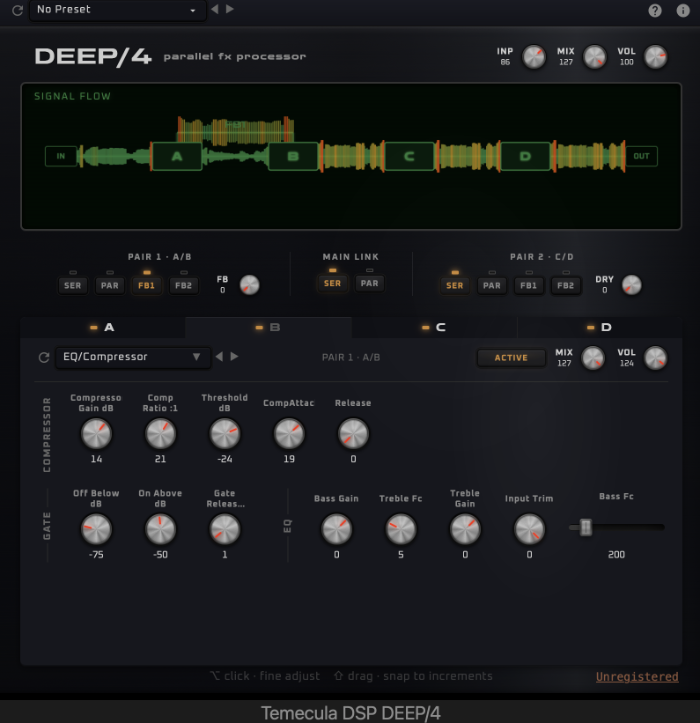
New Update: DEEP/4 v0.3.0

• Performance improvements

• Updated look and feel — new blue-steel color scheme for the unit panel, tabs, toolbar, and dropdowns. Flat dark background with complementary tinted accents throughout. Sliders and switches now use neutral gray fills. Signal flow diagram recolored from red to green. LED indicators are now rectangular. Logo and subtitle use matching typography.

• Signal flow diagram now shows peak level metering — waveform bars change color from green to yellow to red as signal approaches clipping, giving real-time visual feedback on signal health

https://temeculadsp.com/deep4

If anyone missed the intro pricing of $75, use coupon code "LASTCHANCE75" for $25 off. It will be good until March 23 12:00 PM PST.

You must use Stripe Payment to redeem. Thanks!

Image
Last edited by TemeculaDSP on Fri Mar 20, 2026 9:23 pm, edited 1 time in total.

Post

Nice!

Post

Just informing, cpu eating improvement in v0.3.1 actually presents.

Most heavy thing (4U preset), now 22-23% (vs 45% before)
Single algo (plug default state), now 8-9% (vs 19% before)
Single signal generator algo, 6% (vs 17%)
Full empty ("No effect" in all 4 sections), 2% (vs 14% before).

That a much better, thanks.

Post

c_voltage wrote: Sat Mar 21, 2026 1:56 pm Just informing, cpu eating improvement in v0.3.1 actually presents.

Most heavy thing (4U preset), now 22-23% (vs 45% before)
Single algo (plug default state), now 8-9% (vs 19% before)
Single signal generator algo, 6% (vs 17%)
Full empty ("No effect" in all 4 sections), 2% (vs 14% before).

That a much better, thanks.
I'll keep working on it! Thanks for all your analysis. I used it!

Post

@TemeculaDSP
Ok
Little addition: for 4U testing case was used preset "Room Mic Guitar Amp"
(That perhaps may important since as i see differ algos can load cpu a bit differently, so there is 4U presets which can use less cpu, so seems that preset one of most heavy)

Post

Here is a hardware comparison vs DEEP/4 for the Large Plate program at equal settings. It's not great music by any means, but it will give you an idea of the similarities / differences.
  1. The first track is drum machine through the actual Ensoniq DP/4 hardware.
  2. The second is the drum machine through hardware on bypass into plugin (meant to capture analog signal path then process it, which puts the effect after the output, but it is the best I could do there).
  3. The third is drum machine direct to audio interface to plugin.
https://soundcloud.com/temecula-dsp/set ... comparison

Here is the new UI:

https://www.temeculadsp.com/img/deep4.jpg

NEW RELEASE

This is an important release because it replicates the parameter mapping on the original hardware. In otherwords, instead of displaying a generic 0-127, this now displays the correct units and makes it feel like a much different effect. Thanks for temnov, zmix, and callaghan3 for their feedback.

v0.4.0

• Decay parameters now display actual time values in seconds (e.g. "2.89 sec") instead of arbitrary 0–99 numbers. Each reverb algorithm shows its own accurate decay range (Hall: 0.70–250s, Large Plate: 0.40–140s, Large Room: 0.20–150s, Small Room/Plate: 0.20–100s).

• Compressor and expander ratios now display as "1.5:1", "Inf", etc. Attack, release, and gate times show real time values like "50us" or "3.5s". Filter cutoff frequencies display in Hz.

• Reflection time parameters now display with a "ms" suffix on all reverb algorithms

• Mix, Volume, and Input controls now display 0–99 matching the original hardware, instead of the raw 0–127 internal range

• Mix and Volume now default to 99 (full) when selecting a new algorithm, matching hardware behavior. Previously these used per-algorithm preset values that could start partially turned down.

• Fixed display scaling for parameters with non-zero minimum values (e.g. HF Bandwidth starting at 2) which were incorrectly showing the raw 0–127 range instead of 0–99


Download links
WIN: https://temecula-dsp.s3.us-west-1.amazo ... v0.4.0.exe

MAC: https://temecula-dsp.s3.us-west-1.amazo ... v0.4.0.pkg

Post

Sneak peak: Shape your sound with LFOs


A look at the LFO system in Deep 4. Four independent LFOs with drawable curves, adjustable tension, and a step drawing mode for creating rhythmic patterns snapped to a variable grid. Drag-and-drop LFO assignment to any parameter, bipolar modulation, BPM sync, and MIDI-synced parameter sweeping. Full control over curve shape, rate, direction, and trigger mode.

Post Reply

Return to “Effects”