
OB-Xf by Surge Synth Team

VST, AU, AAX, CLAP, etc. Plugin Virtual Instruments Discussion
Post Reply New Topic
RELATED
PRODUCTS
OB-Xf

Post

EvilDragon wrote: Tue Mar 17, 2026 4:30 pm
D-Fusion wrote: Tue Mar 17, 2026 12:18 am This plugin sounds great.
There is one issue i have with it in Bitwig 6 on linux and that is the patch browser.
I can select presets with the prev and next button but clicking on the browser number and selecting a preset from there does nothing in the latest version.

Just noticed that anything in the menu does not change either when selected.

Everything works fine without any problems when i go back to V0.9.48.
"Linux" is an extremely wide term, so more details there would be needed (which distro, which WM, is it in CLAP, VST3, standalone or all of them, etc.).

Works fine here on Windows in BWS 6.
Few other questions

- do any other menus work?
- anything in the bitwig log?
- are you using flatpak or any such or is it an all deb install?

There’s sort of four things I could think of going wrong and this would help quite a bit along with Mario’s questions

Post

Are there any presets already available?

Post

sofu72 wrote: Tue Mar 17, 2026 6:52 pm Are there any presets already available?
Yes. Many and of great quality.

Post

baconpaul wrote: Tue Mar 17, 2026 4:52 pm
EvilDragon wrote: Tue Mar 17, 2026 4:30 pm
D-Fusion wrote: Tue Mar 17, 2026 12:18 am This plugin sounds great.
There is one issue i have with it in Bitwig 6 on linux and that is the patch browser.
I can select presets with the prev and next button but clicking on the browser number and selecting a preset from there does nothing in the latest version.

Just noticed that anything in the menu does not change either when selected.

Everything works fine without any problems when i go back to V0.9.48.
"Linux" is an extremely wide term, so more details there would be needed (which distro, which WM, is it in CLAP, VST3, standalone or all of them, etc.).

Works fine here on Windows in BWS 6.
Few other questions

- do any other menus work?
- anything in the bitwig log?
- are you using flatpak or any such or is it an all deb install?

There’s sort of four things I could think of going wrong and this would help quite a bit along with Mario’s questions
All the menues show up correctly but selecting anything does only close the menu window without doing any changes and the same when i open up the browser menu.

Downgrading from V1 to the version i posted works fine so it is something that is not working properly on my System with V1 and there is nothing in my Bitwig log since it doesn't crash or give any error messages.

No flatpak installed on my System since i also use many windows Vst's and i tried the clap and vst3 version of the OB-XF and both had the same problem.
I used the deb package to install OB-XF.

My linux Distro is a Debian 13 Distro with gnome and V0.9.48 works and it is only after V1 was released i saw this issue.

Post

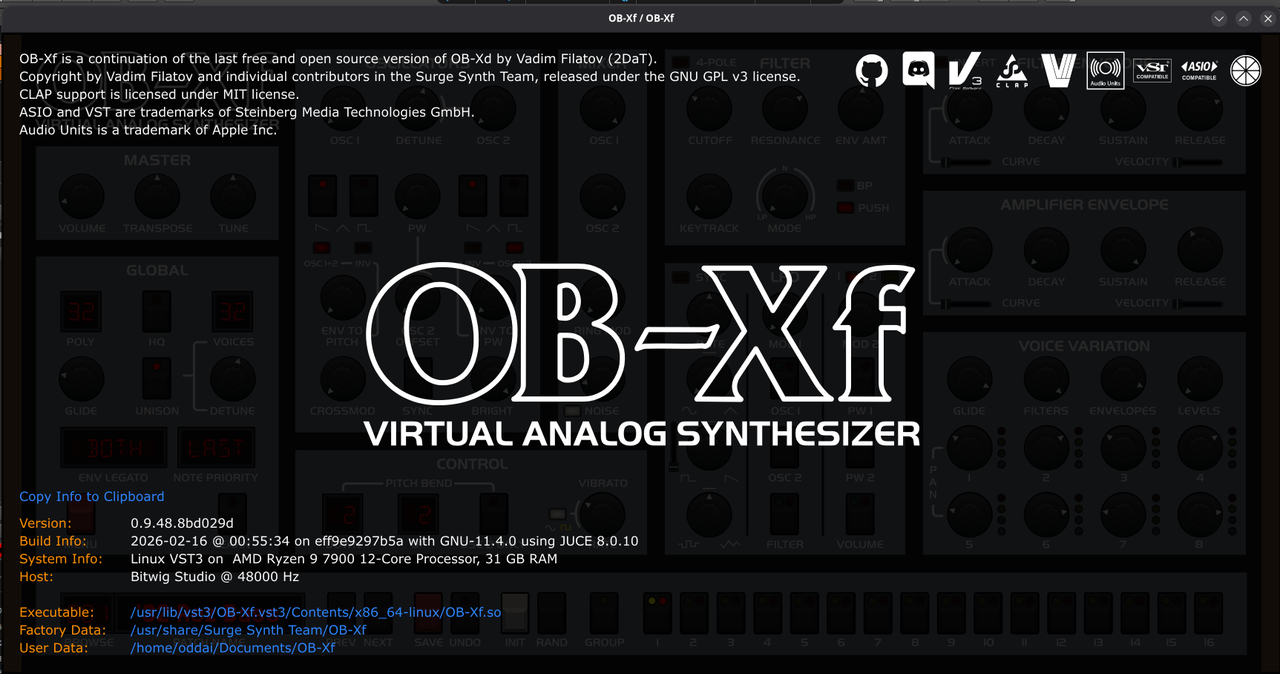
Great can you go to the about screen in 0.9.48 and share the last element - the git hash - and I can look for diffs. Save me having to figure out which commits happened on day 48 of 2026 :)

Post

Oh and do other menus like zoom work? And does it work in standalone?

I can also fire up a vm when I’m back at a desk and look. Thanks for the info so far!

Post

Image
I can't change anything.
I only see the options in the menues and nothing happens when i select anything.

The new version i tried that have this issue is the March 16 nightly release.
The version with the about screen i posted works without any issues.
Last edited by D-Fusion on Tue Mar 17, 2026 8:01 pm, edited 1 time in total.

Post

Excellent thank you

Let me see if I can repro and then will stare at the diffs too

Post

baconpaul wrote: Tue Mar 17, 2026 8:01 pm Excellent thank you

Let me see if I can repro and then will stare at the diffs too
I wonder if it might have something to do with the new menu scaling option in V1.

Post

D-Fusion wrote: Tue Mar 17, 2026 8:03 pm
baconpaul wrote: Tue Mar 17, 2026 8:01 pm Excellent thank you

Let me see if I can repro and then will stare at the diffs too
I wonder if it might have something to do with the new menu scaling option in V1.
Certainly looks that way here yeah. I can repro and am debugging now.

Post

Actually @D-Fusion : curious if you use fractional scaling or have a very large ui.

When I run bws6 with menu scaling on my 4k monitor it craps out and when i run it on my vm on my laptop it doesnt so definitely scaling related.

Post

baconpaul wrote: Tue Mar 17, 2026 8:43 pm Actually @D-Fusion : curious if you use fractional scaling or have a very large ui.

When I run bws6 with menu scaling on my 4k monitor it craps out and when i run it on my vm on my laptop it doesnt so definitely scaling related.
No fractional scaling is used since everything runs at 100% on my 1080p Monitor.

There where some buggy behavior with my gnome setup so i rebuilt my Debian Distro from scratch again and use KDE instead and it works fine now.
The weird part was that it refused to follow any changes and defaulted to 150% zoom even when i did set it to 125% manually in the config file.
I did install KDE to test before i rebuilt my Debian distro and it worked fine there which is why i choose KDE in the end.

I Probably had a Gremlin in my system that was abusing the Gnomes in my System :hihi:

Thank you so much for looking into it for me.
Love the beefy sound of the OB-XF so thank you surge team/baconpaul for making it for us :tu: :party: :hug:

Post

Do you know whether somebody works on bringing this to macOS homebrew?

Congrats on the release!

Post

uOpt wrote: Fri Mar 20, 2026 2:48 pm Do you know whether somebody works on bringing this to macOS homebrew?

Congrats on the release!
Oh I’ll do that this weekend or next week sure

Post

baconpaul wrote: Tue Feb 17, 2026 10:40 pm Adding the effects isn’t that hard and I also always use fx with obxf; but other than that “this preset has fx I need to turn off before I use it in a mix” the case for in synth fx just hasn’t seemed that compelling for this sort of restore-some-code-scale project

My bet is with latest ai tools it would be less than a few hours to add it to the engine with the way we have the surge fx factored. But the ui is a challenge and the “why” is also a challenge since once you do that people will want more modulators and so on ….

And come on. If any one here is using the Valhalla reverbs and is thinking “wow I wish I had surge reverb2 instead” then I have questions:)

We do have a few things we want to do post 1.0 - mpe note expressions and clap polymod are obvious ones - so not like it will be dormant. But investing in a full ui and modulation workflow for fx in the synth, or worse, doing same in a half assed way seems kinda meh
Even my UB-Xa has no onboard effects. I use it with pedals.

Looking forward to the MPE note expressions.

Post Reply

Return to “Instruments”