

Just got a good deal on a limited edition 37 SL ReMOTE ($220 AUD) but programming this on the 'board itself is proving to be problematic!
For example, even though I have set it to channel 8 it still transmits on channel 1 at the same time, no matter how much I try and edit zones. I cannot find a way to set to single zone. I cannot set it to reset to factory as that can ONLY be done in the app!
I run Linux for my workstation so the editing app is not much use.
Hence the need to learn how to set this as a simple notes out, controllers out, single zone on a single channel.
I've got the manual. but it's a bit arcane and occasionally cryptic in it's explanations.
Need good tutorials for Novation ReMOTE 37...
-
- KVRAF
- 3703 posts since 13 Jun, 2004
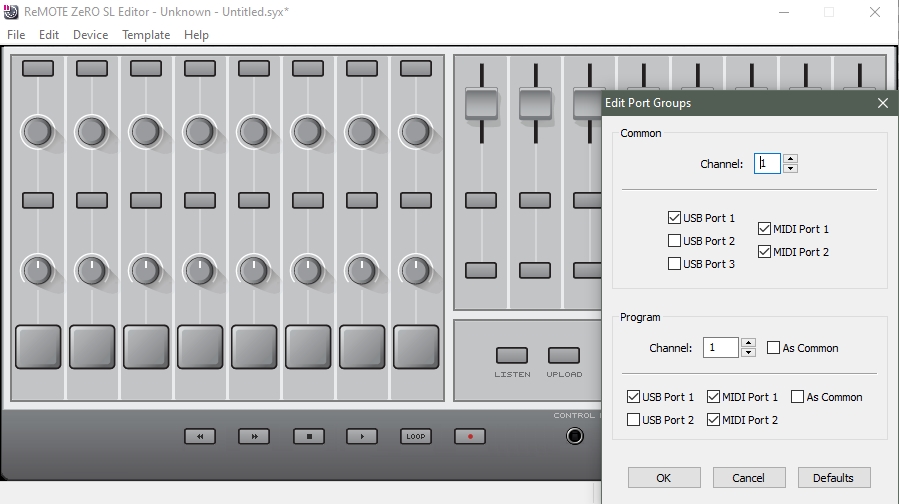
here's a look at the editor (Zero version, the other version shows joystick/XY, otherwise the same) with the MIDI dialog open. as you see, there's a 'common' MIDI channel for the template, and you also have five MIDI ports: 3 USB, and 2 DIN sockets. there's another part at the bottom with just two each. i never really mess with this too much, and don't honestly know what can be achieved with all these outputs. but i use my (Zero) to control hardware, making sysex templates. these could also be MIDI CC, or, unusually, NRPN - and i don't know of too many controllers that handle NRPNs. i have a feeling from what you wrote that you just want to control a VSTi with it on a single channel. so your first stop might be to experiment with disabling USB ports 2 and 3. then you do MIDI learn in your DAW and you don't have to do too much on the controller (self-check: is this correct? never tried this. should have had one when i was using VST more.) so you'd keep one of the 39 (40?) templates as a virgin gen.purpose template of controls to be assigned via midi learn, and save the midi learn in the DAW project. should work.
zones ... i haven't thought of keyboard zones with the RemoteSLs. don't think it does them. but if someone has a way, please say.
-
- KVRist
- Topic Starter
- 232 posts since 7 Nov, 2021
Thanks heaps for that....yeah I hear you re an old Windows device...I just bought a used laptop with W11 on it, which should arrive Monday so I think from that above, it will make it much easier.mztk wrote: Fri Mar 20, 2026 6:57 pm
here's a look at the editor (Zero version, the other version shows joystick/XY, otherwise the same) with the MIDI dialog open. as you see, there's a 'common' MIDI channel for the template, and you also have five MIDI ports: 3 USB, and 2 DIN sockets. there's another part at the bottom with just two each. i never really mess with this too much, and don't honestly know what can be achieved with all these outputs. but i use my (Zero) to control hardware, making sysex templates. these could also be MIDI CC, or, unusually, NRPN - and i don't know of too many controllers that handle NRPNs. i have a feeling from what you wrote that you just want to control a VSTi with it on a single channel. so your first stop might be to experiment with disabling USB ports 2 and 3. then you do MIDI learn in your DAW and you don't have to do too much on the controller (self-check: is this correct? never tried this. should have had one when i was using VST more.) so you'd keep one of the 39 (40?) templates as a virgin gen.purpose template of controls to be assigned via midi learn, and save the midi learn in the DAW project. should work.
zones ... i haven't thought of keyboard zones with the RemoteSLs. don't think it does them. but if someone has a way, please say.
I think I have programmed it to work ok, except it always says my saved template is offline, whatever that means haha! Still seems to work though. Apart from the velocity setting does not seem to "stick".
The other question is should I just run the template as "common"?
-
- KVRAF
- 3703 posts since 13 Jun, 2004
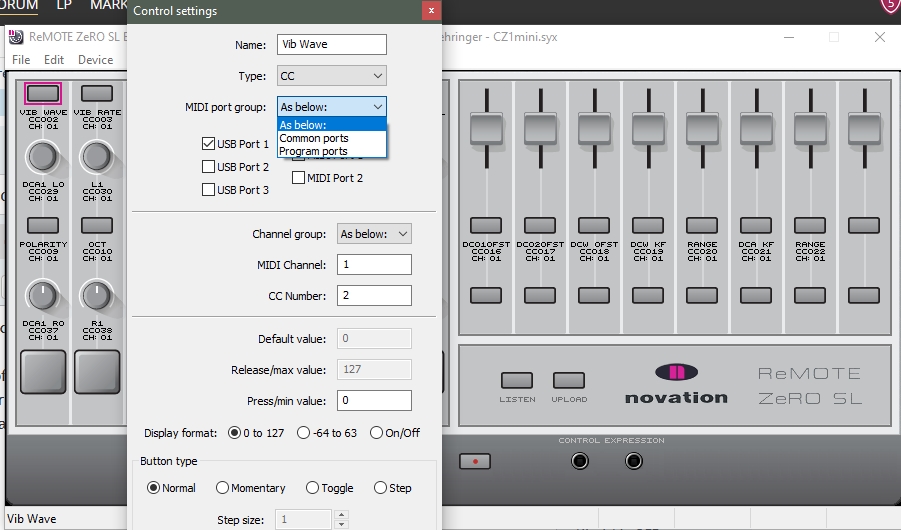
next up, here's a view of a single parameter mapping, for a CC control. (it isn't completed, this is a preliminary mock-up for an attempt at making controls for the Behringer CZ1mini.) as you see, more midi ouput options, just for this control. then you can assign CC#, range, give it a name, and as this is a button, button behaviour.
you only get 8 character spaces for the name display, and some inventiveness will be required sometimes - plus, you don't want to clog the visual aspect too much with complicated nomenclature: i've found it visually tiring. you have caps, lower case, numbers, symbols, and if you have repeated things with the same name, in the same row, it's worth just naming the first one with the name and a '1', and just naming the others '2', '3', '4', etc., just to unclutter what you're going to see when you're using it. it's a bit more 'relaxed' and chilled out, less busy. .. or an envelope will be 'A', 'D', 'S', 'R' .. etc. etc.
-
- KVRAF
- 3703 posts since 13 Jun, 2004
yeah i just use 'common' (i think?).
your template is offline, because you haven't made it and saved it. you have 40 template slots. i think the last one is reserved for the Automap template, which i've never used, so that would mean 39 user templates. or think of them as 'pages', if you are making mappings needing more than one set of controls. each page is referred to as a 'template', but they can be made as a series: you could have 3 pages that you step through, or 4, or more. that's what the side buttons are for on the hardware (don't think the mkIIs have these buttons? i prefer the mk1, because of the 2 displays; seems to do the job, anyway.) you can upload some of the mappings available on the novation site to explore this; they have some for classic old plugins, and some hardware. the files themselves have the extension *.syx, same as sysex, and a series will be "eg:synth1.syx", "eg:synth2.syx", "eeg:synth3.syx", so you'd have these 3 files, for whatever device it is. (or more files/pages)
i've made mappings using 19 pages
which would, incidentally, be completely impractical if you have to step through 19 times to get back to a parameter ! even 3 pages can be annoying/awkward, unless it's a fairly simple synth. i prefer to use 2 pages, and have a toggle A/B action, and then you can 'link' pages, using a button, or the drumpads, if you don't need them. this works .. tolerably well. so that 19-page mapping has several series (stacks?), linked by drumpads, and it gives a kind of navigation system, for complex devices with loads of parameters.
edit: i don't actually know why it's saying it's "offline". never seen that. you should have saved your edits to a memory slot, - save routine - and the template should be in the list on your RemoteSL.
your template is offline, because you haven't made it and saved it. you have 40 template slots. i think the last one is reserved for the Automap template, which i've never used, so that would mean 39 user templates. or think of them as 'pages', if you are making mappings needing more than one set of controls. each page is referred to as a 'template', but they can be made as a series: you could have 3 pages that you step through, or 4, or more. that's what the side buttons are for on the hardware (don't think the mkIIs have these buttons? i prefer the mk1, because of the 2 displays; seems to do the job, anyway.) you can upload some of the mappings available on the novation site to explore this; they have some for classic old plugins, and some hardware. the files themselves have the extension *.syx, same as sysex, and a series will be "eg:synth1.syx", "eg:synth2.syx", "eeg:synth3.syx", so you'd have these 3 files, for whatever device it is. (or more files/pages)
i've made mappings using 19 pages
which would, incidentally, be completely impractical if you have to step through 19 times to get back to a parameter ! even 3 pages can be annoying/awkward, unless it's a fairly simple synth. i prefer to use 2 pages, and have a toggle A/B action, and then you can 'link' pages, using a button, or the drumpads, if you don't need them. this works .. tolerably well. so that 19-page mapping has several series (stacks?), linked by drumpads, and it gives a kind of navigation system, for complex devices with loads of parameters.
edit: i don't actually know why it's saying it's "offline". never seen that. you should have saved your edits to a memory slot, - save routine - and the template should be in the list on your RemoteSL.
-
- KVRist
- Topic Starter
- 232 posts since 7 Nov, 2021
Yeah I did save it via the WRITE tab, which is why I am also confused? Template 1 was where I saved it, and even though it is set to load Template 1, it keeps loading template 38 at boot??mztk wrote: Fri Mar 20, 2026 7:40 pm
edit: i don't actually know why it's saying it's "offline". never seen that. you should have saved your edits to a memory slot, - save routine - and the template should be in the list on your RemoteSL.
I think I AM going to need the editor!
-
- KVRAF
- 3703 posts since 13 Jun, 2004
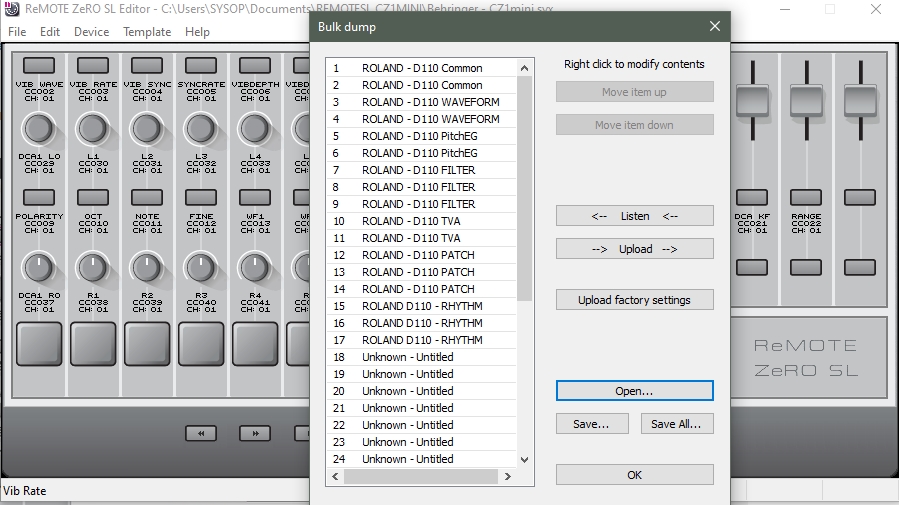
here's a look at uploading those 19 templates to the unit, saved and loading as a *.blk file, which references all of the individual files in a set, in their respective page/memory slots ( they have to keep the same locations as saved, if you want your drumpad/button links to work correctly. it's a bit of a hack, but .. sort of works). this is a more advanced use, once you get familiar with the thing. there are other things to discover, like when you're using sysex, and it's roland machine that requires the checksum, it can deal with that, but there's a certain order to do, and save things, so you don't have to set the checksum parameter every time. i've partially forgotten the order of doing things for this at the moment because it's been a while. you can only set the checksum thing on the hardware unit. you commit it to the saved file when you back it up to the computer - have to do it a couple of times to get the gist of it, really. you won't find any reference to it in any docs, i found out by trial and error. there's a few parameters on the hardware to check out by navigating with the top left pair of buttons. clever thing is that it can do checksum for various sysex message lengths. another clever thing - i'm assuming - is that if it handles NRPNs, it must be wrapping the message with a nrpn termination for each control change, so that you can switch to different controls without it getting stuck on the control initially references. it isn't just a cc#6 data message.
this editor is underestimated. i find it really comfortable to use and useful. novation say they no longer have access to the code, which is strange. they changed hands sold to focusrite, but they must still have the code. seems like a few people worked on this editor, so maybe not all the authors still work for the company.
edit, sorry 17 templates. 19 was the JV1080 perhaps

-
- KVRAF
- 3703 posts since 13 Jun, 2004
similarly, you can 'listen' to the device, and then save off the files to the computer. (and then work on them some more individually, loading them into the editor)
(heh i'm trying to impart a bit of what i've learnt digging into this, using your thread )
)
(heh i'm trying to impart a bit of what i've learnt digging into this, using your thread
)