

I watched a video, truth? Win11 Switchin to mac, nightmare?
-
- KVRAF
- 2452 posts since 1 Jul, 2021
There's even more information about Win 11 experiences in the comments
I didn't know Win 11 is such a mess,
I am really thinking about switching to Mac
M1 laptop is enough to produce music?,
I didn't even see a USB connection or hdmi to connect to a bigger sreen.
Last edited by DCrown on Thu Apr 09, 2026 5:58 am, edited 2 times in total.
-

- KVRAF
- 7316 posts since 19 Apr, 2002 from Utah
The video is true. All OSes have their pros and cons. You have to pick which pros and cons you want to live with.
Vendor‑Dependent Copy Protection: Customers lose. Pirates win.
(Also: I'm Accused of lying about Linux—it boots, runs my pro audio workflow, stays stable, updates--though yearly dismissed as “niche”. Yet I'm the deluded one.)
(Also: I'm Accused of lying about Linux—it boots, runs my pro audio workflow, stays stable, updates--though yearly dismissed as “niche”. Yet I'm the deluded one.)
-
- KVRAF
- Topic Starter
- 2452 posts since 1 Jul, 2021
I am scared of switching to a different os, though.
I took me many years to optimize and customize Reaper, it is perfect for me now
I couldn't do it from scratch again, can't remember how I did most things, figured it out long ago, managed to do it - but it's something I did once only.
I wonder whether I could copy Reaper settings, templates, customized toolbars etc. from Win to Mac
Having to use Reaper's standard version would be a nightmare.
I took me many years to optimize and customize Reaper, it is perfect for me now
I couldn't do it from scratch again, can't remember how I did most things, figured it out long ago, managed to do it - but it's something I did once only.
I wonder whether I could copy Reaper settings, templates, customized toolbars etc. from Win to Mac
Having to use Reaper's standard version would be a nightmare.
-

- KVRAF
- 3037 posts since 5 Jun, 2011 from Preston, England, UK
You can export and import all settings for Reaper. I always do a backup of my settings any time I change something.DCrown wrote: Thu Apr 09, 2026 5:50 am I am scared of switching to a different os, though.
I took me many years to optimize and customize Reaper, it is perfect for me now
I couldn't do it from scratch again, can't remember how I did most things, figured it out long ago, managed to do it - but it's something I did once only.
I wonder whether I could copy Reaper settings, templates, customized toolbars etc. from Win to Mac
Having to use Reaper's standard version would be a nightmare.

software is a tool that allows us to complete a given task.
social media is full of tools that distract us from a given task.
myfeebleeffort
https://paulroach2.bandcamp.com/
https://hearthis.at/83hdtrvm/
social media is full of tools that distract us from a given task.
myfeebleeffort
https://paulroach2.bandcamp.com/
https://hearthis.at/83hdtrvm/
-

- KVRAF
- 16853 posts since 8 Mar, 2005 from Utrecht, Holland
You did not really watch that whole 20 minutes of video, did you?
Otherwise you would not ask.
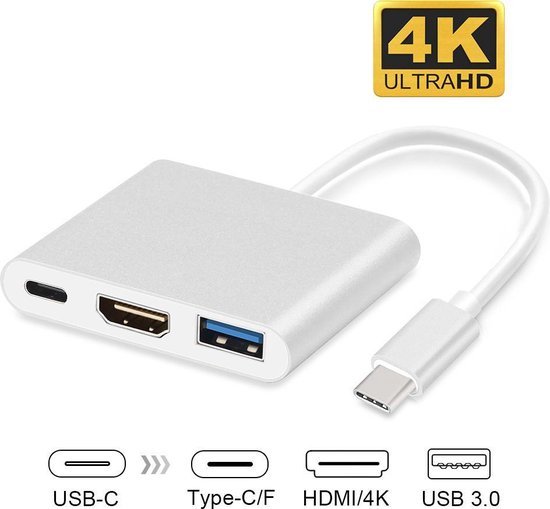
You'll need a simple USB-C -> USB-A & HDMI adapter.DCrown wrote: Thu Apr 09, 2026 5:21 am I didn't even see a USB connection or hdmi to connect to a bigger sreen.
We are the KVR collective. Resistance is futile. You will be assimilated. 
My MusicCalc is served over https!!
My MusicCalc is served over https!!
-
- KVRAF
- Topic Starter
- 2452 posts since 1 Jul, 2021
of course I watched, he wouldn't recommend the Mac he used for large sample libraries, so I am in doubt
-
- KVRAF
- Topic Starter
- 2452 posts since 1 Jul, 2021
I backup twice a year.jethrobull wrote: Thu Apr 09, 2026 5:59 amYou can export and import all settings for Reaper. I always do a backup of my settings any time I change something.DCrown wrote: Thu Apr 09, 2026 5:50 am I am scared of switching to a different os, though.
I took me many years to optimize and customize Reaper, it is perfect for me now
I couldn't do it from scratch again, can't remember how I did most things, figured it out long ago, managed to do it - but it's something I did once only.
I wonder whether I could copy Reaper settings, templates, customized toolbars etc. from Win to Mac
Having to use Reaper's standard version would be a nightmare.
Great, so win to mac would work.
-
- KVRAF
- 3037 posts since 5 Jun, 2011 from Preston, England, UK
AbsolutelyDCrown wrote: Thu Apr 09, 2026 7:34 amI backup twice a year.jethrobull wrote: Thu Apr 09, 2026 5:59 amYou can export and import all settings for Reaper. I always do a backup of my settings any time I change something.DCrown wrote: Thu Apr 09, 2026 5:50 am I am scared of switching to a different os, though.
I took me many years to optimize and customize Reaper, it is perfect for me now
I couldn't do it from scratch again, can't remember how I did most things, figured it out long ago, managed to do it - but it's something I did once only.
I wonder whether I could copy Reaper settings, templates, customized toolbars etc. from Win to Mac
Having to use Reaper's standard version would be a nightmare.
Great, so win to mac would work.
software is a tool that allows us to complete a given task.
social media is full of tools that distract us from a given task.
myfeebleeffort
https://paulroach2.bandcamp.com/
https://hearthis.at/83hdtrvm/
social media is full of tools that distract us from a given task.
myfeebleeffort
https://paulroach2.bandcamp.com/
https://hearthis.at/83hdtrvm/
-
- KVRian
- 1099 posts since 9 Aug, 2018
Same things apply as always do: you need a decent CPU for lots of tracks / plugins / processing / Serum 2 (haha, j/k); enough RAM to deal with large and/or many samples in particular and just complex workloads overall; and enough storage space for recordings, again with the samples, apps of course, and whatever else you might need to store.
Beyond that, MacOS is excellent for music production - in my opinion the best of all three - whereas Windows is good (with potential caveats), and Linux is also good (with different potential caveats).
Beyond that, MacOS is excellent for music production - in my opinion the best of all three - whereas Windows is good (with potential caveats), and Linux is also good (with different potential caveats).
-
- KVRAF
- Topic Starter
- 2452 posts since 1 Jul, 2021
I have Win 10 and still mostly use my Win 7 (I use quite a lot of very old and some discontinued plugins) and it is great. I am surprised it is still alive, I googled and usually a laptop rarely works more than 7 years, I bought it in 2011. Use it for music only.
-

- KVRAF
- 2369 posts since 23 Sep, 2004 from Kocmoc
No problem with Win11Pro here, no problems _at_ _all_ - ALso if the system works why the f... would one suddenly start changing it? Lets see when I run out of CPU inside 10 years, whats up then...
Soft Knees - Live 12, Diva, Omnisphere, Slate Digital VSX, TDR, Kush Audio, U-He, PA, Valhalla, Fuse, Pulsar AUDIO, NI, OekSound etc. on Win11Pro R7950X & RME AiO Pro
https://www.youtube.com/@softknees/videos Music & Demoscene
https://www.youtube.com/@softknees/videos Music & Demoscene
-
- KVRAF
- 16853 posts since 8 Mar, 2005 from Utrecht, Holland
That video is NOT a "guide". The only message of the video is:DCrown wrote: Thu Apr 09, 2026 7:32 am he wouldn't recommend the Mac he used for large sample libraries, so I am in doubt
Q: Can you make "pro" music (with Reaper) on any OS?
A: Sure you can! What else did you think, you daft narrow-minded goof!
He's not a sales guy throwing benchmark figures at you. And he got a MacBook "Neo" which doesn't have an M1 chip but the A18 Pro.
Not that it matters much, for large sample libs you're helped with the fastest SSD drive you can get and more-than-average amounts of not-the-slowest RAM.
I'm a fan of empyrical research: load your fav big sample-lib-heavy project and watch with some proper monitoring tools how much memory it really uses. Does that fit in 8GB if the OS only needs one or 2 GB instead of 7?
We are the KVR collective. Resistance is futile. You will be assimilated.
My MusicCalc is served over https!!
My MusicCalc is served over https!!
-
- KVRist
- 171 posts since 3 Feb, 2003
I thought the same thing when the video started, but he got the job done on it (barely) - pretty impressive for that chipset.
-

- KVRian
- 1266 posts since 6 Jun, 2016
I'm pretty sure VT was only using Arm complied stuff too, unless there was some kind of compatibility layer. Which I've heard of, like Box86 and Box64, but was he using this? Probably not. Therefore, his selection of plugins and software must have been pretty limited.