

There is an update the yesterday's new build:
[30APR26]
- Plug-in projects saved with previous version which had view page set to DIFF/STEREO/MIX
opened with UI glitches after the update to 0.9.9 bug fixed
- EQ Filter Node 2 Q control was linked to 1's bug fixed
- Aligned and visually improved EQ Filter nodes drawing
- All skin menu positions have been properly aligned
- Other minor fixes to the skin
If you already installed build 600 please re-download from the web site and update.
Thanks Ivan for spotting the update issue!
Denis,
DEVPROAUDIO
https://devproaudio.com

Introducing REVERSIDE [BETA] new reverb plug-in from the author of Aether
-
- KVRist
- Topic Starter
- 81 posts since 19 Oct, 2025
-
- KVRAF
- 1766 posts since 8 Jan, 2003 from Edinburgh
I like the new interface!
It takes a little getting used to, and top RH side seems backwards to me for the Reverside button - top LH side makes more sense to me - but that doesn't matter
I'll get used to it.
I'm still never 100% sure in the preset window whether I'm "saving" or doing a "save as".
I still think the "save" and "resave" choices are backwards.
"Save" should save the current preset and "resave" (better if it was called "save as") should be for saving with a different name than is currently loaded.
There's a lot to get used to here...
It takes a little getting used to, and top RH side seems backwards to me for the Reverside button - top LH side makes more sense to me - but that doesn't matter
I'll get used to it.
I'm still never 100% sure in the preset window whether I'm "saving" or doing a "save as".
I still think the "save" and "resave" choices are backwards.
"Save" should save the current preset and "resave" (better if it was called "save as") should be for saving with a different name than is currently loaded.
There's a lot to get used to here...
John Braner
http://johnbraner.bandcamp.com
http://www.soundclick.com/johnbraner
and all the major streaming/download sites.
http://johnbraner.bandcamp.com
http://www.soundclick.com/johnbraner
and all the major streaming/download sites.
-
- KVRist
- Topic Starter
- 81 posts since 19 Oct, 2025
>Hi Dennis, congrats on the plugin, have you thought about adding ducking at all? It’s the one thing I really miss.
maybe in version 1.1
>It takes a little getting used to, and top RH side seems backwards to me for the Reverside button - top LH side makes more sense to me - but that doesn't matter
it's easy to change that in the skin (just edit a little bit a text file). I can tell you how to do that if you like
Denis,
DEVPROAUDIO
https://devproaudio.com
maybe in version 1.1
>It takes a little getting used to, and top RH side seems backwards to me for the Reverside button - top LH side makes more sense to me - but that doesn't matter
it's easy to change that in the skin (just edit a little bit a text file). I can tell you how to do that if you like
Denis,
DEVPROAUDIO
https://devproaudio.com
-
- KVRist
- 307 posts since 23 Apr, 2009
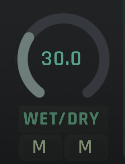
The wet/dry labels definitely need to be swapped. The M (mute) button should mute the signal labeled above it, but currently, the button under the wet label mutes the DRY signal and vice versa.
Additionally, moving the slider towards DRY should make the signal drier, but right now it does the exact opposite.
-
- KVRAF
- 1766 posts since 8 Jan, 2003 from Edinburgh
OK thanks>It takes a little getting used to, and top RH side seems backwards to me for the Reverside button - top LH side makes more sense to me - but that doesn't matter
it's easy to change that in the skin (just edit a little bit a text file). I can tell you how to do that if you like
I can do it when ver 1.0 comes out
John Braner
http://johnbraner.bandcamp.com
http://www.soundclick.com/johnbraner
and all the major streaming/download sites.
http://johnbraner.bandcamp.com
http://www.soundclick.com/johnbraner
and all the major streaming/download sites.
-
- KVRist
- Topic Starter
- 81 posts since 19 Oct, 2025
>The wet/dry labels definitely need to be swapped.
good catch, I'll change that.
Denis,
DEVPROAUDIO
https://devproaudio.com
good catch, I'll change that.
Denis,
DEVPROAUDIO
https://devproaudio.com
-
Funkybot's Evil Twin Funkybot's Evil Twin https://www.kvraudio.com/forum/memberlist.php?mode=viewprofile&u=116627
- KVRAF
- 12513 posts since 16 Aug, 2006
The new main page is a huge usability improvement. Nice job!
That said, it still felt a bit unfamiliar and awkward in spots for me. You can’t please all the people all the time, and I’m just one opinion, so please don’t take this as me demanding changes. This is just some general, meant-to-be-constructive feedback or food for thought.
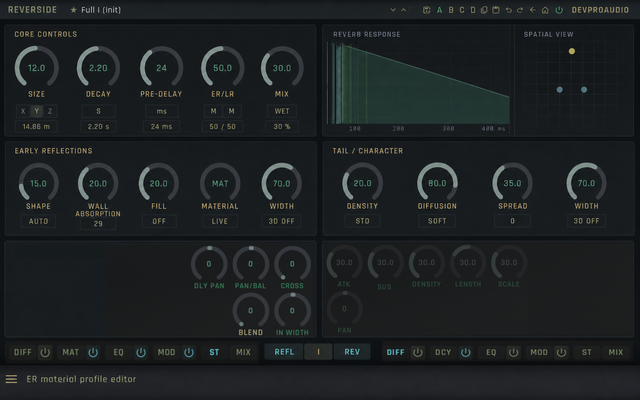
My primary feedback is that the Main page still doesn’t quite guide my eye toward what I think of as the “start here” controls for a reverb: Size, Decay, Pre-Delay, Mix, and Width. Those are usually the first things I reach for when building a space.
We read top to bottom, left to right, so the early reflection controls feel far more visually important than I’d expect. It looks like Shape and Wall Absorpotion are super important because they're the first two things I see. And the sections aren't labeled so it took a few seconds to figure out, 'oh, these are ER controls on the right, the important stuff is in the middle, the tail controls are on the left." I see the logic behind it, but I'm not sure it's the best from an ease of use perspective.
To me, ER is more of a secondary shaping area after the basic size, decay, timing, and blend are set. The Size, Time, and Mix controls visually blend into the center of the UI and don’t really stand out to me. Also, Pre-Delay, which is hugely important in mixing, is hidden in one of the expanded panels. I’d expose that parameter on the main page.
I’d suggest the main page flow more like:
Core Controls (first thing you see): Size, Decay, Pre-Delay, ER/LR, Mix
Tail / Character: Density, Diffusion, Spread, Width
Early Reflections: Shape, Wall Absorption, Fill, Material, Width
EQ / Damping: Low Cut, High Cut, Damping, Tilt
I think the visual style is already strong, so I wouldn’t want to see that changed much. My only suggestion would be to push the layout a little further toward a more hierarchical system where the most important pieces are the first things users are presented with.
Something like this would work better for me:
That said, it still felt a bit unfamiliar and awkward in spots for me. You can’t please all the people all the time, and I’m just one opinion, so please don’t take this as me demanding changes. This is just some general, meant-to-be-constructive feedback or food for thought.
My primary feedback is that the Main page still doesn’t quite guide my eye toward what I think of as the “start here” controls for a reverb: Size, Decay, Pre-Delay, Mix, and Width. Those are usually the first things I reach for when building a space.
We read top to bottom, left to right, so the early reflection controls feel far more visually important than I’d expect. It looks like Shape and Wall Absorpotion are super important because they're the first two things I see. And the sections aren't labeled so it took a few seconds to figure out, 'oh, these are ER controls on the right, the important stuff is in the middle, the tail controls are on the left." I see the logic behind it, but I'm not sure it's the best from an ease of use perspective.
To me, ER is more of a secondary shaping area after the basic size, decay, timing, and blend are set. The Size, Time, and Mix controls visually blend into the center of the UI and don’t really stand out to me. Also, Pre-Delay, which is hugely important in mixing, is hidden in one of the expanded panels. I’d expose that parameter on the main page.
I’d suggest the main page flow more like:
Core Controls (first thing you see): Size, Decay, Pre-Delay, ER/LR, Mix
Tail / Character: Density, Diffusion, Spread, Width
Early Reflections: Shape, Wall Absorption, Fill, Material, Width
EQ / Damping: Low Cut, High Cut, Damping, Tilt
I think the visual style is already strong, so I wouldn’t want to see that changed much. My only suggestion would be to push the layout a little further toward a more hierarchical system where the most important pieces are the first things users are presented with.
Something like this would work better for me:

-
- KVRist
- Topic Starter
- 81 posts since 19 Oct, 2025
Thanks for the detailed feedback and the ui mockup.
your points are valid, the current main page design is sub-optimial.
Let me think it over, I might implement this as just another page.
a note: ER/LR pre-delays are available on the main page just above mixing controls.
Denis,
DEVPROAUDIO
https://devproaudio.com
your points are valid, the current main page design is sub-optimial.
Let me think it over, I might implement this as just another page.
a note: ER/LR pre-delays are available on the main page just above mixing controls.
Denis,
DEVPROAUDIO
https://devproaudio.com
-
- KVRist
- Topic Starter
- 81 posts since 19 Oct, 2025
Reverside Reverb & 3D Spatial Plug‑In updated to version 0.9.9.b604
What’s new:
[03MAY26]
- Presets were not loading correctly on some systems on fresh plug-in instantiation bug fixed
- Early Reflections Decay value of -100% was nullifying tap gains bug fixed
- Filter/EQ Mini Displays display now support changing frequency axis mapping by mouse wheel
- Filter/EQ Curves did not update on frequency mapping change
- Filter Mini Displays had ghost curve drawing when filter gain panning was reset bug fixed
- EQ Filter controls are now disabled if filter node is off
- Mat/Dcy Filters did not have LF > HF frequency protection when changing by param controls
- Mat/Dcy Filters glitch on U-shape band settings and low Q values bug fixed
- Mat/Dcy band gain filters mini knobs now have proper text value entry support
- The mid panel now has FLT/EQ buttons to quick switching to respective pages
- WET/DRY was corrected to DRY/WET
- Two new gradient themes added: Soft and Flat
- Color theme presets have been adjusted
- Other minor fixes to the skin
Mac and Windows demo versions are available on our website for downloading.
Demo limitations:
- Preset saving is disabled
- Plugin state is not restored from DAW project files
- Only one instance allowed per host
REVERSIDE is free for all 2CAudio and SpinAudio users.
For other customers, the plug‑in is available at a special pre‑release price of USD 115 (EUR 100).
Contact For questions, feedback, or beta-testing requests, email: info@devproaudio.com
Denis,
DEVPROAUDIO
https://devproaudio.com
What’s new:
[03MAY26]
- Presets were not loading correctly on some systems on fresh plug-in instantiation bug fixed
- Early Reflections Decay value of -100% was nullifying tap gains bug fixed
- Filter/EQ Mini Displays display now support changing frequency axis mapping by mouse wheel
- Filter/EQ Curves did not update on frequency mapping change
- Filter Mini Displays had ghost curve drawing when filter gain panning was reset bug fixed
- EQ Filter controls are now disabled if filter node is off
- Mat/Dcy Filters did not have LF > HF frequency protection when changing by param controls
- Mat/Dcy Filters glitch on U-shape band settings and low Q values bug fixed
- Mat/Dcy band gain filters mini knobs now have proper text value entry support
- The mid panel now has FLT/EQ buttons to quick switching to respective pages
- WET/DRY was corrected to DRY/WET
- Two new gradient themes added: Soft and Flat
- Color theme presets have been adjusted
- Other minor fixes to the skin
Mac and Windows demo versions are available on our website for downloading.
Demo limitations:
- Preset saving is disabled
- Plugin state is not restored from DAW project files
- Only one instance allowed per host
REVERSIDE is free for all 2CAudio and SpinAudio users.
For other customers, the plug‑in is available at a special pre‑release price of USD 115 (EUR 100).
Contact For questions, feedback, or beta-testing requests, email: info@devproaudio.com
Denis,
DEVPROAUDIO
https://devproaudio.com
-
- KVRist
- Topic Starter
- 81 posts since 19 Oct, 2025
Reverside Reverb & 3D Spatial Plug‑In updated to version 0.9.9.b610 [14MAY26]
What’s new:
- New, advanced Direct path 3D Spatialisation algorithm delivers better externalisation
- Subtle improvements to ER/LR 3D spatialisation algorithms
- Reflection display taps encode now reflection order by color
- Color theme presets have been adjusted some more
- 5 New Color theme presets from RumbaCodex
- Time/Envelope display time axis has non-linear map to accomodate both taps and envelope data
- All mini displays on Main page have auto pop-up icons for going into advanced editing
- All advanced editing pages now have return back buttons
- Incorrect control/display border and graph curve width scaling bug has been fixed
- EQ curve 0dB line crosssing visual glitch fixed
- Incorrect Stroke/Fill blending in graphs problem fixed
- Changing EQ Q with mouse wheel is now full range (was capped at 1)
- Absolute Size controls are now full sliders in-place of reference size control for easier access
- Dry signal delay was not properly initialized on some systems
causing crackles on param changes even with fully dry signal bug fixed
- RumbaCodex preset bank has been updated
- 20 new factory presets included
- Many fixes/adjustments to the skin to improve workflow
Mac and Windows demo versions are available on our website for downloading.
Demo limitations:
- Preset saving is disabled
- Plugin state is not restored from DAW project files
- Only one instance allowed per host
REVERSIDE is free for all 2CAudio and SpinAudio users.
For other customers, the plug‑in is available at a special pre‑release price of USD 115 (EUR 100).
Contact For questions, feedback, or beta-testing requests, email: info@devproaudio.com
Denis,
DEVPROAUDIO
https://devproaudio.com
What’s new:
- New, advanced Direct path 3D Spatialisation algorithm delivers better externalisation
- Subtle improvements to ER/LR 3D spatialisation algorithms
- Reflection display taps encode now reflection order by color
- Color theme presets have been adjusted some more
- 5 New Color theme presets from RumbaCodex
- Time/Envelope display time axis has non-linear map to accomodate both taps and envelope data
- All mini displays on Main page have auto pop-up icons for going into advanced editing
- All advanced editing pages now have return back buttons
- Incorrect control/display border and graph curve width scaling bug has been fixed
- EQ curve 0dB line crosssing visual glitch fixed
- Incorrect Stroke/Fill blending in graphs problem fixed
- Changing EQ Q with mouse wheel is now full range (was capped at 1)
- Absolute Size controls are now full sliders in-place of reference size control for easier access
- Dry signal delay was not properly initialized on some systems
causing crackles on param changes even with fully dry signal bug fixed
- RumbaCodex preset bank has been updated
- 20 new factory presets included
- Many fixes/adjustments to the skin to improve workflow
Mac and Windows demo versions are available on our website for downloading.
Demo limitations:
- Preset saving is disabled
- Plugin state is not restored from DAW project files
- Only one instance allowed per host
REVERSIDE is free for all 2CAudio and SpinAudio users.
For other customers, the plug‑in is available at a special pre‑release price of USD 115 (EUR 100).
Contact For questions, feedback, or beta-testing requests, email: info@devproaudio.com
Denis,
DEVPROAUDIO
https://devproaudio.com
-
- KVRist
- Topic Starter
- 81 posts since 19 Oct, 2025
if anyone interested to see and hear how Reverside can be used to place instruments in a 3D space, check out a video made by Manuel Duque, a mixing engineer from Madrid. Manuel explains and demonstrates on an actual soul mix what makes Reverside unique, focusing on 3D Positioning — each instrument sitting in its own spot within the same room. The result is not just a reverb you hear, but a space you feel.
Denis,
DEVPROAUDIO
https://devproaudio.com
Denis,
DEVPROAUDIO
https://devproaudio.com
-
Funkybot's Evil Twin Funkybot's Evil Twin https://www.kvraudio.com/forum/memberlist.php?mode=viewprofile&u=116627
- KVRAF
- 12513 posts since 16 Aug, 2006
A few small bug reports and requests:
Zoom Views and Preset Browser Back and Forth
1. From the Main view, enter one of the Editor Zoom Views
2. Now open the Preset Browser from the top bar
3. Select a Preset or close the browser
4. You get returned to the Editor Zoom View, now hit the Back button to return to Main
Result: you get returned to the Preset Browser. I get why. But I'm not going to want that.
Expected Result: I go back to Main.
Open in Explorer/Finder Doesn't Work on Windows 10
1. In the Preset browser, right click
2. Select the menu option for Show in Finder/Explorer
Result: Explorer opens but not in the folder location with the presets. I literally have no idea where they are.
Expected Result: Explorer opens in the Presets folder.
FR - Make the Preset Bar 'Always On'
I really like the Preset Browser in the Bottom Panel. Not necessarily the location, but how well laid-out it is and handy compared to the presets in the top bar.
But I really like the Help panel in the bottom bar. I can't have both on at the same time. Might be worth tweaking the top panel to display presets more like they do in the bottom panel.
Question/FR - Moving Presets to a Different Folder and Renaming Presets
Without knowing where the presets are saved on Windows, how can I move presets from one folder to another within the plugin? This doesn't seem to exist. But might be worth adding a right click-menu to presets themselves with the ability to move them to a different folder, delete, and rename them directly from the plugin.
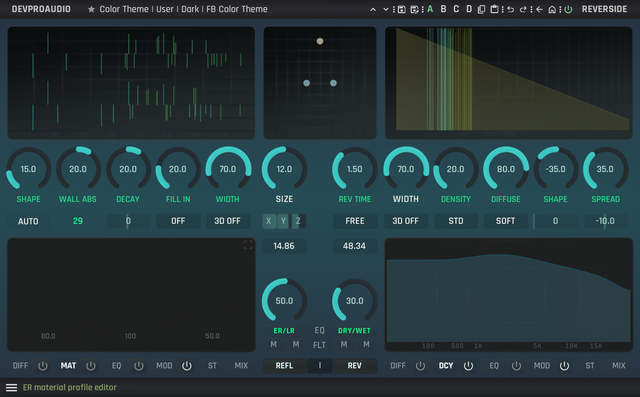
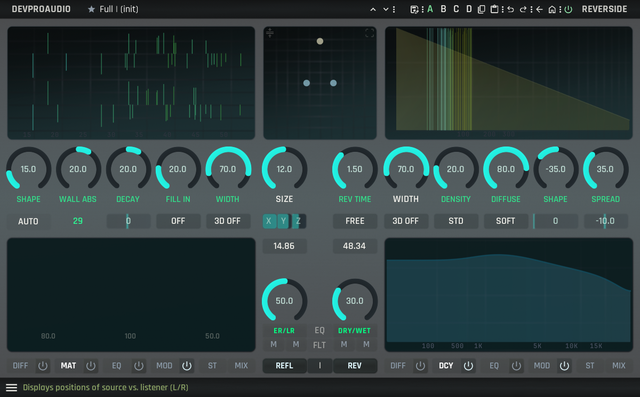
I've got some nice-looking themes I'll share once I make sure I've got everything covered.
Previews below:
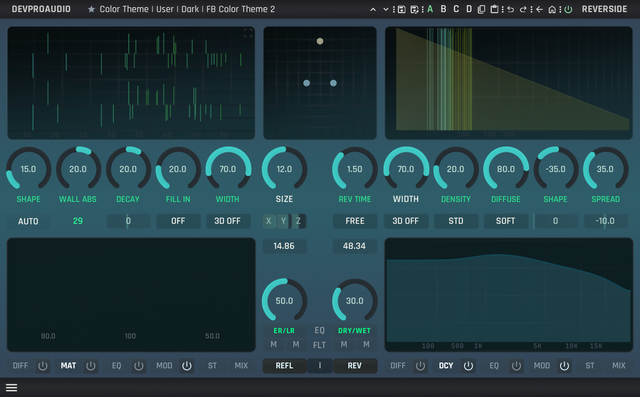
Zoom Views and Preset Browser Back and Forth
1. From the Main view, enter one of the Editor Zoom Views
2. Now open the Preset Browser from the top bar
3. Select a Preset or close the browser
4. You get returned to the Editor Zoom View, now hit the Back button to return to Main
Result: you get returned to the Preset Browser. I get why. But I'm not going to want that.
Expected Result: I go back to Main.
Open in Explorer/Finder Doesn't Work on Windows 10
1. In the Preset browser, right click
2. Select the menu option for Show in Finder/Explorer
Result: Explorer opens but not in the folder location with the presets. I literally have no idea where they are.
Expected Result: Explorer opens in the Presets folder.
FR - Make the Preset Bar 'Always On'
I really like the Preset Browser in the Bottom Panel. Not necessarily the location, but how well laid-out it is and handy compared to the presets in the top bar.
But I really like the Help panel in the bottom bar. I can't have both on at the same time. Might be worth tweaking the top panel to display presets more like they do in the bottom panel.
Question/FR - Moving Presets to a Different Folder and Renaming Presets
Without knowing where the presets are saved on Windows, how can I move presets from one folder to another within the plugin? This doesn't seem to exist. But might be worth adding a right click-menu to presets themselves with the ability to move them to a different folder, delete, and rename them directly from the plugin.
I've got some nice-looking themes I'll share once I make sure I've got everything covered.
Previews below:
-
- KVRist
- Topic Starter
- 81 posts since 19 Oct, 2025
funkybot: I will reply to the above tomorrow. And I'll add your Easy page in the next build.
Denis,
DEVPROAUDIO
https://devproaudio.com
Denis,
DEVPROAUDIO
https://devproaudio.com