


[BETA] filament - Real-Time MIDI Orchestration Plugin & Plugin Host
-
- KVRist
- Topic Starter
- 60 posts since 22 Mar, 2026
Something very off there thanks for letting me know I'm going to take a look now and see where it's gone wrong.
-
- KVRist
- Topic Starter
- 60 posts since 22 Mar, 2026
Hey Morty, I've just pushed a hot fix that should resolve both of these, but let me know if they persist. Also, I'm going to try something to fix the slightly blurry text on larger zooms over the weekend.Morty-C-137 wrote: Thu May 21, 2026 7:14 pm Something seems broken with this install. GUI not resizing properly; zooms into GUI after resize through the settings menu and the drag corner to resize only adjusts height, but GUI still not loading?
This is how it loads:
Also the Apple Silicon designated installer still asks us to install Rosetta before proceeding..

-

- KVRist
- 491 posts since 26 Jun, 2024
Cheers Will! Very responsive. The resizing now works as expected and the installer no longer prompts to install Rosetta before proceeding.WillTurnerFLA wrote: Thu May 21, 2026 10:01 pmHey Morty, I've just pushed a hot fix that should resolve both of these, but let me know if they persist. Also, I'm going to try something to fix the slightly blurry text on larger zooms over the weekend.Morty-C-137 wrote: Thu May 21, 2026 7:14 pm Something seems broken with this install. GUI not resizing properly; zooms into GUI after resize through the settings menu and the drag corner to resize only adjusts height, but GUI still not loading?
This is how it loads:
Also the Apple Silicon designated installer still asks us to install Rosetta before proceeding..
Two more things I noticed in this build were it keeps loading Pro-Q4 on the first mixer insert (I don't have that plugin):

Even after inserting another plugin on the insert fx slots, they won't open after loading nor will they load the GUI after clicking on the insert slot. The behavior for these slots is inconsistent; sometimes it works, sometimes not. The instrument slots do seem to work as they should. One behavior a use would expect if clicking upon a slot opens the instrument/FX plugin; then clicking the slot again should close it.
The newer GUI's look much calmer to the eyes due to the color scheme and contrast. Quicker to see what's what. The only thing I would still add to that is changing the color of the 'mouse hover' color to the color that the theme uses for the strip below the top bar for more visual coherence and the lightness of that part is light enough in contrast to the above strip where the mouse over action happens to denote the hover action;
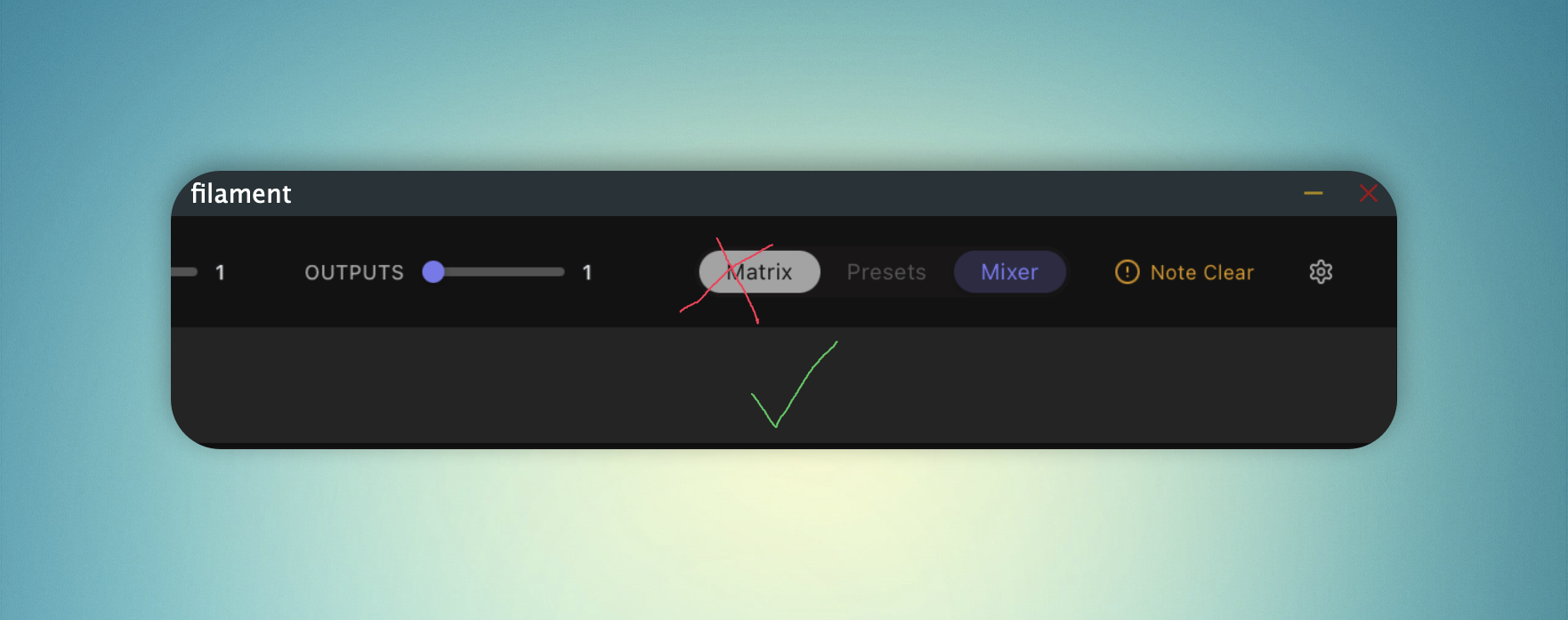
The dark theme would then be coherent. The light theme still needs work to match that (mainly the right plugin panel in the matrix view has the same color as the top KS strip and bottom strip which the dark theme does not.. for the better).
-
- KVRist
- Topic Starter
- 60 posts since 22 Mar, 2026
Thanks Morty - I know what that is, I created a fake slot to help me style but forgot to turn it off... Ooops! Agree on your other points thank you. Should have a fix for this later today. Keep it coming...Morty-C-137 wrote: Fri May 22, 2026 8:41 amCheers Will! Very responsive. The resizing now works as expected and the installer no longer prompts to install Rosetta before proceeding.WillTurnerFLA wrote: Thu May 21, 2026 10:01 pmHey Morty, I've just pushed a hot fix that should resolve both of these, but let me know if they persist. Also, I'm going to try something to fix the slightly blurry text on larger zooms over the weekend.Morty-C-137 wrote: Thu May 21, 2026 7:14 pm Something seems broken with this install. GUI not resizing properly; zooms into GUI after resize through the settings menu and the drag corner to resize only adjusts height, but GUI still not loading?
This is how it loads:
Also the Apple Silicon designated installer still asks us to install Rosetta before proceeding..
Two more things I noticed in this build were it keeps loading Pro-Q4 on the first mixer insert (I don't have that plugin):
Even after inserting another plugin on the insert fx slots, they won't open after loading nor will they load the GUI after clicking on the insert slot. The behavior for these slots is inconsistent; sometimes it works, sometimes not. The instrument slots do seem to work as they should. One behavior a use would expect if clicking upon a slot opens the instrument/FX plugin; then clicking the slot again should close it.
The newer GUI's look much calmer to the eyes due to the color scheme and contrast. Quicker to see what's what. The only thing I would still add to that is changing the color of the 'mouse hover' color to the color that the theme uses for the strip below the top bar for more visual coherence and the lightness of that part is light enough in contrast to the above strip where the mouse over action happens to denote the hover action;
The dark theme would then be coherent. The light theme still needs work to match that (mainly the right plugin panel in the matrix view has the same color as the top KS strip and bottom strip which the dark theme does not.. for the better).

-
- KVRist
- 491 posts since 26 Jun, 2024
Thanks for being open to the feedback Will. Plenty of folks prob would have shrugged it off as nitpicking or hypercritical.
-
- KVRist
- Topic Starter
- 60 posts since 22 Mar, 2026
Not at all, I honestly think it's all about the detailsMorty-C-137 wrote: Fri May 22, 2026 1:05 pm Thanks for being open to the feedback Will. Plenty of folks prob would have shrugged it off as nitpicking or hypercritical.
-
- KVRist
- 491 posts since 26 Jun, 2024
Loving the 1.0.5.3 build Will! Very responsive, stable and no more Rosetta install requirement in the installer for Apple Silicon.
One thing that is still a headschratcher for me is the preset browser. The Banks, Libraries and Orchestrations confuse me as to what they contain and how to apply them.
If I, for instance, drag the Soft Pads orchestration preset onto my Keyswitch it just fails?

One thing that is still a headschratcher for me is the preset browser. The Banks, Libraries and Orchestrations confuse me as to what they contain and how to apply them.
If I, for instance, drag the Soft Pads orchestration preset onto my Keyswitch it just fails?
-
- KVRist
- Topic Starter
- 60 posts since 22 Mar, 2026
Hey Morty,
I'm really glad to hear that! I think the Mac build is getting there now... Windows still has a few issues but will figure them out
It's not you - the preset browser isn't fully up and running yet, sorry! It's the last piece of the puzzle now stability is getting there. I'm hoping to have it working properly in the next build, depending on how the Windows stability stuff goes. The presets work my end, but I haven't quite got them loading on everyone's machines properly.
Hold fire for the moment.
I'm really glad to hear that! I think the Mac build is getting there now... Windows still has a few issues but will figure them out
It's not you - the preset browser isn't fully up and running yet, sorry! It's the last piece of the puzzle now stability is getting there. I'm hoping to have it working properly in the next build, depending on how the Windows stability stuff goes. The presets work my end, but I haven't quite got them loading on everyone's machines properly.
Hold fire for the moment.
-
- KVRist
- Topic Starter
- 60 posts since 22 Mar, 2026
Hi Everyone,
I just wanted to drop a quick thank you across for all your help in the beta test. We're scheduled to release next Tuesday!!
It's become a much better piece of software as a result of the input from everyone - here, and from beta testers from all over the place. I hope you feel like you've had an impact, because you have!
Just for anyone reading this thread who's new - on top of the original plugin we now have:
- Three different ways of getting orchestrated midi out - Midi Drag, Midi Routing and a direct to score MuseScore Bridge
- A fully re-designed UI with light and dark themes (and a big improvement on the dark theme- ty Cuttime & Morty!)
- Resizable text, resizable/scalable window, adjustable contrast & brightness
- Multicore support
- Windows 10 support - originally we were aiming for Windows 11 but we had so many 10 users we pushed for full support on 10, which we now have
- Modular preset system for mixing and matching
- Nesting support for the brave amongst you - putting filament inside of filament, inside of filament...
- Dozens of small workflow improvements
- Tonnes of stability fixes
When in launches on Tuesday, I'll probably start a new thread for anyone with questions etc. But I'll absolutely still be working to improve it after the launch so please keep suggesting and feeding back on the builds with your ideas.
I just wanted to drop a quick thank you across for all your help in the beta test. We're scheduled to release next Tuesday!!
It's become a much better piece of software as a result of the input from everyone - here, and from beta testers from all over the place. I hope you feel like you've had an impact, because you have!
Just for anyone reading this thread who's new - on top of the original plugin we now have:
- Three different ways of getting orchestrated midi out - Midi Drag, Midi Routing and a direct to score MuseScore Bridge
- A fully re-designed UI with light and dark themes (and a big improvement on the dark theme- ty Cuttime & Morty!)
- Resizable text, resizable/scalable window, adjustable contrast & brightness
- Multicore support
- Windows 10 support - originally we were aiming for Windows 11 but we had so many 10 users we pushed for full support on 10, which we now have
- Modular preset system for mixing and matching
- Nesting support for the brave amongst you - putting filament inside of filament, inside of filament...
- Dozens of small workflow improvements
- Tonnes of stability fixes
When in launches on Tuesday, I'll probably start a new thread for anyone with questions etc. But I'll absolutely still be working to improve it after the launch so please keep suggesting and feeding back on the builds with your ideas.
-
- KVRist
- 491 posts since 26 Jun, 2024
Excellent Will!
-

- KVRAF
- 20938 posts since 22 Nov, 2000 from Southern California
Are you planning to add more presets and sound setups?
-
- KVRist
- Topic Starter
- 60 posts since 22 Mar, 2026
Absolutely! It's what we're working on right now. There should be 100 unloaded full setups for release day, then over the following months we'll add new sound setups and orchestrations/banks.
In the long run I'm really excited about the build preset system - because the orchestrations are separated from the sound setups - we can very easily add new sound setups to those and all the orchestrations will still work straight away.
I also think it would be really fun to do some specific orchestrations for Synth + Orchestra combos. Possibly Zebra 3 + Orchestral instruments, or Pigments + Orchestral instruments - there's loads of possibilities!
In the long run I'm really excited about the build preset system - because the orchestrations are separated from the sound setups - we can very easily add new sound setups to those and all the orchestrations will still work straight away.
I also think it would be really fun to do some specific orchestrations for Synth + Orchestra combos. Possibly Zebra 3 + Orchestral instruments, or Pigments + Orchestral instruments - there's loads of possibilities!
-
- KVRist
- Topic Starter
- 60 posts since 22 Mar, 2026
Hey Guys,
Just to let you know I've moved this discussion over to here now it's launched viewtopic.php?t=631287
You're all more than welcome to come on over...
Just to let you know I've moved this discussion over to here now it's launched viewtopic.php?t=631287
You're all more than welcome to come on over...