Making music artwork. Alternatives to Adobe?

If you are new here check this forum first, your question may have been answered.
Post Reply New Topic
RELATED
PRODUCTS

Post

I’m not entirely sure whether I should fully engage in this discussion, because it can very quickly turn into a kind of belief-based debate rather than a technical one, especially in areas where UI/UX trade-offs are involved. And especially since i am personally involved too.

But just to be clear: I’m talking about UI/UX design here, not about liking or disliking software. From a developer’s perspective, I can appreciate all of these projects to a certain degree, and they all have my respect.

Yeah, the Blender UI has become better since 2.49 days. But there is still room for improvement. I repeat, i get headaches after ten minutes in Blender, that's no joke or a dramatic statement but simply fact. And by coincidence i even know what the cause is.
I imagine that's so the Ui gets out of the way, allowing you to concentrate on the content.
Yeah, but you still need to manipulate the content, right? How do you when you can't find the tools anymore? :)
Yeah, scientists and engineers, what the f**k do they know, right?
Now for the longer part ...

I talk exactly about scientistic rules and UI UX engineering. And you quote the wrong part and out of context. These two parts where i explain that first some old UI approaches were more than valid back in the time, and had sometimes a much better readability and usability and that second quite a few UI designers doesn't do their job right and overdo with dimming the graphical UI away because they haven't understood what a low contrast UI means, these two parts belongs together.

What UI/UX design is really about is finding a balance between all the factors involved: software complexity, its purpose, cognitive load, and many others. The actual difficulty lies in weighting these factors correctly against each other, and that is arguably the hardest part of the entire discipline. And for someone not deeply involved in the field, that weighting process can sometimes even look arbitrary from the outside.

I don’t blame designers for sometimes overemphasizing certain aspects. These are difficult trade-offs. But as a user, I can clearly tell whether a piece of software is enjoyable to work with or not. Headache is a clear sign.

And with a UI/UX background, I can also usually identify the underlying reasons for that experience. That's where i am coming from here.
Under what lighting conditions? You're talking generalities, professional software is not for use in well lit rooms or broad daylight and professionals shouldn't be working in those conditions. It's too fatiguing. Control the lighting and you don't need nearly as much contrast. And when you're working with colour, don't you think you have prioritise the images you're working on over ultimate utility of your GUI?
That’s another misunderstanding. I’m not talking about general lighting conditions or light vs dark themes at all.

What I’m referring to is low-contrast interface design and its impact on readability and recognition. This is not inherently tied to a dark UI or a bright UI. Low contrast can happen in both directions: on dark backgrounds and on light backgrounds.

Good UI design is actually about balancing two opposing forces: visual calmness and clear readability. That balance is difficult, because both goals can work against each other, but it is absolutely achievable.

So the point is not “dark is bad” or “light is good”, and it is also not about working environments. The point is when contrast, hierarchy, and visual separation are reduced to the point where recognition speed and usability suffer, regardless of the overall theme.
Can you give an example because it's not something I have ever encountered
I gave you two examples already: Blender and Affinity Canva.

They both have a problem with its monochrome white icons. Many of them have no strong silhouette, no clear border separation, and very little visual hierarchy. Google for rule of seven. That's how much elements a human can recognize at once. Now we have a toolbar with let's say 20 elements. After a while they start blending together visually, especially in large and dense toolsets. That creates unnecessary eye strain and slows down recognition.

And this is exactly where classic UI/UX principles come into play. Icons are not decoration. Their primary job is fast recognition through shape, contrast, hierarchy, and color cues. Take these factors away and you can basically ditch the icons too.

Monochrome icon systems can work very well in environments with only a limited number of actions to distinguish, like smartphone interfaces or operating system taskbars. But the situation changes completely in professional content creation software with thousands of operators and constantly changing contexts. They simply don't scale well there.

Even the relatively small Photoshop or Affinity toolbar is already pushing the limits in my opinion. I find myself at the tooltips more often than i want to. Blender has at least a little coloring here. And it took quite a bit of protest to make the tab buttons in the properties editor colored. Rule of seven works now fine here, great improvement.

The problem is not "dark UI" itself. A dark UI can work perfectly fine. The problem starts when minimalism removes too many recognition cues at once: low contrast separation, ultra thin iconography and text, weak state visibility, and reduced color differentiation.

A big part of my own work over the years has actually been focused on exactly these kinds of workflow and usability issues in Blender. I’m the developer behind the Blender fork Bforartists, which originally started precisely because I felt Blender’s UI and UX decisions were moving too far away from clarity and discoverability in some areas.

I initially came from trueSpace, what a great workflow. Two clicks, done. Then trueSpace was bought by Microsoft, and shut down. And so i had no other choice than to migrate. I needed a state of the art 3D CG tool. Blender was affordable. And i got my job done for a few more years. But man, what once took two clicks and had a super fluent workflow was now an odyssey across the UI, and / or battling with hotkeys where you needed both hands and feet too. At one point it genuinely killed my enjoyment of doing 3D work. For me the choice became either quitting 3D entirely or trying to fix the workflow problems that constantly got in the way. Being a long time developer I chose the latter.

So my criticism here does not come from grey theory, but from years of practical work trying to solve exactly these problems in real production workflows, especially in Blender. And I’m still actively learning about this field, because UI/UX design is far more complex than it looks at first glance.

It is one of the most underestimated areas in software development, and unfortunately also one where many people assume it is already “obvious” or that they understand it completely. And who needs an UI UX designer anyways. I am the programmer here.

Not that i really relied on books, i leared all these things the hard way over the last decades. But in case you want to dive deeper into UI/UX design, a good starting point would be "Don't Make Me Think" by Steve Krug. It is basically one of the classics when it comes to usability and information hierarchy.

Other good reads are "The Design of Everyday Things" by Don Norman, "About Face" by Alan Cooper, or "Universal Principles of Design" by William Lidwell.

And above i have already linked two sources about the contrast matter.

A lot of the problems discussed here regarding visibility, recognition speed, visual hierarchy, and cognitive load are actually very old and well documented topics in UI/UX design.
“The biggest crime of a musician is to play notes instead of making music.”
Isaac Stern

Post

Tiles wrote: Sat May 23, 2026 7:29 am I’m not entirely sure whether I should fully engage in this discussion, because it can very quickly turn into a kind of belief-based debate rather than a technical one, especially in areas where UI/UX trade-offs are involved. And especially since i am personally involved too.
The thing is, you're talking about general rules, rules for making GUIs that work in full sunlight or in a dark room in the middle of the night, that work on a tiny phone screen or a 32 inch monitor and everything in between. That kind of generalised interface design won't always cut it for professional use.

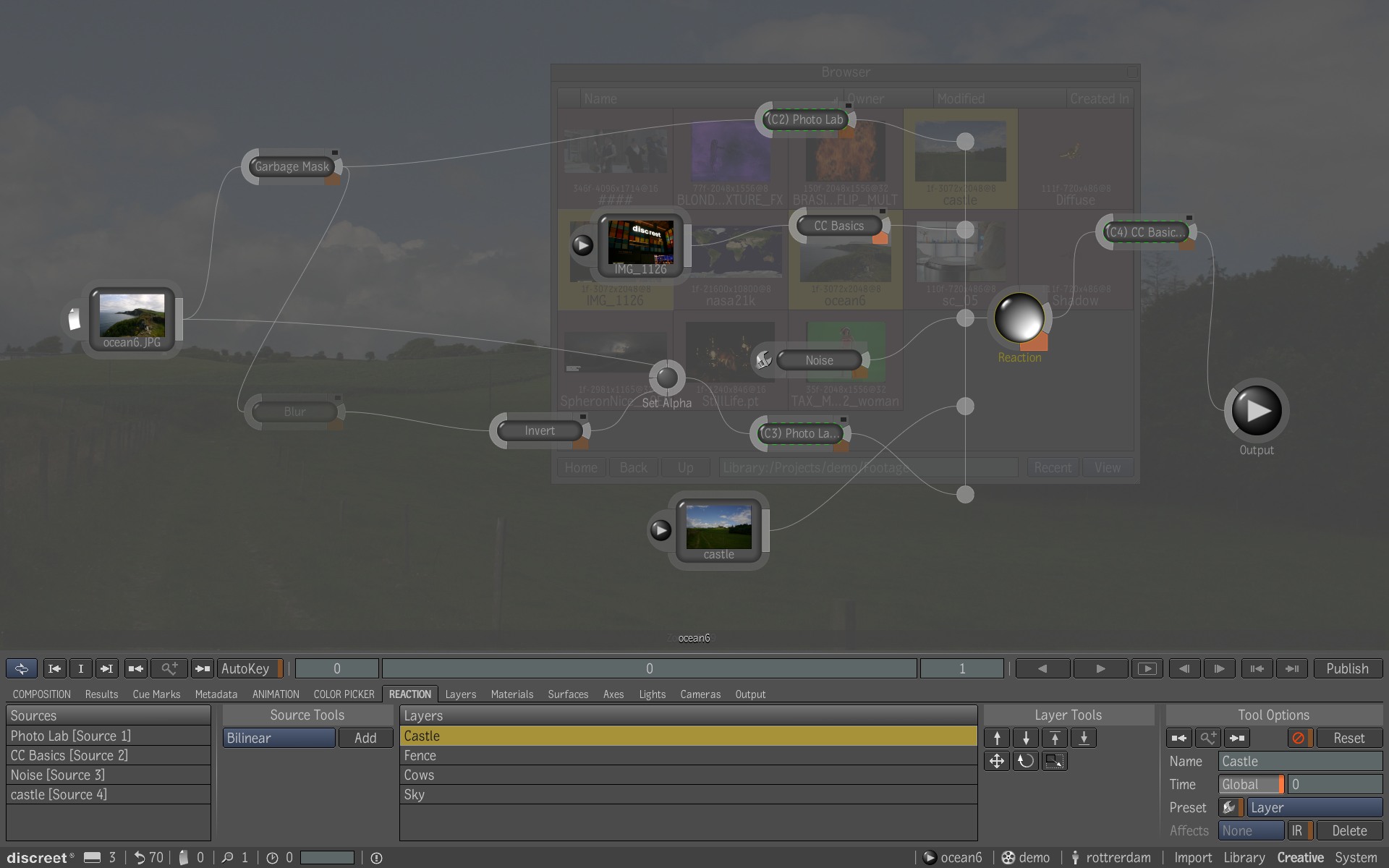
The SMPTE standard isn't a general GUI standard, its a standard for working with images. It's tailored to one specific purpose and, in my 20+ years experience, it is perfectly suited to that task. Autodesk Toxik simply has the best GUI I have ever worked with. I can sit in front of that thing for days on end and never get any eye fatigue at all. It is perfect for the work it is designed for and the suites in which it is used are similarly tailored to facilitate that work. i.e. It is designed for one specific, controlled environment, to do a specific kind of work effectively.

Image
Yeah, the Blender UI has become better since 2.49 days. But there is still room for improvement. I repeat, i get headaches after ten minutes in Blender, that's no joke or a dramatic statement but simply fact. And by coincidence i even know what the cause is.
Then why not tell us? As I said, the default Blender GUI is way too small for me but you can scale it easily enough. But it is in no way compliant to the SMPTE standard, it's still a bit of a hodge-podge, like a lot of dark themed UIs.
you still need to manipulate the content, right? How do you when you can't find the tools anymore? :)
Firstly, you'll know where everything is because you're a professional. Secondly, again because you're a professional, you'll have the right environment in which to work so you'll have no problem at all with the GUI. And I'm not talking about web design or print work, which to me is the arse-end of graphics work, I'm talking about high-end film and television post-production. Serious high stakes stuff. You only have to look at ALL the applications used in that kind of work - Flame, Smoke, Nuke, Shake, Maya, DaVinci Resolve, even lower-end stuff like Premiere Pro and After Effects - they all have very similar GUI styles.

I remember visiting Zoic Studios in LA in 2003, when they were doing VFX for Buffy The Vampire Slayer and gearing up for Battlestar Galactica. They were about to sign a deal to buy 50 or so Combustion licenses from us. They had been using After Effects and couldn't wait to be rid of it's foul, bright GUI but the deal fell through when Adobe released a new version of After Effects with a proper dark GUI. Zoic had been willing to spend 60 grand to get an application with a SMPTE compliant interface. It was a great facility, I'd have loved the chance to work there.

What works for high-end post work also works well for many of us. We work in a controlled environment in our studios. Before I sit down to do any work, I close all the hatches and draw the blackout curtains over the ports to eliminate any direct sunlight, keeping the ambience subdued. I even had special blinds made for the overhead hatches. At night I only have indirect lighting, no overheads. Even on stage, it's usually pitch dark between songs, so a subdued GUI is perfect.
NOVAkILL : Legion GO, AMD Z1x, 16GB RAM, Win11 | Audient EVO 8 | Lumi Keys | Studio Pro 8
Korg Odyssey, bx-oberhausen, Proxima, PolyMax, GR8, JP6K, Union, Atomika,
Invader 2, Flow Motion, Olga, TRK 01, Thorn, Spire, VG Iron

Post

So we arrive where i did not want to arrive. In the belief based debate. Be it. I'll do my best to share the technical side of things.

First, "Us" includes me too. I started with trueSpace 1 back in 1997.
The thing is, you're talking about general rules,
Of course i do, because bad readability and getting headaches from a UI with too low contrast, shape and lack of anchor points is a general UI UX design issue.

You’re partially right, but you’re also mixing together several different layers of the discussion and treating them as if they were the same thing.

Nobody claimed SMPTE is a “general GUI standard” in the sense of “all software must literally copy broadcast grading suites”. The point is that professional imaging industries spent decades researching human visual perception, contrast adaptation, luminance management, and visual fatigue under prolonged use. Those findings absolutely influenced broader UI and UX practices, especially in professional graphics software.

The issue is that you reduce the discussion to “this environment is special, therefore the principles do not transfer”. But perceptual ergonomics do transfer.

The human visual system does not suddenly change because the application category changes.

Things like:
• contrast separation
• luminance adaptation
• local readability
• glare management
• visual hierarchy
• retinal fatigue from excessive bright surfaces
• adaptation lag between focal elements and background

are universal physiological factors, not “film industry only” phenomena. Universal design stands above it all. Since it is humans that interacts with it.

And this is exactly why many professional applications historically converged toward darker neutral interfaces:
Autodesk Toxik, Flame, Nuke, DaVinci Resolve, Maya, Softimage, etc.

Not because “artists like dark themes”, but because neutral low-luminance environments reduce interference with image evaluation and reduce long-session fatigue.

You don't get headache because these UI solutions are consistent in itself, provides enough contrast, enough shape, enough color and hierarchy in the UI to make it possible to work with it without to get stressed. They are not too low in contrast that you could get into trouble. They are just dark.

Where your argument becomes weak is here:

“It works in that specific environment therefore it says nothing about broader UI ergonomics.”

And that simply does not follow.

Airplane cockpit ergonomics are also specialized. Medical imaging displays are specialized. Yet findings from those domains routinely influence broader interface design because humans remain humans.

And there’s another important issue:

You are conflating “dark UI” with “low readability”.

Good ergonomic dark interfaces never relied on tiny low-contrast grey-on-grey text. That is exactly the misunderstanding many modern flat UI trends introduced. A dark UI with colored icons instead of monochrome ones can already do a miracle.

Historically, professional dark UIs often used:
• controlled neutral backgrounds
• strong local contrast at points of interaction
• restrained color usage
• clear visual grouping
• sufficient luminance separation between foreground and background

That is very different from modern fashionable “everything is muted charcoal grey with barely visible typography” design.

So when someone references SMPTE-era ergonomics, they are usually talking about luminance discipline and perceptual ergonomics, not blindly importing a grading suite into Microsoft Word. Or grabbing UX styles and elements from other 3D software without making sure it really fits.

Ironically, your own example actually supports the argument:
You describe being able to work “for days” in Toxik without fatigue. That is precisely the ergonomic outcome people are talking about.
Then why not tell us? ...
Again, i already did. And do it the third time now. When you want it more detailed, then you could have a look in the Bforartists tracker. Most of the issues are actually about improving a tiny little bit in the software. Or you could also buy my book.
Firstly, you'll know where everything is because you're a professional ...
The one has very little to do with the other. Also we professional needs a visible button to see where we need to click. I've worked with lots of software over the time. I knew where everything is, and yet i needed some visual guidance to make my workflow fluent. I cannot click somewhere in the UI and hope i have hit it right.

It may come as a surprise, but especially graphics artists are very visual people.

Besides that, you're actually making a far more nuanced argument now, and I even agree with large parts of it. High-end post-production absolutely converged toward dark neutral interfaces for good reasons. Nobody serious disputes that. And this is actually part of UI UX design. You always need to take the purpose of the software into account.

However, you are conflating three distinct things: environmental optimization, perceptual ergonomics, and general-purpose UI design.

What works in a calibrated, controlled suite is not universally optimal. The success of those UIs depends on a specialized luminance environment. It's a complete perceptual system, not an isolated design choice. To claim that 'subdued dark interfaces are generally superior UX' is a leap. Most users don't work in calibrated rooms or perform color-critical tasks. Furthermore, relying on the fact that 'professionals know where everything is' is dangerous. Experts often use muscle memory to compensate for objectively poor discoverability. But even these experts benefits from a clear UI.

Crucially, and i k now i repeat myself now, old professional UIs weren't 'low-contrast mud'. Here we are at the balancing again. They had disciplined local contrast and clear active regions, which is something modern dark themes often lack.

Regardless of level, a button must remain visible and recognizable to be usable. And every of those named UI solutions is consistent in itself. I don't get headache in the dark theme of Affinity Photo with its colored icons. The Affinity Canva theme is very close to it, but lacks the colored buttons. These are hard to distinguish now. Usabilitywise a step backwards. And it slows me down. That's where my fatigue then comes from.

While at it, UX isn't just about color or the lack of. Maya and Blender, for example, often ignore the F-pattern (left-to-right, top-to-bottom scanning), increasing cognitive load by breaking expected scan paths. Middle aligned elements are harder to read than left aligned ones. And again our brain has more to do than he would need to. Don't make me think ...

Design principles are context-dependent: what works in a constrained professional environment does not automatically generalize to all UI design. This is what makes it so hard to explain. And sometimes so hard to do a proper UI UX design for a software. There are hundrets of rules, and you as a UX designer now need to decide which of these rules should have the higher weight. I say it again, i don't blame any of my Colleagues for weighting it different. But as a user i do have a problem with it when i get headache while working.

Blender, in particular, has historically tended to downplay the graphical interface, treating it as a distraction. This has contributed to its steep learning curve for decades. The long-standing mantra was: "Forget the buttons. Keep one hand on the mouse and the other on the keyboard." While intentional, this approach often slows down the workflow.

In practice, the fastest workflow combines all available input methods. Most users can effectively learn around 40 hotkeys, with advanced users reaching 80. Blender has over 2,000 operators. And most graphics software is also not that far away from that number. You simply need a good graphical target leading and self explaining UI then to be able to interact. No good idea to hide that part away.
“The biggest crime of a musician is to play notes instead of making music.”
Isaac Stern

Post

I never liked truespace, heh

Post

But it had buttons !!!
“The biggest crime of a musician is to play notes instead of making music.”
Isaac Stern

Post

I was a renderman guy, we didn't have a GUI at all.

Post

I feel with you :D

Somebody remembers Pov Ray ? So beautiful. I was so proud when i rendered my first cube <3
“The biggest crime of a musician is to play notes instead of making music.”
Isaac Stern

Post

I still think of the XSI UI as super nice, I loved the organic style buttons that kinda grew out of the UI with the glowing green hi-lites. That might have been in the early versions of it. Also was a big fan of the Nichemen stuff, will always miss it, one of the few times I preferred a simplified over a complex UI.

Post

It had its flaws. It was not really self explaining and target leading. It took me a while to find my way into it. But overall it was indeed a nice and consistent UI back in the days.
“The biggest crime of a musician is to play notes instead of making music.”
Isaac Stern

Post

pekbro wrote: Sun May 24, 2026 9:03 am I still think of the XSI UI as super nice [...]
https://extensions.blender.org/themes/theme-xsi/ :tu:
I'm not a musician, but I've designed sounds that others use to make music. http://soundcloud.com/obsidiananvil

Post

Tiles wrote: Sun May 24, 2026 7:29 amFirst, "Us" includes me too. I started with trueSpace 1 back in 1997.
Right, thoroughly professional piece of kit that was.
Of course i do, because bad readability and getting headaches from a UI with too low contrast, shape and lack of anchor points is a general UI UX design issue.
Don't be a tool, you know exactly what I said, your interpretation is just f**king stupid and you f**king know it. Either that or you are so completely f**king clueless that you don't even understand what I'm saying.

If you're getting headaches working in front of a computer, regardless of the GUIs involved I'd suggest you have physical problems, either with your ergonomics, the environment you work in or your eyesight. I reckon I spend at least 10 hours a day in front of a computer screen and I can't recall it ever giving me a headache. Not even once.

I think maybe you are also mistaken about why you're getting headaches because my experience is that a high contrast user interface will give me eye fatigue more quickly, requiring me to take longer and more frequent breaks.
Nobody claimed SMPTE is a “general GUI standard” in the sense of “all software must literally copy broadcast grading suites”.
First of all, I was responding to your nonsensical assertion that a low-contrast GUI is always a bad idea, pointing out that it is a professional requirement in certain high-end trades and that the standard is a real thing that carries considerable weight. Yet you continue to suggest it can never work, against all evidence to the contrary.

I then pointed out that what works in the VFX industry can work in music production, for the simple reason that we often work in similar, controlled environments that suit this style of interface. You can say that it doesn't work for you, that's your choice, but you can't sit there and tell me it's bad f**king design because it is simply not the case. End of discussion.
The point is that professional imaging industries spent decades researching human visual perception, contrast adaptation, luminance management, and visual fatigue under prolonged use. Those findings absolutely influenced broader UI and UX practices, especially in professional graphics software.
And I'd suggest that much of that research data probably came from SMPTE. Who else has been involved in that kind of work longer than the 110 years they have?
The issue is that you reduce the discussion to “this environment is special, therefore the principles do not transfer”.[/quote]
And you seem to think that your eyes work the same in every environment, that what works in direct sunlight works the same in a dark room with indirect lighting. Anyone who actually has eyes will tell you that is not the case. I'm not going to respond further because the rest of it just you trying to dig yourself out of the hole you dug.
NOVAkILL : Legion GO, AMD Z1x, 16GB RAM, Win11 | Audient EVO 8 | Lumi Keys | Studio Pro 8
Korg Odyssey, bx-oberhausen, Proxima, PolyMax, GR8, JP6K, Union, Atomika,
Invader 2, Flow Motion, Olga, TRK 01, Thorn, Spire, VG Iron

Post

What an excellent example of the Dunning-Kruger effect. Sheesh. What comes next? Explaining me that there are seven primary colors?

Not in this tone my friend. And definitely not with a this big amount of shitty strawmen and personal attacks. You're still arguing against a position I never actually stated.

I gave you the answers now three times. When you are too stupid to understand the simplest UX basics even after indeep explanations and linking you to the literature, then that's not my problem anymore.

EDIT, Sorry, this strawman here tickles me too much ...
First of all, I was responding to your nonsensical assertion that a low-contrast GUI is always a bad idea,
First of all, all of these UIs you call “low contrast” are actually dark neutral interfaces with strong local contrast where it matters.

Tools like DaVinci Resolve, Maya, Nuke, Flame or After Effects don’t rely on low contrast for functional elements. They use high contrast for interaction and hierarchy, and keep the background subdued.

So the claim “low contrast is good because these tools use it” is already a category error.

I linked a screenie of Blender 2.49 here as an example of a genuinely low contrast UI: the UI literally fades into itself and loses clear structure and hierarchy. And when you look closer then you may notice that it is bright. Actual Blender is better, but still not good.

For more modern examples of where this actually goes wrong: Notion in Dark Mode, Apple Notes in Dark Mode, parts of Windows 11 Settings, and a lot of SaaS dashboard templates.

Low contrast in the literal UX sense reduces readability and visual hierarchy and increases search effort. That’s generally considered bad UX practice. And of course i have to stick to that professional opinion.

This is UI/UX design with clear rules and constraints, not just a “Bones is right” situation, however strongly you may disagree.
“The biggest crime of a musician is to play notes instead of making music.”
Isaac Stern

Post

Definely Affinity

Post

No question: GIMP! :D :D :D
free mp3s + info: andy-enroe.de songs + weird stuff: enroe.de

Post

I've got a lot of mileage for the simpler photo collage covers I do using Apple's Keynote, works fine for me. Alas the days of a nice lp cover you physically look at is over for most of us, rather something that looks decent to decent-good in a grid for an online catalogue.

Post Reply

Return to “Getting Started (AKA What is the best...?)”