

Hi everyone,
I've been building Aumixys – a browser-based mastering analyzer for independent producers, mix engineers, and mastering engineers who want a fast, accurate technical check before releasing a track.
No plugin. No installation. Drop a WAV, MP3, FLAC, OGG or AIFF (up to 150 MB) and get a full report in under 30 seconds. All processing happens server-side on a dedicated VPS – so there's zero CPU load on your machine, no matter how heavy the analysis is. Your DAW session stays completely untouched.
What it analyzes:
LUFS (Integrated, Short-term, Momentary) with loudness histogram – Spotify, YouTube, Apple Music and etc. compliance check
True Peak / Inter-Sample Peaks (ISP) – clipping risk after transcoding
Spectrogram & frequency heatmap – spot missing or excessive frequency ranges instantly
Stereo image – L/R correlation, Mid/Side balance, phase goniometer, mono compatibility
Dynamic range – DR Meter, Crest Factor, RMS vs Peak over time
AI Tips & Auto QC – automatic flags for clipping, phase issues, DC offset, silence, transcodes
A/B comparison with gain matching & EBU R128 normalization (no "louder = better" bias)
Batch / Album analysis – consistency check across a full release
Key & BPM detection
Why I built it:
I wanted a tool that closes the decision loop quickly – upload, get the full picture, know if the master is ready. No guessing, no bouncing between scattered meters.
Current status: Beta 1.8 – completely free to use right now. Paid plans are on the roadmap but not yet launched, so for now everything is fully open.
Try it here: www.aumixys.com
Happy to answer any questions and very open to feedback – both on the current feature set and on what would make this most useful in your workflow. Thanks in advance for your interest and for giving it a spin.
Regards,
Jacek Wisniewski | SOUNDSAAR music
Aumixys.com – Online Mastering Analyzer (Beta).
-
- KVRer
- 13 posts since 29 Jun, 2017
Jacek Wisniewski - SOUNDSAAR (Soundsaar Music Studio)
https://www.youtube.com/@soundsaartech
https://www.soundsaar.com
https://www.youtube.com/@soundsaartech
https://www.soundsaar.com
-
- KVRer
- Topic Starter
- 13 posts since 29 Jun, 2017
Hi everyone,
I wanted to share a recent update to Aumixys, my browser-based audio QC and analysis tool for music producers.
On the site, I’ve expanded the analysis stack and made the standards support more explicit. The tool now focuses more clearly on practical mastering and release checks, including:
- LUFS loudness analysis
- True Peak / ISP detection
- stereo and phase checks
- dynamics and crest factor analysis
- spectral inspection
- A/B comparison with gain matching
- batch analysis for full albums or EPs
The public-facing tech stack on the site now highlights:
- WebAssembly
- Faust DSP
- Web Audio API
- 64-bit DSP Engine
- EBU R128
- ITU-R BS.1770
In practice, the goal is simple: give producers a fast technical sanity check before release, so it’s easier to catch problems like over-limited masters, intersample peak risk, mono compatibility issues, poor stereo balance, or inconsistent loudness across a project.
Aumixys is still in active development and currently available as a free beta. I’m trying to make it useful in a real production workflow, not just as another meter or flashy dashboard.
I’d really appreciate feedback from people who work on music every day: what else would you personally like to see in a tool like this? Which metrics, workflows, or export options would actually make your job easier?
If you feel like checking it out, the project is here:
https://aumixys.com
Thanks for reading.
I wanted to share a recent update to Aumixys, my browser-based audio QC and analysis tool for music producers.
On the site, I’ve expanded the analysis stack and made the standards support more explicit. The tool now focuses more clearly on practical mastering and release checks, including:
- LUFS loudness analysis
- True Peak / ISP detection
- stereo and phase checks
- dynamics and crest factor analysis
- spectral inspection
- A/B comparison with gain matching
- batch analysis for full albums or EPs
The public-facing tech stack on the site now highlights:
- WebAssembly
- Faust DSP
- Web Audio API
- 64-bit DSP Engine
- EBU R128
- ITU-R BS.1770
In practice, the goal is simple: give producers a fast technical sanity check before release, so it’s easier to catch problems like over-limited masters, intersample peak risk, mono compatibility issues, poor stereo balance, or inconsistent loudness across a project.
Aumixys is still in active development and currently available as a free beta. I’m trying to make it useful in a real production workflow, not just as another meter or flashy dashboard.
I’d really appreciate feedback from people who work on music every day: what else would you personally like to see in a tool like this? Which metrics, workflows, or export options would actually make your job easier?
If you feel like checking it out, the project is here:
https://aumixys.com
Thanks for reading.
Jacek Wisniewski - SOUNDSAAR (Soundsaar Music Studio)
https://www.youtube.com/@soundsaartech
https://www.soundsaar.com
https://www.youtube.com/@soundsaartech
https://www.soundsaar.com
-
- KVRer
- Topic Starter
- 13 posts since 29 Jun, 2017
Hi guys,
We just pushed a fresh set of updates and officially launched Aumixys Beta 1.9.2, our online track analyzer. A huge thank you to everyone who sent in feedback on the initial beta!
https://aumixys.com
Here is a breakdown of what went live in version 1.9.2:
Smart Low-End Analyzer (Beta v2): The low-end clash detector now actually understands time. We scrapped the slow static separation and replaced it with a bandpass filter + envelope cross-correlation approach. It now detects temporal collisions. If you have sidechain compression or ducking active, it recognizes the gap instead of giving you false positives.
Analysis History: You can now view all your previously analyzed tracks in one place. It makes it super easy to compare different versions of your mixes or masters.
Social Media Streaming Targets: TikTok and Instagram have been added alongside Spotify, Apple Music, and YouTube (-14 LUFS / -1.0 dBTP targets) to help you check how your audio will translate to reels and shorts.
Bug Fixes: Resolved a bug where browser 'back' navigation caused UI crashes and polished mobile menu responsiveness.
It's still fully free to use (analyzing full-length tracks and saving history just requires a quick, free login to prevent server hogging).
Check it out and let me know if you run into any issues or have ideas for what we should add next!
Cheers,
We just pushed a fresh set of updates and officially launched Aumixys Beta 1.9.2, our online track analyzer. A huge thank you to everyone who sent in feedback on the initial beta!
https://aumixys.com
Here is a breakdown of what went live in version 1.9.2:
Smart Low-End Analyzer (Beta v2): The low-end clash detector now actually understands time. We scrapped the slow static separation and replaced it with a bandpass filter + envelope cross-correlation approach. It now detects temporal collisions. If you have sidechain compression or ducking active, it recognizes the gap instead of giving you false positives.
Analysis History: You can now view all your previously analyzed tracks in one place. It makes it super easy to compare different versions of your mixes or masters.
Social Media Streaming Targets: TikTok and Instagram have been added alongside Spotify, Apple Music, and YouTube (-14 LUFS / -1.0 dBTP targets) to help you check how your audio will translate to reels and shorts.
Bug Fixes: Resolved a bug where browser 'back' navigation caused UI crashes and polished mobile menu responsiveness.
It's still fully free to use (analyzing full-length tracks and saving history just requires a quick, free login to prevent server hogging).
Check it out and let me know if you run into any issues or have ideas for what we should add next!
Cheers,
Jacek Wisniewski - SOUNDSAAR (Soundsaar Music Studio)
https://www.youtube.com/@soundsaartech
https://www.soundsaar.com
https://www.youtube.com/@soundsaartech
https://www.soundsaar.com
-
- KVRian
- 540 posts since 31 Mar, 2005 from Tampere, Finland
Thank you for this tool! I'm just starting on learning mastering my own tracks from start to finish and needed some advice on my where to go with my songs.
A guy with serious GAS and lots of unused VSTs. But if I someday need them...
-

- KVRian
- 618 posts since 31 May, 2004 from Germany
One question from my side: what happens with the uploaded data - will it be saved on the servers and be used to train an AI model?
-
- KVRer
- Topic Starter
- 13 posts since 29 Jun, 2017
Hi!DotNoir wrote: Tue May 26, 2026 7:30 pm Thank you for this tool! I'm just starting on learning mastering my own tracks from start to finish and needed some advice on my where to go with my songs.
Thank you so much for the kind words! Hearing that Aumixys is helping you on your mastering journey is incredibly rewarding.
Since you're starting out, I highly recommend using the Compare (A/B) Mode to match your track with a reference, and keeping an eye on the Integrity Report and AI Tips to catch mix issues early.
Also, as a quick teaser: I am currently preparing to develop a brand new feature focused on vocal analysis and vocal placement in the mix to help self-producing creators sit their vocals perfectly.
Regards,
Jacek Wisniewski - SOUNDSAAR (Soundsaar Music Studio)
https://www.youtube.com/@soundsaartech
https://www.soundsaar.com
https://www.youtube.com/@soundsaartech
https://www.soundsaar.com
-
- KVRer
- Topic Starter
- 13 posts since 29 Jun, 2017
Hi,michat wrote: Tue May 26, 2026 7:39 pm One question from my side: what happens with the uploaded data - will it be saved on the servers and be used to train an AI model?
great question! I want to be 100% clear about this: "No, your tracks will never be used to train any AI models, nor are they permanently stored on our servers."
I fully respect your intellectual property. Uploaded files are processed in real-time solely to generate your analysis report. Once the analysis is done, the audio file is automatically deleted.
Regarding our "AI Tips" feature: the AI only interprets raw numerical metadata (such as LUFS, dynamic range, and spectral balance) to generate the recommendations. The actual audio file is never sent to any external AI APIs.
As a musician myself, I am extremely protective of my own unreleased tracks, which I use to test this tool every single day. That’s why building a secure, private environment was my absolute top priority from day one. Your music remains entirely yours, safe and completely private.
Regards,
Jacek Wisniewski - SOUNDSAAR (Soundsaar Music Studio)
https://www.youtube.com/@soundsaartech
https://www.soundsaar.com
https://www.youtube.com/@soundsaartech
https://www.soundsaar.com
-
- KVRer
- Topic Starter
- 13 posts since 29 Jun, 2017
Hey everyone,
Over the past few weeks, I’ve been working hard on my online analysis tool, Aumixys, and I wanted to share the latest 1.9.2 update with the KVR community. For those who aren't familiar, Aumixys is a web-based tool designed to help you analyze your mixes, check your loudness/dynamics, and prepare your tracks for streaming.
I just rolled out two of the most requested features:
 New Kick/Bass Analysis We all know the low end is usually the hardest part of any mix to translate well. I've added a dedicated module that analyzes the relationship between the kick and the bass in your track. It gives you a clear visual on frequency masking, helping you ensure your low end is punchy and tight before you hit the master bus.
 Personal Analysis Database You can now create an account to save your results automatically to a private catalog. This makes it super easy to track your progress, revisit old mixes, and quickly compare different versions or revisions of the same song without losing your past metrics.
 100% Audio Privacy Guarantee I know how protective we all are of our unreleased tracks, so I want to be perfectly transparent: Aumixys does not store your audio files. Once the analysis is generated, only the numerical metrics and charts are kept on your account. Furthermore, absolutely no AI models are trained on your audio. You maintain complete privacy and control over your music.
You can try it out here: https://aumixys.com
I’d love for you guys to test the new Kick/Bass analysis on your recent mixes. Any feedback, ideas, or constructive criticism are always highly appreciated!
Cheers, Jacek
Over the past few weeks, I’ve been working hard on my online analysis tool, Aumixys, and I wanted to share the latest 1.9.2 update with the KVR community. For those who aren't familiar, Aumixys is a web-based tool designed to help you analyze your mixes, check your loudness/dynamics, and prepare your tracks for streaming.
I just rolled out two of the most requested features:
 New Kick/Bass Analysis We all know the low end is usually the hardest part of any mix to translate well. I've added a dedicated module that analyzes the relationship between the kick and the bass in your track. It gives you a clear visual on frequency masking, helping you ensure your low end is punchy and tight before you hit the master bus.
 Personal Analysis Database You can now create an account to save your results automatically to a private catalog. This makes it super easy to track your progress, revisit old mixes, and quickly compare different versions or revisions of the same song without losing your past metrics.
 100% Audio Privacy Guarantee I know how protective we all are of our unreleased tracks, so I want to be perfectly transparent: Aumixys does not store your audio files. Once the analysis is generated, only the numerical metrics and charts are kept on your account. Furthermore, absolutely no AI models are trained on your audio. You maintain complete privacy and control over your music.
You can try it out here: https://aumixys.com
I’d love for you guys to test the new Kick/Bass analysis on your recent mixes. Any feedback, ideas, or constructive criticism are always highly appreciated!
Cheers, Jacek
Jacek Wisniewski - SOUNDSAAR (Soundsaar Music Studio)
https://www.youtube.com/@soundsaartech
https://www.soundsaar.com
https://www.youtube.com/@soundsaartech
https://www.soundsaar.com
-
- KVRer
- Topic Starter
- 13 posts since 29 Jun, 2017
Hi everyone,
After a long period of solo development, I have just released a major update to Aumixys (https://aumixys.com)– my free web-based mastering QC analyzer. I designed this update to help producers diagnose two of the most common issues in home studios: vocal integration and low-mid range muddiness.
Here is a quick overview of what's new:
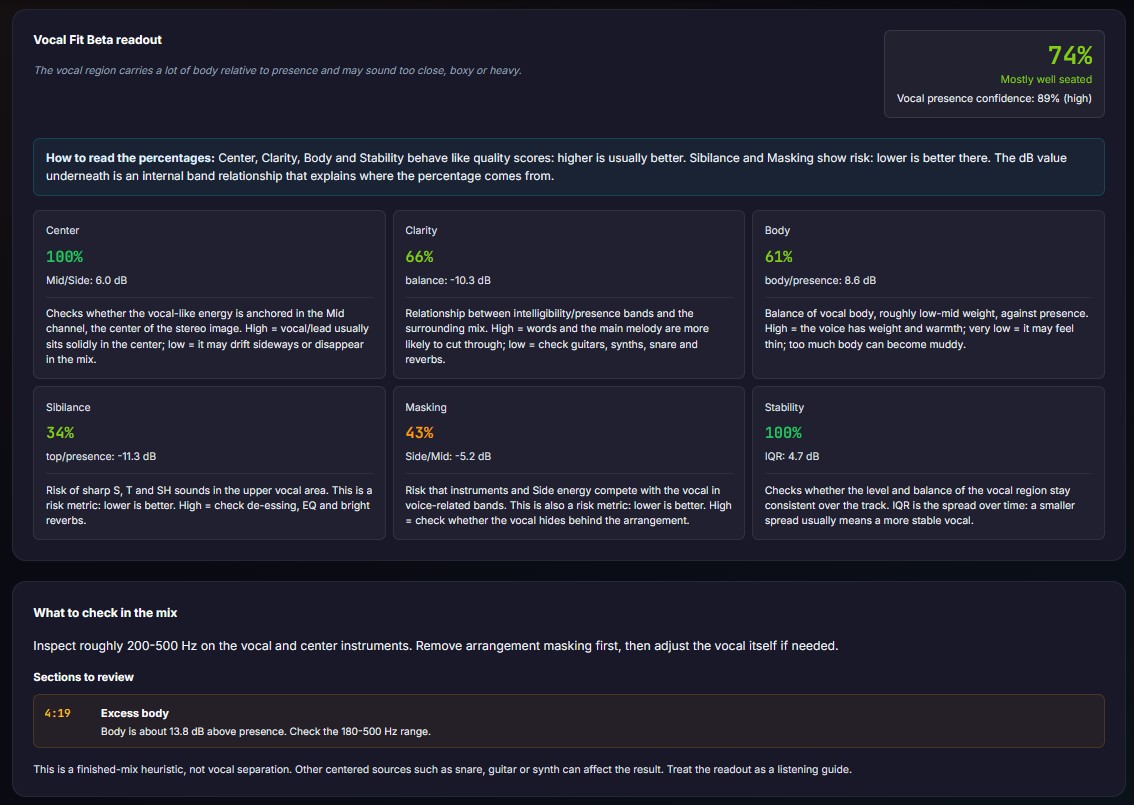
1. "Vocal Fit" Heuristic Analysis (Beta)
A specialized module that evaluates how well your vocal sits within the master.
* pYIN Pitch Tracking Gate: To prevent centered instruments (like lead synths or guitars) from tricking the analyzer, it runs a pYIN pitch-tracking algorithm. If no sustained, voiced vocal properties are confirmed, the analysis is bypassed.
* Mid/Side Spectral Balance: Splits the vocal-range energy (180 Hz to 7.9 kHz) and measures the Mid (center) vs. Side (width) relationship.
* 6 Key Diagnostic Metrics: Evaluates Center Anchoring (stereo wash check), Clarity vs. Body (180-500 Hz balance), Sibilance risk, and Masking risk from wide side elements.
* Timeline-based Alerts: Generates timestamped markers (e.g., "Sibilance peak at 01:24" or "Vocal masking at 02:05") so you know exactly where to look in your DAW.
2. New Practical Guides (Vocals & Muddiness)
I've also published two new, no-nonsense articles in my Learn section:
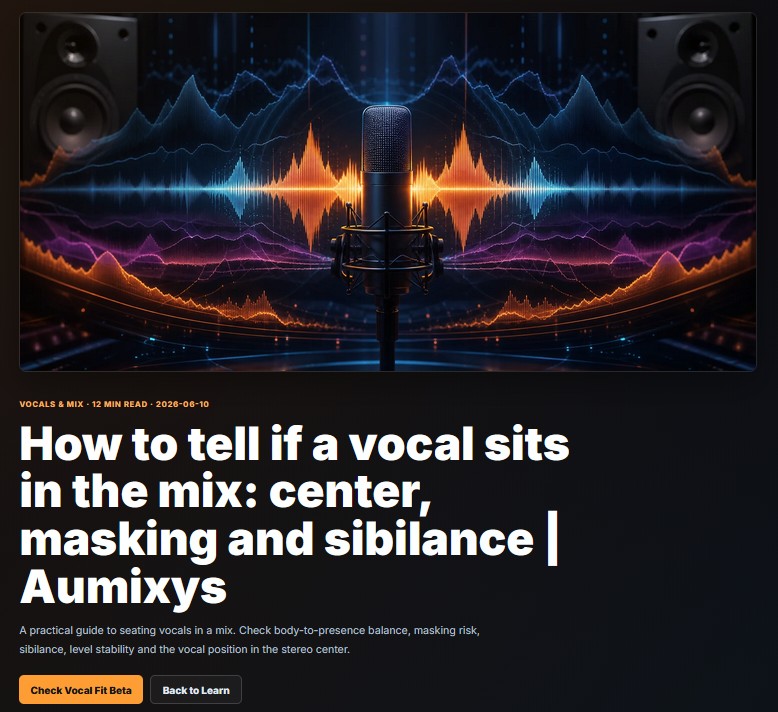
* Vocals in the Mix: How to diagnose vocal placement using listening checks (low-level playback, mono translation, small speakers), manage body vs. presence, and balance reverbs.
* Low-Mid Muddiness (200–500 Hz): Solving arrangement clashes, EQ carving techniques, and high-passing reverb returns to instantly reclaim headroom.
Try Free or Live Demo
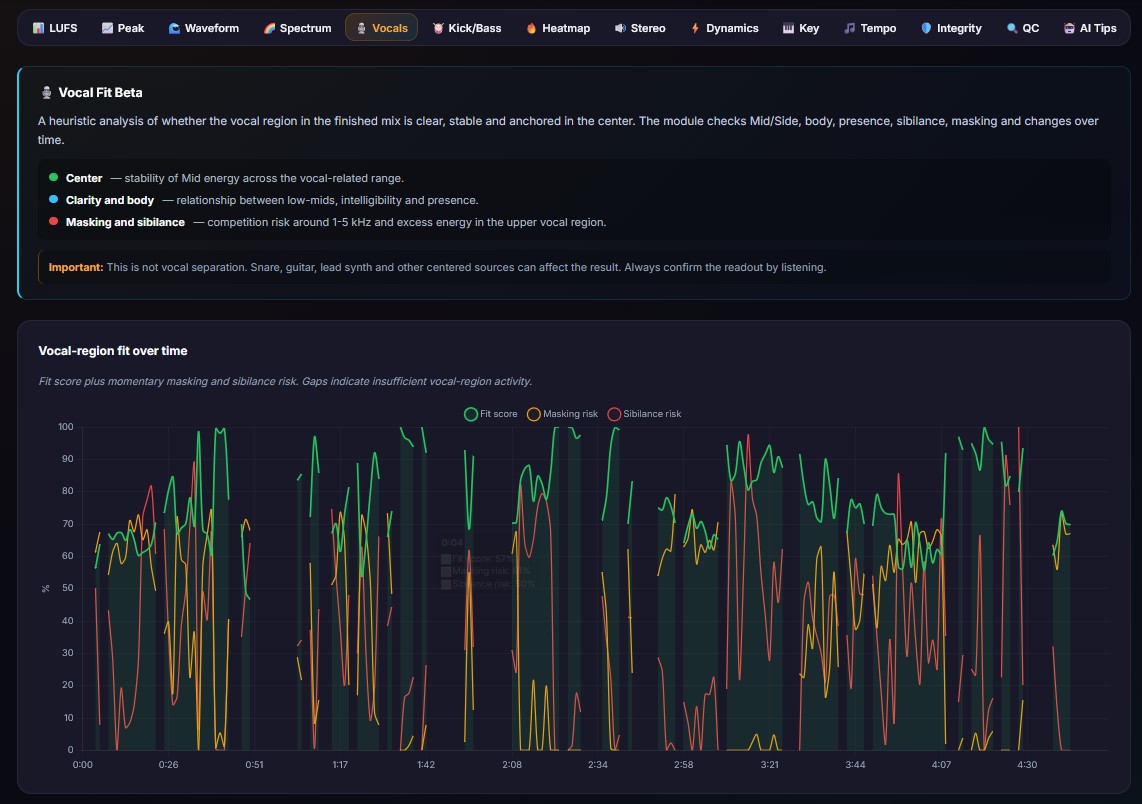
You can test the analyzer for free. I have set up a pre-analyzed Live Demo on the site so you can test the charts and timeline alerts instantly without uploading a file.
Check it out: aumixys.com
I would love to hear your feedback on the Vocal Fit heuristics and how they align with what your ears are telling you.
Best regards,
After a long period of solo development, I have just released a major update to Aumixys (https://aumixys.com)– my free web-based mastering QC analyzer. I designed this update to help producers diagnose two of the most common issues in home studios: vocal integration and low-mid range muddiness.
Here is a quick overview of what's new:
1. "Vocal Fit" Heuristic Analysis (Beta)
A specialized module that evaluates how well your vocal sits within the master.
* pYIN Pitch Tracking Gate: To prevent centered instruments (like lead synths or guitars) from tricking the analyzer, it runs a pYIN pitch-tracking algorithm. If no sustained, voiced vocal properties are confirmed, the analysis is bypassed.
* Mid/Side Spectral Balance: Splits the vocal-range energy (180 Hz to 7.9 kHz) and measures the Mid (center) vs. Side (width) relationship.
* 6 Key Diagnostic Metrics: Evaluates Center Anchoring (stereo wash check), Clarity vs. Body (180-500 Hz balance), Sibilance risk, and Masking risk from wide side elements.
* Timeline-based Alerts: Generates timestamped markers (e.g., "Sibilance peak at 01:24" or "Vocal masking at 02:05") so you know exactly where to look in your DAW.
2. New Practical Guides (Vocals & Muddiness)
I've also published two new, no-nonsense articles in my Learn section:
* Vocals in the Mix: How to diagnose vocal placement using listening checks (low-level playback, mono translation, small speakers), manage body vs. presence, and balance reverbs.
* Low-Mid Muddiness (200–500 Hz): Solving arrangement clashes, EQ carving techniques, and high-passing reverb returns to instantly reclaim headroom.
Try Free or Live Demo
You can test the analyzer for free. I have set up a pre-analyzed Live Demo on the site so you can test the charts and timeline alerts instantly without uploading a file.
Check it out: aumixys.com
I would love to hear your feedback on the Vocal Fit heuristics and how they align with what your ears are telling you.
Best regards,
Jacek Wisniewski - SOUNDSAAR (Soundsaar Music Studio)
https://www.youtube.com/@soundsaartech
https://www.soundsaar.com
https://www.youtube.com/@soundsaartech
https://www.soundsaar.com