
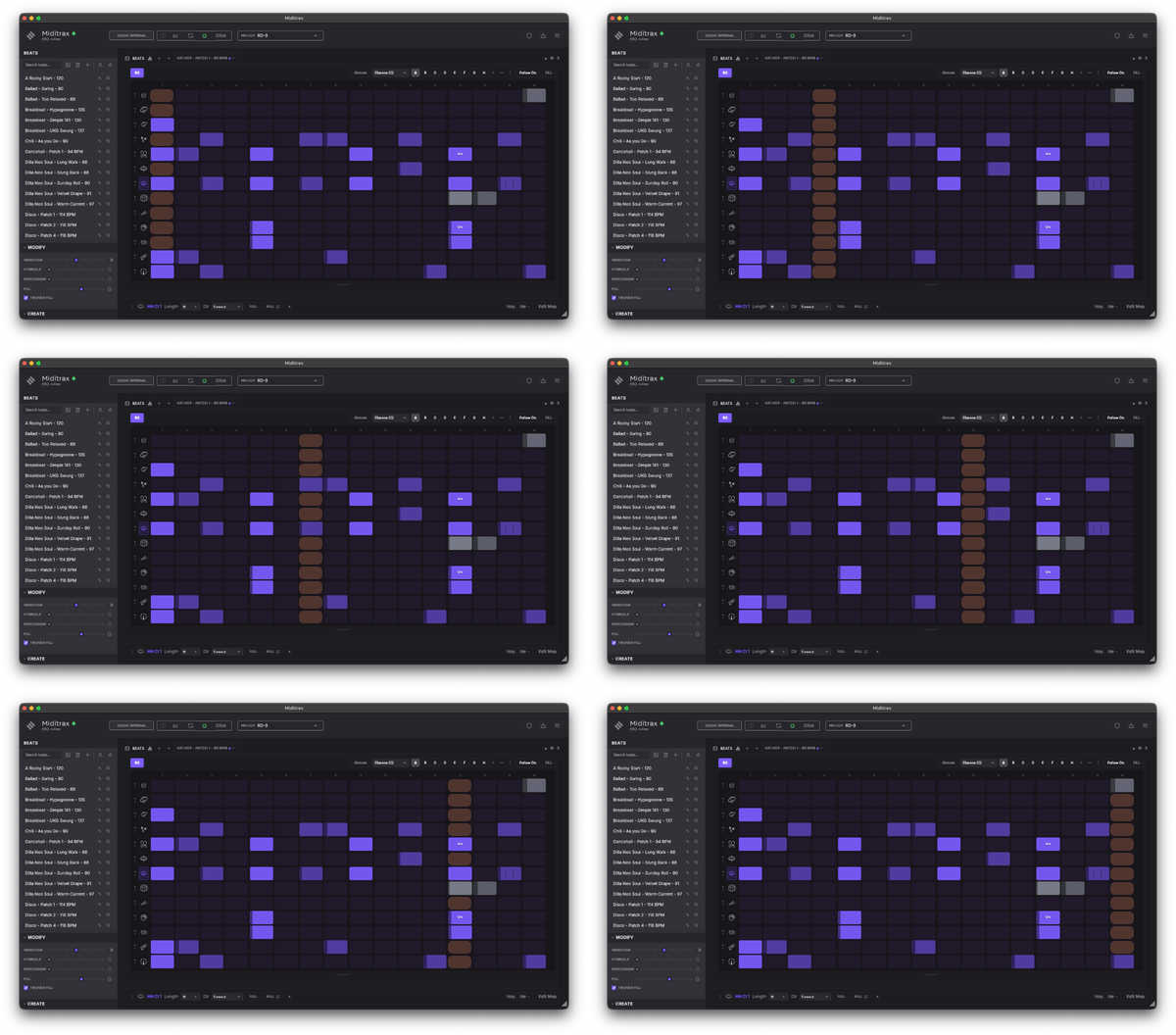
Miditrax - A new visual grid drum sequencer

VST, AU, AAX, CLAP, etc. Plugin Virtual Instruments Discussion
Post Reply New Topic
RELATED
PRODUCTS

Post

Plug in, hit play, make beats. No DAW, no setup — just the grid and your gear. Miditrax is here.

Image

Plug in a drum machine or any synth with drum sounds, and Miditrax turns it into a live sequencing surface. See your entire pattern in one view. Sculpt while it plays. Add variations to make any beat perfect — or better still, imperfect — with micro-timing, swing and chance. Miditrax is a sequencer you actually play, with live, mappable fills.

Miditrax Lite is free — the full sequencer, yours to play: https://midifex.com/miditrax
(Pro unlocks saving and MIDI import/export.)

Post

This would actually be perfect for me if it was a plugin. There's nothing out there that is so simple but also has all the features I need. Would you consider a plugin version?

Post

Hi, Miditrax is not VST Plugin but still works well in any DAW. We have a knowledge base article on how to set that up with Logic Pro (however other DAW's will be similar).

https://midifex.com/support/miditrax/daw-setup

Post

Midifex wrote: Fri Jun 19, 2026 12:17 am Hi, Miditrax is not VST Plugin but still works well in any DAW. We have a knowledge base article on how to set that up with Logic Pro (however other DAW's will be similar).

https://midifex.com/support/miditrax/daw-setup
Ah I didn't see that article! Working perfectly in Ableton Live 12 on Windows 11, thank you.

Post

My DAW is synced and Miditrax's tempo says it's the same as the DAW. However, Miditrax is playing back at double-time.

Also, every time I click a step, the nag screen comes up.

Post

A few QOL things:

Bigger text on the steps as well as allowing double clicking and typing for things like chance - I spent ages trying to get multiple steps to 20% chance

Right click each lane's icon to open the lane menu as well as the menu icon at the bottom

Include a way to delete all lanes at once - essentially clearing the screen

I haven't bought the full licence yet but when I went to click save, it cleared the lane set-up I had made and kicked me back to the init set-up - annoying to say the least

Post

tlvid wrote: Thu Jun 18, 2026 9:11 pm This would actually be perfect for me if it was a plugin. There's nothing out there that is so simple but also has all the features I need. Would you consider a plugin version?
I found this which does function has a plug in...

https://kreuzberg-audio.com/downloads/g ... generator/
My milkshake brings all the girls to the yard

http://soundcloud.com/the-boogee-man

Post

Uncle E wrote: Fri Jun 19, 2026 6:22 am My DAW is synced and Miditrax's tempo says it's the same as the DAW. However, Miditrax is playing back at double-time.

Also, every time I click a step, the nag screen comes up.
Hi Uncle E

Apologies for the popup, that was a real problem. It is now fixed in version 1.4.1, which we have just released. Open Setup and click Check Updates to install it.

On the double-time, we could not reproduce it. It may be that the global pattern Rate at the bottom of the screen is set to 1/32 and not 1/16. Make sure you do not have a track lane selected, as Rate can be set globally and per lane.

Thanks for flagging both, and apologies again for the trouble.

Regards
Oliver
https://midifex.com/miditrax

Post

tlvid wrote: Fri Jun 19, 2026 9:14 am A few QOL things:

Bigger text on the steps as well as allowing double clicking and typing for things like chance - I spent ages trying to get multiple steps to 20% chance

Right click each lane's icon to open the lane menu as well as the menu icon at the bottom

Include a way to delete all lanes at once - essentially clearing the screen

I haven't bought the full licence yet but when I went to click save, it cleared the lane set-up I had made and kicked me back to the init set-up - annoying to say the least
Hi tlvid

Thanks for the suggestions. A few of these are already possible.

Bigger text:
drag the small triangle in the bottom right corner to resize the app. The grid and step text scale up with it.

Lane menu:
click a track lane's icon (the drum pic) on the left to show its menu at the bottom of the scren, where you can setLength, Direction and Feel, or roll the dice for a new pattern on that lane.

Clear all lanes:
click the three dots beside the Follow button (top right), then Clear Pattern to delete the lot. Also to clear one lane, open its menu (click the icon) and use the three dots at bottom of screen to access delete/copy/add features

The save issue:
version 1.4.1 (just released) fixes the upgrade popup, so Lite beat creation now runs smoothly.

Thanks again for the feedback tlvid, much appreciated.

Regards
Oliver

Post

Uncle E wrote: Fri Jun 19, 2026 6:22 am My DAW is synced and Miditrax's tempo says it's the same as the DAW. However, Miditrax is playing back at double-time.

Also, every time I click a step, the nag screen comes up.
Hi Eric, I think you’re using two clocks, one from your DAW perhaps needs deactivating?

Post Reply

Return to “Instruments”