
Dub Forge - Da N0b (autofilter, Win/Mac/Linux, VST/AU/CLAP)

Talk about all things "KVR Developer Challenge" related.
Post Reply New Topic
RELATED
PRODUCTS

Post

Image

Hi everyone.

Dub Forge is a production[1] and plugin-making collab between Thermal of Heat Audio, and yours truly. Da N0b is an analog modeled SVF filter where the amplification and "voltage control" sections are modelled as progressively "worse" behaving JFET-based amplifiers as you turn the OTA/JFET knob. It has LFO and envelope follower (the latter can be triggered via sidechain input) so you can use it as a touch wah, a poor man's mu-tron, or a number of other things. It also has a "filter morph" slider that let's you continuously automate the SVF LP -> BP -> HP output.

It's designed to be filthy and crunchy, slightly unstable, but controllable. It's a very simple plugin but people who have tried it actually reported having a lot of fun with it regardless.

We hope you do too.

No video but I have uploaded some sound demos for the beta:
  • Demo 1: Dub
    Used as distortion on the bass (simple fretless patch on Xpand driven hard into two instances of the filter). As Voice of God hipass sub-boost on bass AND kick, as env-filter on delay and as faked Tubby stepped HP on hihats (using S&H LFO).
  • Demo 2: Chilled
    Used as autowah on Clavi and Epiano (clean patches on Xpand!2), as LFO'd BP turning strings to a synth pad.
  • Demo 3: Disco Raaga
    Aping the famous 1982 "record that predicted acid house". It won't fool anyone that it's a 303 but its just an oscillator from SurgeXT with no processing other than portamento, going into DaNob it to me sounds decently funky. Again used on drums to beef up. Also some showing off of S&H and ramp-down LFOs. Those stabs at the and also go through auto-filtering LP/BP mix.
  • Demo 4: Techy DnB
    Having a go at the techstep DnB bass/midrange sound using two pairs of Da N0b running in parallel and automating the filter morph

[1]: We originally started our collaboration as a production duo for a track we contributed to the charity compilation Dubs on Acid vol. 3 on Keeping Track. Do check it out, and the other two releases, all sales go towards charities.

Post

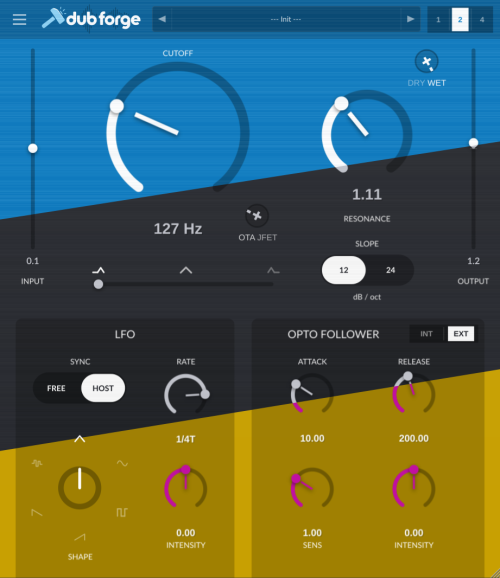
Currently there's no manual so I'll just copy my "manual" post from DOA here:

Ok, short run through the UI:

Top half - the filter itself
  • Input - this is the input trimmer, this is a linear amplification of the input but it affects how much the filter saturates/distorts because it affects how driven is the filter model itself, the value is in dB
  • Cuttoff/Reso - the usual filter controls, the cutoff is the central frequency that is being modulated by the two modulators on the bottom of the UI
  • _/\ - /\ - /\_ - behind the cryptic graphic is really a slider that blends between three filter types, lowpass on the left, bandpass in the middle and highpass on the right.
  • OTA/JFET - this trimmer basically blends between the two models, OTA being almost completely linear except when it saturates (but it takes way more volume in the input signal to do so) when it's a soft clipper, and JFET is the schtick of this filter, a mode in which Cutoff voltage control and all the SVF opamps behave like badly made JFET amps: wide saturation, and additional nonlinearity caused by audio-rate voltage sap (like very mild AM/ring mod kinda except for cutoff where it's more like audio rate cutoff mod, but again fairly mild)
  • Slope 12/24 - switches between one SVF or two in series ie a 2-pole to 4-pole model or 12dB/octave filter or 24dB/octave filter
  • Dry/Wet - you can blend clean input signal with the filtered signal by moving this trimmer towards Dry
  • Output - output trimmer - basically how much the filter output is amplified/attenuated before hitting the output saturator
Also note that there are more saturators in signal path, one after each 12dB SVF stage, and one in the feedback path (resonance) which protects filter stability. Their saturation profiles are also affected by the OTA/JFET trimmer.

Bottom half - the modulators

The filter cutoff is modulated by two different modulation sources: LFO on the left, and an Opto Follower on the right.
  • LFO
    • Sync & Rate- lets you switch the LFO rate from free rate in Hz or synced to host tempo and specified in note length values (1/8 being eight note or quaver, and 1/4T being a quarter note i.e. crotchet triplet)
    • Shape - select one of the LFO oscillator shapes, from top, clockwise: triangle, sine, square, ramp up, ramp down, sample & hold
    • Intensity - how much is cutoff affected by the LFO, to the right, positive values, increase the cutoff as LFO rises and negative values, to the left, decrease it.
  • Opto Follower - modelled optocoupler (Vactrol) type envelope follower. Maybe the most useful thing to note about this is that it is not an envelope, it's a cutoff modulation that is triggered by input audio, and the second most useful is that it's a vactrol - so no threshold above which it triggers, it always kinda triggers but it's got sensitivity instead.
    • Attack/Release - time constants that alter the shape of the optocoupler response to the input audio volume changes
    • Sens - how sensitive is the optocoupler to the changes in the input volume
    • Intensity - same as LFO i.e. how much is cutoff affected by the generated envelope, to the right, positive values, increase the cutoff as env rises and negative values, to the left, decrease it.
    • Int/Ext - lets you pick whether the envelope follower follows the signal being filtered or something you sent to the sidechain, this allows you to alter the filter on, say a pad, with your drums, or something.
Other UI functions:
  • 1 | 2 | 4 - switch between no oversampling (1), 2x or 4x oversampling.
  • Preset menu - lets you store and load plugin presets (no factory presets yet)
  • "Hamburger" menu - opens an About box in which you can switch between the three UI color themes
Some use-cases

Autowah


Basically set the filter to 12dB BP or somewhere between BP and HP, crank the resonance, then combine a triplet LFO with positive intensity envelope. For Mu-Tron like vactrol shape set the attack to 10ms and release to about 150ms. The filter is (sonically) more like a Crybaby than a Mu-tron tho especially if you set the OTA/JFET trimmer about half way. Control distortion with input and output.

T4rnce S&H

Set the filter to BP, crank the resonance between 8 and 10, OTA/JFET about third in, set the LFO type to S&H shape, 1/8, synced to tempo, push some white noise in - bam - you Goa trance dude now :teeth:

Voice of God

Input down to at least -6dB. Set the filter to 12dB Highpass, crank the resonance between 8 and 10 then adjust to taste, chase the bass fundamental with the Cutoff (so around 50Hz ie all the way to the left). Enter the Temple of Boom. Use some utility gain after Da N0b to gain compensate. Full OTA mode for cleanest results.

Airlift

Input down to at least -6dB. Set filter to Lowpass, Cutoff to max and then dial down to taste (or around 10kHz and then dial around it). Crank the resonance up, set Dry/Wet to about half way. Adjust to taste, should give you more air in the signal, you can even crank the input or dial a little towards the JFET side to add some subtle saturation to the air if you want. Again, use utility gain after Da N0b to compensate for lost gain.

Post Reply

Return to “KVR Developer Challenge 2026”