Voyage Voyage by Musical Entropy

Talk about all things "KVR Developer Challenge" related.
Post Reply New Topic
RELATED
PRODUCTS
Voyage Voyage

Post

It's me again :D

Image

The initial idea I had for the KVR DC was to do kind-of an emulation of the Morphor Echon 6, that I really loved when I tried it at SynthFest France 2026 in April, but it sounded a bit complicated to do in only a few weeks of time, and I was quite busy those last months, so I had even given up on the idea of ​​participating this time around, even though I would have liked to give it a shot in 2023.

Then in May, I worked on a Shimmer reverb for a client, and I discovered that it is quite enjoyable to play with the self-oscillated texture when decay is very very high, and I found out by a chance a way to let it stay even if there is no input for a while. A few hours after, I was implementing tons of DSP to manipulate the texture over time, like in an instrument, and that's when I decided to do something for the KVR DC, inspired from a lot of stuff I enjoy at the moment and that I don't own, like the Echon 6, Erica Synths FX boxes, the Nautilus module from Qu-Bit, the BBD delay in the Behringer Neutron, the Korg NTS stuff with their great Submarine and Space/Riser reverbs which inspire the design and the name of the plug-in... My 7-year-old daughter also contributed to the UI design with a drawing. :love:

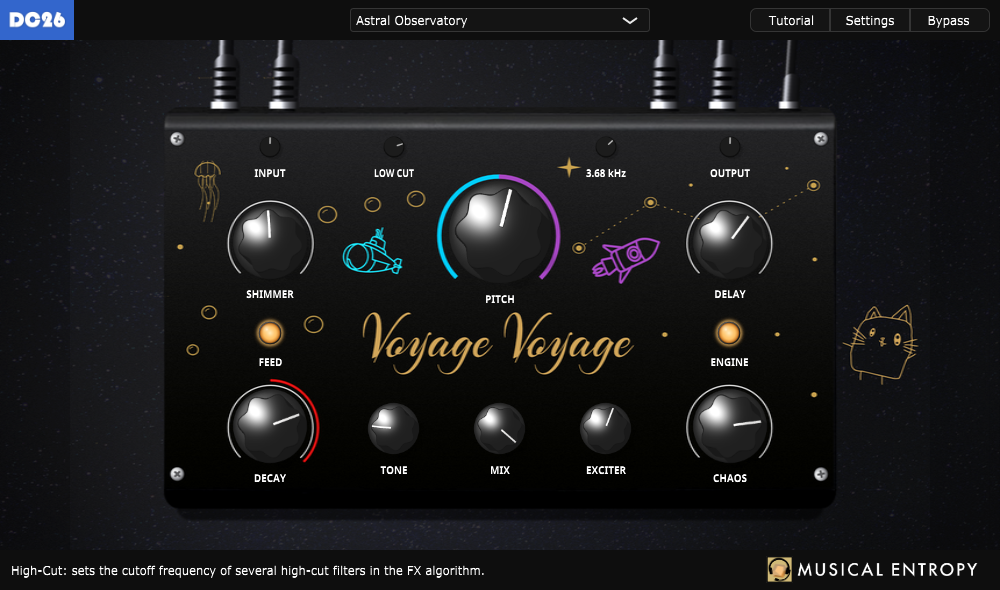
So it is a reverb FX, a Shimmer with negative or positive pitches, involving a BBD delay emulation in the Shimmer signal path for extra crunch / nonlinearities, and an instrument when it is in self-oscillation, needing you to record the output or full automation while playing / recording something, like a drone machine / texture generator, with macros controls to add modulation, resonators and stuff on the sound generated in the reverb loops.

It was very fun to make, and I spent quite the time on the DSP but also on the UI / UX design, because I wanted it to be a large step up from what I did with Spaceship Delay ten years ago (thanks Affinity Photo / Designer and Knobman3d + JUCE for coding some of the UI stuff directly), even if I'm still working on a reskin that will be available soon.

And there are an embedded tutorial, and easter eggs + hidden features :D

https://soundcloud.com/musicalentropy/s ... dfae82f120

Good luck to all the other contestants, thanks to KVR for hosting this, and have fun with Voyage Voyage! I’ll be open to feature requests, but I’ll only be able to work on them after the contest ends (obviously, this doesn’t include bug fixes).
Last edited by Ivan_C on Wed Jul 08, 2026 10:16 am, edited 3 times in total.

Post

Very cool Ivan!

Post

Tried out Voyage Voyage for a bit and it's very cool! Love the little side-note of your daughter helping with a drawing as well. It looks neat and works great so far, nice job!

The amazingly droney, stretched out vibes that you can create with it are great fun (and spacey) to play around with. Whether it's a basic MIDI loop chord progression or a vocal recording, it delivers some instant vibes you can dream away with. I could definitely see myself using Voyage Voyage for various reasons.

If I could be so blunt to give one con, I'd say the input/low cut/output knobs feel a little too small. But overall it doesn't take away from the nice user experience!

Also, nice collection of presets. :-)

Post

hibrasil wrote: Tue Jul 07, 2026 6:50 pm Very cool Ivan!
Thanks again :D
darkpalacestudios wrote: Thu Jul 09, 2026 6:40 pm Tried out Voyage Voyage for a bit and it's very cool! Love the little side-note of your daughter helping with a drawing as well. It looks neat and works great so far, nice job!

The amazingly droney, stretched out vibes that you can create with it are great fun (and spacey) to play around with. Whether it's a basic MIDI loop chord progression or a vocal recording, it delivers some instant vibes you can dream away with. I could definitely see myself using Voyage Voyage for various reasons.

If I could be so blunt to give one con, I'd say the input/low cut/output knobs feel a little too small. But overall it doesn't take away from the nice user experience!

Also, nice collection of presets. :-)
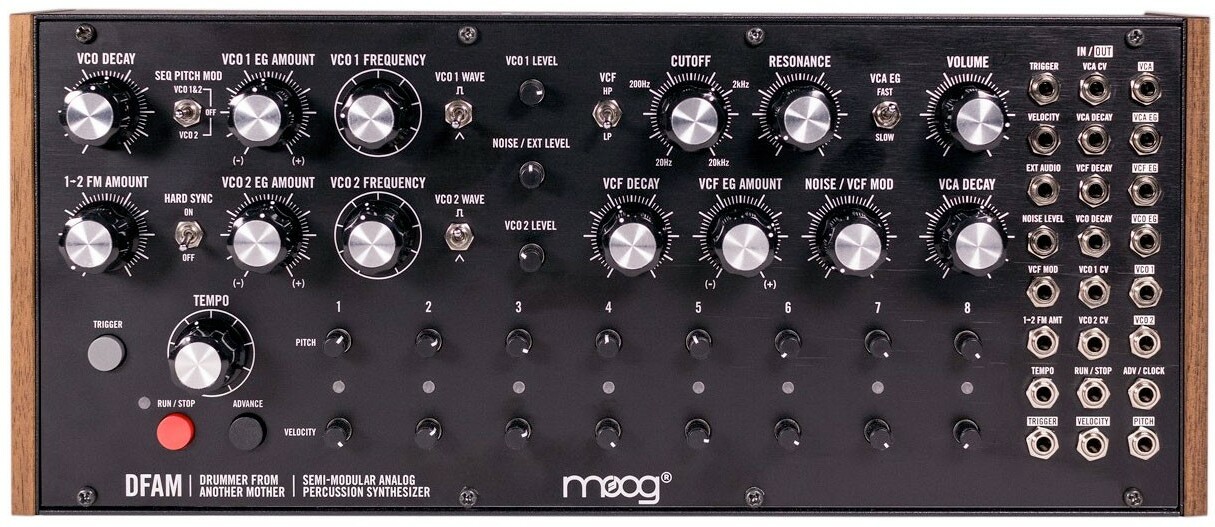
Thanks! Very happy to see you guys like the UI and the user experience so far! About the top knobs, they may be a bit small indeed, I was thinking about "mimicking" some knobs from a semi-modular desktop synth I had in front of me. I wanted a UI where there are different sizes for all the controls, depending on how much I want to emphasize them, and may have gotten a bit too far for those ones. But it's not just my fault - look how incredibly cute they are! :hihi:

Image

By the way, don't forget to try to click on various things on the UI :hyper:

Post

But it's not just my fault - look how incredibly cute they are! :hihi:
Totally get where you're coming from! It's also just personal preference I guess.

Just clicked on every little thing in the UI and got spooked by the small bubble on the left that seems like a randomizer! And the little star making a space-sound noise. :hihi:

Post

Very cool sounding!

Love the demo audio, very on point!

Post

Interesting. I think the 'interactive' tutorial is great. At first glance I was/am confused by the vertical bars left and right. Generally bars like that indicate input and output level, where red is 'too high'. Fiddling around they changed color (blue to red), but whatever I did they stayed red, and I can't see a relationship between color and level. The button left below ('decay') also has half a red halo. But I'm not very smart in these things.

Post

Plannning on checking this one.
100 High Quality Soundsets: Omnisphere 2, Dune 3, Tone 2 Synths, Pigments, Uhe Synths, Halion, Spire, and others.

TTU Youtube

Post

"If I could be so blunt to give one con, I'd say the input/low cut/output knobs feel a little too small"

I agree, but more, meant as mild feedback, the size is disproportional to the effect it can have. For 'input' at the start nothing much happens and suddenly your ears can get blown out, so one should want to use it with care. The scale seems to be linear in dB, maybe that's the 'problem?

Another tiny detail. The 'bypass' does not change color when enabled. When for some reason there's no sound, you can't know whether it it bypassed or not.

Post

Thanks for your feedback and your interest guys!
Frits van Zanten wrote: Fri Jul 10, 2026 2:43 pm Interesting. I think the 'interactive' tutorial is great. At first glance I was/am confused by the vertical bars left and right. Generally bars like that indicate input and output level, where red is 'too high'. Fiddling around they changed color (blue to red), but whatever I did they stayed red, and I can't see a relationship between color and level. The button left below ('decay') also has half a red halo. But I'm not very smart in these things.
The meters on the left and right are indeed volume meters, and they are not supposed to stay red all the time, unless you know what you are doing and it sounds good to your ears :hihi: I guess it can still sound cool with all the filters that are processing the signal in the signal path, even with heavy volume! And so, to keep things safe, you can reduce the amount of input and output volume with the associated knobs, which are mapped linearly in dB indeed :wink:
Frits van Zanten wrote: Fri Jul 10, 2026 4:14 pm Another tiny detail. The 'bypass' does not change color when enabled. When for some reason there's no sound, you can't know whether it it bypassed or not.
Actually, it does change color, but on a too small amount, I have to do something about it, it will be available on next update. I have already added some content in the tutorials, new presets, optimized things here and there, corrected some mistakes I did on the hidden parameters, and solved an issue which prevented the big easter egg to work on Windows, the update will be available next week :D

Post Reply

Return to “KVR Developer Challenge 2026”