


AUTO-ADMIN: Non-MP3, WAV, OGG, SoundCloud, YouTube, Vimeo, Twitter and Facebook links in this post have been protected automatically. Once the member reaches 5 posts the links will function as normal.
Howdy. I wanted to try this experiment where I could simulate having a bunch of actual modules in something like a 500 series rack. So, I wanted things like crosstalk, power supply sag, things like that. I couldn't figure out a good way to let me just use any old vst I had and plug it in, so we had to make some plugins first. I think I'm at the point where it's presentable, and I'm not trying to make money or anything - I just wanted to try it out. So here's what we got:For now, this is a vst3 pack that's Windows only. I'm sure that I can do a MacOS build, but I would want to test it before putting it out.
https://github.com/xBombjackx/werewolf- ... s-releases (https://github.com/xBombjackx/werewolf-dynamics-releases)
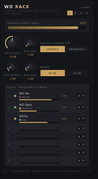
First up is the rack unit itself.
 (https://postimg.cc/6TGCD3H1)
You load an instance of the rack somewhere and choose a channel, then you load some other plugins and put them on the same channel and you'll see them in the rack view. What this does is allow you to dial in the crosstalk, supply sag, ripple etc, so you can do something like put a power-hungry module in slot 1 (say a vari-mu) and dial up the power draw. Then whatever work the vari-mu does will slurp up some amount of the available power and all the downstream modules feel the sag. Or you can leave the power up and have it not do that. You also get proximity-based crosstalk that you can dial in or out.
That's no fun without any effects to use, so there's also a gang of modules to play with. Right now, there's an exciter, echo, FET compressor, Vari-mu compressor, Opto compressor, preamp module, tape, a Pultec, VCA compressor, and a console EQ.
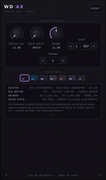
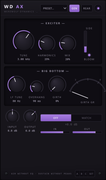
WD AX Exciter:
 (https://postimg.cc/K3LLLqk8)
 (https://postimg.cc/tnPPPSZJ)
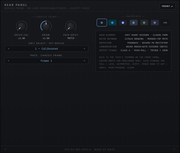
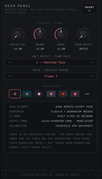
Most of the modules have a back panel that lets you change the color scheme of the interface, adjust the power draw, multiply the effect of the drive knobs, the pair drift thing, and that "unit" selector which basically lets you select from a few different units, like unit 1 is usually "the one that matches what the specs say" and 6 is "the old one." Pair drift works in stereo or mid-side; it's just how closely-matched the two units are. If for some reason you wanted a new LA2A on the left and a broken one on the right... there you go.
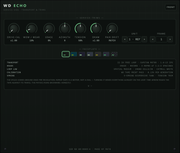
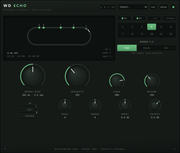
WD Echo:
 (https://postimg.cc/n9777Rjj)
 (https://postimg.cc/tnPPPSZs)
Here's a tape echo
WD FET:
 (https://postimg.cc/q6nnnbht)
 (https://postimg.cc/SjzcwsZf)
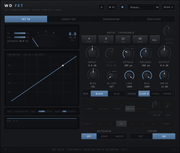
This one here is the FET compressor module. Up at the top, you can see a few different models to pick from, then there's some more choices at the bottom depending on what you pick. The 76, for example, has a black one and a blue one and you can swap the output stage. The autogain settings are either off, "compensate for gain reduction," and "match the loudness of the input signal."
WD Mu:
 (https://postimg.cc/hh7VHjC8)
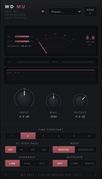 (https://postimg.cc/z3RT9BdS)
This one's the Vari-mu. There's not a whole lot to it, but I like this one a lot.
WD Opto:
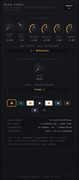 (https://postimg.cc/Hj7bfxSt)
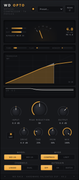 (https://postimg.cc/ThWnZwkQ)
You gotta have an opto. In this case, a 2A and 3A model with some stuff you can tweak in the back.
WD Pre:
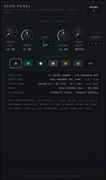 (https://postimg.cc/Dmb1tZCj)
 (https://postimg.cc/NLrRWMNC)
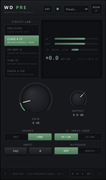
The preamps module. Pick a preamp and crank it. Or don't!
WD Tape:
 (https://postimg.cc/mhF70DdJ)
 (https://postimg.cc/23BnP6HP)
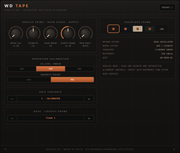
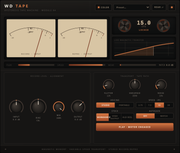
Here's a tape module where the text doesn't fit inside the buttons. You've got a few different tape stocks, and the usual tape machine controls.
WD VCA:
 (https://postimg.cc/23BnP6cN)
 (https://postimg.cc/yWS0wdQz)
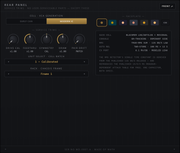
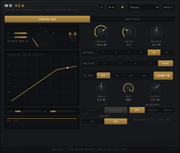
Based on the name, you probably guessed that this was the VCA compressor. This one has "the one that everybody wants" with some little tweaks on the back, and I imagine the next thing will be "the drums one."
WD XQ:
 (https://postimg.cc/MXj1hTPS)
 (https://postimg.cc/MXj1hTPw)
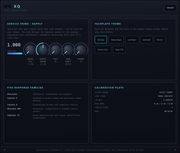
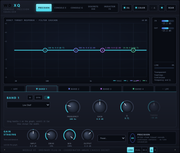
This one is the EQ module. I decided to keep this one a little weird and I don't love the UI, but hey... It's an experiment. Instead of trying to give you a "do everything" eq, I opted to limit it to a few different console eq's. The only real reason for that is everybody has a good digital eq already anyway, and this fits in better with the story that we're trying to tell. Yes, I know that is a goofy thing to say. In any case, you get the usual suspects here with proportional Q where needed and the frequency knobs match the behavior of whatever they're based on - so one console might have a continuous sweep and another might have fixed points to choose from. The UI needs work.
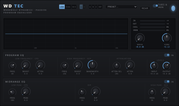
WDTec:
 (https://postimg.cc/bd21KJ64)
 (https://postimg.cc/kDtWk4j0)
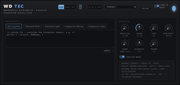
Ok, last one! It's a you-know-what eq.
Wow, thanks for reading all that if you made it this far. So what's the point? I don't know, really. At the end of the day, I think what I learned was that I can barely hear to effects of the power supply sagging and the crosstalk, but they are definitely there. I think my hope is that some of this stuff can help your mix breathe a little, feel alive a little. I reckon it's nice for something like a bus where each instrument has a little impact on the others in the bus. And if it doesn't, at least the modules sound really good. To the extent that I was able, everything uses some combination of data sheets, schematics, service manuals, and other people's research to figure out how any of this works and everything measures very close to whatever info I could find.
https://github.com/xBombjackx/werewolf- ... s-releases (https://github.com/xBombjackx/werewolf-dynamics-releases)
So anyway, I don't want your money but I would love your feedback. I know this is a divisive subject and it really matters to some people, so this is what AI did on this: AI did a lot of the research in terms of finding the specifications of things, AI made a majority of the UI, and AI absolutely had basically spoon-feed all the math to me. So, without AI this would have taken a year to do. Without me, it probably would have gone faster than it did
 I hope at least one person enjoys. If anything breaks, I'm sorry.