3 modulair area's editors with sub-levels ... ?

Official support for: mutools.com
RELATED
PRODUCTS

Post

mutools wrote:
janamdo wrote:Using a muverb in a MUX is still possible, because when you double click on the MUX symbol than you go to the modulair Mux editor where you construct that thing
Now i can't follow at all. You want to do everything in 1 screen, but now you do use multiple screens. I really don't understand.

No there is a one top-level module screen ( session modulair screen ) and from there you go to the other mid-level module screens

Suppose..
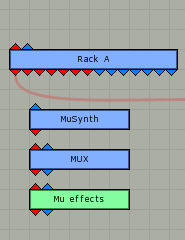
Than it is not possible anymore when you have load a sound(musyntcore) or MUX in a rack to go from there to go open a modulair area and construct there .. no you must now go to the musession modulair area than (working from this startscreen for modulair working)

Post

On the subject of the modular area, is it ever planned for adding audio outputs to a MUX module to function?

I often use multiband effects structures, and this is something I've often wanted to work, because the setups aren't so reusable when all the frequency splitting has to be done within the setup.

Post

Image


What you're asking is actually possible :wink:

On the other hand, look at this very simple example... don't you think there's too much screen objects around? :shock:
... hey, and there's only 4 racks with 4 synths, one of 'em (just a single osc synth)is constructed in this "unique" modular area you suggest. Imagine how would this look if you settup a normal or a big project, or if you put all synths without core modules or muxes or whatever container.

Some of the patches i'm working on doesn't even fit on a full screen MUX and i need to create musynths inse MUX, and core modules inside Musynths... so i can't imagine myself working like this. Anyway it's a matter of tastes, if you like to work this way you can do it, the feature is already there.

Image

In this example you can see a 8 sound drum machine done inside the mux. You can also see that just one of it's sounds, (JMKick) has it's editors opened. Even with just one of the sounds it's been hard to take a screenshot with this all toguether, and there's no racks etc on this example. Sorry but I can't imagine a way of doing this the way you suggest other than usin Muxes cores etc.

But maybe i'm not understanding what you're suggesting.

Post

mutools wrote:
janamdo wrote: A picture tell more than words
Image
Yes, you can work this way now. I don't see the problem.
But i do want to see this be done automaticallythis top-level modules by MUlab and forget the Mysynthcore and MUX modulair editors

When i fill a rackslot with a sound or MUX or effect..than can the MULAB program automatically construct a top-level a modulair session screen for me

I can do it also by hand..but for what we do have software and a computer ?
To free us from repetative things.

Post

janamdo wrote:There is always entrance to the modulair area ..there is no need for more than one location, because ONE location is sufficient in my view
Use it man! It's there already.
What's exactly is your problem having it as it is in order to do what Juan is showing you or having that tons of stuff (like Reason cable's linguini dish ) in the MPA (which again is available to you still).

In other words here is what you are saying:

Having TWO ways to do "one thing" in order to satisfy different Styles of working IT'S NOT GOOD!

ONE (mine) IT'S BETTER!

This is what you are saying. It's in the open! :wink:

Am I misunderstanding your signs?
ABEFLGMOPPRRST :phones:

Post

janamdo wrote:When i fill a rackslot with a sound or MUX or effect..than can the MULAB program automatically construct a top-level a modulair session screen for me
That's a different story, it's not so bad.
Having the Rack slots showing up in the MPA is not that messy.
I wouldn't mind that, but as an option ( collapse a Rack module) just to keep the top level view simple.
ABEFLGMOPPRRST :phones:

Post

On that point, the very first time I went into the MPA I was expecting to be able to get into the wiring of the rack module, rather than just bringing up a window with a copy of the rack from the desk.

Post

liquidsound wrote:
janamdo wrote:When i fill a rackslot with a sound or MUX or effect..than can the MULAB program automatically construct a top-level a modulair session screen for me
That's a different story, it's not so bad.
Than there is no need more for the separate Mysynth and MUX modulair area (deep) editors as it now is in MUlab
liquidsound wrote: Having the Rack slots showing up in the MPA is not that messy.
I wouldn't mind that, but as an option ( collapse a Rack module) just to keep the top level view simple.
Indeed not messy at all (all rackslots are vertical lined and how many wil be there?) and these are at top-level ... when double clicking on them you go to a mid-level

Collapse the rack module ..also if there were are other racks involved ..makes this very "controlable" :)
I call this : "the egg of Columbus" :lol:

Post

So a Rack becomes a MUX with new empty "Slot" plugins (that can be "replaced" with whatever) and a panner/level control wired up at the ">" mark?

Hmm. I have to say I've wondered in similar directions but I can see the complexity in deciding just when a Rack has been pulled around enough it can no longer be displayed as a Rack (rather than just a bunch of plugs on the MPA).

--

A cool feature(tm) would be to select a bunch of plugins and go "Embed in MUX"... (Now I have to go look if I can do that already..!)

Post

janamdo wrote:Than there is no need more for the separate Mysynth and MUX modulair area (deep) editors as it now is in MUlab
Nope! When I work at the sound/effects level I want to to deal ONLY with the MUX or any VST right there with often several Slot devices open without getting in the MPA which IS an extra step and extra huge window.

Your idea requires a "mutually exclusive" system.
My agreement with the Rack's slots in the MPA is not. Is added flexibility. :)
ABEFLGMOPPRRST :phones:

Post

liquidsound wrote: available to you still).

In other words here is what you are saying:

Having TWO ways to do "one thing" in order to satisfy different Styles of working IT'S NOT GOOD!

ONE (mine) IT'S BETTER!

This is what you are saying. It's in the open! :wink:

Am I misunderstanding your signs?
I think that working with one session modulair screen what adding automatically the rackslot modules in a rack as top-levelmodules and from there double click to go to mid-level and then working in a modulair editor for mysynt or mUX is the same style of working right now in MULAB!

- the entrance to the Mysynth deepeditor goes now via the musynth session editor (where all modulair constructions starts)
- the entrance to the MUX editor deep editor goes ...( same see as above)

Jo from Mutools said that he want look at the mysynthcore and Mux because there functionalityis overlapping

In respons on that .. i was thinking how to improve this? ..and came up with this

Post

I think is overlapping due to the nature of the first level MUX MuSynth.
They are the same just a different name (that's what I got so far).
You are talking about "Moving" the alternative modular editing access exclusively in the MPA.

I agree with the auto showing up system in the MPA (up to a point. I like to keep it simple with the option of getting as deep as I like per project).
Again, Adding is different than Substitution.

Adding is also growth at many levels. You like a Bonzai system. Chop everywhere and keep it small in one place.... (OK is an extreme example :wink: )
ABEFLGMOPPRRST :phones:

Post

liquidsound wrote: Nope! When I work at the sound/effects level I want to to deal ONLY with the MUX or any VST right there with often several Slot devices open without getting in the MPA which IS an extra step and extra huge window.
:)
When you work on a effect(MUX) or sound than you are already in the session modulair window ... you get entrance to a sound module editor or MUX module editor by double clicking on the top -level symbol and a go to the mid-level window will open where all components are


liquidsound wrote: Your idea requires a "mutually exclusive" system.
My agreement with the Rack's slots in the MPA is not. Is added flexibility. :)
My idea is to simplify the workflow of the modulair area

Post

liquidsound wrote:I think is overlapping due to the nature of the first level MUX MuSynth.
They are the same just a different name (that's what I got so far).
What can be done in the Musynth can also be done in the MUX..so why than not working only in the MUX enviroment?
BUt now with my idea of working in the session modulair screen ..
liquidsound wrote:
You are talking about "Moving" the alternative modular editing access exclusively in the MPA.
Yes, because it is easy to work with andalso with more than one rack i think
liquidsound wrote: I agree with the auto showing up system in the MPA (up to a point. I like to keep it simple with the option of getting as deep as I like per project).
Again, Adding is different than Substitution.
Adding is also growth at many levels. You like a Bonzai system. Chop everywhere and keep it small in one place.... (OK is an extreme example :wink: )[/quote]

All what you add to a rackslot is automatically showing up in the musession modulair window as i suggested

Post

Juan Mendoza wrote:Image


What you're asking is actually possible :wink:

On the other hand, look at this very simple example... don't you think there's too much screen objects around? :shock:
... hey, and there's only 4 racks with 4 synths, one of 'em (just a single osc synth)is constructed in this "unique" modular area you suggest. Imagine how would this look if you settup a normal or a big project, or if you put all synths without core modules or muxes or whatever container.

Some of the patches i'm working on doesn't even fit on a full screen MUX and i need to create musynths inse MUX, and core modules inside Musynths... so i can't imagine myself working like this. Anyway it's a matter of tastes, if you like to work this way you can do it, the feature is already there.

Image
-------------------------------------------------------------------
Image
But here are two levels mixed ..that is not possible Juan
a top-level shows only the racks and slots( automaticlly done by mulab(that i s my idea))
Than if you double click on the top level symbol you go to the mid-level ,where you see all components
Juan Mendoza wrote: In this example you can see a 8 sound drum machine done inside the mux. You can also see that just one of it's sounds, (JMKick) has it's editors opened. Even with just one of the sounds it's been hard to take a screenshot with this all toguether, and there's no racks etc on this example. Sorry but I can't imagine a way of doing this the way you suggest other than usin Muxes cores etc.

But maybe i'm not understanding what you're suggesting.
That is working on mid-level..oke

Post Reply

Return to “MuTools”