

Can anyone with S1 3.x or 4.x help confirming a bug?
-

- Banned
- Topic Starter
- 11467 posts since 4 Jan, 2017 from Warsaw, Poland
Awesome

-
- KVRian
- 1405 posts since 17 Oct, 2018
Every application has its quirks. It's not a bug since it seems like that is how the developers intended it to work. There is a difference between intention and a bug imo.antic604 wrote: Mon Dec 28, 2020 5:10 pmThen explain this to me, please. There's nothing about why it works like that in user manual (or that it even does that!) and it's not consistent and not logical.oneway wrote: Mon Dec 28, 2020 5:07 pmThis is mostly because you disabled playing overlaps and created overlapping events. Look, this stuff all depends on the order in which you’re doing this, selecting this, the tools you’re using, your Editing/Overlap settings, honestly it is all fairly basic Studio One literacy stuff. I could go into this more but I don’t really see the point if you sold Studio One.antic604 wrote: Mon Dec 28, 2020 5:02 pm when I merge the two 1/16 hi-hats it creates an event spanning whole bar COVERING the other 5 or 6 hi-hats, making them inaudible. I don't think that's intended (I've play overlaps disabled)?
It’s all very logical, but it wasn’t the logic you were expecting. Guess you made the right choice!
Studio One // Bitwig // Logic Pro // Ableton // Reason // FLStudio // MPC // Force // Maschine
-
ReleaseCandidate ReleaseCandidate https://www.kvraudio.com/forum/memberlist.php?mode=viewprofile&u=476930
- KVRian
- 620 posts since 19 Oct, 2020
Long time I didn't post this!
-
- Banned
- Topic Starter
- 11467 posts since 4 Jan, 2017 from Warsaw, Poland
So you're OK with a feature that's not documented, not consistent with its naming and behaving differently to how similar features - in the same DAW! - work? Ok.apoclypse wrote: Mon Dec 28, 2020 5:33 pm I don't think it matters anyway since this doesn't seem to be an issue in version 5. So whether you like it how it works in 3.x or 4.x is irrelevant.
Other such inconsistencies are e.g.
1) "merge" and its opposite being "dissolve" (rather than "unmerge")
2) when transforming a track there's an option to "preserve realtime state" vs. "preserve instrument track state" for audio and instrument tracks respectively, which do exactly the same, but are named differently - why not "audio track" for the former, or "realtime" for the latter?
3) for instrument tracks there's Bounce In Place and Bounce To New Track that make sense for audio tracks, but for instrument tracks they do exactly the same thing - bounce to new track
And so on... I mean I'm not surprised by such things in Cubase, which is 30+ years old, but S1 is only at v5 and it's dissapointing that such a simple consistency things are overlooked. They're confusing for new user.
-
- KVRian
- 557 posts since 11 Dec, 2017
For which new user?
 When I was a new user it was not confusing at all. A colleague of mine just started using Studio One, and she is not confused either.
2/3 of the things you mentioned are splitting hairs over naming. The rest of what you mentioned is that you learned the software, but seem to think it should behave differently not out of any stated desire for convenience, efficiency, speed, or musical purpose, but just because you think it's inconsistent.
Yes, their manual does leave out a lot of what they explain in their tutorial videos. But, I'm happy to see Presonus has been focusing on adding a Keyswitch Lane, a Score Editor, and Retrospective Record rather than renaming tooltips and changing shortcut menu items.
Although now that you've got me thinking about it... Retrospective Record? Shouldn't it be Retroactive Record? or Record Recall? Which is more consistent and less confusing...

-
- Banned
- Topic Starter
- 11467 posts since 4 Jan, 2017 from Warsaw, Poland
Oh, I definitely agree with you!oneway wrote: Mon Dec 28, 2020 6:10 pmFor which new user?
2/3 of the things you mentioned are splitting hairs over naming. The rest of what you mentioned is that you learned the software, but seem to think it should behave differently not out of any stated desire for convenience, efficiency, speed, or musical purpose, but just because you think it's inconsistent.
Yes, their manual does leave out a lot of what they explain in their tutorial videos. But, I'm happy to see Presonus has been focusing on adding a Keyswitch Lane, a Score Editor, and Retrospective Record rather than renaming tooltips and changing shortcut menu items.
Although now that you've got me thinking about it... Retrospective Record? Shouldn't it be Retroactive Record? or Record Recall? Which is more consistent and less confusing...
But fixing those things or naming them properly isn't comparable to adding a full new feature! The risk is if you leave those things hanging at the start, in 5-10 years you'll end up with a cluttered mess that's Cubase right now. Which is what S1 devs wanted to avoid when they left Steinberg, I thought?
Also you're contrasting consistency with convenience, speed and efficiency? When merging events if you know you'll need a full bar, why won't you just select full bar? Does it make sense that a feature called bounce SELECTION bounces full bar, even if the selection is 3/16ths? And why it's Snap To Grid that modifies that behaviour, when - in my example - it's set to quantize, which is 1/16 and not a bar? It's like tasting a bite of something at a grocery store and having to leave with 1 kg/pound bag. I don't see that as convenient, fast and efficient.
I filed a bug report.
-
- Banned
- Topic Starter
- 11467 posts since 4 Jan, 2017 from Warsaw, Poland
This I can understandoneway wrote: Mon Dec 28, 2020 6:27 pm Ok, whatever, I have found that "bug" very convenient, very fast, and very efficient, especially when gluing sections to fly them to other parts of the song.

-
- KVRian
- 1405 posts since 17 Oct, 2018
1). The Merriam-Webster dictionary defines Unmerge as "to dissolve a merger". So S1 is correct in their terminology. Either way if you know what it does, why does it matter?antic604 wrote: Mon Dec 28, 2020 5:51 pmSo you're OK with a feature that's not documented, not consistent with its naming and behaving differently to how similar features - in the same DAW! - work? Ok.apoclypse wrote: Mon Dec 28, 2020 5:33 pm I don't think it matters anyway since this doesn't seem to be an issue in version 5. So whether you like it how it works in 3.x or 4.x is irrelevant.
Other such inconsistencies are e.g.
1) "merge" and its opposite being "dissolve" (rather than "unmerge")
2) when transforming a track there's an option to "preserve realtime state" vs. "preserve instrument track state" for audio and instrument tracks respectively, which do exactly the same, but are named differently - why not "audio track" for the former, or "realtime" for the latter?
3) for instrument tracks there's Bounce In Place and Bounce To New Track that make sense for audio tracks, but for instrument tracks they do exactly the same thing - bounce to new track
And so on... I mean I'm not surprised by such things in Cubase, which is 30+ years old, but S1 is only at v5 and it's dissapointing that such a simple consistency things are overlooked. They're confusing for new user.
2). They don't do the same thing exactly. When you preserve the realtime state for an audio track, you are preserving the effects applied to it. When you preserve instrument state you preserving the VSTs settings etc. This will render it to audio and embed the midi data. To you the distinction may not matter but to the developers they think it does. Considering each dialog actually shows you what these two terms mean and what they do, I think you are just nitpicking.
3). So the one thing where they actually show consistency, it's a problem? Okay. Note that S1 doesn't call it Bounce in Place they call it Bounce Selection. So behavior is still consistent with the naming even if there are two ways of doing it.
Studio One // Bitwig // Logic Pro // Ableton // Reason // FLStudio // MPC // Force // Maschine
-
- Banned
- Topic Starter
- 11467 posts since 4 Jan, 2017 from Warsaw, Poland
1) I'm not English native obviously, so for me dissolve describes a chemical process, rather than unmerging of a merger. But point taken.apoclypse wrote: Mon Dec 28, 2020 9:23 pm1). The Merriam-Webster dictionary defines Unmerge as "to dissolve a merger". So S1 is correct in their terminology. Either way if you know what it does, why does it matter?antic604 wrote: Mon Dec 28, 2020 5:51 pmSo you're OK with a feature that's not documented, not consistent with its naming and behaving differently to how similar features - in the same DAW! - work? Ok.apoclypse wrote: Mon Dec 28, 2020 5:33 pm I don't think it matters anyway since this doesn't seem to be an issue in version 5. So whether you like it how it works in 3.x or 4.x is irrelevant.
Other such inconsistencies are e.g.
1) "merge" and its opposite being "dissolve" (rather than "unmerge")
2) when transforming a track there's an option to "preserve realtime state" vs. "preserve instrument track state" for audio and instrument tracks respectively, which do exactly the same, but are named differently - why not "audio track" for the former, or "realtime" for the latter?
3) for instrument tracks there's Bounce In Place and Bounce To New Track that make sense for audio tracks, but for instrument tracks they do exactly the same thing - bounce to new track
And so on... I mean I'm not surprised by such things in Cubase, which is 30+ years old, but S1 is only at v5 and it's dissapointing that such a simple consistency things are overlooked. They're confusing for new user.
2). They don't do the same thing exactly. When you preserve the realtime state for an audio track, you are preserving the effects applied to it. When you preserve instrument state you preserving the VSTs settings etc. This will render it to audio and embed the midi data. To you the distinction may not matter but to the developers they think it does. Considering each dialog actually shows you what these two terms mean and what they do, I think you are just nitpicking.
3). So the one thing where they actually show consistency, it's a problem? Okay. Note that S1 doesn't call it Bounce in Place they call it Bounce Selection. So behavior is still consistent with the naming even if there are two ways of doing it.
2) Are the options for programmers or for the users? The descriptions wouldn't be necessary if they used clear(er) language, like 'preserve state to allow back transformation' or something like that
3) Sorry, I meant Bounce Selection. I don't understand how showing both that and Bounce To New Track for Instrument Tracks makes any sense, since they're doing exactly the same.
Oh, and one more! When you right click on instrument track header to transform it to audio, why does it only render the insert FX within the boundaries of the clips?!? If you have an 8-bar loop consisting of 8x 1-bar midi events with some insert reverb on top, then the tail of the reverb from 1st clip won't be rendered to the start of 2nd clip and so on. Unless you merge the events first, that is. Shouldn't this be in the transform menu, so you could choose the behaviour? That's pretty bad design, IMO.
Or why shared clips don't display a number next to the 'ghost' icon? If you have several shared groups on a track, how are you supposed to tell them apart?
-
- KVRian
- 1405 posts since 17 Oct, 2018
Right under each check box it literally tells you what each one does.antic604 wrote: Mon Dec 28, 2020 9:52 pm Are the options for programmers or for the users? The descriptions wouldn't be necessary if they used clear(er) language, like 'preserve state to allow back transformation' or something like that.
But it is consistent with the audio options. Weren't you complaining about consistency?3) Sorry, I meant Bounce Selection. I don't understand how showing both that and Bounce To New Track for Instrument Tracks makes any sense, since they're doing exactly the same.
Not sure what you mean here but both Transform options let you set the tail. So if you want, make the tail as long you want. They wouldn't be rendered to the start of the second clip in your example because then if you moved the first clip the 2nd clip will not sound right. The correct way to address this is with a crossfade.Oh, and one more! When you right click on instrument track header to transform it to audio, why does it only render the insert FX within the boundaries of the clips?!? If you have an 8-bar loop consisting of 8x 1-bar midi events with some insert reverb on top, then the tail of the reverb from 1st clip won't be rendered to the start of 2nd clip and so on. Unless you merge the events first, that is. Shouldn't this be in the transform menu, so you could choose the behaviour? That's pretty bad design, IMO.
You can color the clips. You can rename the clips before creating the ghost clips and it will keep the name. Or you know just look at the clip itself. I name my clips based on sections.Or why shared clips don't display a number next to the 'ghost' icon? If you have several shared groups on a track, how are you supposed to tell them apart?
Studio One // Bitwig // Logic Pro // Ableton // Reason // FLStudio // MPC // Force // Maschine
-
- Banned
- Topic Starter
- 11467 posts since 4 Jan, 2017 from Warsaw, Poland
That's my point. You wouldn't need those if the features were named correctly.apoclypse wrote: Mon Dec 28, 2020 10:21 pmRight under each check box it literally tells you what each one does.antic604 wrote: Mon Dec 28, 2020 9:52 pm Are the options for programmers or for the users? The descriptions wouldn't be necessary if they used clear(er) language, like 'preserve state to allow back transformation' or something like that.
Because when I'm selecting midi event on instrument track I shouldn't be getting audio track options? Like I don't get the same musical functions for an audio event that I do for midi event. Consistency is getting the right options for particular situation, not getting everything alwaysapoclypse wrote: Mon Dec 28, 2020 10:21 pmBut it is consistent with the audio options. Weren't you complaining about consistency.3) Sorry, I meant Bounce Selection. I don't understand how showing both that and Bounce To New Track for Instrument Tracks makes any sense, since they're doing exactly the same.
You're telling me that when I have 8 consecutive 1-bar clips and reverb tail extends to 2 further clips, then I should have 8 clips, each 3-bars long and overlaping with eachother??apoclypse wrote: Mon Dec 28, 2020 10:21 pmNot sure what you mean here but both Transform options let you set the tail. So if you want, make the tail as long you want. They wouldn't be rendered to the start of the second clip in your example because then if you moved the first clip the 2nd clip will not sound right. The correct way to address this is with a crossfade.Oh, and one more! When you right click on instrument track header to transform it to audio, why does it only render the insert FX within the boundaries of the clips?!? If you have an 8-bar loop consisting of 8x 1-bar midi events with some insert reverb on top, then the tail of the reverb from 1st clip won't be rendered to the start of 2nd clip and so on. Unless you merge the events first, that is. Shouldn't this be in the transform menu, so you could choose the behaviour? That's pretty bad design, IMO.
 Are you kidding me? And why would I want to crassfade between reverb and dry signal?
 I've never seen any DAW do it like that!
I mean it's interesting and quite fun, but so prone to errors, e.g. say I have some glitch plugin on that track or automated send, that sometimes includes the tail from previous clips - that's not going to be captured properly at all. This should be an option, NOT a default behaviour!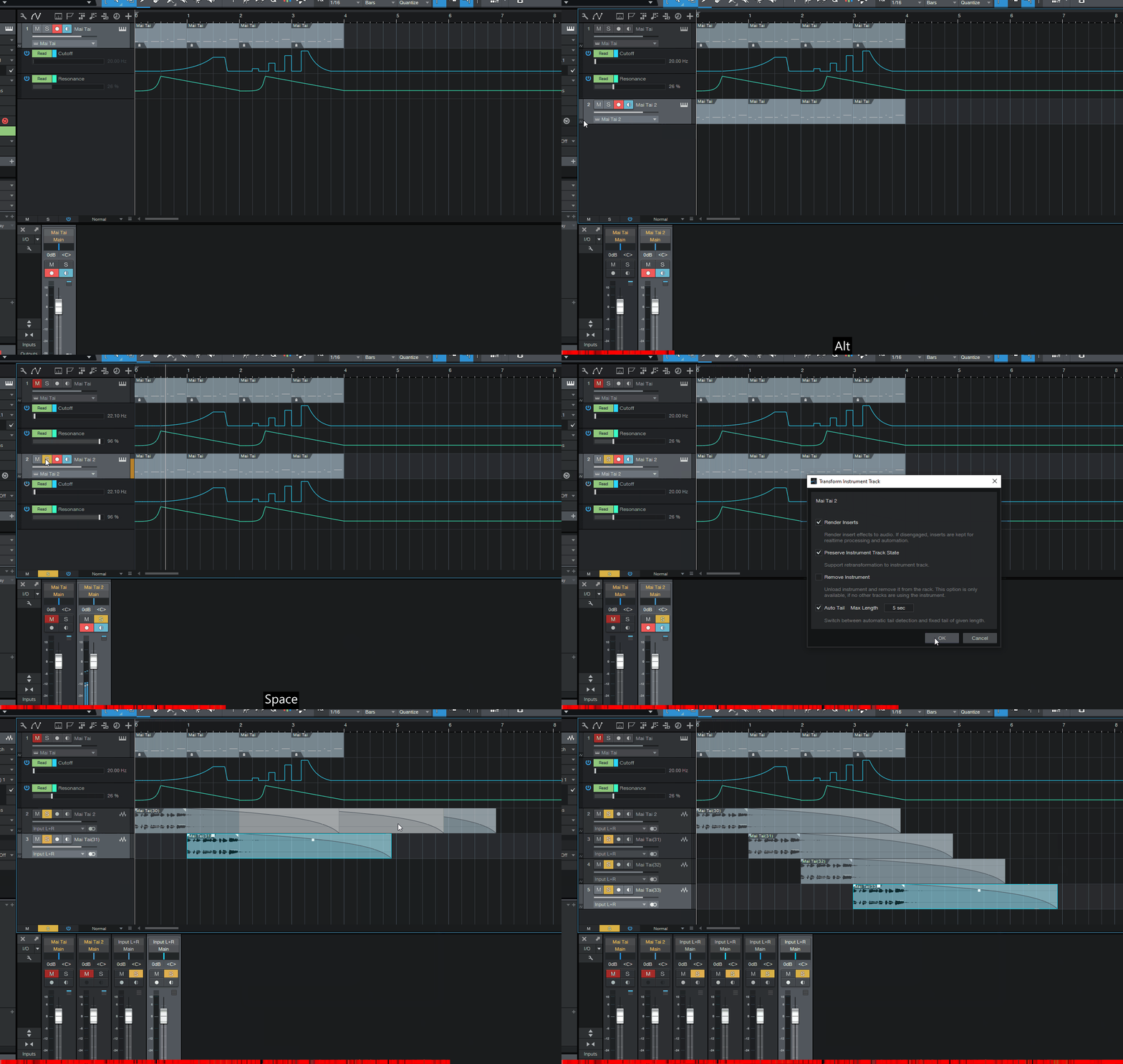
That's a crutch, not a solution. I'm not playing chess colouring clips on the same track differently. And I won't be searching for clip names across a 8+ minutes track. This should be a simple thing.apoclypse wrote: Mon Dec 28, 2020 10:21 pmYou can color the clips. You can rename the clips before creating the ghost clips and it will keep the name. Or you know just look at the clip itself. I name my clips based on sections.Or why shared clips don't display a number next to the 'ghost' icon? If you have several shared groups on a track, how are you supposed to tell them apart?
Last edited by antic604 on Tue Dec 29, 2020 7:46 am, edited 2 times in total.
-
- Banned
- Topic Starter
- 11467 posts since 4 Jan, 2017 from Warsaw, Poland
-
- KVRian
- 1405 posts since 17 Oct, 2018
They are named correctly it's just your opinion that they are not. I don't agree with you on this one.antic604 wrote: Tue Dec 29, 2020 6:51 am That's my point. You wouldn't need those if the features were named correctly.
Okay if you know what the functionality does why does it matter? Are you just bored and have nothing better to do?Because when I'm selecting midi event on instrument track I shouldn't be getting audio track options? Like I don't get the same musical functions for an audio event that I do for midi event. Consistency is getting the right options for particular situation, not getting everything always
I'm not defending whether S1 should work this way or not but the easy solution is to merge those clip regions if you have long automation on them before transforming them to audio. S1 is not going to magically know what your intention is. It's basically doing a bounce in place with metadata in the audio file. So if you have 20 clips in a track, it's going to bounce down those 20 individual clips to audio. Merge the clip regions that have long repeating delays or reverbs into one region based on sections to avoid the issue. That's just common sense. On top of that I don't know of any other DAW's freeze function that works half as well as the one in S1. Some just bounce the whole track down to an audio file and call it a day with no real editing capability.You're telling me that when I have 8 consecutive 1-bar clips and reverb tail extends to 2 further clips, then I should have 8 clips, each 3-bars long and overlaping with eachother??
I've never seen any DAW do it like that!
Okay. How should it work then? Cubase works exactly like S1 in that regard, as does Logic for the most part. Live doesn't even have alias clips. Neither does Bitwig. S1 is not alone in how Ghost clips/Alias Regions/Shared Copies work. You seem to think you know something that DAW makers don't.That's a crutch, not a solution. I'm not playing chess colouring clips on the same track differently. And I won't be searching for clip names across a 8+ minutes track. This should be a simple thing.
Studio One // Bitwig // Logic Pro // Ableton // Reason // FLStudio // MPC // Force // Maschine